1. Киришүү
This manual provides comprehensive instructions for the setup, operation, and maintenance of your Alcatel T-56 Black Corded Landline Phone. Please read this manual carefully to ensure proper use and to maximize the features of your device.

Figure 1: Alcatel T-56 Black Corded Landline Phone

Figure 2: Important Note on Phone Type
Маанилүү эскертүү:
- This is a landline instrument that operates on a standard telephone line connection.
- It is not a SIM or WiFi phone.
2. Продукциянын өзгөчөлүктөрү
The Alcatel T-56 offers a range of features designed for convenience and ease of use:
- Numerical display with Caller ID function.
- Handsfree function for speakerphone calls.
- Four direct memory keys and ten two-touch memory keys for frequently called numbers.
- Call log for incoming and missed calls.
- Line-powered operation, requiring no external power adapter or batteries.
- Adjustable ringer and handsfree volume.
- Wall-mountable design.
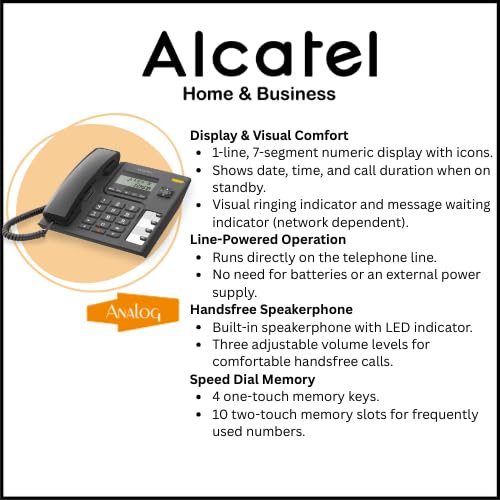
Figure 3: Display, Line-Powered Operation, Handsfree, and Speed Dial Memory
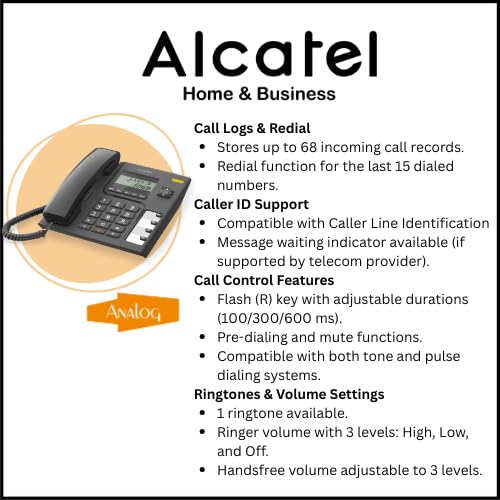
Figure 4: Call Logs, Caller ID, Call Control, and Ringtones & Volume Settings
3. Орнотуу жана орнотуу
3.1 Телефонду туташтыруу
- Unpack the Phone: Бардык компоненттерди таңгактан кылдаттык менен алып салыңыз.
- Телефонду туташтыруу: Plug one end of the coiled cord into the handset and the other end into the handset jack on the side of the phone base.
- Зым кабелин туташтырыңыз: Plug one end of the telephone line cord (RJ11) into the jack labeled 'LINE' on the back of the phone base. Plug the other end into your telephone wall jack.
- Байланышты текшерүү: Lift the handset. You should hear a dial tone, indicating a successful connection.
3.2 Дубалга орнотуу (кошумча)
The Alcatel T-56 can be wall-mounted for flexible placement. Use the provided wall mount bracket and screws (if included) to secure the phone to a suitable wall surface. Ensure the telephone line cord is long enough to reach the wall jack.
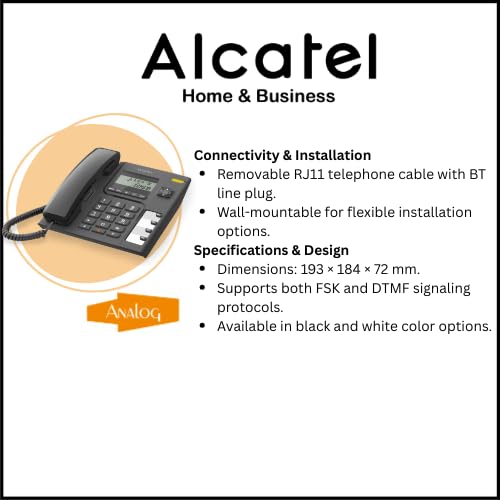
Figure 5: Connectivity and Installation
4. Негизги операция
4.1 Чалууларды жасоо
- Телефонду көтөрүңүз же басыңыз Handsfree баскычы.
- Терүү обонун угуңуз.
- Клавиатураны колдонуп, каалаган телефон номерин териңиз.
- Чакырууну аяктоо үчүн телефонду алмаштырыңыз же басыңыз Handsfree кайра баскычын.
4.2 Чалууларды кабыл алуу
- Телефон шыңгыраганда, телефонду көтөрүңүз же басыңыз Handsfree жооп берүү үчүн баскыч.
- Чакырууну аяктоо үчүн телефонду алмаштырыңыз же басыңыз Handsfree баскычы.
4.3 Using Handsfree Function
To use the handsfree speakerphone:
- Чалуу учурунда, басыңыз Handsfree button to activate the speakerphone. The handset can be placed back on the cradle.
- Трубкага кайра которулуу үчүн, трубканы көтөрүңүз.
- To end a handsfree call, press the Handsfree кайра баскычын.
4.4 Үндү тууралоо
- Handsfree Volume: Use the volume control buttons (up/down arrows) during a handsfree call to adjust the speaker volume. There are 3 adjustable levels.
- Коңгуроонун үнү: The ringer volume can be set to High, Low, or Off. Refer to the phone's settings menu (if available) or a dedicated switch for adjustment.
4.5 Кайра терүү
Акыркы чалынган номерди кайра терүү үчүн, трубканы көтөрүңүз же баскычын басыңыз Handsfree, андан кийин басыңыз Кайра терүү баскычы. Телефон акыркы 5 терилген номерди сактайт.
4.6 Үнсүз кылуу функциясы
Чалуу учурунда, басыңыз Үнсүз Микрофонуңузду убактылуу өчүрүү үчүн баскычын басыңыз. Экинчи тарап сизди укпайт, бирок сиз аларды дагы эле уга аласыз. Басыңыз Үнсүз again to resume speaking.
5. Өркүндөтүлгөн функциялар
5.1 Чалуучуну аныктоо дисплейи
When an incoming call is received, the caller's number (and name, if available and subscribed to Caller ID service) will be displayed on the LCD screen. The display also shows the date and time in standby mode.
5.2 Storing Speed Dial Numbers
The Alcatel T-56 supports both direct and two-touch memory dialing:
- Түз эс тутум (M1-M4): These 4 keys allow for one-touch dialing of frequently used numbers. Consult the phone's specific programming instructions to store numbers to these keys.
- Two-Touch Memory: The phone has 10 two-touch memory slots. To use, press a memory key (e.g., M) followed by a digit (0-9) to dial a stored number. Refer to the full manual for programming steps.
5.3 Чалуу журналдары
The phone stores a log of incoming calls, including missed calls. Use the МЕНЮ or arrow buttons to navigate through the call log and view details. The log can store up to 68 incoming call records.
6. Техникалык тейлөө
6.1 Тазалоо
Телефонуңузду тазалоо үчүн жумшак,amp cloth. Do not use abrasive cleaners or solvents, as these can damage the phone's surface. Avoid spraying liquids directly onto the phone.
6.2 Жалпы кам көрүү
- Телефонду ашыкча ысыктан, тике күн нурунан жана нымдан алыс кармаңыз.
- Телефонду түшүрүп алуудан же катуу соккуга кабылтуудан алыс болуңуз.
- Ensure the telephone line cord is not kinked or damaged.
7. Кыйынчылыктарды
Эгерде сиз Alcatel T-56 телефонуңузда көйгөйлөргө туш болсоңуз, төмөнкү кеңири таралган көйгөйлөрдү жана чечимдерди караңыз:
| Көйгөй | Мүмкүн себеп | Чечим |
|---|---|---|
| Терүү үнү жок | Phone line not connected properly or service issue. | Check all cable connections. Ensure the telephone line cord is securely plugged into both the phone and the wall jack. Test with another phone if available to rule out line service issues. |
| Poor sound quality (low volume, static) | Handsfree volume too low, faulty line cord, or line interference. | Adjust handsfree volume using the arrow buttons. Replace the telephone line cord. Ensure the phone is not near other electronic devices that may cause interference. |
| Чалуучунун ID көрсөтүлбөйт | Чалуучуну аныктоо кызматы жазылган эмес же активдүү эмес. | Сиздин линияңызда Чалуучунун ID кызматы активдүү экенин текшерүү үчүн телефон кызматын камсыздоочу менен байланышыңыз. |
| Телефон шыңгырбайт | Ringer volume set to 'Off' or 'Low'. | Adjust the ringer volume setting to High or Low. |
| Cannot store speed dial numbers | Туура эмес программалоо кадамдары аткарылды. | Refer to the detailed programming instructions in the full user manual for storing direct and two-touch memory numbers. |
8. Техникалык шарттар
Below are the technical specifications for the Alcatel T-56 Corded Landline Phone:
| Өзгөчөлүк | Description |
|---|---|
| Бренд | Alcatel |
| Модел | Т-56 |
| Продукциянын өлчөмдөрү | 19.3 x 18.4 x 7.2 см |
| Элемент Салмагы | 670 г |
| Дисплей түрү | LCD (1-line, 7-segment numeric with icons) |
| Power Source | AC (Сызыктан иштейт, батарейкалардын кереги жок) |
| Жаздыруу мүмкүнчүлүгү | Not applicable (no answering machine) |
| Монтаж түрү | Дубалга орнотулган |
| Келип чыккан өлкө | Кытай |
| Телефон түрү | жоон |
| Терүүчү түрү | Single Keypad (Tone/Pulse dialing) |
| Handsfree Volume Control | 3 деңгээл |
| Рингтон үнүнүн деңгээли | 3 (High/Low/Off) |
| Direct Access Memory | 4 keys (M1-M4) |
| Two-Touch Memories | 10 ачкыч |
| Кирүүчү чалуулар журналы | 68 XNUMX жазууга чейин |
| Акыркы номерди кайра терүү | Акыркы 5 сан |
| Flash (R) Key | Yes (Adjustable durations: 100/300/600 ms) |
| Алдын ала терүү | Ооба |
| Ачкычтын үнүн басуу | Ооба |
9. Кепилдик жана колдоо
9.1 Өндүрүүчүнүн кепилдиги
The Alcatel T-56 typically comes with a manufacturer's warranty. Based on available information, a warranty period of at least six months is indicated. Please refer to the warranty sticker on the product or contact Alcatel customer service for precise warranty terms and conditions.
9.2 Extended Warranty Plans
Optional extended warranty plans may be available from third-party providers. For example, 1-Year and 2-Year Extended Warranty Plans by Onsitego are offered separately. These are not part of the standard manufacturer's warranty.
9.3 Кардарларды колдоо
Техникалык жардам, ушул колдонмодон тышкары мүчүлүштүктөрдү оңдоо же кепилдик боюнча дооматтар үчүн Alcatel кардарларды колдоо кызматына кайрылыңыз. Расмий Alcatel сайтына кириңиз website for contact information or refer to the documentation included with your product.


