1. Продукт бүтүп калдыview
The Sharp EL-531TG-GY is a scientific calculator designed for students and professionals requiring advanced mathematical functions. It features a 2-line display and Multi-Line Playback, facilitating the input and review of complex equations. This model is suitable for general math, algebra, geometry, trigonometry, statistics, biology, chemistry, and general science applications.
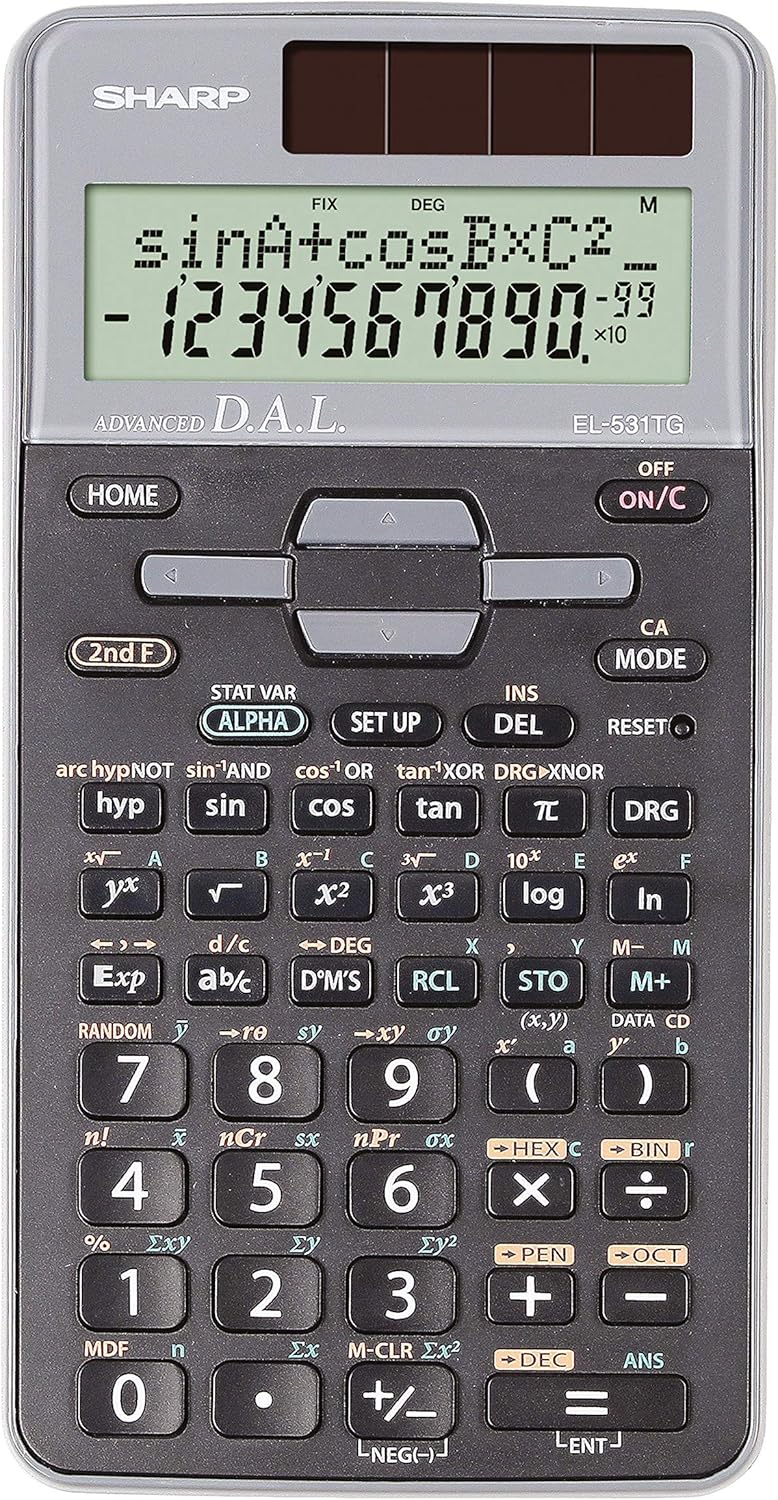
Сүрөт 1: Алдыңкы view of the Sharp EL-531TG-GY Scientific Calculator, showing the display, keypad, and solar panel.
2. Орнотуу жана алгачкы колдонуу
2.1 Кубат булагы
The EL-531TG-GY calculator operates using both solar power and a single LR44 button cell battery. The solar panel provides power in well-lit environments, while the battery ensures operation in low-light conditions or when solar power is insufficient. An LR44 battery is included with the calculator.
2.2 Күйгүзүү/өчүрүү
- Калькуляторду иштетүү үчүн ON, басыңыз ON/C ачкыч.
- Калькуляторду иштетүү үчүн ӨЧҮРҮҮ, басыңыз 2-чи Франс ачкычтын артынан ӨЧҮРҮҮ key (which is typically the same as ON/C).
2.3 Initial Display Settings
Upon first use or after a reset, the calculator will typically default to certain settings (e.g., DEG for angle units). Refer to Section 3.3 for details on changing mode settings.
3. Иштөө нускамалары
3.1 Негизги арифметикалык амалдар
Enter numbers using the numeric keypad. Use the +, -, ×, жана ÷ keys for addition, subtraction, multiplication, and division, respectively. Press = натыйжаны алуу үчүн.
3.2 Илимий функциялар
The calculator performs over 273 advanced scientific functions. Many functions are accessed by pressing the 2-чи Франс key before the desired function key.
- Тригонометриялык функциялар: Колдонуу күнөө, cos, тан. Inverse functions (күнөө⁻¹, cos⁻¹, күрөң түс⁻¹) are accessed via 2-чи Франс.
- Логарифмдик функциялар: Колдонуу журнал (10-база) жана ln (натурал логарифм).
- Күчтөр жана тамырлар: Колдонуу x², √, x³, ³√.
- Бөлчөктөр: колдонуу d/c key for fraction input and conversion.
3.3 Mode Settings (DEG/RAD/GRAD)
To change the angle unit mode (Degrees, Radians, Gradians):
- басыңыз DRG ачкыч.
- кайра-кайра басыңыз DRG to cycle through DEG (Degrees), RAD (Radians), and GRAD (Gradians). The current mode is indicated on the display.
3.4 Эстутум функциялары
Калькулятор маанилерди сактоо жана кайра чакырып алуу үчүн эстутум функцияларын камтыйт.
- Дүкөн (СТО): Басыңыз СТО followed by a variable key (e.g., A, B) to store the displayed value.
- RCL (кайра чакыртып алуу): Басыңыз RCL followed by the variable key to recall the stored value.
- M+ (Memory Plus): Көрсөтүлгөн маанини көз карандысыз эс тутумга кошот.
- M- (эс тутум минус): Subtracts the displayed value from the independent memory.
3.5 Multi-Line Playback
The 2-line display allows for Multi-Line Playback, enabling users to review previous calculations and expressions. Use the directional arrow keys (up/down) to scroll through past entries and results. This feature is useful for checking work or re-using parts of previous calculations.
4. Техникалык тейлөө
4.1 Тазалоо
To clean the calculator, wipe the surface gently with a soft, dry cloth. Do not use abrasive cleaners, solvents, or excessive moisture, as these can damage the display or internal components.
4.2 Батареяны алмаштыруу
The calculator uses one LR44 button cell battery. If the display becomes dim or erratic in low-light conditions, the battery may need replacement. To replace the battery:
- Калькулятор өчүрүлгөнүн текшериңиз.
- Калькулятордун артындагы батарея бөлүкчөсүн табыңыз.
- Отсектин капкагын кылдаттык менен ачыңыз.
- Эски LR44 батарейкасын чыгарып, туура полярдуулукту (+/-) камсыз кылуу менен жаңысын салыңыз.
- Батарея уясынын капкагын бекем жабыңыз.
4.3 Сактоо
When not in use, store the calculator in a cool, dry place away from direct sunlight and extreme temperatures. The hard cover included with the calculator provides protection from scratches and minor impacts.
5. Кыйынчылыктарды
5.1 Дисплей маселелери
- Бош же күңүрт дисплей: Ensure sufficient light for the solar panel. If the issue persists, replace the LR44 battery.
- Erratic Display: This may indicate a low battery. Replace the LR44 battery.
5.2 Incorrect Results
- Check Mode Settings: Verify that the angle unit (DEG, RAD, GRAD) is set correctly for trigonometric calculations.
- Input Error: Review your input using the Multi-Line Playback feature to ensure the expression was entered correctly.
- Memory Contents: If using memory functions, ensure the stored values are correct.
5.3 Калькулятор жооп бербей жатат
Эгерде эсептегич жооп бербей калса, баштапкы абалга келтирип көрүңүз. RESET button (often a small recessed button requiring a thin object like a paperclip to press). Pressing this button will clear all memory and return the calculator to its factory default settings.
6. Техникалык шарттар

Сүрөт 2: Алдыңкы view of the Sharp EL-531TG-GY Scientific Calculator, illustrating its dimensions.
| Өзгөчөлүк | Description |
|---|---|
| Модель номери | SH-EL531TGGY |
| Дисплей түрү | 2-line LCD with Multi-Line Playback |
| Функциялар | Over 273 advanced scientific functions |
| Power Source | Solar and 1 x LR44 battery (included) |
| Материал | Пластик |
| Өлчөмдөрү (L x W x Y) | 16.1 x 8 x 1.5 см (болжол менен) |
| Салмагы | 100 г (болжол менен) |

3-сүрөт: Каптал view of the Sharp EL-531TG-GY Scientific Calculator, showing its slim profile.
7. Кепилдик жана колдоо
7.1 Кепилдик маалыматы
This product is covered by a manufacturer's warranty. Please refer to the warranty card included with your purchase or visit the official Sharp webСиздин аймакка тиешелүү деталдуу кепилдик шарттары жана шарттары үчүн сайт.
7.2 Кардарларды колдоо
For technical assistance, troubleshooting not covered in this manual, or service inquiries, please contact Sharp customer support. Contact information can typically be found on the Sharp official webсайтында же продуктунун таңгагында.


