1. Киришүү
This manual provides essential information for the safe and efficient operation of your APC Smart-UPS 600 VA Battery Backup System. This Uninterruptible Power Supply (UPS) is designed to provide temporary battery power during power outages and protect your electronic equipment from power surges and fluctuations. Please read this manual thoroughly before installation and use.
2. Коопсуздук боюнча маанилүү маалымат
Observe the following safety precautions during installation, operation, and maintenance of the UPS unit.
- UPS корпусун ачпаңыз. Ичинде колдонуучу тейлей турган тетиктер жок.
- Do not dispose of the battery in a fire as it may explode.
- Do not connect non-computer related items, such as medical equipment, life support equipment, microwave ovens, or vacuum cleaners, to the UPS.
- UPS жерге туташтырылган AC розеткага туташып турганын текшериңиз.
- Operate the UPS in a well-ventilated area, free from excessive dust, corrosive fumes, and conductive contaminants.
3. Пакеттин мазмуну
Таңгактан чыгарганда бардык буюмдар бар экенин текшериңиз:
- APC Smart-UPS 600 VA Battery Backup System
- Колдонуучунун Колдонмосу (бул документ)
- USB байланыш кабели (эгер бар болсо)

Сүрөт 3.1: Алдыңкы view of the APC Smart-UPS 600 VA Battery Backup System, showing the power button and outlets.
4. Продукт бүтүп калдыview
4.1. Компоненттер жана башкаруу элементтери
Familiarize yourself with the key components of your UPS unit.
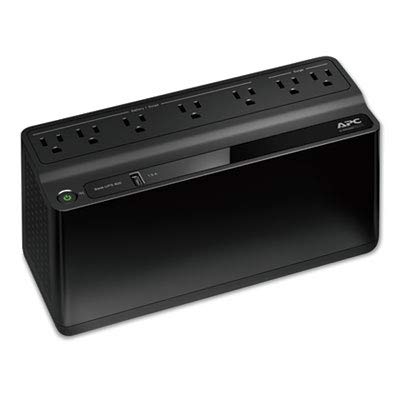
4.1-сүрөт: жогорудан ылдыйга view of the UPS, highlighting the seven power outlets. Four outlets are for battery backup and surge protection, and three are for surge protection only.
- Кубат баскычы: UPSти күйгүзөт же өчүрөт.
- Батареянын камдык көчүрмөсүн жана чыңалуудан корголгон розеткалар (4): Иштөө учурунда батарея кубатын бериңизtagжана толкундануудан коргойт.
- Surge Protected Only Outlets (3): Чыңалуудан коргоону камсыз кылыңыз, бирок резервдик батареянын кереги жок.
- USB Charging Port (1.5A): Мобилдик түзмөктөрдү кубаттоо үчүн.
- AC киргизүү шнуру: Connects the UPS to wall power.
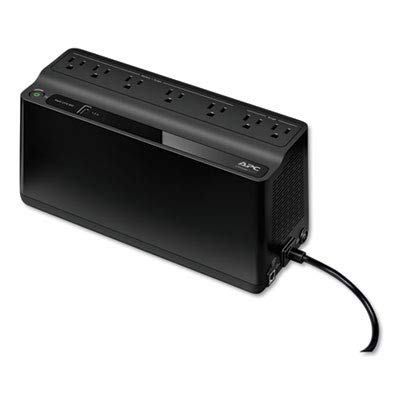
4.2-сүрөт: Арткы view of the UPS, showing the integrated power cord and ventilation grilles.
5. Орнотуу
5.1. Жайгаштыруу
Place the UPS on a flat, stable surface away from direct sunlight, heat sources, and excessive moisture. Ensure adequate airflow around the unit.
5.2. Батареяны баштапкы туташтыруу
The UPS battery is disconnected for safety during shipping. Before initial use, connect the battery as follows:
- Lay the UPS on its side.
- Батарея уясынын капкагын табыңыз.
- Remove the cover and connect the battery terminal.
- Капкакты алмаштырыңыз.
5.3. Жабдууларды туташтыруу
Connect your computer, monitor, and other critical equipment to the Батареянын резервдик көчүрмөсү жана толкундан корголгон розеткалар. Connect less critical peripherals, such as printers or scanners, to the Surge Protected Only Outlets.
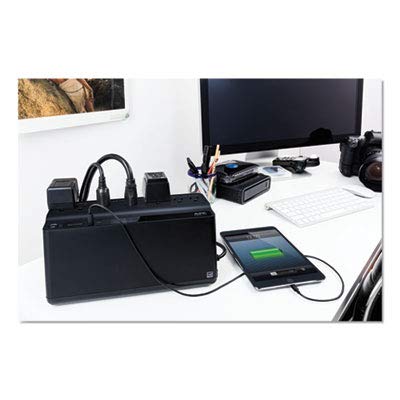
Figure 5.1: The UPS connected to a typical desktop computer setup, providing power and protection to the computer, monitor, and other accessories.
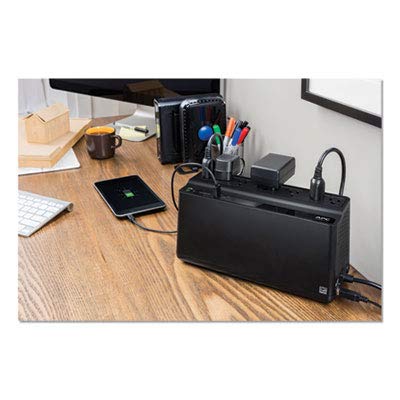
Figure 5.2: The UPS providing power and surge protection to multiple office devices, including a smartphone charging via the USB port.
5.4. AC кубатына туташуу
Plug the UPS power cord directly into a grounded 2-pole, 3-wire wall receptacle. Avoid using extension cords or surge strips with the UPS.
6. UPSти иштетүү
6.1. Күйгүзүү/өчүрүү
- Күйгүзүү: Press the power button once. The UPS will emit a short beep, and the power indicator will illuminate.
- Өчүрүү: Press and hold the power button until the UPS beeps and the power indicator turns off.
6.2. Батареяны кубаттоо
The UPS battery charges automatically when connected to AC power. Allow the battery to charge for at least 8 hours before initial use to ensure full runtime capacity.
6.3. Power Outage Операция
бийлик учурунда уtage, the UPS will automatically switch to battery power. It will emit a series of beeps to indicate it is operating on battery. The duration of battery power depends on the load connected. Save your work and shut down your equipment gracefully when the battery is low.
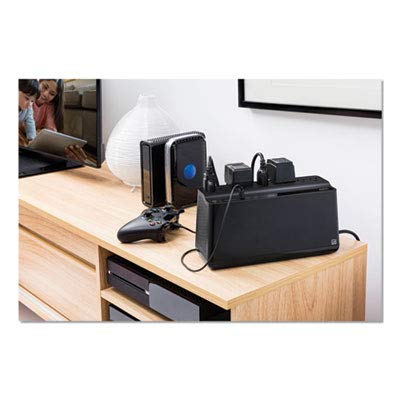
Figure 6.1: The UPS integrated with a home entertainment system, providing backup power for devices like a gaming console and media server.
7. Техникалык тейлөө
7.1. Батареяны алмаштыруу
The battery in your UPS is designed for a service life of 3-5 years under normal operating conditions. Battery replacement should only be performed by qualified service personnel. Contact APC support for battery replacement options.
7.2. Тазалоо
UPSтин сыртын жумшак, кургак чүпүрөк менен тазалаңыз. Суюктук же аэрозолдук тазалоочу каражаттарды колдонбоңуз. Желдетүүчү тешиктердин чаң жана таштандыдан таза болушун камсыз кылыңыз.
8. Кыйынчылыктарды
Жалпы маселелер жана аларды чечүү үчүн төмөнкү таблицага кайрылыңыз.
| Көйгөй | Мүмкүн себеп | Чечим |
|---|---|---|
| UPS күйбөйт. | Battery not connected or low. | Ensure battery is connected. Charge UPS for 8 hours. |
| UPS тынымсыз сигнал берет. | Батареянын кубаты менен иштейт. | Save work and shut down equipment. Restore AC power. |
| Туташкан түзмөктөргө кубат жок. | Overload or tripped circuit breaker. | Reduce load. Check and reset circuit breaker on UPS (if present). |
9. Техникалык шарттар
| Өзгөчөлүк | Деталь |
|---|---|
| Модель номери | 600М1 |
| Кубаттуулугу | 600 VA / 490 J |
| Киргизүү көлөмүtage | 120 вольт |
| Ampөчүрүү | 1.6 Amps |
| Соода түйүндөрү | 7 (4 Battery Backup & Surge, 3 Surge Only) |
| Батарея түрү | Литий ион |
| Түс | Кара |
| Өлчөмдөрү (L x W x Y) | 10.7 x 5.47 x 4.13 дюйм |
| Өндүрүүчү | AMERICAN POWER CONVERSION |
| Дата биринчи жеткиликтүү | 16-март, 2017-жыл |
10. Кепилдик жана колдоо
For warranty information and technical support, please visit the official APC webсайтка же кардарларды тейлөөгө кайрылыңыз. Сатып алганыңыздын далили катары сатып алуу дүмүрчөгүңүздү сактаңыз.
Өндүрүүчү: AMERICAN POWER CONVERSION (APC)
Webсайт: www.apc.com


