Introduction
This manual provides comprehensive instructions for the setup, operation, maintenance, and troubleshooting of your Thomson Universal 2-in-1 Zapper Remote Control ROC Z107. Please read this manual carefully before using the device to ensure optimal performance and longevity.
Продукт бүттүview
The Thomson ROC Z107 is a universal remote control designed to operate two devices, typically a Television (TV) and a Set-Top Box (STB). It features large buttons for ease of use and includes a learning function for expanded compatibility.
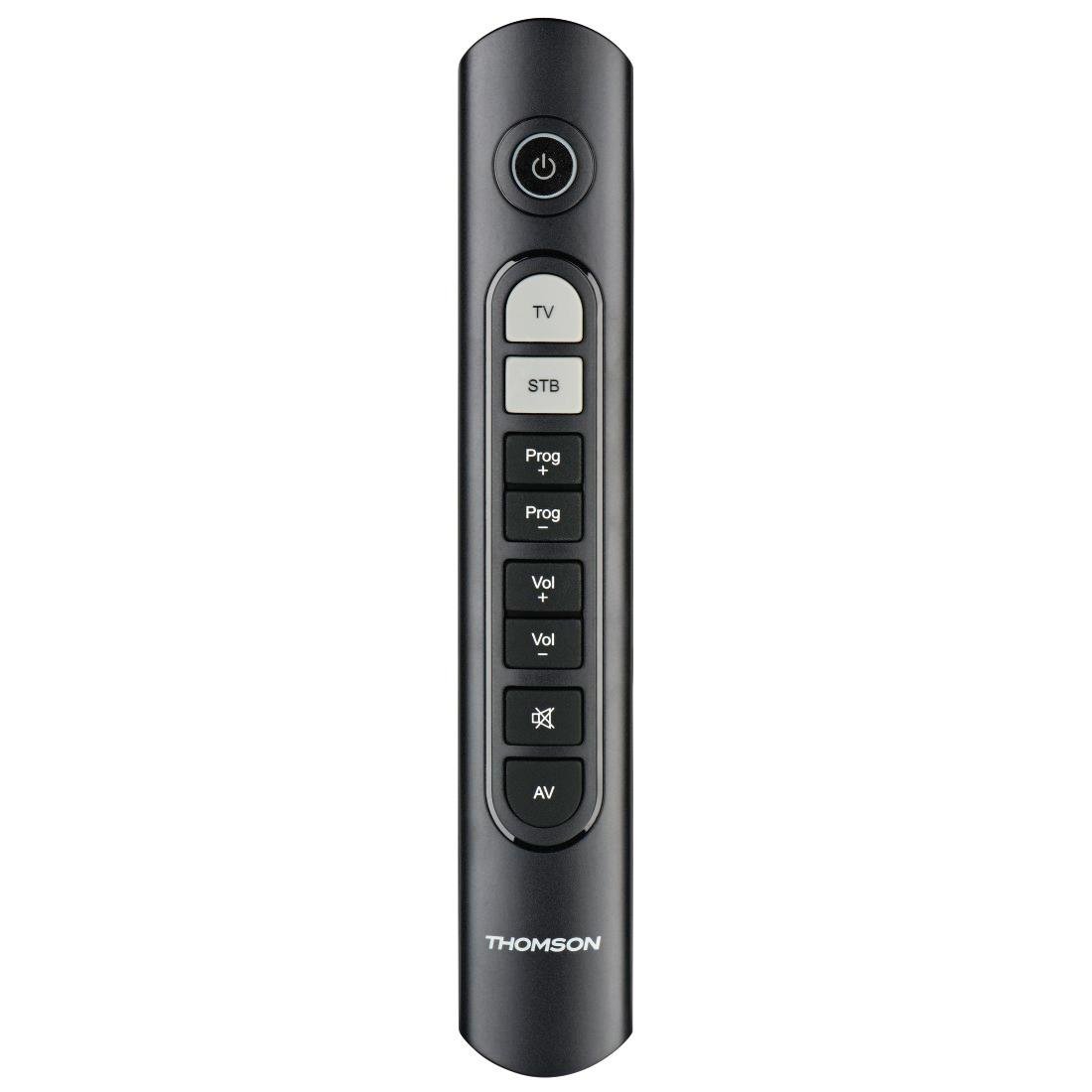
Image: Thomson Universal 2-in-1 Zapper Remote Control ROC Z107. This image displays the remote control from a slightly angled top-down perspective, highlighting its ergonomic design and the layout of its primary buttons.
Жайгашуу
1. Батареяны орнотуу
- Алыстан башкаруу пультунун артындагы батарея бөлүмүнүн капкагын ачыңыз.
- Insert two AAA batteries, ensuring correct polarity (+ and -). Two AAA batteries are included with your purchase.
- Батарея уясынын капкагын бекем жабыңыз.
2. Initial Programming (Pre-programmed Devices)
The remote control is pre-programmed for many popular brands such as LG, Sony, Samsung, Sharp, and Philips. For these brands, the remote may function immediately after battery installation without further setup. Test the remote with your TV and STB.
3. Learning Function (For Unlisted or Specific Functions)
If your device is not immediately compatible or if you wish to add specific functions from your original remote, use the learning function:
- Place the Thomson remote and your original remote control head-to-head, approximately 2-5 cm apart.
- Press and hold the desired device button (TV or STB) on the Thomson remote until the indicator light blinks.
- Press the button on the Thomson remote that you wish to program. The indicator light will blink slowly.
- Press the corresponding button on your original remote control. The indicator light on the Thomson remote will blink rapidly to confirm successful learning.
- Керек болсо, башка баскычтар үчүн кайталаңыз.
- Press the device button (TV or STB) again to exit learning mode.
4. Master Volume and Program Selection
This feature allows you to designate which device (TV or STB) controls the volume and program channels, regardless of which device mode the remote is currently in. Refer to the full user manual for specific steps on setting up master control functions.
Иштөө нускамалары
The Thomson ROC Z107 remote control features a simplified button layout for essential functions.

Image: Close-up of Thomson ROC Z107 remote control buttons. This image provides a detailed view of the remote's buttons, including Power, TV, STB, Program Up/Down, Volume Up/Down, Mute, and AV input selection.
- Кубат баскычы (⏻): Turns the selected device (TV or STB) on or off.
- Сыналгы баскычы: Selects the Television control mode.
- STB Button: Selects the Set-Top Box control mode.
- Prog + / Prog - Buttons: Changes the program/channel up or down.
- Vol + / Vol - Buttons: Үнүн көбөйтөт же азайтат.
- Үнсүз баскычы (🔇): Аудионун үнүн өчүрөт же ачат.
- AV баскычы: Switches the input source on the TV (e.g., HDMI 1, HDMI 2, AV).
Техникалык тейлөө
Батареяны алмаштыруу
When the remote control's performance degrades or the indicator light does not respond, it is time to replace the batteries. Follow the battery installation steps outlined in the Setup section.
Тазалоо
Пультту тазалоо үчүн жумшак, кургак чүпүрөктү колдонуңуз. Суюк тазалагычтарды же абразивдүү материалдарды колдонбоңуз, алар пульттун бетин же ички тетиктерин бузушу мүмкүн.
Проблемаларды чечүү
- Пульт жооп бербей жатат:
- Батареялар туура салынганын жана түгөнбөгөнүн текшериңиз. Керек болсо алмаштырыңыз.
- Пульт менен түзмөктүн инфракызыл кабыл алгычынын ортосунда эч кандай тоскоолдуктар жок экенин текшериңиз.
- Verify that the remote is in the correct device mode (TV or STB).
- Атайын функциялар иштебейт:
- If a specific button does not work, it may not be programmed for your device or the device may not support that function. Use the learning function to program the button from your original remote.
- Some older devices may have limited compatibility with universal remotes.
- Remote range is limited:
- Батареялар жаңы экенин текшериңиз.
- The maximum operating range is 10 meters. Operating beyond this distance may result in unreliable performance.
Техникалык шарттар
| Бренд | Томсон |
| Модель аты | ROC Z107 |
| Модель номери | 00132672 |
| Материал | Пластик |
| Түс | Кара |
| Жугуу | Infrared (IR Wireless) |
| Колдоого алынган түзмөктөрдүн саны | 2 (TV, STB) |
| Шайкеш келген перифериялык түзүлүштөр | Television, DTH, Set-Top Box |
| Power Source | 2 x AAA Батареялар (кошулган) |
| Максималдуу диапазон | 10 метр |
| Продукциянын өлчөмдөрү | 31.5 x 15.5 x 4 см |
| Элемент Салмагы | 170 грамм |
| баскычтардын саны | 9 |
Кепилдик
This product is covered by a manufacturer's warranty. Please refer to the warranty card included in the product packaging or contact Thomson customer support for detailed warranty information and terms.
Колдоо
For further assistance, technical support, or inquiries regarding your Thomson Universal 2-in-1 Zapper Remote Control ROC Z107, please visit the official Thomson website or contact their customer service department. Contact details can typically be found on the product packaging or the brand's official online presence.


