1. Продукт бүтүп калдыview
The Walfront HA-4004 is a digital Islamic Azan alarm clock designed to provide accurate prayer times for major cities worldwide. It features a clear LCD display, multiple alarm functions, and temperature display.
Негизги өзгөчөлүктөрү:
- Automatic Azan time calculation for over 1500 cities.
- Five daily Azan times with full Azan sound (volume adjustable) or beep option.
- Daily alarm with optional weekend settings.
- Special Fajr alarm that adjusts relative to Fajr Azan time.
- Qibla direction display relative to North.
- Hijri and Gregorian calendar display.
- Temperature display (Celsius/Fahrenheit switchable).
- Жайкы убакытка өтүү (DST) опциясы.
- Snooze function (5 minutes).
- Full screen light for visibility in the dark.

Сүрөт 1.1: Алдыңкы view of the Walfront HA-4004 Islamic Azan Alarm Clock.

Image 1.2: Dimensions of the Walfront HA-4004 Islamic Azan Alarm Clock (approx. 33cm H x 21cm W x 3cm D).
2. Орнотуу нускамалары
2.1 Батареяны орнотуу
The clock requires 4 x AA batteries (not included). Locate the battery compartment on the back of the clock, insert the batteries according to the polarity indicators, and close the cover.
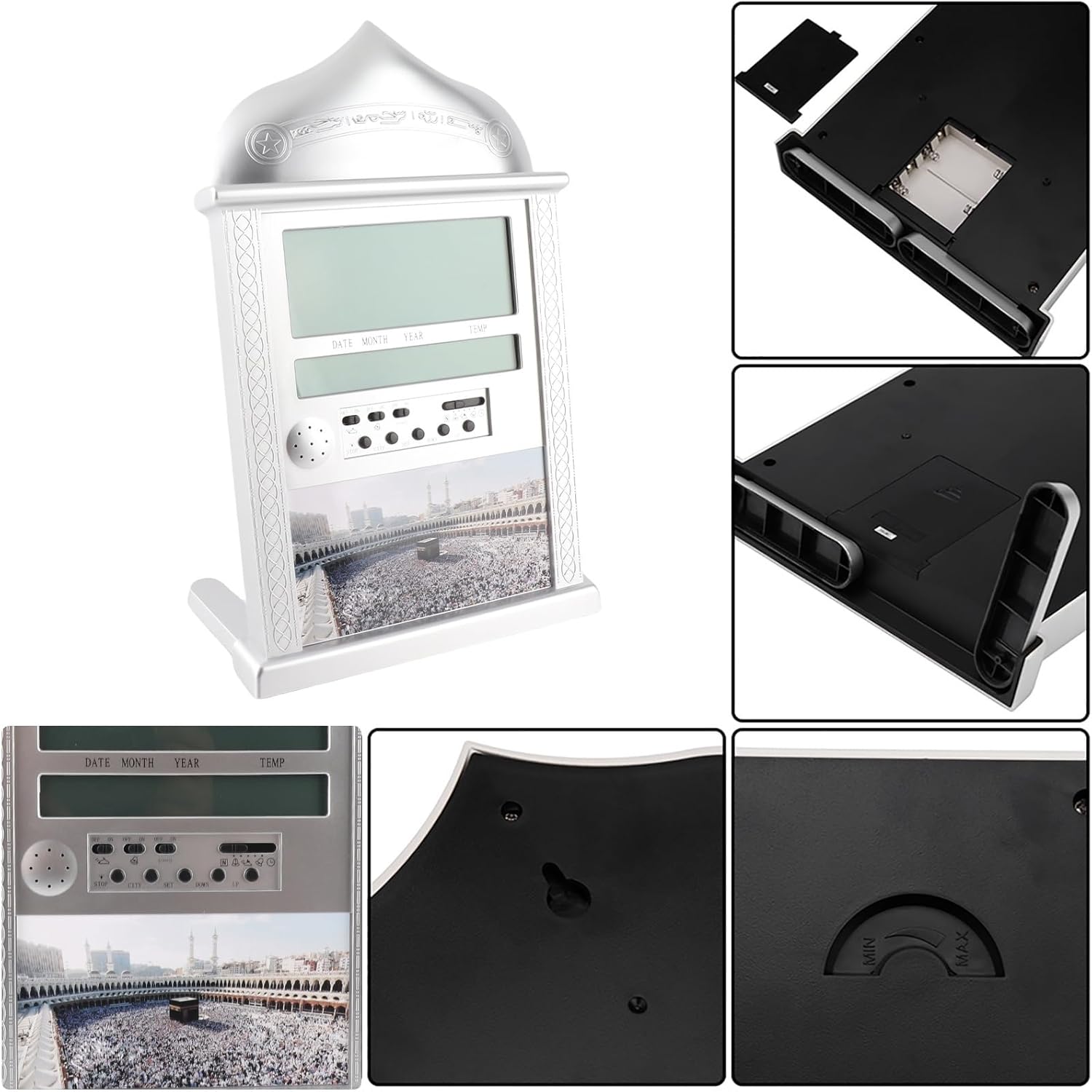
Image 2.1: Detail of the battery compartment and rear controls.
2.2 Initial Settings (Time, Date, City)
Upon first power-on or after battery replacement, you will need to set the current time, date, and your city for accurate Azan times.
Учурдагы убакытты орнотуу:
- Move the switch on the back of the clock to the SET позиция.
- колдонуу UP or ылдый сааттарды тууралоо үчүн баскычтар.
- Басыңыз SET мүнөттөргө жылдыруу үчүн кайрадан колдонуңуз, андан кийин колдонуңуз UP or ылдый тууралоо.
- Once time is set, move the switch back to the НОРМАЛЬ позиция.
Setting Gregorian Calendar:
- Которуштургучту жылдырыңыз SET позиция эки жолу.
- Колдонуу UP or ылдый жылды тууралоо.
- Басыңыз SET to move to month, then use UP or ылдый.
- Басыңыз SET to move to day, then use UP or ылдый.
- Once date is set, move the switch back to the НОРМАЛЬ позиция.
Note: After setting the Gregorian calendar, the Hijri calendar will be automatically recalculated.
Adding a New City:
The clock has pre-programmed Azan times for 1500 cities. You need to select your city code.
- басыңыз CITY баскычы.
- колдонуу UP or ылдый buttons to scroll through city codes until you find your desired city.
- Alternatively, you can select the country code first, then the city code.
- The Qibla direction and angle relative to North will be displayed once a city is selected.
2.3 Жайкы убакыт (DST)
DSTти иштетүү же өчүрүү үчүн:
- басып, кармап туруңуз DST баскычын бир нече секунда басыңыз.
- The DST icon will appear or disappear on the screen, indicating activation or deactivation.
3. Иштөө нускамалары
3.1 Setting Daily Alarm
The daily alarm is a regular alarm that rings at the same time every day. Weekends can be optional.
- Которуштургучту жылдырыңыз SET позиция.
- колдонуу UP or ылдый buttons to adjust the alarm hours.
- Басыңыз SET мүнөткө жылдыруу, андан кийин колдонуу UP or ылдый тууралоо.
- Ойготкучту буруңуз ON. The alarm icon will be displayed.
- To stop the alarm when it rings, press the ТОКТОТ button or turn the alarm switch ӨЧҮРҮҮ.
3.2 Setting Fajr Alarm
This unique feature allows you to wake up at a specific time relative to the Fajr Azan. For example, if you set the alarm for 10 minutes after Fajr Azan, it will automatically adjust daily.
- Которуштургучту жылдырыңыз SET позиция.
- колдонуу UP or ылдый buttons to adjust the desired offset (e.g., 5:00 for 5 minutes after Fajr).
- Ойготкучту буруңуз ON. The alarm icon will be displayed.
Note: If the Fajr alarm is set to ring exactly at the Fajr Azan time, the Azan sound will be disabled for that prayer.
3.3 Setting Special Alarm
This clock includes an extra alarm for special occasions or appointments.
- Которуштургучту жылдырыңыз SET позиция.
- колдонуу UP or ылдый сааттарды тууралоо үчүн баскычтар.
- Басыңыз SET мүнөткө жылдыруу, андан кийин колдонуу UP or ылдый тууралоо.
- Ойготкучту буруңуз ON. The alarm icon will be displayed.
Note: To cancel a special alarm after it has been set, press and hold the ТОКТОТ баскычын бир нече секунда басыңыз.
3.4 Azan Sound Control
- The volume of the Azan sound can be controlled using the dial switch located on the side of the clock.
- You can set the clock to beep 3 times instead of playing the full Azan sound.
3.5 Azan Taqweem Systems
The clock calculates Fajr and Isha times based on various Taqweem systems. You can select the system most appropriate for your location.
- басып, кармап туруңуз POSITION баскычы.
- колдонуу UP or ылдый buttons to select from available Taqweem systems (e.g., Local Taqweem, Muslim League, ISNA, Islamic Scientific University, Egypt Taqweem).
- бошотуңуз POSITION ырастоо үчүн баскыч.
Note: Re-selecting a city will reset the Taqweem system to the city's default.
4. Техникалык тейлөө
4.1 Батареяны алмаштыруу
When the display dims or the clock functions become erratic, it is time to replace the batteries. Always use 4 new AA batteries. Ensure correct polarity during installation.
4.2 Тазалоо
To clean the clock, use a soft, dry cloth. Do not use abrasive cleaners or solvents, as these may damage the display or casing.
5. Кыйынчылыктарды
- Саат күйбөй жатат же дисплей бош турат: Check battery installation and ensure batteries are new and correctly inserted.
- Incorrect Azan times: Verify that the correct city code, Gregorian calendar date, Daylight Saving Time (DST) setting, and Taqweem system are selected for your location. Refer to Section 2.2 and 3.5 for detailed instructions.
- Azan sound is not playing: Check the volume dial. If a Fajr alarm is set to ring exactly at the Fajr Azan time, the Azan sound for that prayer will be disabled. Also, if any alarm is set at the exact time of an Azan, that specific Azan will be disabled.
- Qibla direction seems inaccurate: Ensure your city code is correctly set. The Qibla direction is calculated based on the selected city.
6. Техникалык шарттар
| Өзгөчөлүк | Деталь |
|---|---|
| Модел | HA-4004 |
| Бренд | Walfront |
| Түс | Silver |
| Дисплей түрү | Санарип LCD |
| Материал | Пластик жана металл |
| Продукциянын өлчөмдөрү | Болжол менен 33 x 21 x 3 см (12.99 x 8.26 x 1.18 дюйм) |
| Элемент Салмагы | 0.66 килограмм (1.45 фунт) |
| Power Source | Батарея менен иштейт |
| Батареялар талап кылынат | 4 x AA батарейкалар (киргизилген эмес) |
| Монтаж түрү | Wall Mount or Desk Stand |
| Өзгөчөлүктөр | Azan Alarm, Daily Alarm, Fajr Alarm, Qibla Direction, Temperature Display, DST |

Сүрөт 6.1: Алдыңкы жана арткы views of the clock, showing wall mount option.
7. Кепилдик жана колдоо
7.1 Кепилдик маалыматы
This Walfront HA-4004 Islamic Azan Alarm Clock comes with a Lifetime Warranty. For any quality-related issues, please contact the seller or manufacturer for assistance.
7.2 Кардарларды колдоо
If you encounter any problems or have questions not covered in this manual, please contact Walfront customer support or the retailer from whom you purchased the product for further assistance.