Introduction
The Humanscale M8 Dual Monitor Arm with Crossbar is designed to enhance your workspace ergonomics and efficiency. This robust and adaptable monitor arm can support a wide range of monitors, making it ideal for both single and dual-monitor setups. Its advanced mechanical spring system replaces traditional gas cylinders, offering superior durability and smooth, effortless adjustments. The M8 is engineered to provide a full range of dynamic adjustability, ensuring optimal viewing and a clutter-free desk environment.

Figure 1: Humanscale M8 Dual Monitor Arm with Crossbar (Black)
Орнотуу жана орнотуу
The M8 Dual Monitor Arm features an Integrated Bolt-Through Mount and Base for secure attachment to your desk. Follow these general steps for installation:
- Жумуш мейкиндигиңизди даярдаңыз: Clear the area where the monitor arm will be installed. Ensure your desk has a suitable hole for the bolt-through mount.
- Базаны коргоо: Insert the bolt-through mount through the desk hole and secure it from underneath using the provided hardware. Tighten firmly to prevent wobbling.
- Колду бекитүү: Connect the monitor arm to the secured base. Ensure all connections are tight and stable.
- Мониторлорду орнотуу: The M8 features a quick release ball joint for easy monitor installation. Attach your VESA-compatible monitors (75mm and 100mm VESA plates supported) to the crossbar. The crossbar accommodates two monitors, each weighing up to 20 lbs (40 lbs total).
- Кабелдик башкаруу: Utilize the integrated cable management system to route and conceal monitor cables, maintaining a clean and organized workspace.
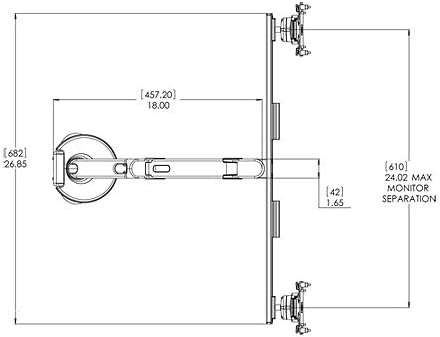
Figure 2: Technical dimensions of the M8 Dual Monitor Arm, showing maximum monitor separation.
Video 1: Official Humanscale video demonstrating monitor arm features and adjustments.
Монитор колду иштетүү
The M8 Monitor Arm allows users to effortlessly retract, swivel, rotate, or reposition monitors up or down to fit any body or any task. This dynamic adjustability is crucial for creating an ergonomic workstation.
- Бийиктигин тууралоо: The arm offers 11.5 inches of dynamic height adjustment. Adjust the monitor height so the top line of text is at or slightly below eye level.
- Тереңдикти жөндөө: Enjoy 22 inches of depth adjustment. Position the monitor at arm's length away for optimal viewаралык.
- Эңкейүү жана айлануу: Tilt the top of the monitor slightly away from you until your line of sight is perpendicular to the screen. Swivel the monitors as needed for collaborative work or to adjust viewбурчтар.
- Айлануу: Rotate the monitor from landscape to portrait orientation for different tasks, such as document viewing or coding.
- 180-degree Stop Mechanism: The arm includes a 180-degree stop mechanism to prevent wall damage from over-rotation, especially useful in cubicle environments.
Properly positioning your monitor increases viewing safety and comfort, minimizing potential health risks such as neck and shoulder strain, eye fatigue, and headaches. The full lateral movement of the arm also facilitates quick and easy information sharing in multi-user workstations.
Техникалык тейлөө
The Humanscale M8 Monitor Arm is designed for durability and minimal maintenance. To ensure its longevity and optimal performance:
- Тазалоо: Колду жана түбүн жумшак, d менен сүртүңүзamp кездеме. Катуу химиялык заттарды же абразивдүү тазалоочу каражаттарды колдонуудан алыс болуңуз, анткени алар капталга зыян келтириши мүмкүн.
- Кабелдик башкаруу: Periodically check the integrated cable management system to ensure cables are securely routed and not pinched.
- Joints and Fasteners: While designed for long-term stability, occasionally check that all fasteners and joints are secure. Do not overtighten.
Проблемаларды чечүү
If you encounter any issues with your Humanscale M8 Monitor Arm, consider the following common solutions:
- Monitor Sagging/Not Holding Position: The M8 features counterbalance adjustment with simple hex screw adjustment. Use the provided hex key to adjust the tension until the monitor holds its desired position.
- Жөнгө салуудагы кыйынчылык: Ensure no cables are snagged or obstructing movement. Check that the arm is not overloaded beyond its weight capacity (up to 40 lbs total for two monitors, 8-40 lbs for single).
- солкулдап: Verify that the bolt-through mount is securely fastened to the desk and that all arm connections are tight.
For persistent issues, refer to the detailed specification sheet or contact Humanscale customer support.
Техникалык шарттар
| Өзгөчөлүк | Деталь |
|---|---|
| Бренд | Адамдык масштаб |
| Модел | M8BB1C |
| Материал | Metal (predominantly steel and recycled aluminum) |
| Түс | Кара |
| Шайкеш түзмөктөр | PC (Monitors) |
| Тоо түрү | Integrated Bolt-Through Mount and Base |
| Monitor Capacity (Single) | 8ден 40 фунтка чейин |
| Monitor Capacity (Dual with Crossbar) | Up to 20 lbs each (40 lbs Total) |
| Dynamic Height Adjustment | 11.5 дюйм |
| Тереңдикти жөндөө | 22 дюйм |
| Элемент Салмагы | 9 фунт |
| VESA колдоосу | 75mm and 100mm VESA plates |
| Өзгөчөлүктөр | Integrated Cable Management, 180-degree Stop Mechanism, Quick Release Ball Joint |

Figure 3: Humanscale M8 Monitor Arm Specification Sheet, detailing features and sustainability.
Кепилдик жана колдоо
The Humanscale M8 Dual Monitor Arm comes with a Humanscale Limited 15-Year Warranty for 24/7 use on all parts. This warranty covers defects in materials and workmanship under normal use.
For warranty claims, technical support, or additional information, please visit the official Humanscale webсайтка же кардарларды тейлөө бөлүмүнө кайрылыңыз. Сатып алганыңыздын далили катары сатып алуу дүмүрчөгүңүздү сактаңыз.


