1. Киришүү
The UNI-T UT315A is a portable LCD Vibration Tester designed for measuring acceleration, velocity, and displacement. It features a long and short external probe for versatile applications, USB connectivity for data transfer, a Max mode for peak value capture, and PC software for advanced analysis. This manual provides detailed instructions for the safe and effective use of your UT315A device.
2. Коопсуздук маалыматы
Please read and understand all safety warnings and operating instructions before using this instrument. Failure to follow these instructions may result in injury or damage to the device.
- Do not operate the device in explosive atmospheres or in the presence of flammable gases or vapors.
- Ensure the probe is securely connected before taking measurements.
- Avoid dropping the instrument or subjecting it to severe impact.
- Do not attempt to open or modify the device; refer all servicing to qualified personnel.
- Батареяларды жергиликтүү эрежелерге ылайык жок кылыңыз.
3. Продукт бүтүп калдыview
The UT315A Vibration Tester consists of a main unit with an LCD display and control buttons, and an external vibration probe connected via a cable. The device is powered by batteries and includes a USB interface for PC communication.
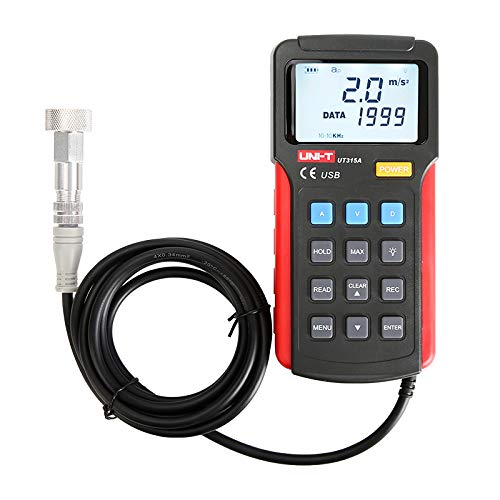
Сүрөт 1: Алдыңкы view of the UNI-T UT315A Vibration Tester with its external probe and cable. The LCD screen displays '2.0 m/s²' and 'DATA 1999'. Buttons for A, V, D, HOLD, MAX, READ, CLEAR, REC, MENU, and ENTER are visible.
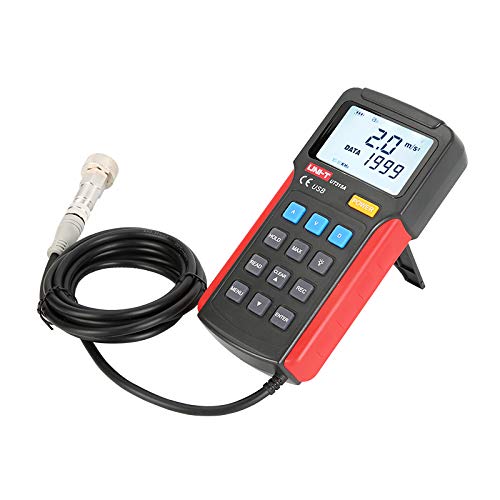
2-сүрөт: Каптал view of the UNI-T UT315A Vibration Tester, showing the integrated kickstand extended for desktop use. The external probe and cable are also visible.
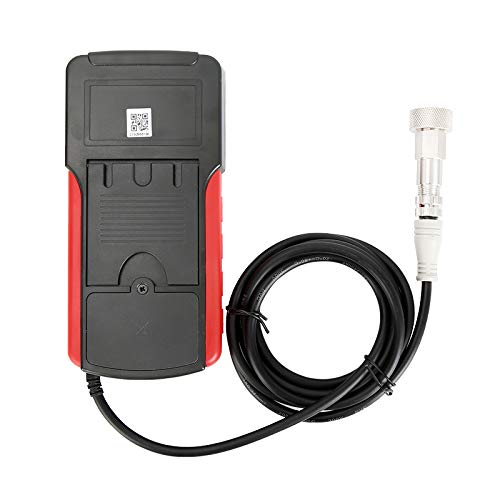
3-сүрөт: Артка view of the UNI-T UT315A Vibration Tester, showing the battery compartment cover and a QR code. The external probe cable is connected to the top of the unit.
4. Орнотуу
4.1 Пакеттен чыгаруу
Carefully unpack the UNI-T UT315A Vibration Tester and check for any damage. The package should contain:
- UNI-T UT315A Main Unit
- External Vibration Probe (long and short options)
- USB кабели
- Компьютердик программалык камсыздоонун CDси (же жүктөп алуу шилтемеси)
- User Manual
4.2 Батареяны орнотуу
The UT315A is battery-powered. To install or replace batteries:
- Аппараттын артындагы батарея отсегин табыңыз (3-сүрөттү караңыз).
- Батарея уясынын капкагын ачыңыз.
- Туура полярдуулукту (+/-) камсыз кылуу менен керектүү батарейкаларды салыңыз.
- Батарея уясынын капкагын бекем жабыңыз.
4.3 Зонд туташуусу
Connect the external vibration probe to the designated port on the top of the main unit. Ensure the connection is firm and secure to prevent inaccurate readings.
4.4 Күйгүзүү/өчүрүү
басыңыз КҮЧ button located on the front panel to turn the device on or off.
5. Иштөө нускамалары
5.1 Өлчөө режимин тандоо
The UT315A can measure acceleration, velocity, and displacement. Use the dedicated buttons to switch between modes:
- Басыңыз A for Acceleration (m/s²).
- Басыңыз V for Velocity (cm/s).
- Басыңыз D for Displacement (mm).
5.2 Ченөө
- Ensure the device is powered on and the probe is connected.
- Select the desired measurement mode (Acceleration, Velocity, or Displacement).
- Carefully place the tip of the external probe firmly against the surface of the object whose vibration you wish to measure.
- ЖК экранында көрсөтүлгөн өлчөө маанисин окуңуз.
5.3 HOLD Функциясы
Учурдагы көрсөткүчтү дисплейде тоңдуруу үчүн, баскычын басыңыз БЕРҮҮ button. Press it again to release and resume live measurements.
5.4 MAX Mode
To capture the maximum vibration value during a measurement period, press the МАКС button. The display will show the peak value detected. Press again to exit MAX mode.
5.5 Маалыматтарды жазуу (REC)
The UT315A allows for data recording. Refer to the detailed instructions in the full user manual for specific steps on initiating, stopping, and reviewing recorded data using the REC баскыч жана навигация баскычтары.
5.6 PC Software and USB Connection
To transfer data to a computer or perform advanced analysis:
- Install the provided PC software from the CD or download it from the UNI-T webсайт.
- Connect the UT315A to your computer using the supplied USB cable.
- Launch the PC software and follow its instructions to establish communication with the device and manage data.
6. Техникалык тейлөө
6.1 Тазалоо
Аппаратты жумшак менен сүртүңүз, гamp кездеме. Абразивдүү тазалагычтарды же эриткичтерди колдонбоңуз. Аппаратка эч кандай суюктук кирбесин.
6.2 Сактоо
Узак убакыт бою колдонулбаган учурда, агып кетпеши үчүн батареяларды алып салыңыз. Түзмөктү салкын, кургак жерде, күн нуру түз тийбеген жана өтө жогорку температурадан алыс сактаңыз.
6.3 Калибрлөө
For optimal accuracy, periodic calibration by a qualified service center is recommended. Refer to UNI-T's official support for calibration services.
7. Кыйынчылыктарды
- Түзмөк күйбөйт: Батареянын орнотулушун текшерип, батарейкалары түгөнүп калбагандыгын текшериңиз. Керек болсо алмаштырыңыз.
- Туура эмес окуулар: Ensure the probe is firmly in contact with the surface. Check for any damage to the probe or cable.
- USB туташуу маселелери: Verify the USB cable is correctly connected to both the device and the PC. Ensure PC software drivers are installed correctly.
- Display shows 'OL' or 'OVER': The measurement value exceeds the device's range for the selected mode.
If problems persist, contact UNI-T customer support.
8. Техникалык шарттар
| Параметр | Нарк |
|---|---|
| Модель номери | UT315A |
| Acceleration Measurement Range | 0.1 ~ 199.9 m/s² |
| Ылдамдыкты өлчөө диапазону | 0.01 ~ 19.99 cm/s |
| Displacement Measurement Range | 0.001 ~ 1.999 мм |
| Power Source | Батарея менен иштейт |
| Элемент Салмагы | 3.31 фунт |
| Өндүрүүчү | UNI-T |
| UPC | 666354108580 |
9. Кепилдик жана колдоо
For warranty information, technical support, or service inquiries, please contact UNI-T directly or refer to their official webсайт. Сатып алганыңыздын далили катары сатып алуу дүмүрчөгүңүздү сактаңыз.
Manufacturer: UNI-T
Кошумча жардам алуу үчүн, баш багыңыз Amazon'догу UNI-T дүкөнү.