1. Киришүү
This user manual provides comprehensive instructions for the installation, operation, and maintenance of the Mitel IP 480G Gigabit Telephone. Designed for professional communication environments, this device offers advanced features and reliable performance for Voice over IP (VoIP) telephony. Please read this manual thoroughly before using the telephone to ensure proper functionality and to maximize your experience.

Сүрөт 1.1: Алдыңкы view of the Mitel IP 480G Gigabit Telephone, showcasing its display, keypad, and function buttons.
2. Пакеттин мазмуну
Verify that all items listed below are present in your product package. If any items are missing or damaged, please contact your vendor or Mitel support.
- Mitel IP 480G Gigabit Telephone Unit
- Телефон
- Handset Cord (coiled)
- Ethernet кабели
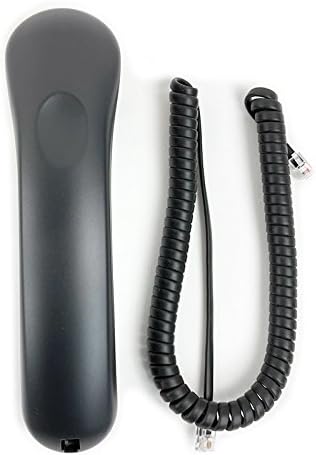
Figure 2.1: The telephone handset and its coiled cord.

Figure 2.2: Standard Ethernet cable included for network connection.

Figure 2.3: The product packaging box.
3. Орнотуу
3.1 Физикалык байланыштар
- Телефонду туташтыруу: Plug one end of the coiled handset cord into the handset and the other end into the handset port on the side of the telephone base.
- Тармакка/кубатка туташуу:
- If using Power over Ethernet (PoE): Connect one end of the Ethernet cable to the LAN port on the back of the telephone and the other end to a PoE-enabled network switch or injector.
- If not using PoE: Connect one end of the Ethernet cable to the LAN port on the back of the telephone and the other end to your network switch or router. Connect an optional 12V power adapter (not included) to the power port on the back of the telephone and then to a power outlet.
- Optional Headset Connection: If using a headset, connect it to the dedicated RJ-22 headset port on the side of the telephone.

3.1-сүрөт: Арткы view of the telephone, showing the LAN port for network and power connection.
3.2 Баштапкы күйгүзүү жана тармак конфигурациясы
Once connected, the telephone will power on automatically. The backlit display will illuminate, and the phone will begin its boot sequence. During this process, it will attempt to obtain network settings.
- DHCP: By default, the phone is configured to obtain an IP address and other network settings automatically via DHCP. This is the most common setup for most networks.
- Static IP Addressing: If your network requires a static IP address, you may need to access the phone's network settings menu to manually configure the IP address, subnet mask, gateway, and DNS servers. Consult your network administrator for these details.
4. Иштөө нускамалары
4.1 Чакыруунун негизги функциялары
- Чакыруу:
- Телефонду көтөрүңүз же басыңыз Динамик баскычы.
- Ариптакта аркылуу каалаган номерди териңиз.
- басыңыз Терүү or Жөнөтүү soft key (if available on display) or wait for the call to connect.
- Чалууга жооп берүү:
- Телефон шыңгыраганда, телефонду көтөрүңүз же басыңыз Динамик баскычы.
- Чалууну аяктоо:
- Трубканы кайра ордуна коюңуз же баскычын басыңыз Динамик трубканы коюу үчүн кайра баскычын басыңыз.
4.2 Өзгөчөлүк баскычтары
The Mitel IP 480G includes dedicated feature keys for enhanced call management:
- өткөрүүсү: Used to transfer an active call to another extension or external number.
- Конференция: Initiates a multi-party conference call (supports up to 6 parties).
- Кармап туруу: Places the current active call on hold.
- History/Redial: Accesses a filterable and unlimited call history. Allows redialing previous numbers.
- Үн почтасы: Direct access to your voicemail messages.
- Каталог: Provides access to a searchable and filterable directory of contacts stored on the system.
4.3 Аудио башкаруу каражаттары
Manage your audio experience with the following controls:
- Көлөмү: Independent volume control for handset, speakerphone, headset, and alert/ring tones. Use the dedicated volume buttons.
- Үнсүз: Press to mute your microphone during a call. An LED indicator will illuminate when muted.
- Динамик: Toggles the speakerphone function on or off. An LED indicator will illuminate when the speakerphone is active.
- Гарнитура: Activates or deactivates the headset mode. An LED indicator will illuminate when the headset is active.
4.4 Дисплей навигациясы
The 297 x 160 pixels backlit display provides clear information. Use the navigation cluster (up, down, left, right arrows, and select button) to browse menus, directories, and call history. Soft keys located below the display provide context-sensitive options.
5. Техникалык тейлөө
5.1 Тазалоо
To maintain the appearance and functionality of your telephone, clean it regularly.
- жумшак колдонуу, damp сырткы беттерин сүртүү үчүн чүпүрөк.
- Avoid using abrasive cleaners, solvents, or strong chemicals, as these can damage the plastic and finish.
- Do not spray cleaning liquids directly onto the phone.
- Ensure the phone is unplugged from power before cleaning.
5.2 Программалык камсыздоо жаңыртуулары
Periodically, Mitel may release software updates to improve performance, add features, or address security vulnerabilities. These updates are typically managed by your system administrator. Do not attempt to manually update the phone's firmware unless instructed by qualified personnel.
6. Кыйынчылыктарды
This section addresses common issues you might encounter with your Mitel IP 480G Gigabit Telephone.
| Көйгөй | Мүмкүн себеп | Чечим |
|---|---|---|
| Телефон күйбөйт. | PoE которгучунан же кубат адаптеринен кубат жок. | Verify that the Ethernet cable is securely connected to a PoE-enabled port or that the optional power adapter is correctly plugged in and receiving power. |
| Терүү үнү жок. | Network connectivity issue; phone not registered with SIP server. | Check network cable connection. Ensure your network is operational. Contact your system administrator to verify SIP registration status. |
| Чалууларды кабыл алуу же жасоо мүмкүн эмес. | Network configuration error; SIP account issues. | Confirm network settings (DHCP/Static IP). Verify SIP account credentials with your system administrator. |
| Үн сапатынын начардыгы (жаңылык, статикалык). | Network congestion; faulty cable; environmental interference. | Check network cable. Ensure sufficient bandwidth. Try a different handset or headset. If issues persist, contact support. |
If you encounter problems not listed here or if the suggested solutions do not resolve the issue, please contact your IT department or Mitel technical support for further assistance.
7. Техникалык шарттар
- Модел: Mitel IP 480G
- Бөлүмдүн номери: 10577
- Өлчөмдөрү (L x W x Y): Болжол менен 10 x 7 x 3 дюйм
- Салмагы: Approximately 1.06 pounds (480 Grams)
- Түсү: Кара
- Материал: Пластик
- Дисплей: 297 x 160 pixels backlit display
- Ethernet порттору: 10/100/1000 Gigabit Ethernet Switch
- Кубат булагы: 802.3af Power over Ethernet (PoE) or optional 12V power adapter (not included)
- Протоколдор: SIP Protocol, VLAN and DiffServ/ToS supported Quality of Service
- Гарнитура шайкештиги: RJ-22 гарнитура порту
- Динамик: Толук дуплекстүү динамик
- Feature Keys: Transfer, Conference (6 party), Hold, History/Redial, Voicemail, Directory
- Аудио башкаруу каражаттары: Independent volume control for handset, speakerphone, headset, alert/rings; Mute (LED indicator); Speakerphone (LED indicator); Headset (LED indicator)
8. Кепилдик жана колдоо
For information regarding the product warranty, please refer to the warranty card included with your purchase or visit the official Mitel website. Technical support and additional resources can also be found on the Mitel support portal.
Mitel Official Webсайт: www.mitel.com


