1. Киришүү
This manual provides comprehensive instructions for the installation, operation, maintenance, and troubleshooting of the MOXA EDS-316 16-Port Unmanaged Ethernet Switch. Please read this manual thoroughly before using the device to ensure proper functionality and safety.
2. Коопсуздук маалыматы
- электр менен жабдууну камсыз кылуу voltage is within the specified range for the device.
- Аппаратты нымдуулукка же экстремалдык температурага дуушар кылбаңыз.
- Ашыкча ысып кетүүнүн алдын алуу үчүн вентиляция тешиктерин жабуудан качыңыз.
- Монтаждоо жана тейлөөнү квалификациялуу кызматкерлер гана аткарышы керек.
- Аппаратты тазалоодон же тейлөөдөн мурун электр энергиясын өчүрүңүз.
3. Пакеттин мазмуну
Пакетиңизде төмөнкү заттар бар экенин текшериңиз:
- MOXA EDS-316 Unmanaged Ethernet Switch
- Тез орнотуу боюнча колдонмо (эгер бар болсо)
- Кепилдик картасы (эгер бар болсо)
- Кубат киргизүү үчүн терминалдык блок
Эгерде кандайдыр бир буюмдар жок болсо же бузулуп калса, дароо сатуучуга кайрылыңыз.
4. Продукт бүтүп калдыview
The MOXA EDS-316 is a robust 16-port unmanaged Ethernet switch designed for industrial applications. It features 16 10/100BaseT(X) ports, providing reliable network connectivity. Key features include:
- Relay output warning for power failure and port break alarm.
- Broadcast storm protection to maintain network stability.
- Wide operating temperature range for harsh environments.
4.1 Түзмөктүн жайгашуусу
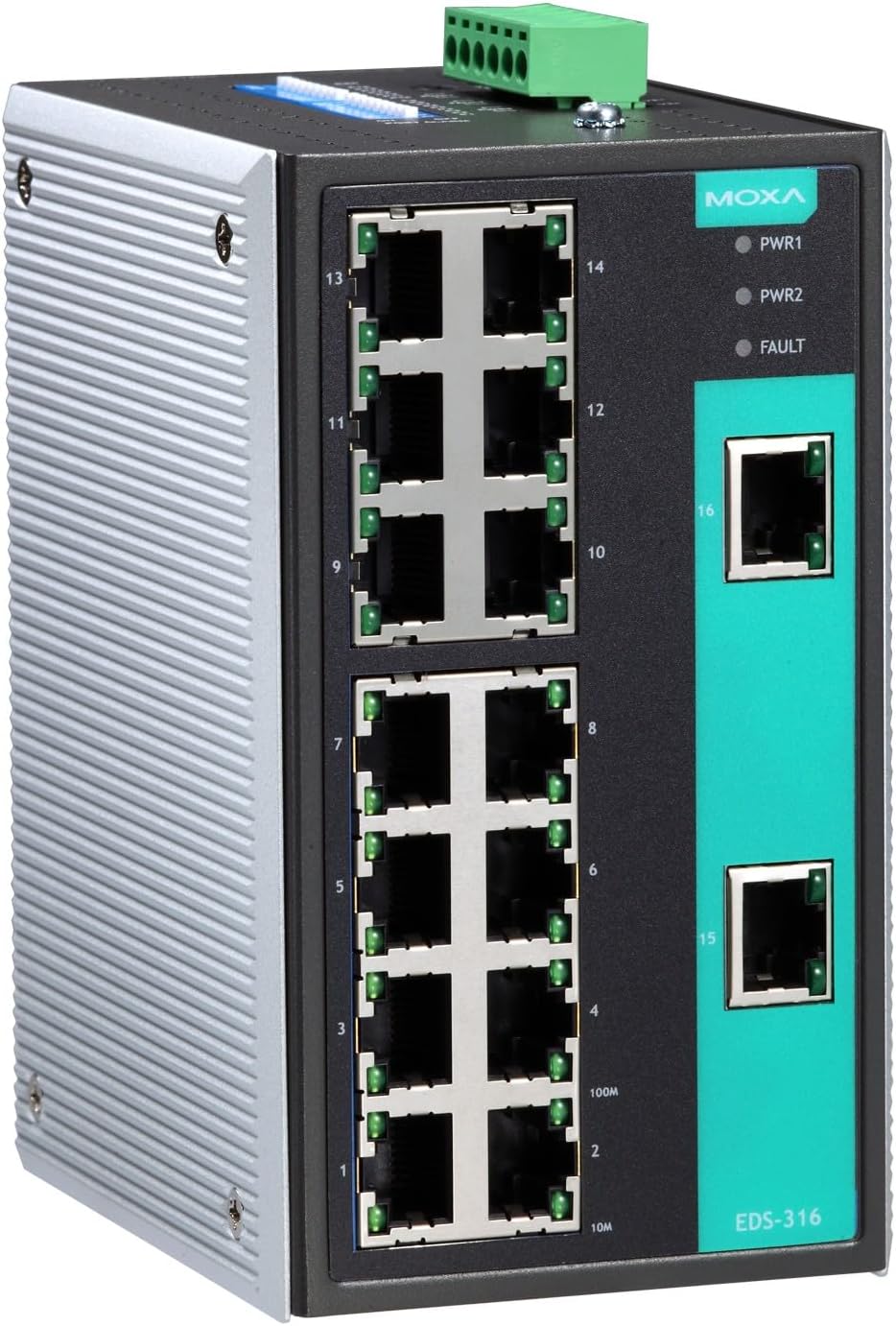
1-сүрөт: Фронт view of the MOXA EDS-316 Ethernet Switch, displaying the 16 RJ45 10/100BaseT(X) ports, power input terminals, and LED indicators for power (PWR1, PWR2) and fault status.

2-сүрөт: Бурчтуу алдыңкы view of the MOXA EDS-316 Ethernet Switch, providing a clearer perspective of the port numbering (1-16) and the robust metal casing suitable for industrial environments.
5. Орнотуу
5.1 Коммутаторлорду орнотуу
The EDS-316 is designed for DIN-rail mounting. Attach the DIN-rail kit to the rear of the switch, then snap the switch onto a standard DIN rail. Ensure it is securely fastened to prevent accidental dislodgement.
5.2 Кубат туташтыруу
- Connect the power source to the terminal block located on the top of the switch. The EDS-316 supports redundant power inputs (PWR1, PWR2).
- Voltage is within the specified range (9.6 Volts DC).
- Verify that the power cables are securely connected.
5.3 Тармактык туташуу
Connect Ethernet cables from your network devices (e.g., computers, servers, other switches) to any of the 16 RJ45 10/100BaseT(X) ports on the front panel. The switch will automatically detect the speed and duplex mode of the connected devices.
6. Иштөө нускамалары
6.1 Күйгүзүү
Once power is connected, the PWR1 and/or PWR2 LEDs on the front panel will illuminate, indicating that the switch is receiving power.
6.2 LED көрсөткүчтөрү
- PWR1/PWR2 (Жашыл): Lit when power input 1/2 is active.
- КЕСИП (Кызыл): Lit when a power failure or port break alarm is detected.
- Link/Act (Green per port): Lit when a valid network link is established; blinks when data is being transmitted or received.
6.3 Network Operation
The EDS-316 is an unmanaged switch, meaning it operates automatically without requiring any configuration. Simply connect your devices, and the switch will facilitate communication between them.
7. Техникалык тейлөө
7.1 Тазалоо
Use a soft, dry cloth to clean the exterior of the switch. Do not use liquid or aerosol cleaners. Ensure the device is powered off before cleaning.
7.2 Айлана-чөйрөнү коргоо
Maintain the operating environment within the specified temperature and humidity ranges to ensure optimal performance and longevity of the device.
8. Кыйынчылыктарды
| Көйгөй | Мүмкүн себеп | Чечим |
|---|---|---|
| No power (PWR LEDs off) | No power input or faulty power supply. | Check power cable connections and power source. Verify power supply functionality. |
| FAULT LED is lit | Power failure or port break alarm. | Check power inputs. Inspect all connected network cables for breaks or disconnections. |
| No network link (Link/Act LED off) | Cable issue, device off, or incompatible settings. | Ensure the connected device is powered on. Check Ethernet cable for damage. Try a different port or cable. |
| Тармактын жай иштеши | Network congestion, faulty cable, or device issue. | Check for broadcast storms (the switch has protection, but excessive traffic can still impact performance). Verify cable quality. Isolate problematic devices. |
9. Техникалык шарттар
| Атрибут | Нарк |
|---|---|
| Бренд | Moxa |
| Модел | EDS-316 |
| Порттардын саны | 16 |
| Interface Type | RJ45, SFP |
| Маалыматтарды өткөрүү ылдамдыгы | 1600 Megabits Per Second (Full Duplex) |
| Иштөө температурасы | 0дөн 60°Cге чейин |
| Иштин материалы | Металл |
| Тtage | 9.6 вольт (ток) |
| Элемент Салмагы | 14.99 фунт |
| UPC | 750958427663 |
10. Кепилдик жана колдоо
MOXA products are designed for reliability and performance. For warranty information, please refer to the warranty card included with your product or visit the official MOXA website. For technical support, contact your local MOXA distributor or the MOXA customer service team with your product model and serial number.


