1. Киришүү
Thank you for choosing the Sceptre 32-inch Class FHD (1080P) LED TV with Built-in DVD, Model E325BD-FSR. This manual provides essential information for the proper setup, operation, and maintenance of your new television. Please read this manual thoroughly before using the product and retain it for future reference.
2. Коопсуздук маалыматы
Коопсуз эксплуатацияны камсыз кылуу жана зыян келтирбөө үчүн төмөнкү коопсуздук чараларын сактаңыз:
- Телевизорду иштетүүдөн мурун бардык нускамаларды окуп чыгыңыз.
- Бул колдонмону келечекте маалымат алуу үчүн сактаңыз.
- Шаймандагы жана колдонуу нускамасындагы бардык эскертүүлөргө кулак салыңыз.
- Бардык нускамаларды аткарыңыз.
- Кургак чүпүрөк менен гана тазалаңыз.
- Туура желдетүүнү камсыз кылыңыз. Эч кандай желдетүүчү тешиктерди жаап албаңыз.
- Электр шнурын басуудан же кысып калуудан сактаңыз.
- Чагылган бороондо же көпкө чейин пайдаланылбай турганда сыналгыны розеткадан ажыратыңыз.
- Бардык тейлөөлөрдү квалификациялуу тейлөө кызматкерлерине тапшырыңыз.
3. Пакеттин мазмуну
Сураныч, төмөнкү нерселер үчүн кутучаны белгилеңиз:
- Sceptre 32-inch Class FHD (1080P) LED TV with Built-in DVD (Model E325BD-FSR)
- Телевизордук стенд
- Алыстан башкаруу
- Электр кабели
- 6ft Indoor 3-Outlet Extension Cord
- Колдонуучунун Колдонмосу (бул документ)
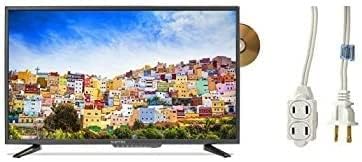
Image: The Sceptre 32-inch Class FHD LED TV with its built-in DVD player visible on the side, accompanied by a 6ft indoor 3-outlet extension cord.
4. Орнотуу
4.1 Стендди орнотуу
- Сыналгынын экранын кылдаттык менен ылдый каратып жумшак, таза бетке коюңуз.
- Телевизордун астыңкы монтаждоо тешиктери менен сыналгы станогун тууралаңыз.
- Берилген бурамалар менен стендди бекитиңиз. Ашыкча кысып албаңыз.
4.2 Кубатты туташтыруу
Plug the power cord into the TV's power input, then connect the other end to a standard electrical outlet. Use the included 6ft indoor 3-outlet extension cord if additional outlets are needed.
4.3 Тышкы түзмөктөрдү туташтыруу
Your TV features various input ports for connecting external devices:
- HDMI: For high-definition video and audio from devices like Blu-ray players, game consoles, or cable/satellite boxes.
- Антенна/кабель (RF): Аба аркылуу берүүлөр үчүн антеннаны же кабелдик телеберүүнү туташтыруу үчүн.
- USB: USB сактагыч түзмөктөрүнөн медиа ойнотуу үчүн.
Connect your devices to the appropriate ports on the back or side of the TV.
5. Иштөө нускамалары
5.1 Күйгүзүү/өчүрүү
басыңыз КҮЧ телевизорду күйгүзүү же өчүрүү үчүн пульттагы же телевизордун өзүндөгү баскычты басыңыз.
5.2 Киргизүү булагын тандоо
басыңыз INPUT or БУЛАК button on the remote control to cycle through available input sources (e.g., TV, HDMI1, HDMI2, DVD, USB).
5.3 Channel Scan (TV Input)
If using an antenna or cable connection, select the 'TV' input source. Navigate to the TV's menu, find the 'Channel' or 'Setup' section, and initiate an 'Auto Scan' or 'Auto Program' to find available channels.
5.4 Built-in DVD Player Operation
- Ensure the TV is powered on and the input source is set to 'DVD'.
- Gently insert a DVD disc into the disc slot on the side of the TV, label side facing up. The TV will automatically detect the disc and begin playback.
- Use the DVD control buttons on your remote control (Play, Pause, Stop, Fast Forward, Rewind, Skip) to manage playback.
- Дискти чыгаруу үчүн басыңыз ЧЫГАРУУ пульттун же сыналгыдагы баскычты басыңыз.
5.5 Меню Навигациясы
басыңыз МЕНЮ button on the remote control to access the TV's settings. Use the arrow buttons to navigate and the ENTER or OK параметрлерди тандоо үчүн баскычын басыңыз. ЧЫГУУ or МЕНЮ менюну жабуу үчүн кайрадан басыңыз.
6. Техникалык тейлөө
6.1 Экранды тазалоо
Экранды жумшак, кургак, түксүз чүпүрөк менен акырын сүртүңүз. өжөр белгилери үчүн, жеңил гampчүпүрөккө суу же атайын экран тазалоочу каражат. Эч качан суюктукту түздөн-түз экранга чачпаңыз.
6.2 Сырты тазалоо
Wipe the TV's exterior with a soft, slightly damp cloth. Avoid using harsh chemicals, abrasive cleaners, or solvents, as these can damage the finish.
6.3 Сактоо
If storing the TV for an extended period, unplug it from the power outlet and store it in a cool, dry place, preferably in its original packaging.
7. Кыйынчылыктарды
Кардарларды колдоо кызматына кайрылуудан мурун, жалпы маселелер боюнча төмөнкү чечимдерди колдонуп көрүңүз:
- Кубат жок: Кубат шнуру телевизорго да, иштеп жаткан электр розеткасына да бекем сайылганын текшериңиз. Розеткада кубат бар же жок экенин текшериңиз.
- Сүрөт жок: Туура киргизүү булагы тандалганын текшериңиз. Бардык кабелдик туташуулар (HDMI, антенна) коопсуз экендигин текшериңиз.
- Үн жок: Check the volume level and ensure the TV is not muted. Verify audio settings in the menu.
- Алыстан башкаруу иштебейт: Батареяларды алмаштырыңыз. Пульт менен сыналгынын IR сенсорунун ортосунда эч кандай тоскоолдуктар жок экенин текшериңиз.
- DVD ойнотуу көйгөйлөрү: Ensure the disc is clean and free of scratches. Verify the disc is inserted correctly. Confirm the input source is set to 'DVD'.
8. Техникалык шарттар
| Модел | E325BD-FSR |
| Screen Size | 31.5 дюйм |
| Резолюция | 1080p (Full HD) |
| Өзгөчөлүктөр | Flat Screen, Built-in DVD Player |
| Tuner Technology | ATSC |
| Башкаруу ыкмасы | Алыстан |
| Screen Surface | Жылтырак |
| Year (Manufacturing) | 2017 |
| Колдоого алынган Интернет кызматтары | Blockbuster |
9. Кепилдик жана колдоо
Your Sceptre TV is covered by a manufacturer's warranty. For specific warranty details, please refer to the warranty card included with your product or visit the official Sceptre website. For technical assistance, troubleshooting beyond this manual, or warranty claims, please contact Sceptre customer support.


