1. Киришүү
This manual provides essential information for the safe and efficient operation, installation, and maintenance of your Carrier Estrella Pro 2018 1.0 Ton 3 Star Window Air Conditioner. Please read this manual thoroughly before using the appliance and retain it for future reference. This air conditioner is designed to provide comfortable cooling for your indoor environment, featuring a 1.0 ton capacity and a 3-star energy rating.
2. Коопсуздук маалыматы
Колдонуучуга же башка адамдарга зыян келтирбөө жана мүлктүк зыян келтирбөө үчүн төмөнкү көрсөтмөлөрдү аткаруу керек. Көрсөтмөлөрдү этибарга албагандыктан туура эмес иштөө зыян келтириши же бузулушу мүмкүн.
- Кубат булагынын кубаттуулук көрсөткүчү түзмөктүн техникалык мүнөздөмөсүнө дал келгенин текшериңиз.
- Кондиционерди ным кол менен иштетпеңиз.
- Манжаларды же бөтөн нерселерди аба кирүүчү же чыгуучу жайга киргизбеңиз.
- Тез күйүүчү материалдарды аппараттан алыс кармаңыз.
- Агрегатты тазалоодон же тейлөөдөн мурун ар дайым электр кубатын ажыратыңыз.
- Орнотуу жергиликтүү электр эрежелерине ылайык квалификациялуу адистер тарабынан жүргүзүлүшү керек.
- Түзмөктү өз алдынча оңдоого аракет кылбаңыз. Ыйгарым укуктуу тейлөө кызматкерлерине кайрылыңыз.
3. Продукциянын өзгөчөлүктөрү
Your Carrier Estrella Pro 2018 air conditioner is equipped with several features designed for enhanced comfort and efficiency:
- С витамининин чыпкасы: Disperses minute particles of Vitamin C into the air, which may help soften skin and reduce stress.
- Оңой тазалоо: Extra sensors built into the remote control inform the unit of the temperature in various parts of the room, ensuring optimal temperature delivery.
- Акылдуу диагностика: In case of a fault, this function diagnoses the issue immediately, turns off the AC to protect it, and indicates a protection or error code for faster service.
- Уйку режими: An energy-saving mode that gradually increases the temperature while you sleep, maintaining comfort while reducing energy consumption.
- Exhaust Command: Ensures a constant supply of fresh and healthy air in your room.
- Автоматтык түрдө өчүрүү: Retains settings and temperature levels during unexpected power outages, restarting with previous settings automatically when power resumes.
- Auto Swing: Evenly cools or heats every part of the room by automatically rotating/swinging the air deflector.
- Nexgen Dehumidifier: Reduces humidity in a specific room while retaining cooling capability, maintaining a comfortable temperature and preventing mold/mildew.
- LED дисплей: Bright LED display included in the control panel.
- Built-in Slinger: Condensed water is absorbed and recycled by the heat condenser for minimum energy use and zero drainage problems.
- Hydrophilic Blue Fins: Improve heat exchange by absorbing and spreading water on their surface, preventing droplet formation. The anti-corrosive epoxy coating improves heat transfer and prevents corrosion.
- 24hr Timer: Allows the unit to run on automatic mode, programming it to start and stop at a pre-assigned time.
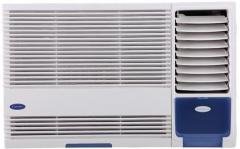
Сүрөт 3.1: Алдыңкы view of the Carrier Estrella Pro 2018 Window Air Conditioner, showcasing анын компакттуу дизайны.
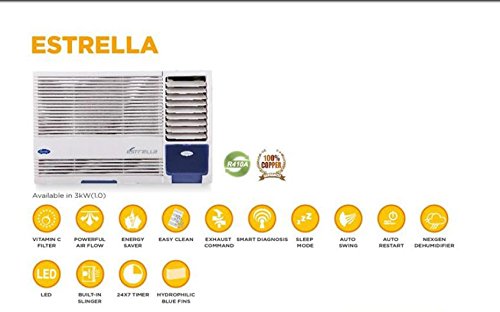
Сүрөт 3.2: An overview of the Estrella Pro's key features, including Vitamin C filter, powerful airflow, energy saver, easy clean, exhaust command, smart diagnosis, sleep mode, auto swing, auto restart, Nexgen dehumidifier, LED, built-in slinger, 24x7 timer, and hydrophilic blue fins.
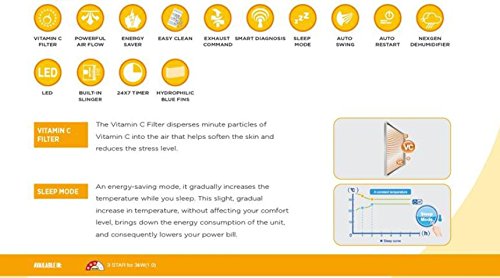
Figure 3.3: Detailed explanation of the Vitamin C Filter and Sleep Mode functionalities, including a graph illustrating temperature changes during Sleep Mode.
4. Орнотуу
Proper installation is crucial for the performance and longevity of your air conditioner. It is recommended that installation be carried out by a certified technician.
4.1 Жайгашкан жерди тандоо
- Select a window that can support the weight of the unit.
- Ensure there are no obstructions to airflow both inside and outside the room.
- Конденсатты тийиштүү түрдө дренаждоо үчүн түзүлүштү сыртка бир аз ылдый кыйшайтып орнотуу керек.
4.2 Электрдик талаптар
- Connect the unit to a dedicated power outlet with the correct voltagд жана amperage as specified on the product label.
- Узарткычтарды же көп розеткалуу адаптерлерди колдонбоңуз.
- Электр розеткасынын туура жерге туташтырылганын текшериңиз.
4.3 Орнотуу кадамдары (Жалпы)
- Терезенин ачылышын даярдаңыз, анын таза жана таштандылардан таза экенине ынаныңыз.
- Carefully lift and place the air conditioner into the window opening.
- Берилген бекитүүчү кронштейндерди жана бурамаларды колдонуп, түзүлүштү бекитиңиз.
- Install the side panels to seal the gap between the unit and the window frame.
- Ensure all seals are tight to prevent air leakage.
5. Иштөө нускамалары
Your air conditioner can be operated using the control panel on the unit or the provided remote control.
5.1 Негизги операция
- Күйгүзүү/өчүрүү: басыңыз КҮЧ аппаратты күйгүзүү же өчүрүү үчүн баскыч.
- Режим тандоо: басыңыз РЕЖИМ button to cycle through available modes: Cool, Fan, Dry (Dehumidifier).
- Температураны жөндөө: колдонуу UP жана ылдый каалаган температураны коюу үчүн жебе баскычтарын басыңыз.
- желдеткич ылдамдыгы: басыңыз Күйөрмандардын ылдамдыгы button to adjust the fan speed (Low, Medium, High, Auto).
5.2 Атайын функциялар
- Уйку режими: Activate this mode for quiet, energy-efficient operation during sleep. The temperature will gradually increase over time.
- Таймер функциясы: колдонуу ТАЙМЕР button to set a specific time for the unit to turn on or off automatically within a 24-hour period.
- Auto Swing: басыңыз САЛКЫН button to activate or deactivate the automatic louver movement for even air distribution.
- Dehumidifier (Dry) Mode: Select this mode to reduce humidity in the room without significant cooling.
6. Техникалык тейлөө
Үзгүлтүксүз тейлөө оптималдуу иштешин камсыз кылат жана кондиционериңиздин иштөө мөөнөтүн узартат.
6.1 Аба чыпкасын тазалоо
- Жыштыгы: Clean the air filter every two weeks, or more often if the unit is used frequently or in dusty environments.
- Кадамдар:
- Агрегатты кубаттан ажыратыңыз.
- Алдыңкы панелди ачып, аба чыпкасын алып салыңыз.
- Фильтрди жылуу суу жана жумшак жуугуч каражат менен жууңуз.
- Кайра орнотуудан мурун жакшылап чайкап, толугу менен кургатыңыз.
6.2 Тышкы тазалоо
- Агрегаттын сыртын жумшак менен сүртүңүз, гamp кездеме.
- Катуу химиялык заттарды, абразивдерди же эриткичтерди колдонбоңуз.
6.3 Сезондук тейлөө
- Before long periods of non-use (e.g., winter), run the unit in fan-only mode for a few hours to dry the internal components.
- Clean the air filter and cover the unit to protect it from dust.
7. Кыйынчылыктарды
If you encounter issues with your air conditioner, refer to the following common problems and solutions. For more complex issues, utilize the Smart Diagnosis feature or contact customer support.
| Көйгөй | Мүмкүн себеп | Чечим |
|---|---|---|
| Түзмөк күйбөйт | No power supply; Power cord unplugged; Blown fuse/tripped breaker | Check power connection; Reset breaker/replace fuse. |
| Жетишсиз муздатуу | Dirty air filter; Room too large; Doors/windows open; Temperature setting too high | Clean air filter; Close doors/windows; Lower temperature setting. |
| Ашыкча ызы-чуу | Loose installation; Fan hitting obstruction; Unit not level | Ensure secure installation; Check for obstructions; Level the unit. |
| Суунун агып чыгышы | Unit not tilted correctly; Drain pan clogged | Adjust unit tilt; Clear drain pan. |
If the problem persists after attempting these solutions, please contact Carrier customer service for assistance. The Smart Diagnosis feature can provide error codes to help service technicians identify the issue quickly.
8. Техникалык шарттар
The following table outlines the key specifications for the Carrier Estrella Pro 2018 1.0 Ton 3 Star Window Air Conditioner:
| Өзгөчөлүк | Деталь |
|---|---|
| Бренд | Ташуучу |
| Энергия натыйжалуулугу | 3 жылдыз рейтинги |
| Кубаттуулугу | 1 тонна |
| Орнотуу түрү | Терезе |
| Өзгөчөлүктөр | Auto Restart, Dehumidifier, Sleep Mode, Vitamin C Filter, Easy Clean, Smart Diagnosis, Exhaust Command, Auto Swing, Nexgen Dehumidifier, LED, Built-in Slinger, Hydrophilic Blue Fins, 24hr Timer |
| Түс | ак |
| Control Console | алыстан башкаруу |
| Сертификация | энергетикалык жылдыз |
| Муздаткыч | R-32 |
| ASIN | B07BFXPZ2T |
| Дата биринчи жеткиликтүү | 13 2018-март |
9. Кепилдик жана колдоо
Your Carrier Estrella Pro 2018 air conditioner comes with a comprehensive warranty:
- Продукт Кепилдиги: Бардык продукты боюнча 1 жыл.
- Компрессор Кепилдиги: Компрессордо 5 жыл.
For warranty claims, technical support, or service requests, please contact Carrier customer service. Ensure you have your product model number and purchase date available when contacting support.
You can find contact information for Carrier customer support on the official Carrier webсайтында же продуктунун таңгагында.