1. Киришүү
This manual provides detailed instructions for the setup, operation, and maintenance of your Digoo DG-M1X HD 960P IP Camera. Please read this manual thoroughly before using the product to ensure proper functionality and safety.
The Digoo DG-M1X is a 960P HD wireless IP camera designed for home security, featuring night vision, two-way audio, and app monitoring capabilities.
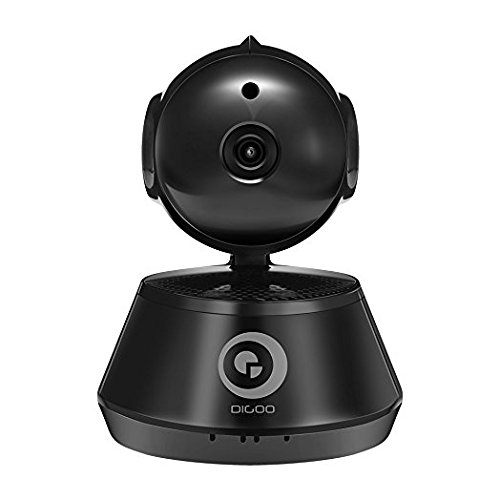
1-сүрөт: Фронт view of the Digoo DG-M1X HD 960P IP Camera. This image shows the camera's main body, lens, and base, highlighting its compact dome form factor.
2. Пакеттин мазмуну
Пакетте бардык буюмдар бар экенин текшериңиз:
- 1 x Digoo DG-M1X 960P Wireless PAN/Tilt IP Camera Monitor
- 1 x Digoo DG-M1X Micro USB Power Cable
- 1 x Digoo DG-M1X Full English User Manual (this document)
- 1 x Digoo DG-M1X Original Color Gift Package
- 1 x Pack of Installing Accessories
3. Орнотуу колдонмосу
3.1 Физикалык орнотуу
- Жайгашкан жерди тандаңыз: Select an indoor location with a clear view of the area you wish to monitor. Ensure it is within range of your Wi-Fi network. The camera is designed for surface mount installation.
- Монтаждоо: Use the provided installing accessories to securely mount the camera. The camera has a dome form factor and can be mounted on a flat surface or inverted.
- Кубат туташуу: Connect the Micro USB Power Cable to the camera's power input and plug the other end into a power outlet. The camera will power on and initiate its startup sequence.
3.2 Тармактын конфигурациясы
The Digoo DG-M1X supports wireless Wi-Fi connectivity.
- Колдонмону жүктөп алыңыз: Издөө the official Digoo app on your smartphone's app store (compatible with Android devices).
- Каттоо эсеби: Open the app and follow the on-screen instructions to register a new user account.
- Түзмөк кошуу: In the app, select the option to add a new device. Follow the prompts to connect your camera to your Wi-Fi network. This typically involves scanning a QR code on the camera or entering your Wi-Fi credentials into the app.
- Баштапкы орнотуу: Once connected, the app will guide you through any initial setup steps, such as setting a device password.
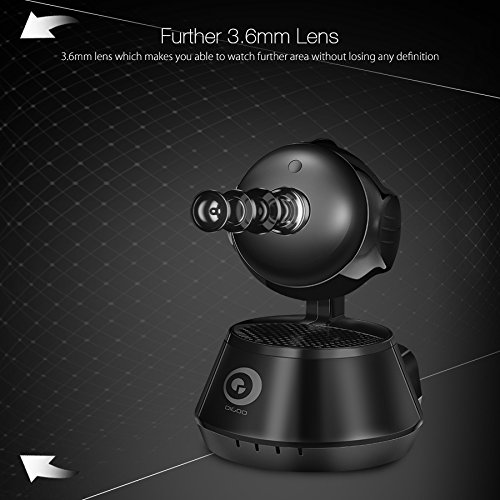
2-сүрөт: Side view of the Digoo DG-M1X camera, emphasizing its 3.6mm lens. This lens provides a further and higher definition view for surveillance.
4. Иштөө нускамалары
4.1 Live View жана Мониторинг
Open the Digoo app on your smartphone. Select your DG-M1X camera from the device list to access the live video feed. You can view the area in 960P HD resolution.
4.2 Pan/Tilt башкаруусу
The camera supports pan and tilt functions. Use the controls within the app to remotely adjust the camera's viewing angle horizontally (pan) and vertically (tilt) to cover a wider area.
4.3 Эки тараптуу аудио
The DG-M1X features two-way audio. Tap the microphone icon in the app to speak through the camera's speaker, and listen to audio from the camera's surroundings through your phone.
4.4 Түнкү көрүнүш
The camera is equipped with a 1/3 Progressive CMOS Sensor with night vision capabilities. It automatically switches to night vision mode in low-light conditions, providing clear black and white video footage.
3-сүрөт: A night vision capture from the Digoo DG-M1X camera, displaying a clear black and white image of an outdoor scene at night. This demonstrates the camera's ability to monitor in low-light conditions.
4.5 Жазуу жана ойнотуу
The camera supports video recording. Depending on your setup (e.g., local storage via microSD card, cloud storage), you can record footage. Access recorded videos through the app for playback.
4.6 Кыймылды аныктоо жана эскертүүлөр
Configure motion detection settings within the app. When motion is detected, the camera can send alerts to your smartphone, allowing for immediate awareness of activity.
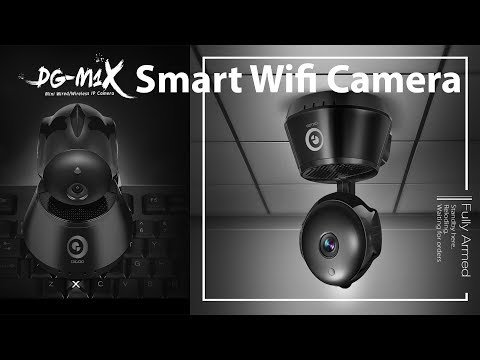
Видео 1: An official product video demonstrating the features of the Digoo DG-M1X Smart Wifi Camera. This video showcases the camera's design, pan/tilt functionality, and app interface, providing a visual overview анын мүмкүнчүлүктөрүнөн.
5. Техникалык тейлөө
- Тазалоо: Камера линзасын жана корпусун жумшак, кургак чүпүрөк менен акырын сүртүңүз. Камерага зыян келтириши мүмкүн болгон катуу химиялык заттарды же абразивдүү материалдарды колдонуудан алыс болуңуз.
- Программалык камсыздоонун жаңыртуулары: Regularly check the Digoo app for available firmware updates. Keeping the camera's firmware updated ensures optimal performance and security.
- Power Cycle: If the camera experiences issues, try power cycling it by unplugging it from the power source for a few seconds and then plugging it back in.
- Экологиялык шарттар: The camera is designed for indoor use and is not water-resistant. Ensure it is kept in a dry environment and within recommended operating temperatures.
6. Кыйынчылыктарды
| Көйгөй | Мүмкүн себеп | Чечим |
|---|---|---|
| Камера Wi-Fi'га туташпай жатат | Incorrect Wi-Fi password; camera too far from router; router firewall settings | Verify Wi-Fi password; move camera closer to router; check router settings or temporarily disable firewall for testing. |
| Жандуу видео түрмөгү жок | Camera offline; network issue; app malfunction | Check camera power and network connection; restart camera and app; ensure stable internet connection. |
| Эки тараптуу аудио иштебейт | Microphone/speaker muted in app; app permissions | Ensure audio is enabled in the app; check app permissions for microphone access on your smartphone. |
| Night vision unclear | Obstruction near lens; insufficient ambient light for IR to activate | Камеранын бардык тоскоолдуктарын алып салыңыз view; ensure the area is dark enough for night vision to engage automatically. |
7. Техникалык шарттар
| Өзгөчөлүк | Деталь |
|---|---|
| Модел | DG-M1X |
| Сүрөт сенсору | 1/3 Progressive CMOS Sensor |
| Видео тартуунун резолюциясы | 960P (1,300,000 Pixel) |
| Объектив | 3.6мм |
| Компрессия | H.264 |
| Frame Rate | секундасына 30 кадр |
| Байланыш технологиясы | Зымсыз (Wi-Fi) |
| Өзгөчө өзгөчөлүк | Night Vision, Two-Way Audio, Pan/Tilt |
| Ички/тышкы колдонуу | Indoor |
| Форма фактору | Купол |
| Монтаж түрү | Surface Mount |
| Power Source | Электр зымдары |
| Шайкеш түзмөктөр | Laptop (for viewing, primarily app-controlled) |
| Controller Type | Android (via app) |
| Түс | Кара |
| Материал | Башкалар |
| Элемент Салмагы | 340 г |
| Пакеттин өлчөмдөрү | 16.1 x 13 x 11 см |
8. Кепилдик жана колдоо
8.1 Кепилдик маалыматы
Specific warranty details for the Digoo DG-M1X camera are typically provided at the point of purchase or within the product packaging. Please refer to your purchase receipt or contact your retailer for warranty terms and conditions.
8.2 Кардарларды колдоо
For technical assistance, troubleshooting beyond this manual, or inquiries regarding your Digoo DG-M1X camera, please contact Digoo customer support through their official webсайт же продукт документациясында көрсөтүлгөн байланыш маалыматы.


