Comprehensive guide for operating and maintaining your ANCEL VD500 diagnostic tool.
1. Киришүү
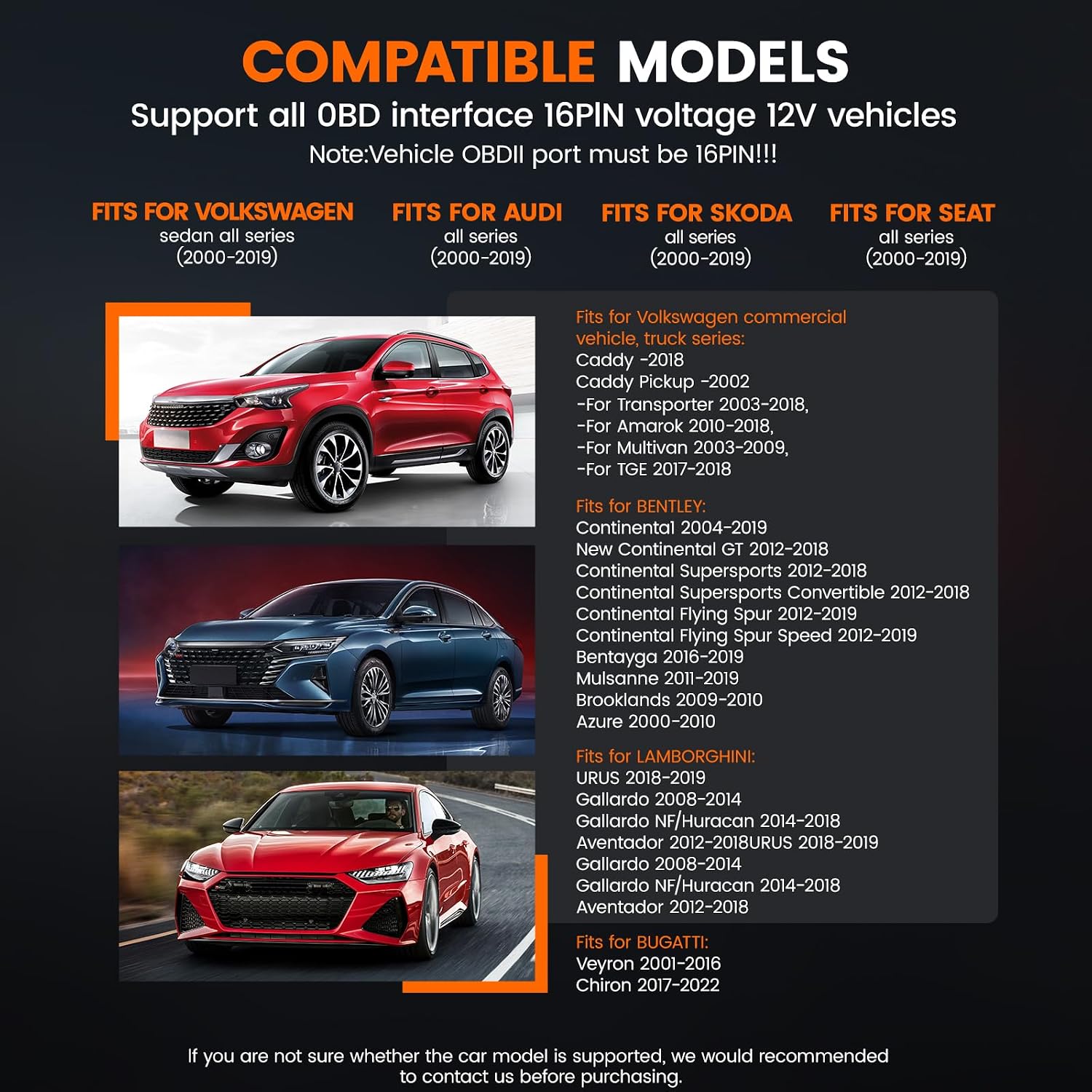
The ANCEL VD500 is a versatile OBD2 scanner primarily designed for Volkswagen Group (VW, Audi, Skoda, SEAT) 12-volt 16-pin vehicles. It also supports general OBD II compliant vehicles manufactured 1996 or later. This manual provides detailed instructions for setup, operation, maintenance, and troubleshooting, enabling users to diagnose and resolve common vehicle issues efficiently.
2. Кутуда эмне бар
Пакетти ачканда, сиз төмөнкү нерселерди табышыңыз керек:
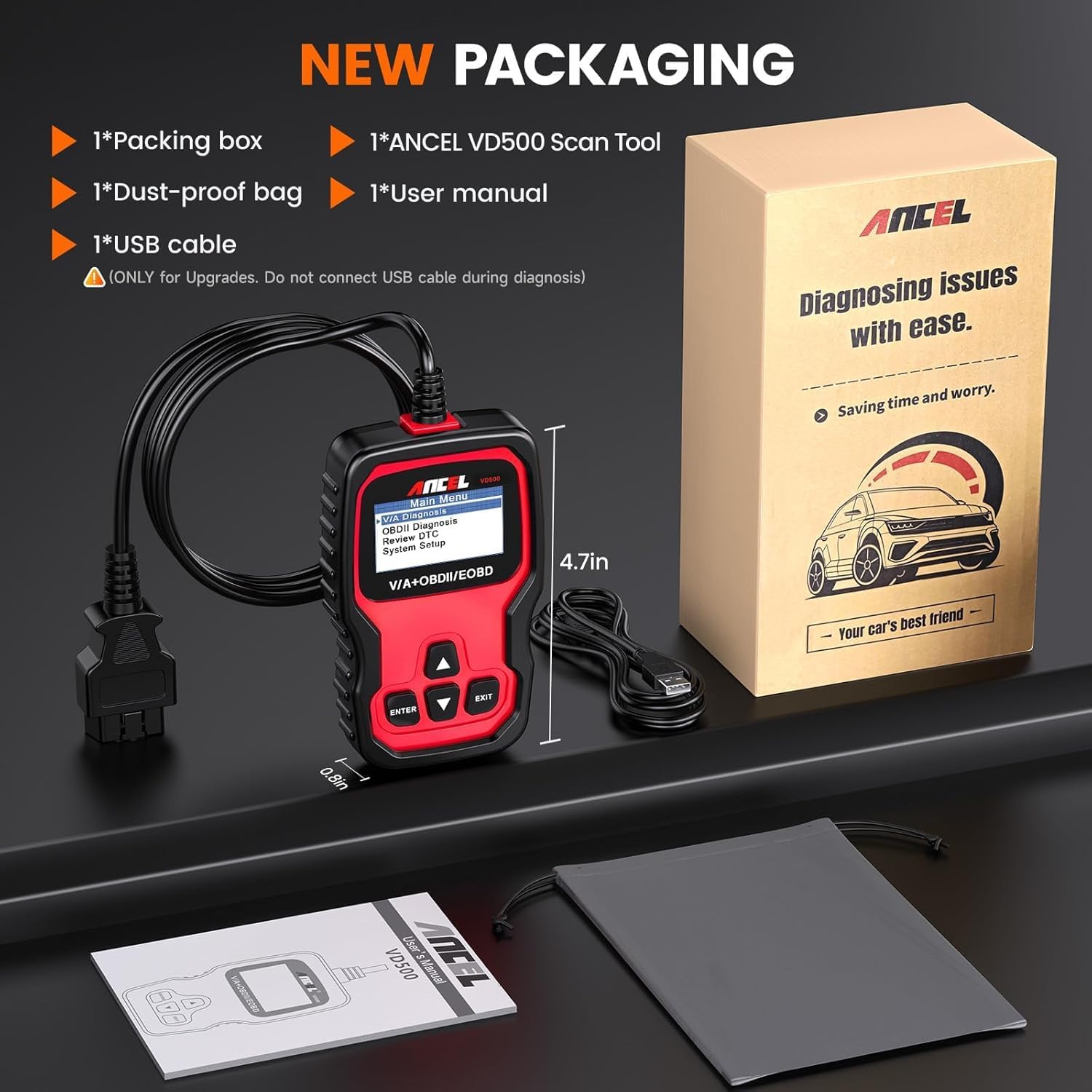
1*ANCEL VD500 for vw scan tool
1*Dust-proof bag
1 * USB кабели
1 * Колдонуучунун колдонмосу
Figure 2.1: ANCEL VD500 package contents.
3. Орнотуу
3.1 Аппаратты туташтыруу
The ANCEL VD500 is a plug-and-play device, requiring no batteries or complex networking. Simply connect it to your vehicle's OBD2 port.
Locate your vehicle's 16-pin OBD2 port. This is typically found under the dashboard on the driver's side.
Ensure the vehicle's ignition is in the ON position (engine off for most diagnostic functions).
Connect the VD500's OBD2 cable to the vehicle's OBD2 port. The device will power on automatically.
Figure 3.1: Connecting the ANCEL VD500 to the vehicle's OBD2 port.
Video 3.1: Demonstrates the simple plug-and-play connection of the ANCEL VD500 to a vehicle's OBD2 port.
4. Operating the ANCEL VD500
4.1 Колдонуучунун интерфейси жана навигациясы
The VD500 features a clear display and intuitive button layout for easy navigation. Use the ENTER, EXIT, and arrow buttons to select options and confirm actions within the menu.
Figure 4.1: ANCEL VD500 user interface and navigation buttons.
Video 4.1: A detailed walkthrough of the ANCEL VD500's menu and navigation for VAG vehicles.
4.2 VAG Specific Functions (Volkswagen, Audi, Skoda, SEAT)
The VD500 offers advanced diagnostic and reset functions tailored for Volkswagen Group vehicles:
Толук системалык диагностика: Read and clear codes from various systems including Engine, ABS, Transmission, SAS (not all cars), ESP, TPMS, and other control modules.
Май кызматын баштапкы абалга келтирүү: Reset the oil service light after an oil change to ensure proper maintenance scheduling.
Электрондук кол тормозду (EPB) баштапкы абалга келтирүү: Safely retract and release brake calipers for brake pad replacement on vehicles with electronic parking brakes.
Дроссельдин абалын адаптациялоо: Perform throttle body adaptation to ensure correct idle speed and smooth acceleration.
Figure 4.2: Special functions for VAG vehicles diagnosis.
Видео 4.2: Бүттүview of the all-in-one professional diagnostic capabilities of the ANCEL VD500 for VAG vehicles.
4.3 Standard OBD2 Functions (for non-VAG vehicles)
For other 1996 and newer OBD II compliant vehicles (non-Volkswagen), the VD500 can perform essential OBD2 functions:
Ката коддорун окуп жана тазалаңыз: Read current, pending, and permanent Diagnostic Trouble Codes (DTCs) and clear the Check Engine Light (CEL).
Display Fault Code Definitions: Provides generic and manufacturer-specific definitions for DTCs.
Retrieve VIN Information: Access the Vehicle Identification Number (VIN) for vehicle identification.
Figure 4.3: OBDII functions for most cars.
5. Software Updates and Language Options
The ANCEL VD500 offers free lifetime software updates to ensure compatibility with new vehicle models and to add new features. Keeping your device updated is crucial for optimal performance.
Navigate to the "Download" or "Support" section and select the VD500 model.
Download the latest software update package to your computer.
Connect the VD500 to your computer using the provided USB cable.
Follow the on-screen instructions from the downloaded software to complete the update process.
Figure 5.1: ANCEL official website for software updates and language downloads.
Video 5.1: Step-by-step guide on how to perform a free lifetime software update for your ANCEL VD500.
5.2 Тилди тандоо
The device supports English and German by default. Additional languages (Spanish, French, Italian) can be downloaded from the official website during the update process, allowing you to customize the interface to your preference.
Figure 5.2: Multiple language support on the ANCEL VD500.
6. Техникалык тейлөө жана кам көрүү
Proper maintenance ensures the longevity and reliable performance of your ANCEL VD500 scanner:
Keep the device clean and free from dust, dirt, and moisture. Use a soft, dry cloth for cleaning.
Store the scanner in its dust-proof bag in a cool, dry place when not in use.
Avoid dropping the device or subjecting it to strong impacts, as this can damage internal components.
Do not attempt to disassemble the device, as this will void the warranty and may cause irreparable damage.
7. Кыйынчылыктарды
7.1 Жалпы маселелер
Түзмөк күйбөй жатат: Ensure the OBD2 cable is securely connected to the vehicle's OBD2 port and the ignition is in the ON position. Check the vehicle's battery voltage.
"Vehicle does not support" message: This may occur for certain advanced functions if your specific vehicle model or year is not fully compatible with that particular function. Refer to the detailed compatibility list on the ANCEL website or contact support for clarification.
Airbag light reset failure: While the VD500 can clear airbag codes, persistent issues may indicate an underlying hardware fault that requires professional diagnosis and repair by a qualified mechanic.
VIN not readable: Some older or non-VAG vehicles may not fully support VIN retrieval via the standard OBD2 protocol.
7.2 Колдоо кызматы менен байланышуу
For further assistance, specific technical queries, or warranty claims, please visit the official ANCEL support webсайт: www.anceltech.com. You can find FAQs, additional resources, and contact information for their customer service team.
8. Техникалык шарттар
Өзгөчөлүк
Деталь
Бренд
ANCEL
Продукциянын өлчөмдөрү
2.76"L x 0.87"W x 4.92"H
Операция системасы
Linux
Тил
English (default), German, Spanish, French, Italian (downloadable)
Display Resolution
64 x 64
Элемент Салмагы
12 унция
Тtage
12 вольт
Тектеш документтер - VD500
ANCEL VD500 Колдонуучунун колдонмосу: OBD2 диагностикалык куралы ANCEL VD500 OBD2 диагностикалык сканер үчүн комплекстүү колдонуучу колдонмо. Унааңыздын диагностикалык куралы үчүн коопсуздук чаралары, өзгөчөлүктөрү, иштеши, спецификациялары жана кепилдик маалыматы жөнүндө билип алыңыз.
ANCEL VD500 колдонуучусунун колдонмосу: VW, Audi, Skoda, Seat үчүн OBDII диагностикалык сканери ANCEL VD500 колдонуучусунун колдонмосунда VD500 OBDII диагностикалык сканерин иштетүү боюнча кеңири көрсөтмөлөр берилген. Бул колдонмо окуу жана башка маанилүү функцияларды камтыйт.asinVW, Audi, Skoda жана Seat 12V моделдери үчүн g ката коддору, тейлөөнү баштапкы абалга келтирүү, дроссельди адаптациялоо жана EPB тормоз колодкасын алмаштыруу. Унааңызды натыйжалуу тейлөө үчүн түзмөктү кантип туташтырууну, менюларды кантип башкарууну жана диагностикалык маалыматты кантип чечмелөөнү үйрөнүңүз.
ANCEL VD700 колдонуучусунун колдонмосу: VW Group унаалары үчүн көп системалуу OBD2 сканери ANCEL VD700 көп системалуу сканери үчүн кеңири колдонуучу колдонмосу. Бул диагностикалык куралды VW, Audi, Skoda, Seat жана Bentley унаалары үчүн кантип колдонууну үйрөнүңүз, анда системаны сканерлөө, ката кодун окуу, атайын функциялар жана техникалык тейлөөнү баштапкы абалга келтирүү сыяктуу функциялар камтылган.
ANCEL BD300 колдонуучусунун колдонмосу жана тез баштоо боюнча колдонмо ANCEL BD300 Bluetooth OBD2 диагностикалык куралы үчүн BMW/Mini унааларын орнотуу, иштетүү жана функцияларын камтыган кеңири колдонуучу колдонмосу. Колдонмону туташтыруу, системаны диагностикалоо жана тейлөөнү баштапкы абалга келтирүү боюнча көрсөтмөлөрдү камтыйт.