1. Продукт бүтүп калдыview
The Maxwest Nitro 5N is an Android 7.0 smartphone designed for reliable communication and multimedia use. It features a 5-inch display, a Quad Core processor, and dual SIM capability, making it suitable for various global GSM networks.

Сүрөт 1.1: Алдыңкы жана арткы view of the Maxwest Nitro 5N smartphone, showcasing its sleek black design and display.
2. Кутуда эмне бар
Upon opening your Maxwest Nitro 5N package, please ensure all the following items are present:
- Maxwest Nitro 5N Smartphone
- Батарея (2000 мАч)
- Заряддоочу адаптер
- USB кабели
- Protective Case Cover
3. Баштапкы орнотуу
3.1. SIM карта(лар)ды жана батарейканы салуу
- Өчүрүү: Ensure your Maxwest Nitro 5N is powered off before proceeding.
- Арткы капкакты алып салуу: Телефондун арткы капкагын кылдаттык менен алып салыңыз.
- SIM-карталарды салыңыз: Locate the SIM card slots. This device supports dual SIM cards. Insert your GSM SIM card(s) into the designated slots with the gold contacts facing down. Ensure they are securely seated.
- Батарея салыңыз: Place the 2000 mAh battery into its compartment, aligning the gold contacts on the battery with those in the phone.
- Арткы капкакты алмаштыруу: Carefully reattach the back cover until it clicks into place.
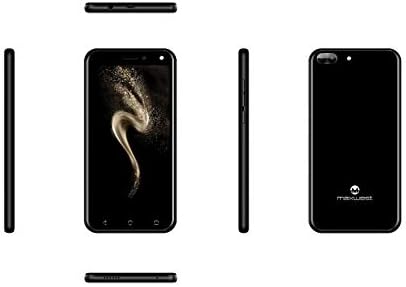
Сүрөт 3.1: Каптал views of the Maxwest Nitro 5N, illustrating the location of buttons and ports for SIM/battery access.
3.2. Күйгүзүү жана баштапкы конфигурация
- Күйгүзүү: Press and hold the Power button (usually on the side) until the Maxwest logo appears.
- Тил тандоо: Каалаган тилиңизди тандоо үчүн экрандагы көрсөтмөлөрдү аткарыңыз.
- Wi-Fi туташуусу: Орнотуу процессин аяктоо жана керектүү жаңыртууларды жүктөп алуу үчүн Wi-Fi тармагына туташыңыз.
- Google аккаунту: Google аккаунтуңуз менен кириңиз же жаңысын түзүңүз. Бул Google Play Дүкөнүнө жана башка Google кызматтарына кирүү үчүн зарыл.
- Дата жана убакыт: Туура күн менен убакытты коюңуз же тармакка аны автоматтык түрдө коюуга уруксат бериңиз.
- Коопсуздук: Configure screen lock options such as PIN, pattern, or password for device security.
Маанилүү эскертүү: This device is designed to work with GSM carriers such as AT&T, T-Mobile, and Metro PCS. It will NOT work with CDMA carriers like Verizon, Sprint, or Boost Mobile.
4. Operating Your Maxwest Nitro 5N
4.1. Негизги навигация
- Сенсордук экран: Interact with the device by tapping, swiping, pinching, and spreading on the 5-inch LCD display.
- Башкы экран: Колдонмолоруңуз жана виджетиңиз үчүн борбордук борбор. Кошумча экрандарга жетүү үчүн солго же оңго сүрүңүз.
- Эскертме панели: Эскертмелерге жана тез жөндөөлөргө жетүү үчүн экрандын өйдө жагынан ылдый сүрүңүз.
- Чабыттоо баскычтары: Use the on-screen navigation buttons (Back, Home, Recent Apps) at the bottom of the display.
4.2. Чалууларды жасоо жана билдирүүлөрдү жөнөтүү
- Телефон колдонмосу: Чалуучуга, чалуулар тизмесине жана байланыштарга кирүү үчүн Телефон сүрөтчөсүн басыңыз.
- Кабарлар колдонмосу: Tap the Messages icon to send and receive SMS/MMS messages.
4.3. Камераны колдонуу
Your Nitro 5N is equipped with 5MP front and rear cameras.
- Камераны ачуу: Үй экраныңыздагы же колдонмо суурмасындагы Камера сүрөтчөсүн таптаңыз.
- Камераларды алмаштыруу: Алдыңкы жана арткы камералардын ортосунда которулуу үчүн камераны которуштуруу сүрөтчөсүн таптаңыз.
- Сүрөткө/Видео тартууга: Сүрөткө тартуу же видео жазууну баштоо/токтоо үчүн жапкычты таптаңыз.
4.4. Screen Pinning Feature
Screen Pinning allows you to lock your phone to a single application, preventing others from accessing other apps or settings. This is useful when sharing your phone temporarily.
- Enable Screen Pinning: барыңыз Settings > Security > Screen pinning жана аны күйгүзүңүз.
- Pin an App: Open the app you wish to pin. Tap the Recent Apps button (square icon). Swipe up on the app's preview and tap the pin icon.
- Unpin an App: To unpin, simultaneously press and hold the Back and Recent Apps buttons. You may need to enter your PIN/pattern/password if required by your security settings.
5. Техникалык тейлөө жана кам көрүү
5.1. Батареяга кам көрүү
- Заряддоо: Use only the provided charger and USB cable. Avoid overcharging by disconnecting the charger once the battery is full.
- Температура: Avoid exposing the phone to extreme temperatures, as this can degrade battery life.
- Сактагыч: If storing the phone for an extended period, ensure the battery is partially charged (around 50%).
5.2. Аппаратыңызды тазалоо
- Экран: Жумшак, түксүз кездемени колдонуңуз, бир аз dampened with water or a screen cleaner, to gently wipe the display.
- Дене: Use a soft, dry cloth to clean the phone's body. Avoid harsh chemicals or abrasive materials.
5.3. Программалык камсыздоону жаңыртуу
Оптималдуу иштөөнү жана коопсуздукту камсыз кылуу үчүн системанын жаңыртууларын мезгил-мезгили менен текшерип туруңуз. Орнотуулар > Телефон жөнүндө > Системанын жаңыртуулары жеткиликтүү жаңыртууларды текшерүү жана орнотуу үчүн.
6. Жалпы көйгөйлөрдү чечүү
| Көйгөй | Мүмкүн чечим |
|---|---|
| Телефон күйбөйт. | Ensure the battery is correctly inserted and charged. Connect the charger and try again. |
| Тармак сигналы жок. | Verify SIM card insertion. Check if you are within network coverage. Ensure your carrier is GSM compatible (e.g., AT&T, T-Mobile). Restart the phone. |
| Колдонмолор жай же бузулуп жатат. | Фондук колдонмолорду жабуу. Колдонмонун кэшин тазалоо (Орнотуулар > Колдонмолор > [Колдонмонун аты] > Сактагыч > Кэшти тазалоо). Restart the phone. Ensure sufficient storage space. |
| Батарея бат эле түгөнөт. | Reduce screen brightness. Disable Wi-Fi, Bluetooth, and GPS when not in use. Close unnecessary background apps. Check battery usage in settings to identify power-hungry apps. |
| Wi-Fi'га туташпай жатат. | Wi-Fi иштетилгенин текшериңиз. Роутериңизди жана телефонуңузду өчүрүп-күйгүзүңүз. Тармакты унутуп, кайра туташыңыз. |
7. Продукттун спецификациялары
| Өзгөчөлүк | Деталь |
|---|---|
| Модель аты | Nitro 5N |
| Операция системасы | Android 7.0 |
| Процессор | Quad Core 1.2 GHz (1.2GHz Cortex A9 Processor) |
| RAM | 1 ГБ |
| Ички сактагыч | 8 GB (approximately 5.6 GB user available) |
| Дисплей | 5.0 inch LCD, 480 x 854 pixels, 2.5D TP |
| Арткы камера | 5 депутат |
| Алдыңкы камера | 5 депутат |
| Батарея сыйымдуулугу | 2000 мАч литий-ион |
| Тармактын шайкештиги | 3G H+ 850/1900/2100 MHz, 2G: 850/900/1800/1900 MHz (GSM Carriers only) |
| Байланыш | USB, Cellular, GPS, Wi-Fi, Bluetooth (Wireless) |
| Аудио Jack | 3.5 мм |
| Өлчөмдөрү (L x W x Y) | 5.73 x 2.83 x 0.38 дюйм |
| Салмагы | 5.4 унция (153 грамм) |
| Түс | Кара |
8. Кепилдик маалыматы
The Maxwest Nitro 5N comes with a бир жылдык тетиктер жана эмгек кепилдиги from the date of purchase. This warranty covers manufacturing defects and workmanship under normal use. It does not cover damage caused by misuse, accidents, unauthorized repairs, or normal wear and tear.
Кепилдик дооматтары үчүн сатып алганыңыздын далилин сактап коюңуз.
9. Кардарларды колдоо кызматы
For technical assistance, troubleshooting beyond this manual, or warranty inquiries, please contact Maxwest customer support. Refer to the contact information provided with your product packaging or visit the official Maxwest webакыркы колдоо маалымат үчүн сайт.
When contacting support, please have your product model (Nitro 5N) and proof of purchase readily available.


