Introduction
The JDIAG EL-50448 TPMS Relearn Tool is an essential device designed to activate and relearn Tire Pressure Monitoring System (TPMS) sensors in compatible vehicles. This tool is particularly effective for GM series vehicles, including Buick, Chevrolet, Cadillac, and Opel models from 2006-2022, equipped with 315 or 433 MHz TPMS sensors. It simplifies the process of resetting tire pressure sensors after tire rotation, replacement, or alarm removal, saving time and effort.
This manual provides detailed instructions for the proper use and maintenance of your EL-50448 tool to ensure optimal performance and longevity.
Продукт бүттүview

Сүрөт 1: Алдыңкы view of the JDIAG EL-50448 TPMS Relearn Tool, showing the TX (Transmit) and LOW BAT (Low Battery) indicator lights, and the activation button.

2-сүрөт: Арткы view of the JDIAG EL-50448 TPMS Relearn Tool with the battery compartment open, indicating where a 9V battery (not included) should be inserted.
Негизги өзгөчөлүктөрү:
- 2024 Updated EL50448: More energy-saving, faster, stronger, and more sensitive than previous versions.
- Унаанын кеңири чөйрөсү: Compatible with most Chevy, Buick, Opel, and Cadillac vehicles (2006-2022) equipped with 315 or 433 MHz TPMS sensors.
- Колдонууга оңой: Simple 3-step process for resetting all tires.
- Эффективдүү: Activates individual TPMS sensors quickly, potentially saving significant costs compared to dealership services.
Жайгашуу
Батарея орнотуу:
- Locate the battery compartment on the back of the EL-50448 tool.
- Батареянын капкагын жылдырыңыз.
- Insert a new 9V battery, ensuring correct polarity (+/-) as indicated inside the compartment. (Note: 9V battery is not included with the product and must be purchased separately.)
- Батареянын капкагын бекем орнотуңуз.
Video 1: Unboxing and battery installation for the EL-50448 TPMS Relearn Tool. This video demonstrates how to open the battery compartment and insert a 9V battery.
Иштөө нускамалары
Follow these steps to successfully relearn your vehicle's TPMS sensors:
- Унааны даярдоо: Ensure your vehicle is in the TPMS Learn Mode. This process varies by vehicle model; consult your vehicle's owner's manual for specific instructions on how to enter TPMS Learn Mode. Typically, the vehicle will signal readiness (e.g., horn chirps twice, or a message on the dashboard).
- Start Relearn Process: Begin with the front left tire. Hold the EL-50448 tool against the sidewall of the tire, near the valve stem. Ensure the antenna is in the correct position, parallel to the valve stem.
- Сенсорду иштетүү: Depress and hold the activation button on the tool. The green "TX" (Transmit) light will illuminate.
- Жандандырууну ырастаңыз: Once the vehicle's horn chirps (or another confirmation signal is given), the sensor has been successfully activated. Release the button.
- Proceed to Next Tires: Follow the specified order for your vehicle (e.g., Front Right, Rear Right, Rear Left). Repeat steps 2-4 for each tire.
- Complete Relearn: After all sensors are reset, the vehicle's horn will typically chirp twice, indicating that the TPMS relearn process is finished.
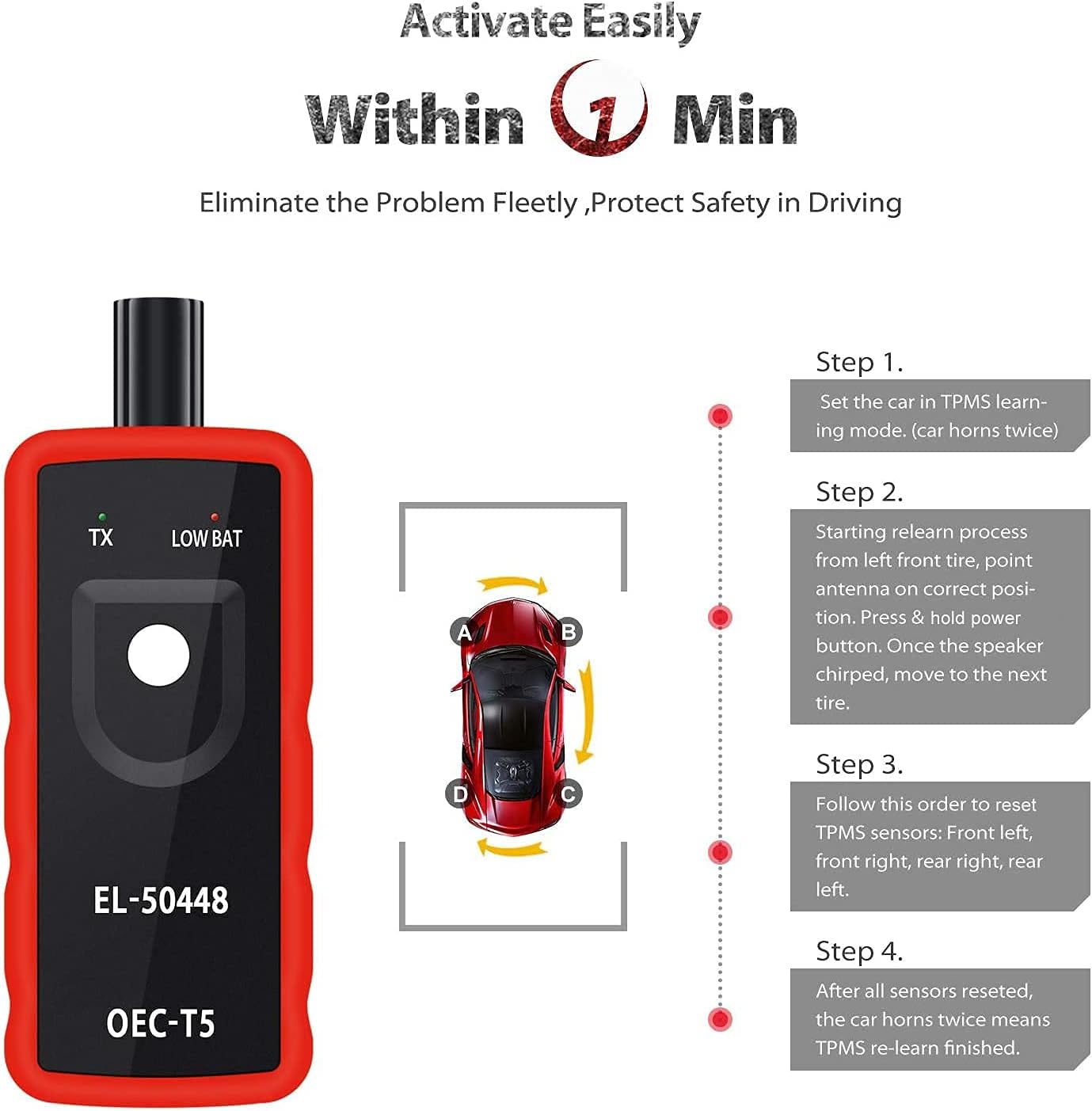
Figure 3: Visual guide to the 4-step TPMS relearn process, illustrating the sequence of activating sensors on each tire.
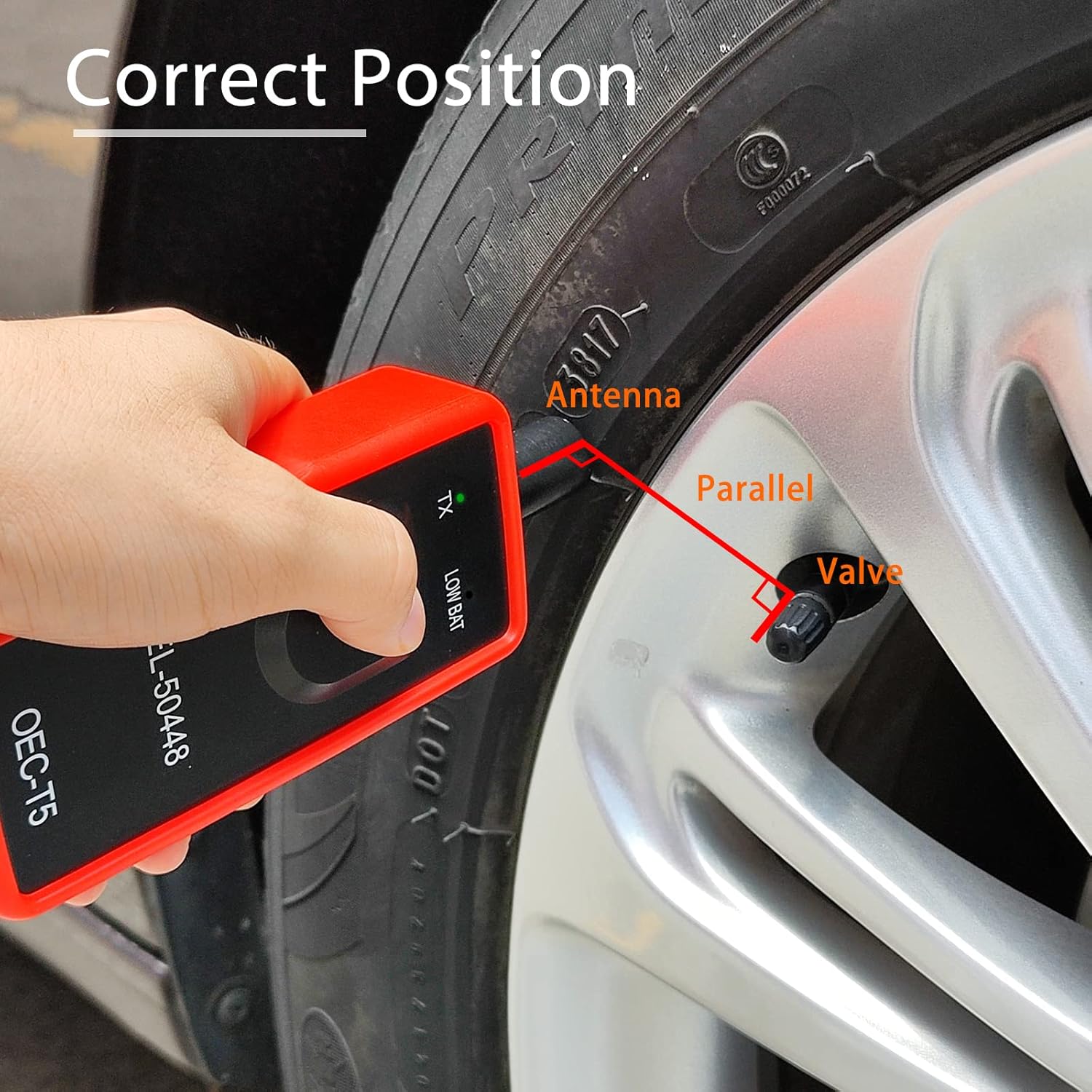
Figure 4: Proper positioning of the EL-50448 tool's antenna parallel to the tire valve stem for effective sensor activation.
Унаа шайкештиги:
The EL-50448 tool is designed for a wide range of GM vehicles. Below is a general overview of compatible vehicle types. For a comprehensive list of supported models and years, please refer to the official product documentation or the manufacturer's webсайт.

Figure 5: The EL-50448 tool is compatible with various Chevy series vehicles (2006-2023), including cars, SUVs, pickups, and light trucks.

Figure 6: The tool supports TPMS relearn for vehicles from Buick, Chevrolet, Cadillac, and Opel.
Vehicle Compatibility (Detailed)

Figure 7: Detailed list of compatible vehicle models and years, including both factory-tested and customer-verified models for the EL-50448 TPMS Relearn Tool.
The EL-50448 TPMS Relearn Tool supports a broad range of GM vehicles. The image above provides a detailed breakdown of models and years that have been factory-tested or verified by customers. This includes various models from Buick, Chevrolet, and Cadillac, ensuring wide applicability for users with compatible vehicles.
Техникалык тейлөө
- Батареяны алмаштыруу: When the "LOW BAT" indicator light illuminates, replace the 9V battery promptly to ensure optimal performance.
- Сактагыч: Store the tool in a cool, dry place away from direct sunlight and extreme temperatures. Remove the battery if the tool will not be used for an extended period.
- Тазалоо: Wipe the tool with a soft, dry cloth. Do not use abrasive cleaners or solvents.
Проблемаларды чечүү
| Көйгөй | Мүмкүн себеп | Чечим |
|---|---|---|
| Tool not activating sensor. | Incorrect positioning; low battery; vehicle not in learn mode. | Ensure antenna is parallel to valve stem and close to the tire sidewall. Replace 9V battery if "LOW BAT" light is on. Verify vehicle is in TPMS Learn Mode. |
| "LOW BAT" light is on. | Батарея аз же түгөнүп калган. | Replace the 9V battery with a new one. |
| Vehicle does not confirm sensor activation. | Sensor not receiving signal; incorrect relearn sequence. | Reposition the tool and try again. Ensure you are following the correct tire sequence for your vehicle. Some vehicles may require more time for activation. |
If you continue to experience issues, please refer to your vehicle's specific TPMS relearn procedure in its owner's manual or contact JDIAG customer support.
Техникалык шарттар
- Модел: ЭЛ-50448
- Иштөө жыштыгы: 315 МГц жана 433 МГц
- Кубат булагы: 1 x 9V батарея (кошулбаган)
- Өлчөмдөрү: Болжол менен 2.64 x 1.65 x 6.3 дюйм
- Салмагы: Болжол менен 5.6 унция
- Сертификаттар: CE and FCC Approval
- Шайкештик: GM Series (Buick, Chevy, Cadillac, Opel) vehicles from 2006-2022.
Кепилдик жана колдоо
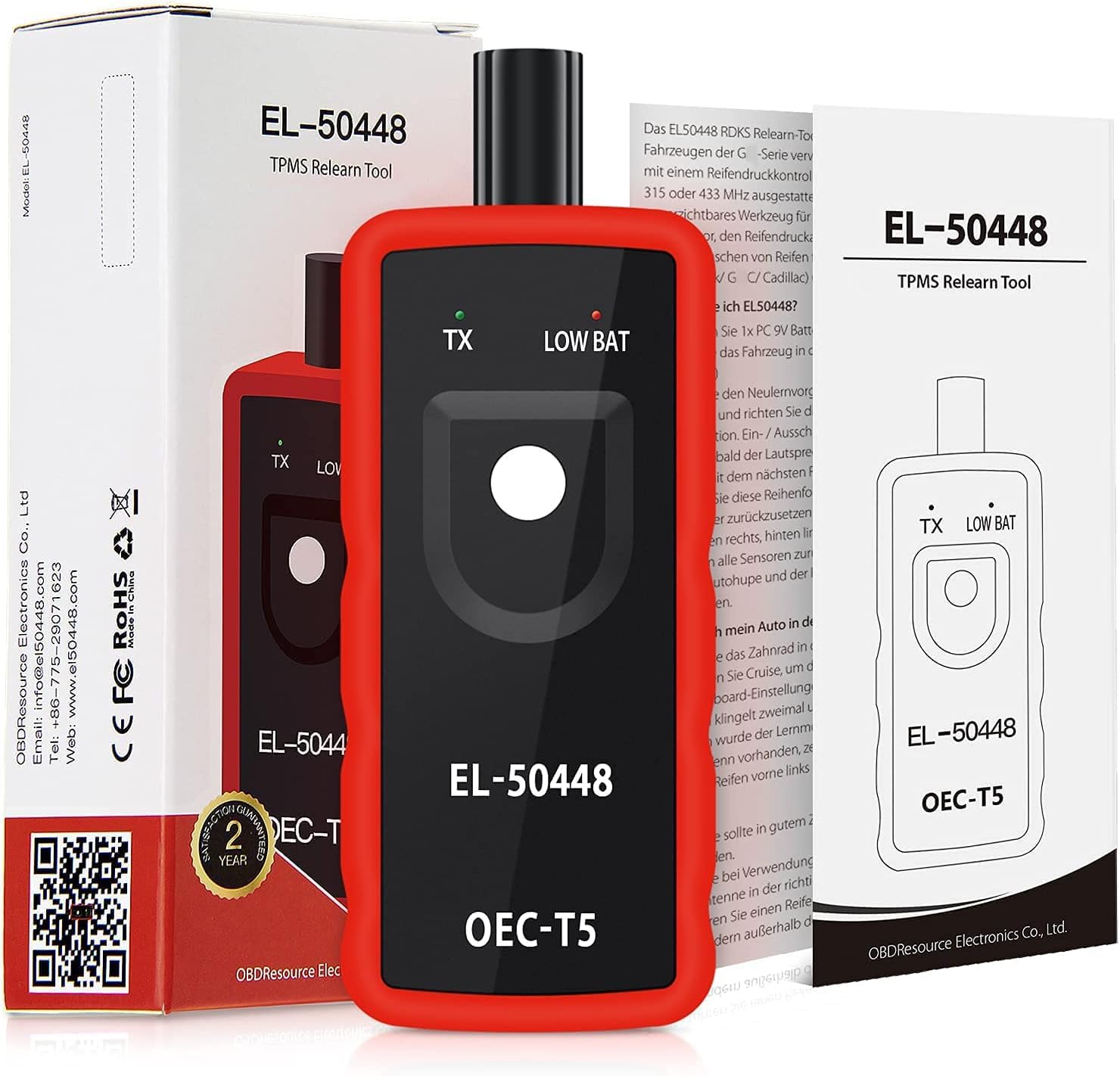
Figure 8: Product packaging highlighting the 2-year warranty and official webколдоо үчүн сайт.
The JDIAG EL-50448 TPMS Relearn Tool typically comes with a 2-year warranty from the date of purchase. Please retain your proof of purchase for warranty claims.
For technical support, troubleshooting assistance, or warranty inquiries, please contact JDIAG customer service through their official website or the contact information provided with your product packaging. You may also find additional resources and FAQs on the www.el50448.com webсайт.


