1. Киришүү
Сатып алганыңыз үчүн рахматasing the Bytech Massive Bluetooth Long Bar Speaker-BK. This manual provides essential information for the proper setup, operation, and maintenance of your new speaker. Please read this manual thoroughly before using the product to ensure optimal performance and longevity.
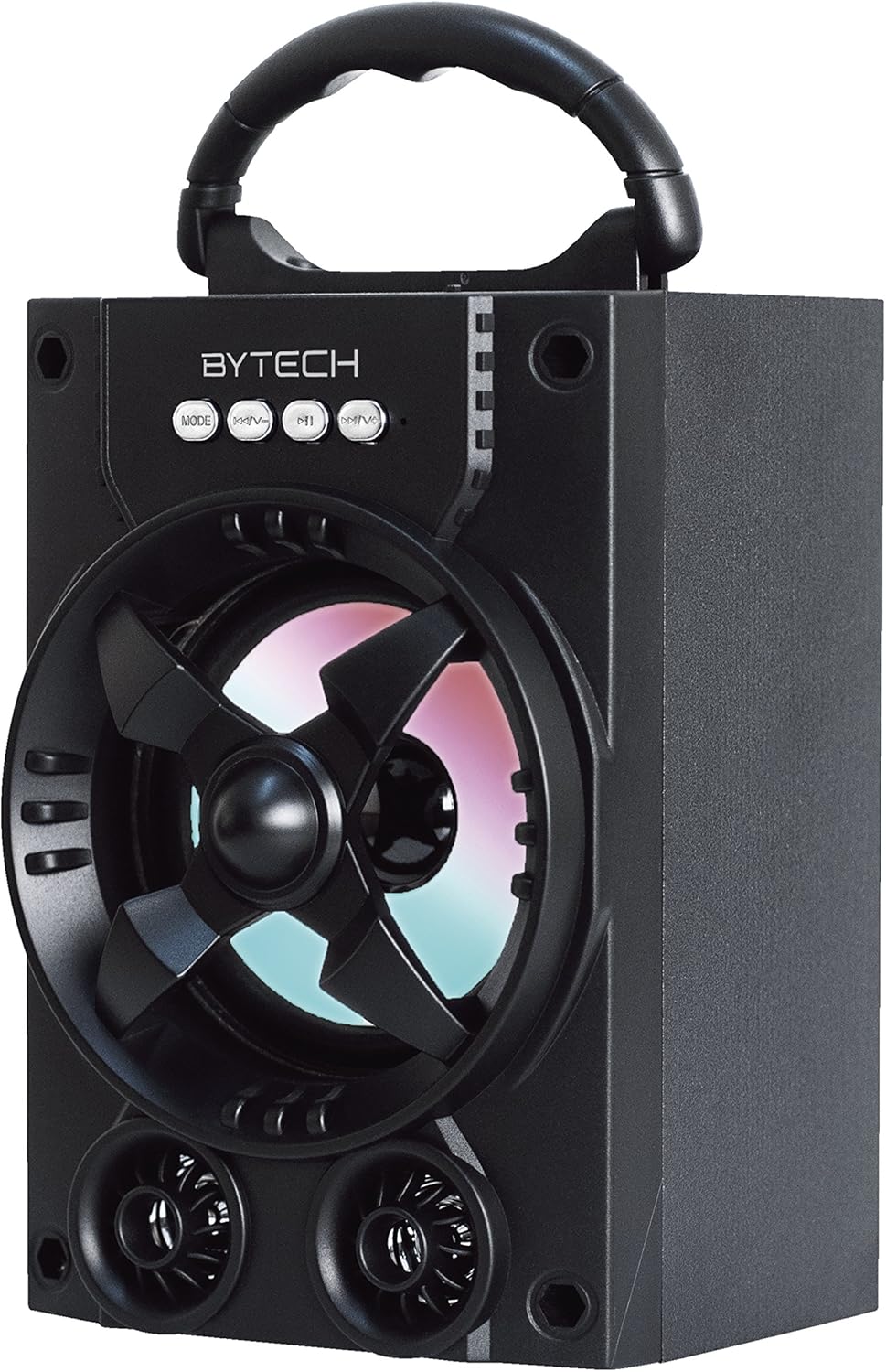
Сүрөт 1.1: Алдыңкы view of the Bytech Massive Bluetooth Long Bar Speaker-BK, showcasing its design, handle, and speaker grille with LED lights.
2. Пакеттин мазмуну
Сураныч, пакетте төмөнкү нерселерди текшериңиз:
- Bytech Massive Bluetooth Long Bar Speaker-BK
- USB заряддоо кабели
- Колдонуучунун Колдонмосу (бул документ)
Эгерде кандайдыр бир нерселер жок болсо же бузулса, кардарларды колдоо менен байланышыңыз.
3. Продукциянын өзгөчөлүктөрү
- LED Performance Lights: Dynamic LED lights that synchronize with your music for an enhanced audio-visual experience.
- Convenient Carrying Handle: Integrated handle for easy portability, allowing you to take your music anywhere.
- Универсалдуу Bluetooth байланышы: Seamlessly connect wirelessly to your smartphone, tablet, or other Bluetooth-enabled devices.
- Көлөмдүү үн: Designed to deliver a high-quality surround sound experience.
- Портативдик дизайн: Ideal for various settings, including parties, outdoor gatherings, and personal use.

Figure 1.2: The speaker shown with its retail packaging, illustrating its key features such as multi-color LED lights, Bluetooth connectivity, and surround sound capability.
4. Башкаруу каражаттары жана көрсөткүчтөр
The speaker features intuitive controls and indicators for easy operation:
- MODE баскычы: Press to switch between available input modes (e.g., Bluetooth).
- V- баскычы: Press to decrease volume. Long press to skip to the previous track.
- V+ баскычы: Press to increase volume. Long press to skip to the next track.
- M баскычы: (Function not explicitly detailed, typically for mode or mute)
- LED жарыктары: Indicate power status, charging status, and provide dynamic light effects during audio playback.
5. Орнотуу колдонмосу
5.1 Динамикти заряддоо
- USB заряддоо кабелинин кичинекей учун динамиктеги заряддоо портуна туташтырыңыз.
- USB заряддоо кабелинин чоң учун USB кубат адаптерине (кошумча эмес) же компьютердин USB портуна туташтырыңыз.
- LED индикатору заряддоонун абалын көрсөтөт (мисалы, заряддоо үчүн кызыл, толук заряддалганда өчүк).
- Биринчи жолу колдонуудан мурун толук заряддоо үчүн болжол менен 3-4 саат күтүңүз.
5.2 Күйгүзүү/өчүрүү
- To power on, press and hold the Power button (location not specified, typically near charging port or on control panel) for a few seconds until you hear an audible prompt or see the LED lights activate.
- Өчүрүү үчүн, динамик өчкөнгө чейин Кубат баскычын кайра басып, кармап туруңуз.
5.3 Bluetooth жупташтыруу
- Ensure the speaker is powered on and in Bluetooth pairing mode (indicated by a flashing LED light or audible prompt).
- Смартфонуңузда же планшетиңизде Bluetooth жөндөөлөрүнө өтүңүз.
- Издөө available devices. The speaker will appear as "BYTECH" or a similar name.
- Жупташтыруу үчүн тизмеден динамикти тандаңыз.
- Once successfully paired, the LED indicator will typically become solid, and you may hear a confirmation tone.
6. Иштөө нускамалары
6.1 Bluetooth аркылуу аудио ойнотуу
- After successful Bluetooth pairing, open your preferred music application on your connected device.
- Select and play your desired audio. The sound will be streamed wirelessly to the speaker.
- Use the V+ and V- buttons on the speaker or your connected device to adjust the volume.
- Long press V+ or V- to skip tracks.
6.2 LED Performance Lights
The speaker features integrated LED lights that enhance your listening experience. These lights typically activate automatically when the speaker is powered on and playing audio. Specific controls for light modes are not detailed, but they are designed to provide dynamic visual effects.
6.3 Режимди алмаштыруу
басыңыз РЕЖИМ button to cycle through available input modes. While Bluetooth is the primary connectivity, other modes (if available, such as FM radio or AUX input) can be accessed via this button.
7. Техникалык тейлөө жана кам көрүү
- Тазалоо: Динамиктин сыртын тазалоо үчүн жумшак, кургак чүпүрөктү колдонуңуз. Абразивдүү тазалоочу каражаттарды, момдорду же эриткичтерди колдонбоңуз.
- Сактагыч: Узак мөөнөткө колдонулбаганда, динамикти күн тийбеген жана өтө температурадан алыс, салкын, кургак жерде сактаңыз.
- Батареяга кам көрүү: To prolong battery life, avoid fully discharging the battery frequently. Recharge the speaker regularly, even if not in use, to maintain battery health.
- Суу каршылык: Бул продукт болуп саналат ЖОК waterproof. Avoid exposure to water, rain, or excessive moisture to prevent damage.
8. Кыйынчылыктарды
Динамикиңизде көйгөйлөргө туш болсоңуз, төмөнкү жалпы көйгөйлөрдү жана чечимдерди караңыз:
| Көйгөй | Мүмкүн себеп | Чечим |
|---|---|---|
| Динамик күйбөйт. | Батарея аз. | Динамикти толук заряддаңыз. |
| Динамиктен үн жок. | Volume too low; Not paired; Incorrect mode. | Increase volume on speaker and device; Ensure successful Bluetooth pairing; Press MODE button to select correct input. |
| Bluetooth байланышы туруксуз же иштебей калды. | Device too far; Interference; Pairing issue. | Move device closer to speaker (within 33 ft/10m); Avoid obstacles; Forget device on your phone and re-pair. |
| LED жарыктары иштебейт. | Speaker not powered on or playing audio. | Ensure speaker is on and audio is playing. |
9. Техникалык шарттар
| Өзгөчөлүк | Деталь |
|---|---|
| Бренд | Bytech |
| Модель аты | BYTECH |
| Элемент моделинин номери | BCAUBS134BK |
| Динамик түрү | Surround Sound |
| Байланыш технологиясы | Bluetooth |
| Зымсыз байланыш технологиясы | Bluetooth |
| Шайкеш түзмөктөр | Смартфон |
| Динамиктин максималдуу чыгаруу күчү | 20 Ватт |
| Frequency Response | 20 KHz |
| Импеданс | 1 Ом |
| Динамик өлчөмү | 5 дюйм |
| Power Source | Электр зымдары (заряддоо үчүн) |
| Батарея түрү | 1 литий-иондук батарейка талап кылынат |
| Түс | Кара |
| Продукциянын өлчөмдөрү | 4.75 x 5.5 x 8.5 дюйм |
| Элемент Салмагы | 1.3 фунт |
| Суу өткөрбөйт | Жок |
| Келип чыккан өлкө | Кытай |
| UPC | 805112038121 |
10. Кепилдик маалыматы
Bytech products are manufactured to the highest quality standards. For specific warranty terms and conditions, please refer to the warranty card included with your purchase or visit the official Bytech webсайт. Кепилдик дооматтар үчүн сатып алганыңыздын далилин сактаңыз.
11. Кардарларды колдоо кызматы
For technical assistance, troubleshooting, or general inquiries, please contact Bytech customer support. Contact information can typically be found on the product packaging, the official Bytech webсайты же сатып алуу дүмүрчөгү.
Эскертүү: Берилген маалыматтардын негизинде кыстаруу үчүн сатуучудан расмий продукт видеолору жеткиликтүү эмес.


