1. Киришүү
The ViewSonic PX706HD is a 1080p short throw projector designed for versatile entertainment and gaming. It delivers large, immersive images in various environments, including smaller rooms, thanks to its short throw lens. This manual provides essential information for setting up, operating, and maintaining your projector.
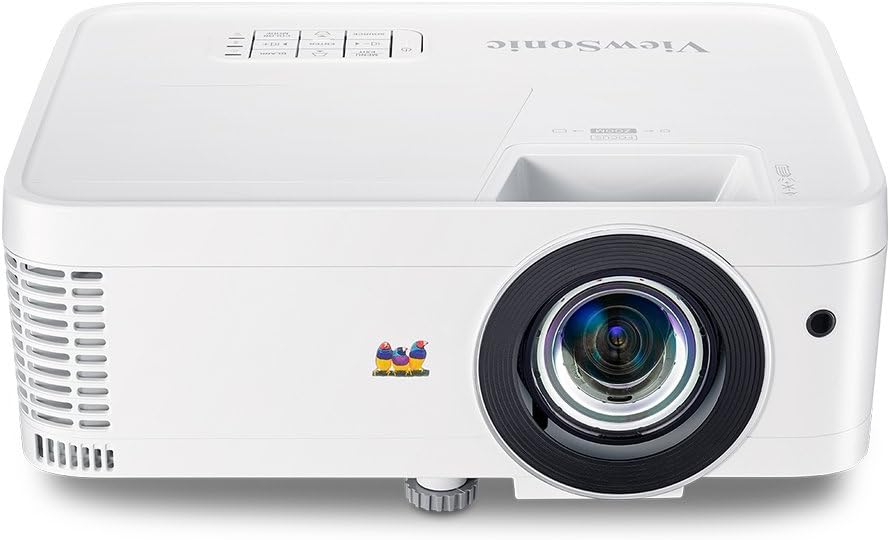
Сүрөт 1.1: Алдыңкы view -ныкы ViewSonic PX706HD Projector.
2. Пакеттин мазмуну
Төмөндө саналып өткөн нерселердин баары сиздин продукт таңгагыңызда камтылганын текшериңиз:
- PX706HD проектор
- Электр кабели
- USB түрү C Cable
- Алыстан башкаруу
- Колдонуучунун Колдонмосу (бул документ)

Figure 2.1: Items included in the PX706HD package.
3. Продукт бүтүп калдыview
The ViewSonic PX706HD projector offers a range of features for an enhanced viewоюн жана оюн тажрыйбасы:
- Жогорку жарыктык жана чечилиш: 3000 Lumens and Full HD 1920x1080 resolution for vivid, ultra-sharp images.
- Кыска ыргытуу линзасы: Project large images (up to 100 inches) from a short distance, ideal for smaller rooms.
- Low Input Latency: 16ms input latency ensures faster frame-by-frame action for smooth gameplay without delay.
- Cinematic Colors: Exclusive Color technology provides a wide color gamut for accurate and vibrant image production.
- Ийкемдүү туташуу: Supports various devices via Dual HDMI, USB-C, and other inputs.
- Full HD 3D Compatibility: Enjoy 3D movies and games.
- Ички баяндамачы: Delivers room-filling sound for an immersive audiovisual experience.

Figure 3.1: High brightness and 1080p resolution for clear images.

Figure 3.2: Low input latency for responsive gaming.
4. Орнотуу
4.1 Проекторду жайгаштыруу
The PX706HD features a short throw lens, allowing for large images from a close distance. Refer to the diagram below for typical projection distances and screen sizes.
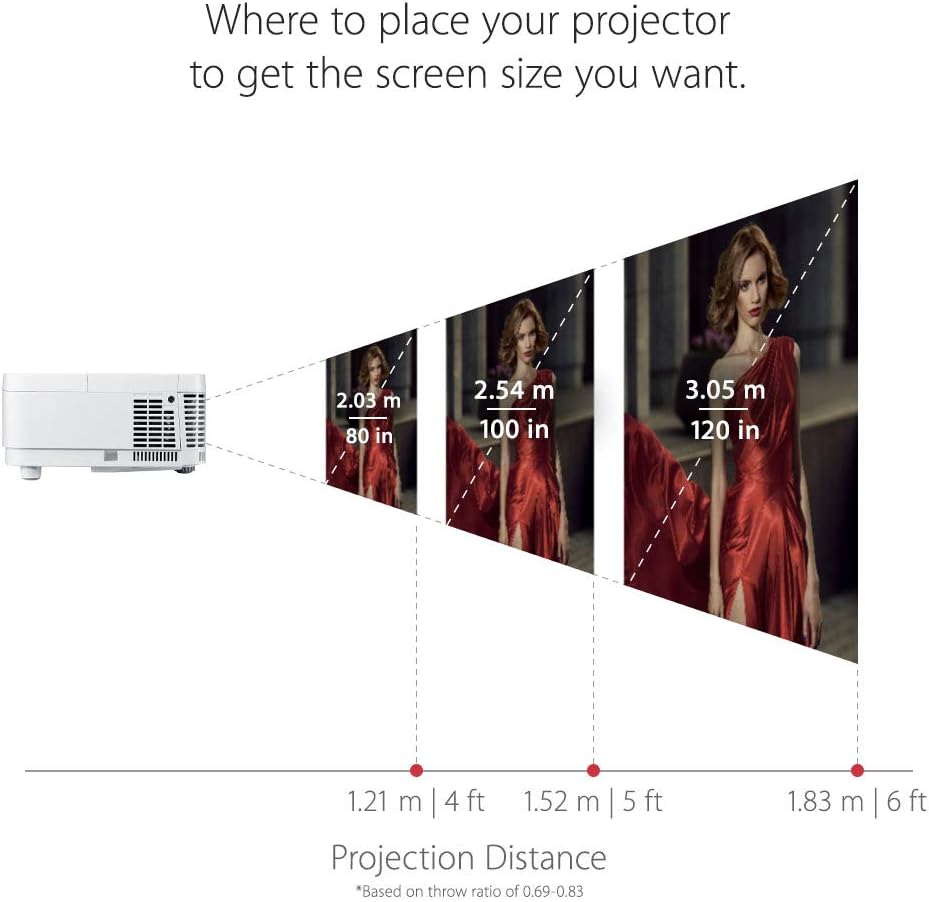
4.1-сүрөт: Ар кандай экран өлчөмдөрү үчүн сунушталган проекция аралыктары.
4.2 Түзмөктөрдү туташтыруу
The projector offers multiple connectivity options. Identify the appropriate port for your device:
- HDMI: Connect media players, gaming consoles, PCs, and Macs.
- USB-C: Connect compatible mobile devices for video streaming and gaming.
- VGA: For older computer connections.
- Аудио кириш/чыгыш: For external audio systems.

Сүрөт 4.2: Арткы панелдин байланыш порттору.
4.3 Баштапкы күйгүзүү
- Электр шнурын проекторго жана розеткага туташтырыңыз.
- Аны күйгүзүү үчүн проектордун же пульттун кубат баскычын басыңыз.
- Adjust the focus and zoom using the rings on the projector lens.
- Use the menu to adjust keystone correction if the image is distorted.
5. Проекторду иштетүү
5.1 Күйгүзүү/өчүрүү
басыңыз Күч button once to turn the projector on. Press it twice to turn it off. The projector will go through a cool-down cycle before completely shutting down.
5.2 Булакты тандоо
колдонуу Булак button on the remote control or the projector's control panel to cycle through available input sources (HDMI 1, HDMI 2, USB-C, VGA, etc.).
5.3 Сүрөттү тууралоо
Access the On-Screen Display (OSD) menu by pressing the Меню/Чыгуу button. Navigate using the arrow keys and confirm selections with the Кириңиз button. Adjust settings such as:
- Жарыктык/Контраст: Fine-tune image luminance and distinction.
- Түс режими: Select pre-set modes (e.g., Movie, Game, Standard) or customize.
- Негизги таш: Correct trapezoidal image distortion.
- Аспект катышы: Adjust the image display ratio.
6. Оюн функциялары
The PX706HD is optimized for gaming with features designed to enhance your experience:
- Ultra-Low Input Latency: A 16ms input latency minimizes delay between your input and the on-screen action, crucial for fast-paced games.
- Оюн режими: Activates enhanced colors and contrast specifically tuned for gaming visuals.
- USB-C туташуусу: Directly connect compatible mobile devices for large-screen gaming.
Видео 6.1: Бүттүview -ныкы ViewSonic PX706HD's gaming capabilities, highlighting low input lag and immersive experience.
Video 6.2: Demonstrates an ultimate gaming setup using the PX706HD projector with an Xbox 360.
7. Техникалык тейлөө
Regular maintenance ensures optimal performance and longevity of your projector:
- Lamp Жашоо: Проектор лamp has a life of up to 15,000 hours in SuperEco Mode. Replace the lamp when its brightness significantly diminishes.
- Тазалоо: Regularly clean the projector lens with a soft, lint-free cloth. Ensure air vents are clear of dust and obstructions to prevent overheating.
- Сактагыч: Узак мөөнөткө колдонулбаганда, проекторду чаңдан корголгон салкын, кургак жерде сактаңыз.
8. Кыйынчылыктарды
If you encounter issues with your projector, try the following basic troubleshooting steps:
- Кубат жок: Ensure the power cord is securely connected and the power outlet is functional.
- Сүрөт жок: Verify the input source is correctly selected and the connected device is powered on and outputting a signal. Check all cable connections.
- бүдөмүк сүрөт: Adjust the focus ring on the projector lens. Ensure the projection surface is flat.
- Сүрөттүн бурмаланышы: Трапеция сымал сүрөттөрдү оңдоо үчүн OSD менюсундагы Keystone коррекция функциясын колдонуңуз.
- Ашыкча ысып кетүү: Ensure the projector's air vents are not blocked and there is adequate ventilation around the unit.
For more detailed troubleshooting or persistent issues, please refer to the comprehensive user manual provided with your product or contact ViewSonic кардарларды колдоо.
9. Техникалык шарттар
| Өзгөчөлүк | Спецификация |
|---|---|
| Продукциянын өлчөмдөрү | 8.66 x 4.53 x 11.53 дюйм |
| Элемент Салмагы | 5.94 фунт |
| Элементтин моделинин номери | PX706HD |
| Батареялар | 2 AAA батарейка талап кылынат (алыстан үчүн) |
| Дата биринчи жеткиликтүү | 9-апрель, 2018-жыл |
| Өндүрүүчү | ViewSonic |
| Бренд | ViewSonic |
| Продукт үчүн сунушталган колдонуу | Оюндар |
| Өзгөчө өзгөчөлүк | Камтылган 3D |
| Байланыш технологиясы | USB, HDMI, VGA |
| Дисплейдин чечилиши | 1920 x 1080 (Full HD) |

Figure 9.1: Projector dimensions.
10. Кепилдик жана колдоо
For warranty information and technical support, please refer to the warranty card included in your product packaging or visit the official ViewSonic webсайт. Кепилдик дооматтары үчүн сатып алуу дүмүрчөгүңүздү сактаңыз.


