1. Киришүү
This manual provides comprehensive instructions for the safe and proper installation, operation, and maintenance of your PERLESMITH Corner TV Wall Mount Bracket, model PSCMF1. Please read this manual thoroughly before installation to ensure correct assembly and to prevent potential damage or injury. Keep this manual for future reference.
2. Коопсуздук боюнча маанилүү маалымат
ЭСКЕРТҮҮ: Failure to read and follow all instructions can result in personal injury, property damage, or voiding of your warranty. If you do not understand these instructions or have doubts about the safety of the installation, please contact PERLESMITH customer support or a qualified installer.
- Do not install this product on walls that are not structurally sound.
- Монтаждоо бети монтаждын жана телевизордун биргелешкен салмагын коопсуз көтөрө аларын текшериңиз.
- Always use a stud finder to locate wood studs accurately. Do not rely on visual estimation.
- Verify that the VESA mounting pattern of your TV is compatible with this mount (Max VESA 400x400mm).
- 99 lbs (45 кг) максималдуу салмак сыйымдуулугунан ашпаңыз.
- Бардык кичинекей бөлүктөрүн балдардан алыс кармаңыз.
- Use only the hardware provided or specified by PERLESMITH.
- Tighten all screws firmly but do not overtighten. Overtightening can damage screws and components.
- Бул продукт ички колдонуу үчүн гана арналган.
3. Пакеттин мазмуну
Verify that all components are present and undamaged before beginning installation. If any parts are missing or defective, contact PERLESMITH customer support.

Сүрөт: бүттүview of the PERLESMITH Corner TV Wall Mount Bracket and its components, including the main mount assembly, TV brackets, and a spirit level.
Монтаж компоненттери:
- Wall Plate Assemblies (Left and Right)
- Articulating Arms
- ТВ плитасы
- Сыналгы кронштейндери (сол жана оң)
Аппараттык комплект:
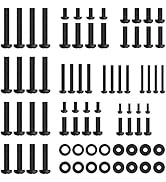
Image: Various screws, washers, and spacers provided for attaching the TV to the mount and for wall installation.
The hardware kit includes various screws (M4, M6, or M8), washers, and spacers to accommodate different TV models and wall types. A spirit level and cable ties are also typically included.
4. Талап кылынган куралдар (камтылган эмес)
- Карандаш
- Филлипс баш бурагычы
- Электрдик бургу
- Аргымак
- Level (a small one is usually included, but a longer one can be helpful)
- Тасма өлчөгүч
- Розетка ачкычы (артка чегинүүчү болттор үчүн)
- Hammer (for concrete anchors, if applicable)
5. Орнотуу жана орнотуу
5.1 Орнотууга чейинки текшерүүлөр
- TV шайкештиги: This mount supports TVs from 26 to 60 inches, weighing up to 99 lbs (45 kg).
- VESA шайкештиги: Compatible VESA patterns include 200x100mm, 200x200mm, 300x200mm, 300x300mm, 400x200mm, 400x300mm, 400x400mm. Measure the distance between the mounting holes on the back of your TV.
- Дубал түрү: This mount is designed for installation on wood studs, concrete, or brick walls. Жалгыз гипсокартон үстүнө ОРНОТПОЙТ.

Image: Visual guide for TV compatibility, VESA patterns, and suitable wall types for installation.

Image: Illustration emphasizing the strong TV support and maximum weight capacity of 99 lbs.
5.2 Телевизордун кронштейндерин телевизорго бекитүү
- Экрандын бузулуп калышына жол бербөө үчүн, телевизоруңуздун бетин ылдый каратып жумшак, таза бетке этияттык менен коюңуз.
- Identify the correct diameter and length of screws (M4, M6, or M8) that fit your TV's mounting holes. Use washers and spacers if necessary to ensure a snug fit without overtightening.
- Attach the left and right TV brackets to the back of your TV using the selected screws. Ensure the brackets are centered and level.
5.3 Wall Plate Installation (Corner Mounting)
This mount is specifically designed for corner installations, allowing for flexible placement in both inside and outside corners, as well as offset walls.

Сүрөт: Мисamples of how the mount adapts to various wall shapes, including inside corners, outside corners, and offset wall installations.
- Locate Studs/Mark Holes:
- For wood stud installation: Use a stud finder to locate the center of the wood studs in the desired corner. Mark the drilling points for the wall plates. Ensure the stud spacing is appropriate for the mount (if your wood stud spacing exceeds 16 inches, refer to model PSXFK1).
- For concrete/brick installation: Mark the drilling points directly on the wall.
- Бургулоочу тешиктер:
- For wood studs: Drill pilot holes using a 7/32 inch (5.5mm) drill bit to a depth of 2.75 inches (70mm).
- For concrete/brick: Drill pilot holes using a 3/8 inch (10mm) masonry drill bit to a depth of 2.95 inches (75mm). Insert concrete anchors into the holes, ensuring they are flush with the wall surface.
- Attach Wall Plates:
- Align the left and right wall plates with the drilled pilot holes.
- Secure the wall plates to the wall using the provided lag bolts and washers. Tighten firmly with a socket wrench, but do not overtighten.
- Use the included spirit level to ensure the wall plates are perfectly level before fully tightening.

Image: Step-by-step illustration of securing the wall plates to the chosen wall type, including drilling and fastening.
5.4 Телевизорду илип коюу
- With assistance, carefully lift the TV with the attached brackets and hook them onto the TV plate of the wall mount.
- Ensure the TV brackets are securely seated on the TV plate.
- Tighten the safety screws located at the bottom of the TV brackets to prevent accidental dislodgement.

Image: Illustration demonstrating the process of hanging the TV onto the wall mount and securing it with safety screws.
6. Колдонуу боюнча нускамалар (Оңдоолор)
Your PERLESMITH Corner TV Wall Mount offers various adjustments for optimal viewing.
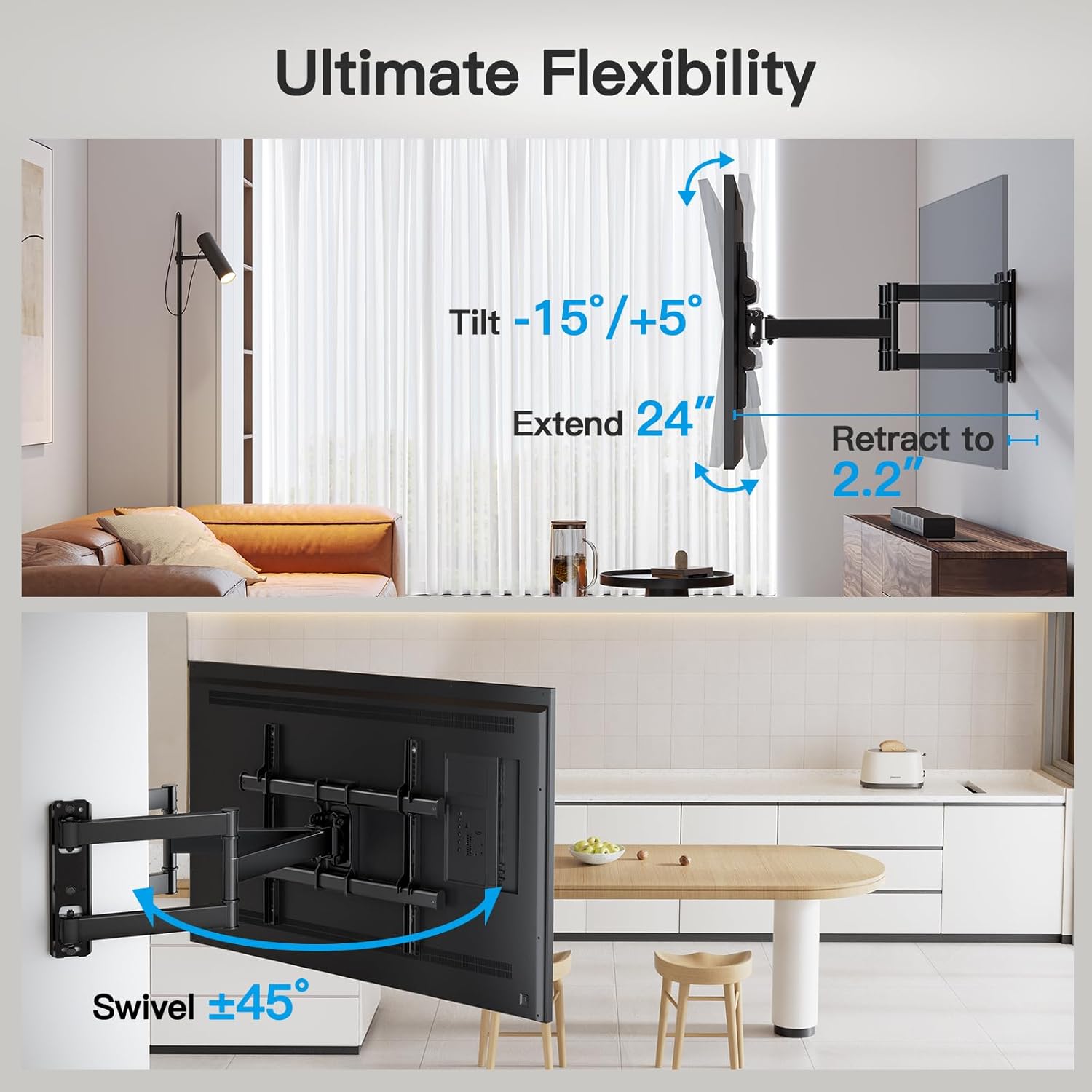
Image: Visual representation of the mount's flexibility, including tilt, extension, retraction, and swivel capabilities.
- Эңкейүүнү тууралоо: The mount allows for a tilt range of +5° to -10°. Loosen the tilt knobs on the TV plate, adjust the TV to the desired angle, and then retighten the knobs to secure.
- Айланууну жөндөө: The articulating arms allow the TV to swivel up to 45° left or right (maximum swivel angle depends on TV size). Gently push or pull the TV to the desired viewбурч.
- Кеңейтүү жана артка тартуу: The mount can extend up to 24 inches (61 cm) from the wall and retract to 2.2 inches (5.6 cm). Carefully pull the TV forward or push it back towards the wall.
- Орнотуудан кийинки тегиздөө: The TV plate can be adjusted +/-3° for fine-tuning the horizontal level after installation. Loosen the leveling screws, adjust the TV, and retighten.

Image: Illustration demonstrating the post-installation leveling feature, allowing for minor horizontal adjustments.
7. Техникалык тейлөө
- Periodically check that all screws and connections are secure. Retighten if necessary.
- Монтажды жумшак, кургак чүпүрөк менен тазалаңыз. Абразивдүү тазалагычтардан же эриткичтерден качыңыз.
- Ensure the articulating arms move smoothly. If movement becomes stiff, a small amount of silicone-based lubricant can be applied to the pivot points.
8. Кыйынчылыктарды
| Көйгөй | Мүмкүн себеп | Чечим |
|---|---|---|
| Орнотуудан кийин сыналгы түз эмес. | Wall plates not perfectly level, or post-installation leveling not adjusted. | Use the post-installation leveling feature (+/-3°) to fine-tune. Loosen leveling screws, adjust, then retighten. |
| Тоо бошоң же туруксуз сезилет. | Screws not fully tightened, or incorrect wall type/anchors used. | Ensure all lag bolts and TV bracket screws are securely tightened. Verify installation on appropriate wall type (wood stud, concrete, brick). Do not install on drywall alone. |
| Телевизор розеткага туура келбейт. | Туура эмес сыналгы өлчөмү же VESA үлгүсү. | Confirm your TV's size (26-60 inches) and VESA pattern (max 400x400mm) are compatible with this mount. |
| Эңкейүүнү/айланууну тууралоодогу кыйынчылык. | Tilt knobs too tight, or pivot points need lubrication. | Loosen tilt knobs before adjusting. Apply a small amount of silicone-based lubricant to articulating joints if movement is stiff. |
If you encounter issues not listed here, please contact PERLESMITH customer support for assistance.
9. Продукттун спецификациялары
- Модел: PSCMF1
- Бренд: ПЕРЛЕСМИТ
- Материал: Жогорку бекемдиктеги болот
- Түсү: Кара
- Сыналгы өлчөмү шайкештиги: 26 - 60 дюйм
- Салмак сыйымдуулугу: 99 фунтка чейин (45 кг)
- VESA шайкештиги: 200x100mm, 200x200mm, 300x200mm, 300x300mm, 400x200mm, 400x300mm, 400x400mm
- Ийилген бурч: +5°тан -10°ка чейин
- Айлануу бурчу: Up to 45° (left/right, TV size dependent)
- Деңгээлди тууралоо: +/-3°
- Дубалдан кеңейтүү: 2.2 дюймдан (5.6 см) 24 дюймга чейин (61 см)
- Продукциянын өлчөмдөрү: Болжол менен 32 x 13 x 3 дюйм
- Элемент Салмагы: Болжол менен 13.37 фунт
10. Кепилдик жана Кардарларды колдоо
PERLESMITH is committed to providing high-quality products and excellent customer service. This product is backed by a manufacturer's warranty. For specific warranty details, please refer to the product packaging or contact PERLESMITH directly.
If you have any questions, require assistance with installation, or need to report a missing/defective part, please contact our US-based customer support team:
- Webсайт: www.perlesmith.com
- Электрондук почта: support@perlesmith.com
- Телефон: 1-800-XXX-XXXXX
Please have your model number (PSCMF1) and purchase information ready when contacting support.


