1. Киришүү
This manual provides comprehensive instructions for the setup, operation, and maintenance of your RCA OEM 228892 TV/VCR Combo Remote Control. This remote is designed to control various functions of compatible RCA, Mitsubishi, and Sharp TV/VCR combo units. Please read this manual thoroughly to ensure proper use and to maximize the functionality of your remote control.
2. Продукт бүтүп калдыview
The RCA OEM 228892 remote control features a standard layout for TV and VCR functions. Familiarize yourself with the button layout as shown in the image below.
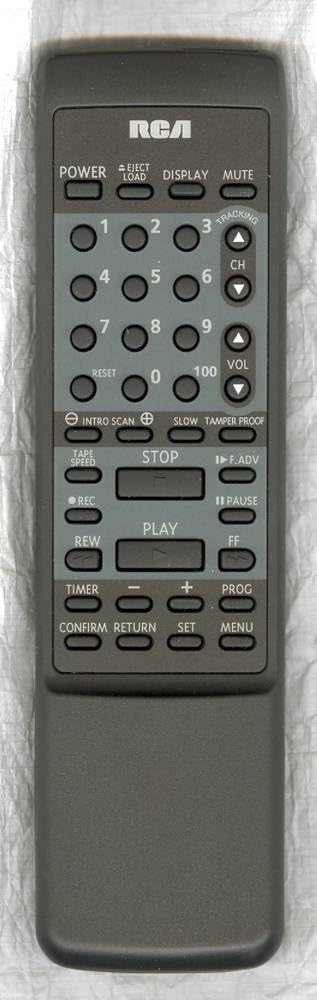
Баскыч функциялары:
- КҮЧ: Turns the TV/VCR combo unit on or off.
- EJECT/LOAD: Ejects or loads a VCR tape.
- КӨРСӨТҮҮ: Shows on-screen information such as channel number, time, or VCR status.
- Үнсүз: Аудио чыгыштын үнүн басат.
- Сан баскычтары (0-9, 100): Used to directly select channels or input numerical values.
- КАЛТЫРУУ: Resets certain settings or counters, often for VCR functions.
- CH (каналдын өйдө/ылдый жагы): Телеканалды өйдө же ылдый өзгөртөт.
- ҮН (Үндү көбөйтүү/азайтуу): Аудионун үнүн жогору же ылдый тууралайт.
- INTRO SCAN: Scans the beginning of each recorded program on a tape.
- ЖАЯН: Activates slow-motion playback for VCR.
- TAMPER PROOF: A security feature, often related to VCR recording.
- СЕНТТЕГИ: Adjusts the VCR tape playback or recording speed.
- ТОКТОТУУ: Stops VCR playback or recording.
- F.ADV (Frame Advance): Advances the VCR playback frame by frame.
- REC (Record): Initiates VCR recording.
- ТЫНЫТУУ: Pauses VCR playback or recording.
- ОЙНОО: Starts VCR playback.
- REW (кайра түрүү): Rewinds the VCR tape.
- FF (Алдыга жылдыруу): Fast forwards the VCR tape.
- ТАЙМЕР: Accesses timer settings for recording or power on/off.
- МИНУС (-): Decreases a value or navigates backward in menus.
- PLUS (+): Increases a value or navigates forward in menus.
- PROG (Программа): Accesses programming functions, often for VCR recording or channel setup.
- ЫРАСТОО: Confirms a selection or setting.
- КАЙТУУ: Мурунку менюга же экранга кайтат.
- ЖӨНДӨӨ: Enters setup mode or confirms a setting.
- МЕНЮ: Opens the on-screen menu for TV or VCR settings.
3. Орнотуу
3.1 Батареяны орнотуу
The remote control requires two (2) AA batteries for operation.
- Пульттун артындагы батарея бөлүкчөсүнүн капкагын табыңыз.
- Капкакты ылдый жылдырыңыз же ачуу үчүн кулпуну басып, көтөрүңүз.
- Оң (+) жана терс (-) терминалдары бөлүмдүн ичиндеги белгилер менен туура дал келишин камсыз кылып, эки АА батарейканы салыңыз.
- Батарея бөлүкчөсүнүн капкагын ордуна коюңуз, аны бекем чыккыча ордуна жылдырыңыз.
Эскертүү: Always replace both batteries at the same time. Do not mix old and new batteries or different types of batteries. Remove batteries if the remote will not be used for an extended period.
4. Негизги операция
4.1 Күйгүзүү/өчүрүү
- басыңыз КҮЧ button to turn your TV/VCR combo unit on or off.
4.2 Канал тандоо
- To change channels sequentially, press the CH ▲ (Channel Up) or CH ▼ (Channel Down) buttons.
- To directly select a channel, use the Сан баскычтары (0-9). For two-digit channels, enter both digits. For channel 100, press the 100 баскычы.
4.3 Үндү башкаруу
- басыңыз ТОМ ▲ (Volume Up) or ТОМ ▼ (Volume Down) buttons to adjust the audio level.
4.4 Үнсүз кылуу функциясы
- басыңыз БАСУУ button to temporarily silence the audio. Press it again to restore the sound.
5. VCR Operation
5.1 Tape Playback
- Insert a VHS tape into the VCR.
- басыңыз ОЙНОО ойнотууну баштоо үчүн баскыч.
- Ойнотууну тындыруу үчүн, басыңыз ТЫНЫГУУ. Басыңыз ОЙНОО кайра улантуу үчүн.
- Ойноону токтотуу үчүн басыңыз ТОКТОТ.
- To rewind the tape, press REW.
- To fast forward the tape, press FF.
- To eject the tape, press EJECT/LOAD.
5.2 Жазуу
- Жаздырылуучу VHS кассетасын салыңыз.
- Select the desired input source or channel.
- басыңыз REC жазууну баштоо үчүн баскыч.
- Басыңыз ТОКТОТ жазууну токтотуу.
5.3 Special VCR Functions
- INTRO SCAN: Press this button to play the first few seconds of each recorded program on a tape, allowing you to quickly find specific content.
- СЕНТТЕГИ: Use this button to cycle through available tape speeds (e.g., SP, LP, EP) for recording or playback, if supported by your VCR.
- ЖАЯН: During playback, press this button to activate slow-motion.
- F.ADV (Frame Advance): During pause or slow-motion, press to advance the video one frame at a time.
- TAMPER PROOF: This function is typically used to prevent accidental recording or erasure on certain VCR models. Refer to your VCR's specific manual for details on its use.
6. Өркүндөтүлгөн функциялар
- КӨРСӨТҮҮ: Press to show on-screen information such as current channel, time, or VCR status.
- КАЛТЫРУУ: Used to reset the VCR's tape counter or other temporary settings.
- ТАЙМЕР: Accesses the VCR's timer programming menu to set up future recordings.
- PROG (Программа): Used in conjunction with the Timer function to program recording events or to access channel programming menus.
- МЕНЮ: Opens the main on-screen menu for your TV/VCR combo unit, allowing access to various settings (picture, sound, VCR options, etc.).
- ЖӨНДӨӨ: Used to confirm selections within menus or to enter setup modes.
- ЫРАСТОО: Confirms a selection or action, similar to 'Enter'.
- КАЙТУУ: Navigates back to the previous menu screen or exits a current menu without saving changes.
7. Шайкештик
The RCA OEM 228892 remote control is compatible with a range of TV/VCR combo units. Below is a list of known compatible models and any specific feature limitations:
7.1 OEM Compatibility:
- RCA: T25004BC, T25204BC
7.2 Full Feature Support:
- RCA: 221359, RRMCG1139PESA, T25001, T25001GY, T25003, T25003BC
- MITSUBISHI: RRMCG1166PESA, G1166PESA, CV-20125, RRMCG1166PESB, CV-20126
- КУРЧ: RRMCG1103PESA, G1103PESA, 13VT-G60, 20VT-G60, 25VT-G60, RRMCG1242PESA, G1242PESA, 13VT-CH6, 13VT-H60, 20VT-CH6, 20VT-H60, 25VT-H60
7.3 Partial Feature Support:
- Supports all features except CH GUIDE and VIEW LIMIT for:
КУРЧ: RRMCG1144PESA, G1144PESA, 20VT-G200, 25VT-G200, 25VT-G50, 27VS-G300, RRMCG1113PESA, G1113PESA, 13VT-G100, 13VT-G120, 20VT-G100, 25TV-G100, 25VT-G100, RRMCG1112PESA, G1112PESA, 13VT-G80, 25VT-G80 - Supports all features except CATV for:
КУРЧ: RRMCG1244PESA, G1244SA, 13VT-H100, 13VT-H150, 20VT-H200, 25VT-H80 - Supports all features except WAKE-UP TIMER and SLEEP TIMER for:
КУРЧ: RRMCG1032PESA, G1032PESA, 13VT-F40, 20VT-F40 - Supports all features except INPUT and FLASHBACK for:
КУРЧ: RRMCG1330PESB, G1330SB, 13VT-J150, 13VT-K150, 13VT-L150, 13VT-N150, 13VT-R150, RRMCG1330PESA, G1330SA, 13VT-CJ10, 13VT-CK10, 13VT-CL10, 13VT-CN10, 13VT-CR10, 13VT-J100, 13VT-K100, 13VT-L100, 13VT-N100, 13VT-R100, 20VT-J100, 25VS-J250, 25VT-CJ10, 25VT-CK10, 25VT-J100, 25VT-K100, RRMCG1331PESA, G1331SA, 13VT-L200, 13VT-N200
8. Кыйынчылыктарды
If you encounter issues with your remote control, please refer to the following common troubleshooting steps:
- Пульт жооп бербей жатат:
- Ensure the remote has fresh AA batteries installed correctly (check polarity).
- Make sure there is a clear line of sight between the remote control and the TV/VCR combo unit's infrared sensor. Obstructions can block the signal.
- Confirm that the remote is pointed directly at the unit. - Атайын баскычтар иштебейт:
- Some buttons may only function with specific models or modes (e.g., VCR buttons only work when the unit is in VCR mode). Refer to the compatibility section and your unit's manual.
- Clean the remote control buttons and surface to remove any dirt or debris that might be interfering with button presses. - Үзгүлтүксүз иштөө:
- Weak batteries can cause inconsistent performance. Replace them.
- Strong ambient light (like direct sunlight) can sometimes interfere with infrared signals. Try operating the remote in different lighting conditions.
If problems persist after trying these steps, consult the user manual for your specific TV/VCR combo unit or contact customer support.
9. Техникалык шарттар
- Модель номери: 228892 (also T25004BC, T25204BC)
- Бренд: RCA
- Байланыш технологиясы: Инфракызыл
- Контроллердин түрү: Control Button
- Шайкеш түзмөктөр: TV/VCR Combo Units (refer to compatibility list)
- Батареялар талап кылынат: 2 АА батарейка
- Өзгөчө өзгөчөлүгү: Эргономикалык дизайн
- Өндүрүүчү: RCA Parts
- Биринчи жеткиликтүү болгон күнү: 12-апрель, 2018-жыл
10. Техникалык тейлөө
- Тазалоо: Алыстан башкаруу пультун тазалоо үчүн жумшак, кургак чүпүрөктү колдонуңуз. Өтө кир болсо, бир азampen the cloth with water or a mild cleaning solution, then wipe dry immediately. Do not use abrasive cleaners or immerse the remote in liquid.
- Батареяга кам көрүү: Remove batteries if the remote will not be used for an extended period (e.g., one month or more) to prevent leakage and damage.
- Сактагыч: Пультту күн нурунан жана өтө температурадан алыс салкын, кургак жерде сактаңыз.
11. Колдоо маалыматы
For further assistance or inquiries regarding your RCA OEM 228892 TV/VCR Combo Remote Control, please refer to the support resources provided by your retailer or the manufacturer, RCA. You may also consult the user manual specific to your TV/VCR combo unit for detailed operational instructions related to your device.
Онлайн ресурстар: For general information about RCA products, you may visit the official RCA webсайтка же кардарларды тейлөө бөлүмүнө кайрылыңыз.


