Introduction
The Powertech MP3087 is a versatile 0-32V DC Dual Output Laboratory Power Supply designed for precision applications. It features automatic constant voltage (CV) or constant current (CC) transfer, ensuring stable power delivery. Its dual outputs can operate independently, or be configured in parallel or series to achieve various voltage and current combinations. Each output is equipped with independent digital voltage and current meters, providing clear, backlit readings for accurate monitoring. Coarse and fine controls allow for precise adjustment of voltage жана учурдагы чектөөлөр.
Коопсуздук нускамалары
Please read and understand all safety instructions before operating the power supply. Failure to do so may result in injury or damage to the equipment.
- Always connect the power supply to a grounded AC outlet.
- Агрегатты нымдуу жерде иштетпеңиз же damp шарттар.
- Ашыкча ысып кетүүнүн алдын алуу үчүн аппараттын айланасында туура желдетүүнү камсыз кылыңыз. Вентиляция тешиктерин жаап албаңыз.
- в ачпагылаasinг. Ичинде колдонуучу тейлей турган бөлүктөр жок. Бардык тейлөөлөрдү квалификациялуу кызматкерлерге тапшырыңыз.
- Before making any connections or disconnections, ensure the power supply is turned off and unplugged from the AC mains.
- Томду ырастаңызtage and current settings before connecting to any circuit or device.
- Чыгаруу терминалдарынын узак убакытка кыска туташуусунан алыс болуңуз.
Продукт бүттүview
Алдыңкы панелдин башкаруу элементтери жана көрсөткүчтөрү

Сүрөт 1: Алдыңкы view of the Powertech MP3087 showing dual displays, control knobs, and output terminals.
The front panel of the MP3087 is intuitively designed for ease of use, featuring two identical sets of controls for each independent output, plus central controls for power and output configuration.
- Санариптик дисплейлер: Two backlit displays show real-time voltage (V) and current (A) for each output.
- VOL-ADJ Knobs: Coarse and fine adjustment for output voltage.
- CUR-ADJ Knobs: Coarse and fine adjustment for output current limit.
- CC/CV Indicators: LEDs indicating Constant Current (CC) or Constant Voltage (CV) режими.
- Чыгуу терминалдары: Red (+) and Black (-) binding posts for connecting loads. A green (GND) terminal is also provided.
- POWER которуштуруу: Main power ON/OFF switch for the unit.
- PARALLEL Button: Configures both outputs in parallel for increased current output.
- SERIES Button: Configures both outputs in series for increased voltage чыгаруу.
Арткы панелдин өзгөчөлүктөрү
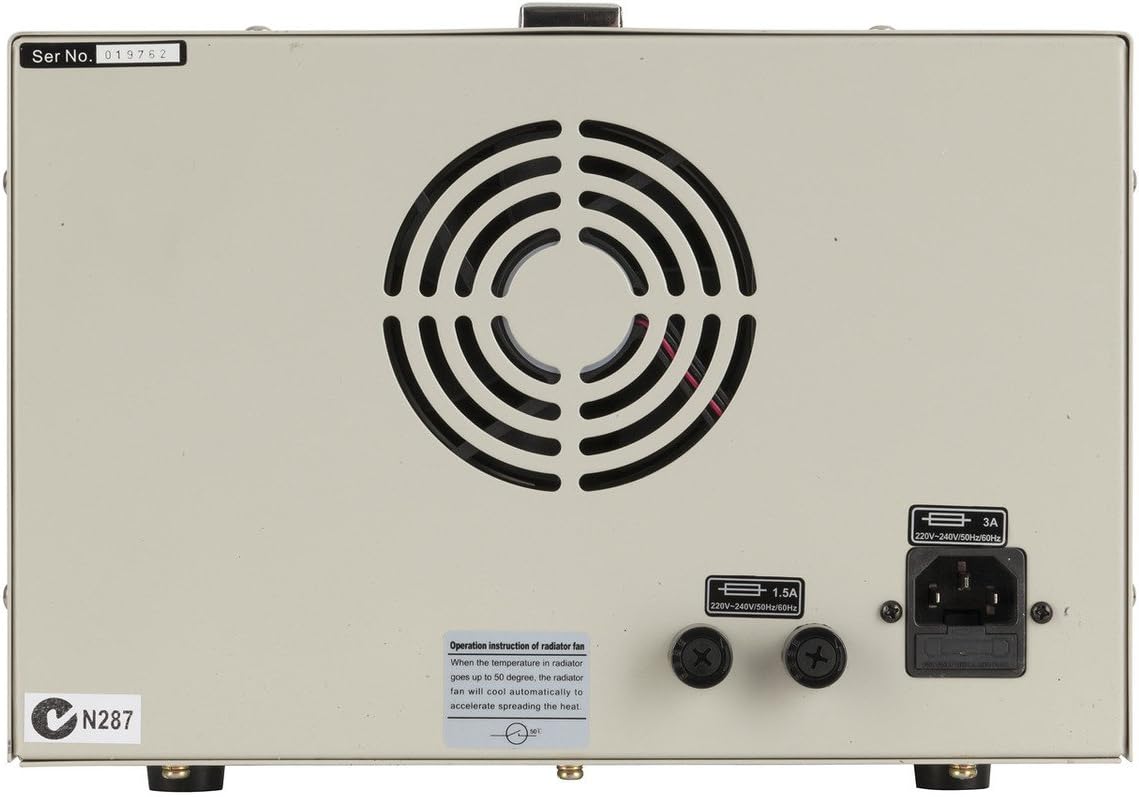
2-сүрөт: Арткы view of the Powertech MP3087 showing the power input, fuse holder, and cooling fan.
The rear panel houses essential connections and cooling components.
- AC кубаттуулугун киргизүү: IEC C14 inlet for connecting the AC power cord.
- Страховка кармагыч: Contains the main protective fuse.
- Муздатуу желдеткич: Жылуулукту кетирүү жана оптималдуу иштөө температурасын сактоо үчүн автоматтык түрдө иштетилет.
Жайгашуу
- Пакеттен чыгаруу: Carefully remove the power supply from its packaging. Inspect for any signs of damage during transit.
- Жайгашкан жери: Place the unit on a stable, level surface with adequate ventilation space around it (at least 10 cm on all sides, especially the rear). Avoid placing it near heat sources or in direct sunlight.
- Кубат туташуу: Ensure the POWER switch on the front panel is in the OFF position. Connect the supplied AC power cord to the AC Power Input on the rear panel and then to a grounded wall outlet.
- Алгачкы текшерүү: Turn the POWER switch ON. The digital displays should illuminate, showing default voltage жана учурдагы окуулар.
Иштөө нускамалары
The Powertech MP3087 offers flexible operation modes to suit various laboratory and testing requirements.
1. Independent Operation
In this mode, each output functions as a separate, isolated power supply.
- Ensure both PARALLEL and SERIES buttons are disengaged (not pressed in).
- Электр менен жабдууну күйгүзүңүз.
- For each output, adjust the VOL-ADJ (coarse and fine) knobs to set the desired output voltage.
- Adjust the CUR-ADJ (coarse and fine) knobs to set the desired current limit. It is recommended to set the current limit slightly above the expected operating current of your load to prevent unintended current limiting.
- Connect your load to the respective output terminals (Red for positive, Black for negative).
- Monitor the displays for actual voltage and current draw. The CC/CV indicator will show the operating mode.
2. Series Operation (Increased Voltage)
To combine the voltage of both outputs, use the series mode. The total output voltage will be the sum of the individual output voltages, while the current limit will be determined by the lower of the two set current limits.
- Ensure the power supply is OFF.
- Press the SERIES button on the front panel.
- Connect the positive (+) terminal of Output 1 to the negative (-) terminal of Output 2 using a short, heavy-gauge wire.
- The combined output will be available from the negative (-) terminal of Output 1 and the positive (+) terminal of Output 2.
- Электр менен жабдууну күйгүзүңүз.
- Adjust the VOL-ADJ and CUR-ADJ knobs for both outputs to achieve the desired total voltage and current limit. Note that the current limit will be the lowest setting of the two outputs.
- Connect your load to the combined output terminals.
3. Parallel Operation (Increased Current)
To combine the current capacity of both outputs, use the parallel mode. The total output current will be the sum of the individual output currents, while the voltage will be determined by the lower of the two set voltages.
- Ensure the power supply is OFF.
- Press the PARALLEL button on the front panel.
- Connect the positive (+) terminal of Output 1 to the positive (+) terminal of Output 2 using a short, heavy-gauge wire.
- Connect the negative (-) terminal of Output 1 to the negative (-) terminal of Output 2 using a short, heavy-gauge wire.
- The combined output will be available from either set of connected terminals.
- Электр менен жабдууну күйгүзүңүз.
- Adjust the VOL-ADJ and CUR-ADJ knobs for both outputs to achieve the desired total current and voltage. Note that the voltage will be the lowest setting of the two outputs.
- Connect your load to the combined output terminals.
Техникалык тейлөө
Proper maintenance ensures the longevity and reliable operation of your power supply.
- Тазалоо: Disconnect the power supply from the AC mains before cleaning. Use a soft, dry cloth to wipe down the exterior. Do not use abrasive cleaners or solvents.
- Вентиляция: Regularly check that the ventilation openings on the rear and sides are free from dust and obstructions. A soft brush or compressed air can be used to gently clear dust.
- Сактагыч: When not in use for extended periods, store the power supply in a cool, dry place, away from direct sunlight and excessive humidity.
- Сактагычты алмаштыруу: If the unit fails to power on, check the fuse located on the rear panel. Replace only with a fuse of the same type and rating (refer to specifications). Always disconnect from AC mains before replacing the fuse.
Проблемаларды чечүү
| Көйгөй | Мүмкүн себеп | Чечим |
|---|---|---|
| Түзмөк күйбөйт. | No AC power; Blown fuse; Power switch off. | Check AC power cord connection and wall outlet. Check and replace fuse if necessary. Ensure power switch is ON. |
| Чыгаруунун көлөмү жокtagе/ток. | Output terminals not connected; Current limit set too low; Overload protection activated. | Ensure load is properly connected. Increase current limit. Reduce load or check for short circuit in load. |
| Чыгуу томtage/current fluctuates. | Unstable AC input; Loose connections; Faulty load. | Check AC power source stability. Secure all connections. Test with a different load. |
| Түзмөк ысып кетти. | Бөгөттөлгөн желдетүү; Ашыкча жүк. | Ensure ventilation openings are clear. Reduce load or operate within specified limits. |
Техникалык шарттар
| Өзгөчөлүк | Деталь |
|---|---|
| Модел | MP3087 |
| Output Voltage | 0-32V DC (per channel) |
| Output Current | 0-3A (per channel) |
| Output Type | Dual, Independent, Series, Parallel |
| Дисплей | Digital Voltage and Current Meters (Backlit) |
| Иштөө режимдери | Constant Voltage (CV), Constant Current (CC) |
| Киргизүү көлөмүtage | 220-240V AC, 50/60Hz (as per rear panel image) |
| Fuse рейтинги | 1.5A (as per rear panel image) |
| Өлчөмдөр | Approx. 40 x 26 x 18.5 cm (from product title) |
| Салмагы | Болжол менен 9.97 кг |
| Материал | Поликарбонат (PC) |
Кепилдик жана колдоо
This Powertech product is covered by a standard manufacturer's warranty. For specific warranty terms, duration, and conditions, please refer to the documentation provided with your purchase or contact Jaycar customer support.
For technical assistance, troubleshooting beyond this manual, or service inquiries, please contact your retailer or the manufacturer's authorized service center. Keep your purchase receipt as proof of purchase for warranty claims.


