Introduction
This manual provides detailed instructions for the setup, operation, maintenance, and troubleshooting of your Jaycar Composite AV to HDMI Converter (Model AC-1722). Please read this manual thoroughly before using the device to ensure proper functionality and to prevent damage.
Негизги өзгөчөлүктөрү
- Converts Composite Video and Stereo Audio (RCA) to HDMI output.
- Supports HDMI 1080p or 720p output resolutions.
- Compatible with NTSC and PAL video systems.
- Plug and play operation.
Пакеттин мазмуну
Пакетиңизде бардык буюмдар бар экенин текшериңиз:
- Jaycar Composite AV to HDMI Converter (AC-1722)
- Кубат адаптери (5V DC)
- Колдонуучунун Колдонмосу (бул документ)
Продукт бүттүview
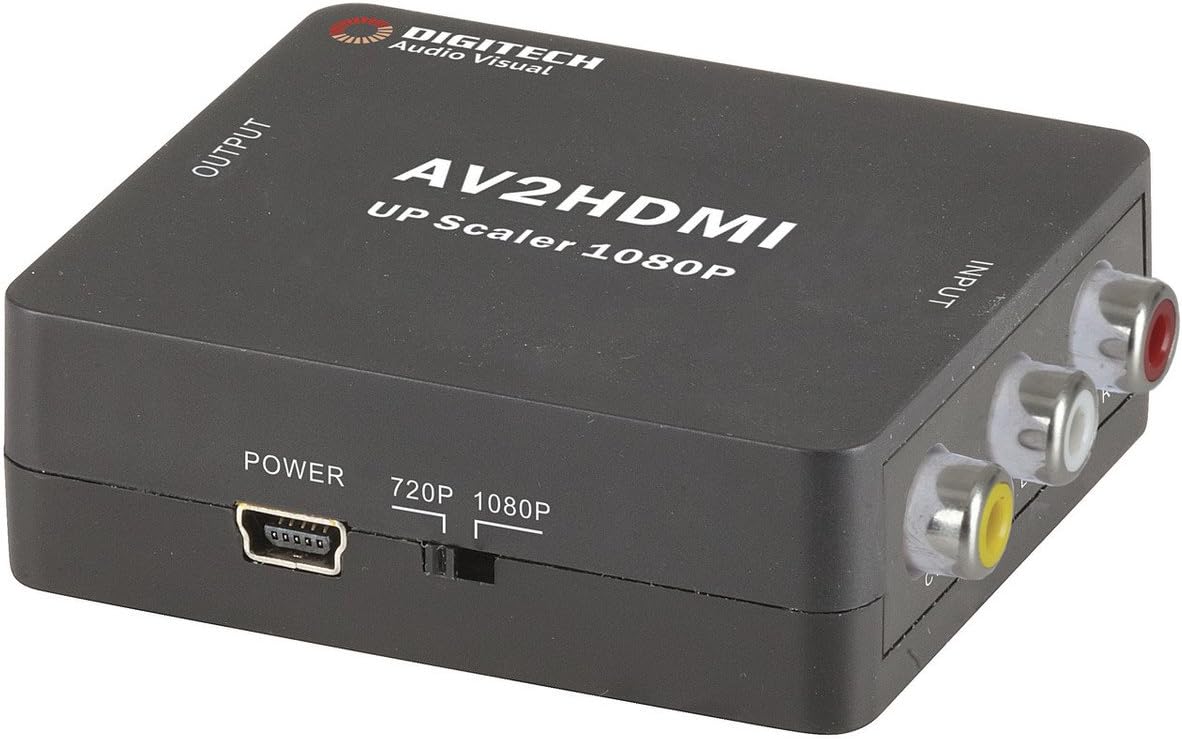
Сүрөт 1: Фронт view of the Jaycar Composite AV to HDMI Converter. This image displays the top and front of the converter, showing the "AV2HDMI UP Scaler 1080P" label, "OUTPUT" and "INPUT" indicators, the power input, and the 720p/1080p resolution switch. The Composite AV input ports (yellow, white, red) are visible on the right side.

Сүрөт 2: Side view of the converter showing the HDMI output port. This port is labeled "HDMI" and is where the HDMI cable connects to your display device.

Сүрөт 3: Side view of the converter showing the Composite AV input ports. These ports are labeled "CVBS" (yellow for video), "L" (white for left audio), and "R" (red for right audio).

Сүрөт 4: Side view of the converter showing the power input port and the 720p/1080p resolution switch. The power port is a mini-USB type, and the switch allows selection between 720p and 1080p output resolutions.
Орнотуу нускамалары
- Түзмөктү туташтыруу: Connect your Composite AV source device (e.g., DVD player, VCR, game console) to the converter's input ports. Match the yellow RCA cable to the "CVBS" port, the white RCA cable to the "L" (Left Audio) port, and the red RCA cable to the "R" (Right Audio) port.
- Connect Display Device: Connect an HDMI cable from the converter's "HDMI" output port to an available HDMI input on your display device (e.g., TV, monitor, projector).
- Select Output Resolution: Use the 720p/1080p switch on the converter to select your desired output resolution. For most modern displays, 1080p is recommended. If you experience issues, try 720p.
- Туташуу кубаты: Connect the provided 5V DC power adapter to the converter's "POWER" input port, then plug the adapter into a wall outlet. The converter will power on automatically.
- Select Input on Display: Turn on your display device and select the corresponding HDMI input channel to view the converted signal.
Иштөө нускамалары
The Jaycar Composite AV to HDMI Converter is designed for plug-and-play operation. Once all connections are made and power is supplied, the converter will automatically scale the analog AV signal to the selected HDMI output resolution (720p or 1080p).
- Ensure your source device is powered on and outputting a Composite AV signal.
- Дисплей түзмөгүңүз туура HDMI киргизүүсүнө коюлганын текшериңиз.
- If no image appears, check all cable connections and the power supply.
- Experiment with the 720p/1080p switch if the image is distorted or not displayed correctly.
Техникалык тейлөө
The converter requires minimal maintenance. Follow these guidelines to ensure longevity:
- Keep the device in a dry, well-ventilated area, away from direct sunlight, high temperatures, and humidity.
- Аппаратты түшүрүүдөн же катуу таасирлерден сактаныңыз.
- Сыртын жумшак, кургак чүпүрөк менен тазалаңыз. Суюк тазалоочу каражаттарды же эриткичтерди колдонбоңуз.
- Бардык кабелдер бекем туташтырылганын текшериңиз, бирок аларды мажбурлабаңыз.
Проблемаларды чечүү
| Көйгөй | Мүмкүн себеп | Чечим |
|---|---|---|
| Видео же аудио чыгаруу жок. |
|
|
| Distorted or flickering image. |
|
|
| No audio, but video is present. |
|
|
Техникалык шарттар
| Киргизүү түрү | Composite Video and Audio (3 RCA) |
| Output Type | HDMI Type-A |
| Колдоого алынган токтомдор | 1080p (1920 x 1080), 720p |
| Видео системалары | NTSC, PAL |
| Power талап | 5V DC (Power adapter included) |
| Продукциянын өлчөмдөрү (L x W x Y) | 54мм x 60мм x 20мм (болжол менен 2.13" x 2.36" x 0.79") |
| Продукт Салмагы | 80г |
Кепилдик маалымат
This Jaycar product comes with a 1 жылдык кепилдик сатып алынган күндөн тартып. Бул кепилдик нормалдуу колдонуудагы материалдардагы жана жасалгадагы кемчиликтерди камтыйт. Бул туура эмес колдонуудан, кырсыктан, уруксатсыз өзгөртүүдөн же туура эмес орнотуудан келип чыккан зыянды камтыбайт.
For warranty claims, please retain your proof of purchase and contact Jaycar customer support.
Кардарларды колдоо
If you require further assistance or have questions not covered in this manual, please contact Jaycar customer support through their official webсайтка же продуктуну сатып алган сатуучуга.
For the latest support information, please visit the official Jaycar webсайт: www.jaycar.com.au


