1. Киришүү
The POWERTECH MP3752 is an intelligent and lightweight solar charge controller designed to manage the power flow from your solar panels to your battery bank. Utilizing Pulse Width Modulation (PWM) technology, it ensures efficient and safe battery charging. This controller offers a set-and-forget operation, providing maximum charge into your batteries without constant monitoring. It integrates essential safety features such as overload, short-circuit, over-discharge, and reverse-polarity protection. Additionally, a convenient USB port on the front panel allows for up to 1.2A charging, useful for mobile devices during power outages. The unit supports various battery types including sealed lead-acid, Gel, and flooded cells, and automatically selects the optimal charging mode (bulk, equalise, float).
2. Коопсуздук маалыматы
Please read all instructions carefully before installation and operation. Failure to follow these instructions may result in damage to the unit, battery, or personal injury.
- Ensure all connections are correct and secure before applying power.
- Do not connect the solar controller to an AC power source.
- Контроллерди күйүүчү материалдардан жана тике күндүн нурунан алыс, жакшы желдетилген жерге орнотуңуз.
- Avoid short-circuiting the battery terminals or solar panel terminals.
- Ар дайым алгач батареяны, андан кийин күн батареясын жана акырында жүктү туташтырыңыз. Тескери тартипте ажыратыңыз.
- This device is not waterproof; protect it from moisture and water.
- Монтаждоо жана тейлөөнү квалификациялуу кызматкерлер гана аткарышы керек.
3. Продукциянын өзгөчөлүктөрү
- Automatic charge mode selection (Bulk, Equalise, Float).
- Suitable for both 12V and 24V battery banks.
- Integrated USB charging port (5V, 1.2A max) on the front panel.
- Supports sealed lead-acid, Gel, and flooded battery types.
- Comprehensive protection features: overload, short-circuit, over-discharge, reverse-polarity.
- Pulse Width Modulation (PWM) charging technology.
4. Пакеттин мазмуну
Сураныч, алгандан кийин пакеттин мазмунун текшериңиз:
- 1 x POWERTECH MP3752 Solar Controller
- 1 х Колдонуучунун колдонмосу (бул документ)
5. Продукт бүтүп калдыview жана Байланыштар
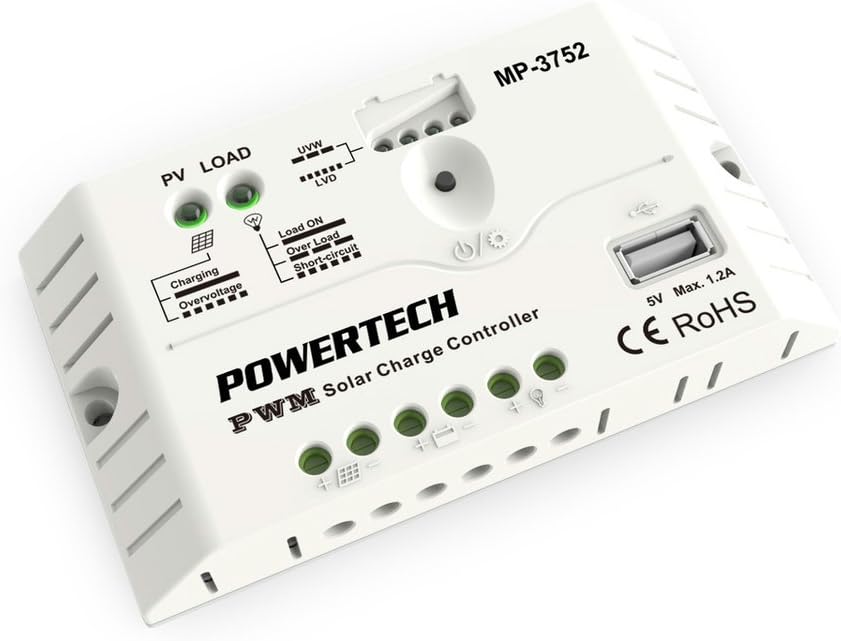
Сүрөт 1: Алдыңкы view of the POWERTECH MP3752 Solar Controller. This image displays the PV LOAD, UVW, LVD, Load ON, Over Load, Short-Circuit indicators, the USB port, and the connection terminals for solar panels, battery, and load.
The MP3752 controller features clearly marked terminals for easy connection. Refer to Figure 1 for a visual guide to the controller's layout and indicators.
Туташуу терминалдары:
- Solar Panel Input (PV): Connect your solar panel array here. Ensure correct polarity (+ and -).
- Батарея туташуу: Connect your 12V or 24V battery bank here. Observe correct polarity (+ and -).
- Жүктөө чыгаруу: Connect your DC loads (e.g., lights, fans) here. Observe correct polarity (+ and -).
- USB порт: 5V, 1.2A max output for charging small electronic devices.
6. Орнотуу жана орнотуу
Follow these steps for proper installation of your solar charge controller:
- Монтаждоо: Choose a dry, well-ventilated indoor location, away from direct sunlight, high temperatures, and moisture. Ensure sufficient air circulation around the controller.
- Батарея туташуу:
- Connect the positive (+) terminal of the battery to the battery positive (+) terminal on the controller.
- Connect the negative (-) terminal of the battery to the battery negative (-) terminal on the controller.
- The controller will automatically detect if it's a 12V or 24V system.
- Күн панелинин туташуу:
- Connect the positive (+) terminal of the solar panel to the solar panel positive (+) terminal on the controller.
- Connect the negative (-) terminal of the solar panel to the solar panel negative (-) terminal on the controller.
- Ensure the open-circuit voltage of the solar panel does not exceed the maximum input voltage of the controller (typically 50V for 12/24V systems).
- Туташуу жүктөө:
- Connect the positive (+) terminal of your DC load to the load positive (+) terminal on the controller.
- Connect the negative (-) terminal of your DC load to the load negative (-) terminal on the controller.
- Do not exceed the maximum rated current for the load output (20A).
- Байланыштарды текшерүү: Double-check all connections for correct polarity and tightness before proceeding.

Figure 2: The POWERTECH MP3752 Solar Controller shown in its packaging, illustrating its application with solar panels. This image provides a contextual view of the product's intended use.
7. Иштөө нускамалары
7.1. Automatic System Voltage Recognition
The controller automatically detects whether the connected battery bank is 12V or 24V upon initial connection. Ensure the battery is connected first for proper voltage аныктоо.
7.2. Заряддоо режимдери
The MP3752 employs intelligent PWM charging, automatically cycling through different stages to optimize battery health and lifespan:
- Жапырт акы: Delivers maximum current to rapidly bring the battery to approximately 80% charge.
- Equalise Charge: Periodically applies a higher voltage to equalize the charge among battery cells, preventing sulfation and extending battery life (for flooded batteries).
- Float акысы: Maintains the battery at a full charge by providing a small, constant voltage, өзүн-өзү бошотуу үчүн компенсация.
7.3. Load Control
The load output is controlled by the controller to prevent over-discharge of the battery. When the battery voltage Төмөн Төмөндө төмөндөйтtage Disconnect (LVD) threshold, the load output will be automatically disconnected. It will reconnect once the battery has recharged to the Low Voltage Reconnect (LVR) threshold.
Press the power button on the controller to manually turn the load output ON or OFF.
7.4. USB кубаттоочу порт
The 5V, 1.2A USB port can be used to charge small electronic devices like smartphones or tablets. This port is active as long as the battery has sufficient charge.
8. Көрсөткүчтөр
The POWERTECH MP3752 features several LED indicators to provide real-time status information:
- PV LOAD (Solar Panel Indicator):
- Жашыл: Solar panel is connected and generating power.
- Өчүк: No solar input or insufficient light.
- Заряддоо көрсөткүчү:
- Жашыл: Батарея заряддалууда.
- Өчүк: Battery is fully charged or not charging.
- Overvoltage Индикатор:
- Кызыл: Киргизүү тtage from solar panel is too high, or battery voltage is overcharge protection level.
- UVW (Battery Voltage Indicator): Multiple LEDs indicating battery charge level.
- LVD (Төмөн томtage Disconnect Indicator):
- Кызыл: Батарея көлөмүtage is low, load output has been disconnected.
- Load ON Indicator:
- Жашыл: Load output is active.
- Over Load Indicator:
- Кызыл: Load current exceeds the maximum rated current. Load output may be temporarily disconnected.
- Short-Circuit Indicator:
- Кызыл: Short-circuit detected on the load output. Load output will be disconnected.
9. Техникалык тейлөө
To ensure optimal performance and longevity of your solar charge controller, regular maintenance is recommended:
- Тазалоо: Periodically clean the exterior of the controller with a dry, soft cloth. Do not use solvents or abrasive cleaners.
- Байланыштары: Annually check all wiring connections for tightness and corrosion. Loose connections can cause overheating and poor performance.
- Вентиляция: Ensure that the ventilation openings are not blocked and that there is adequate airflow around the unit.
- Текшерүү: Inspect the controller for any signs of physical damage, discoloration, or unusual odors.
10. Кыйынчылыктарды
| Көйгөй | Мүмкүн себеп | Чечим |
|---|---|---|
| No charging from solar panel. |
|
|
| Load output not working. |
|
|
| Overvoltage индикатор күйүп турат. |
|
|
11. Техникалык шарттар
| Параметр | Нарк |
|---|---|
| Модель номери | MP3752 (03617080) |
| System Voltage | 12V/24V Auto-sensing |
| Макс. Заряддоо агымы | 20A |
| Max. Учурдагы жүктөө | 20A |
| USB чыгышы | 5V, 1.2A Макс |
| Заряддоо түрү | PWM (Bulk, Equalise, Float) |
| Батареянын түрлөрү колдоого алынат | Sealed Lead-Acid, Gel, Flooded |
| Продукциянын өлчөмдөрү | 5.83 x 3.39 x 1.38 дюйм |
| Элемент Салмагы | 5.6 унция |
| Өндүрүүчү | POWERTECH |
| Бренд | Джайкар |
12. Кепилдик жана колдоо
This product is covered by a standard manufacturer's warranty against defects in materials and workmanship. Please refer to your purchase documentation for specific warranty terms and duration. For technical support, troubleshooting assistance, or warranty claims, please contact your retailer or the manufacturer directly.
Note: Unauthorized disassembly or modification of the product will void the warranty.


