1. Киришүү
The Kaito Voyager Pro KA600 is a versatile digital emergency radio designed for both daily use and emergency preparedness. It features multiple power options, comprehensive radio band coverage, and additional functions like a smartphone charger, reading lamp, and flashlight. This manual provides detailed instructions for its setup, operation, and maintenance.
2. Коопсуздук маалыматы
- Do not expose the radio to extreme temperatures, direct sunlight for prolonged periods, or high humidity.
- Радиону жерге түшүрүүдөн же катуу таасирлерден сактаныңыз.
- Радиону күчтүү магниттик талаалардан алыс кармаңыз.
- Do not attempt to disassemble or modify the radio. This will void the warranty.
- Use only recommended batteries and power adapters.
- When charging external devices, ensure they are compatible with 5V USB output.
3. Пакеттин мазмуну
Пакетиңизде бардык буюмдар бар экенин текшериңиз:
- Kaito Voyager Pro KA600 Digital Emergency Radio
- Наушник
- Колдонуучунун Колдонмосу (бул документ)
- Кепилдик картасы
4. Продукт бүтүп калдыview
Familiarize yourself with the main components of your Kaito Voyager Pro KA600 radio.

1-сүрөт: алдыңкы панелдин макети
This image displays the front of the Kaito Voyager Pro KA600 radio, highlighting the digital display, numeric keypad, speaker grille, and various control buttons and knobs for tuning and volume.
Негизги компоненттер:
- Санариптик дисплей: Shows frequency, time, temperature, humidity, and other operational information.
- Баяндамачы: Аудио чыгаруу.
- Баскычтоп: Numeric buttons for direct frequency entry and function selection.
- Тунинг баскычы: For manual frequency adjustment.
- Үн баскычы: Аудио чыгаруу деңгээлин тууралайт.
- Power Select Switch: Choose between battery, solar/crank, or adapter power.
- Телескопиялык антенна: Жакшыртылган радио кабыл алуу үчүн.
- Кол бурчу: Кол менен электр энергиясын өндүрүү үчүн.
- Күн панели: Күн кубаттоо үчүн.
- USB чыгуу порту: Тышкы түзмөктөрдү кубаттоо үчүн.
- LED окуу Лamp & Flashlight: Integrated lighting features.
Video 1: Kaito Voyager Pro KA600 Radio Overview
This video provides a visual demonstration of the Kaito Voyager Pro KA600 radio, showcasing its various features and components in action, including tuning and power options.
5. Орнотуу
5.1 Радиону кубаттоо
The KA600 offers multiple power options:
- Internal Rechargeable Ni-MH Battery: The radio includes a built-in rechargeable battery pack (3 Ni-MH batteries, 600mAh). This battery can be charged via hand crank, solar panel, USB input, or an optional AC/DC adapter.
- AA Batteries (Not Included): For extended use, insert three (3) AA batteries into the battery compartment.
- Кол менен кыймылдаткычтын динамосу: Rotate the hand crank on the side of the radio to generate power and charge the internal battery.
- Күн панели: Expose the integrated solar panel to direct sunlight to charge the internal battery.
- USB Input (5V): Connect the radio to a computer or a standard USB wall adapter using a USB cable (not included) to charge the internal battery.
- AC/DC Adapter (Optional): A 6V DC wall power adapter (sold separately) can be used to power the radio and charge the internal battery.

Сүрөт 2: Батарея бөлүмү
This image shows the rear of the radio with the battery cover removed, revealing the internal rechargeable Ni-MH battery and the slots for optional AA batteries.
5.2 Антеннаны узартуу
For optimal reception, extend the telescopic antenna fully when listening to FM, LW, SW, or NOAA Weather bands. For AM reception, the radio uses an internal ferrite bar antenna, so the telescopic antenna is not required.
6. Иштөө нускамалары
6.1 Күйгүзүү/өчүрүү жана диапазонду тандоо
басыңыз КҮЧ button to turn the radio on or off. Use the FM/WB button to cycle through FM and NOAA Weather bands. Use the AM button to select the AM band. For Longwave (LW) and Shortwave (SW), use the appropriate band selection buttons or direct frequency entry.
6.2 Tuning Methods
The KA600 offers several ways to tune into stations:
- Кол менен жөндөө: айлантыңыз TUNING knob on the side of the radio to manually scan frequencies.
- Direct Keypad Entry: Enter the desired frequency directly using the numeric keypad and press ENTER (or similar confirmation button, refer to display).
- Автоматтык тюнинг системасы (ATS): This function automatically scans and stores strong stations. Refer to the on-screen prompts or specific button for ATS activation.
- Memory Tuning: Store your favorite stations into memory for quick access. Use the M+ жана M- баскычтар сакталган станциялар боюнча чабыттоо.
6.3 NOAA Weather Alert Function
The NOAA Weather Alert feature automatically activates the radio to broadcast emergency weather alerts. To enable this:
- Ensure the radio is set to a NOAA Weather channel (1-7).
- Activate the "Alert" mode (refer to the specific button or menu option on the radio, typically labeled ALERT).
- The radio will remain in standby and automatically turn on with an audible alert and broadcast the weather warning when activated by the NOAA network.
6.4 RDS (Radio Data System)
When tuned to an FM station broadcasting RDS, the radio's display may show additional information such as station name, program type, or song title. This feature is automatic when available.
6.5 Emergency Mobile Charger
The KA600 can charge external devices via its built-in standard DC 5V USB output port.
- Connect your smartphone, GPS unit, MP3 player, or digital camera to the USB output port using a compatible USB cable.
- Ensure the radio has sufficient power (internal battery charged, or actively cranking/solar charging).
- Заряддоо автоматтык түрдө башталат.
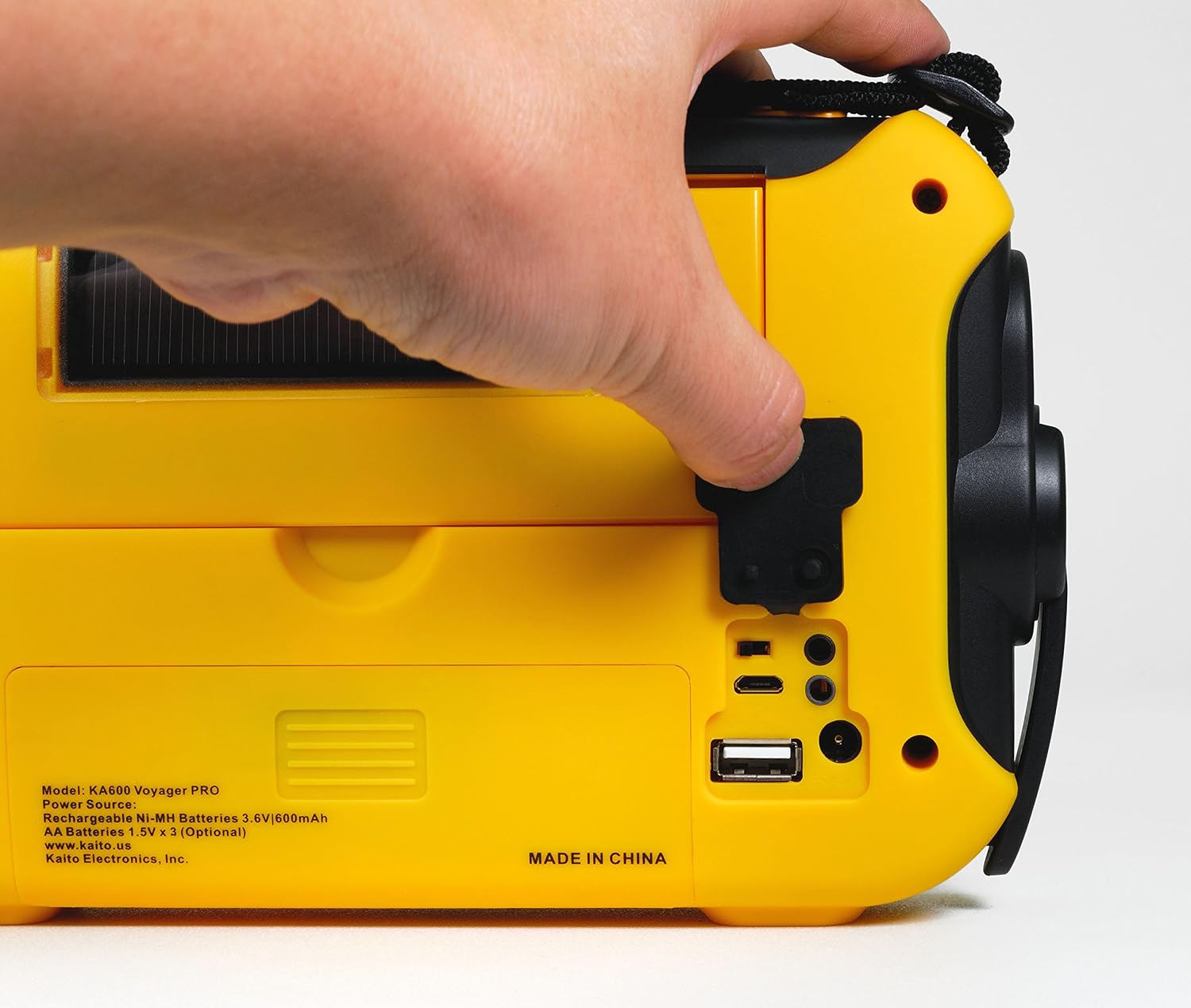
Figure 3: USB Output Port
This image highlights the USB output port on the side of the radio, used for charging external mobile devices.
6.6 Жарыктын өзгөчөлүктөрү
- 5-LED окуу Лamp: Flip up the solar panel to reveal the integrated reading lamp. Activate it using the designated button.
- LED фонарик: A powerful LED flashlight is integrated into the radio. Activate it using its dedicated button.
- Red LED S.O.S. Beacon Light: In emergencies, activate the S.O.S. beacon for signaling.

Figure 4: Reading Lamp and Solar Panel
This image shows the rear of the radio with the solar panel raised, exposing the 5-LED reading lamp жарыктандыруу үчүн.
7. Техникалык тейлөө
- Тазалоо: Радиону жумшак менен сүртүңүз, гamp кездеме. Абразивдүү тазалагычтарды же эриткичтерди колдонбоңуз.
- Батареяга кам көрүү: If storing the radio for an extended period, remove any non-rechargeable AA batteries to prevent leakage. Ensure the internal Ni-MH battery is charged periodically to maintain its lifespan.
- Сактагыч: Радиону салкын, кургак жерде, түз күндүн нурунан жана экстремалдык температурадан алыс сактаңыз.
8. Кыйынчылыктарды
| Көйгөй | Мүмкүн себеп | Чечим |
|---|---|---|
| Радио күйбөйт. | Low or depleted battery; incorrect power source selected. | Charge the internal battery via hand crank, solar, or USB. Insert fresh AA batteries. Ensure the power select switch is in the correct position. |
| Радио кабыл алуу начар. | Антенна узартылган эмес; сигнал начар; тоскоолдук бар. | Fully extend the telescopic antenna. Reposition the radio for better signal. Avoid sources of electronic interference. |
| Тышкы түзмөктү кубаттоого болбойт. | Radio battery too low; incompatible device; faulty cable. | Ensure the radio's internal battery is sufficiently charged. Verify device compatibility. Try a different USB cable. |
| NOAA Alert not activating. | Not on a NOAA channel; Alert mode not enabled; no active alerts. | Tune to a NOAA Weather channel. Ensure Alert mode is activated. Confirm there are active alerts in your area. |
9. Техникалык шарттар
- FM: 88 - 108 МГц
- AM (МВт): 520 - 1710 KHz
- LW (Longwave): 150 - 521 KHz
- SW (Shortwave): 2,300 - 23,000 KHz
- NOAA Аба ырайы: Channels 1 - 7
- Ички баяндамачы: Диаметри 66 мм
- Гарнитура уясы: 3.5 мм
- Аккумуляторлор: 3 Ni-MH batteries, 600mAh
- Өлчөмдөрү: 9.5 x 5.5 x 2.5 дюйм (24.13 x 13.97 x 6.35 см)
- Салмагы: 1 Lbs (0.45 кг)
- Байланыш: USB (тышкы түзмөктөрдү кубаттоо үчүн)
- Кубат булактары: Hand crank, solar panel, 3x AA batteries (not included), 5V USB input, 6V DC adapter (optional), internal Ni-MH battery.
10. Кепилдик жана колдоо
Your Kaito Voyager Pro KA600 radio comes with a warranty. Please refer to the included Warranty Card for details on coverage, terms, and how to register your product. For technical support or service inquiries, please visit the official Kaito webсайтка же кардарларды тейлөө бөлүмүнө кайрылыңыз.
Kaito Official Webсайт: www.kaito.us


