Introduction
This instruction manual provides detailed guidance for the safe and efficient use of your Lenco Xemio-768 Digital Media Player. Please read this manual thoroughly before operating the device and retain it for future reference.
The Lenco Xemio-768 is a versatile digital media player capable of playing MP3/MP4 files, displaying photos, reading e-books, and recording voice memos. It features Bluetooth connectivity for wireless audio and an expandable memory via Micro SD card.
Пакеттин мазмуну
- Lenco Xemio-768 Digital Media Player
- USB кабели
- Кулак ичиндеги наушниктер
- 8 ГБ Micro SD карта (алдын ала орнотулган же өзүнчө камтылган)
- Көрсөтмө (бул документ)
Түзмөк бүттүview
Familiarize yourself with the various parts and controls of your Xemio-768 player.
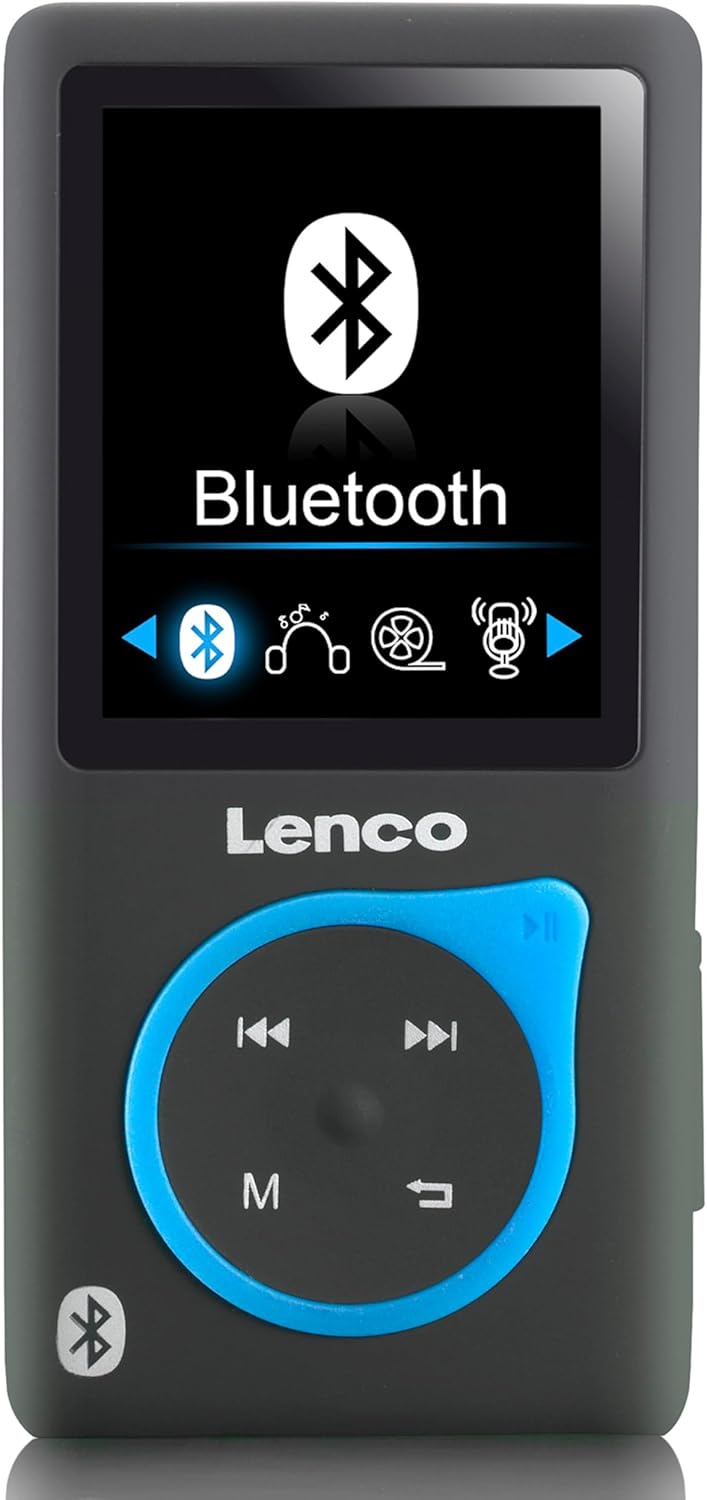
Сүрөт 1: Фронт view of the Lenco Xemio-768 Digital Media Player. The screen displays the Bluetooth menu option. Below the screen are the Lenco logo and a circular control pad with playback buttons (previous, next, play/pause) and a menu button (M). A Bluetooth symbol is also visible on the bottom left of the device.
Key Controls and Ports:
- 1.8 дюймдук TFT LCD экран: Displays menus, media, and settings.
- Башкаруу панели: Navigation and playback controls (Play/Pause, Next/Fast Forward, Previous/Rewind, Menu).
- Микро USB порту: Заряддоо жана маалыматтарды өткөрүү үчүн.
- Микро SD карта слоту: For memory expansion (supports up to 32GB).
- 3.5 мм кулакчын уячасы: Зымдуу кулакчын туташуусу үчүн.
- Камтылган микрофон: For voice recording.
Жайгашуу
1. Аппаратты заряддоо
- Connect the small end of the included USB cable to the Micro USB port on the player.
- Connect the larger end of the USB cable to a powered USB port on a computer or a USB wall adapter (not included).
- The battery indicator on the screen will show charging status. A full charge typically takes approximately 3 hours.
- Disconnect the USB cable once fully charged.
2. Micro SD картаны салуу (милдеттүү эмес)
The player comes with an 8GB Micro SD card. If you wish to expand the storage, you can replace it with a card up to 32GB.
- Ойноткучтун капталынан Micro SD карта уячасын табыңыз.
- Gently insert the Micro SD card with the gold contacts facing down until it clicks into place.
- Чыгаруу үчүн картаны чыкылдагыча акырын түртүңүз, анан коё бериңиз, ошондо ал чыгып калат.
3. Наушниктерди туташтыруу
- Зымдуу кулакчындар: Plug the 3.5 mm jack of the included in-ear headphones (or your own compatible headphones) into the headphone port on the player.
- Bluetooth Headphones/Speakers: Refer to the "Bluetooth Connectivity" section under Operating for wireless connection instructions.
4. өткөрүп берүү Files
- USB кабелин колдонуп, ойноткучту компьютериңизге туташтырыңыз.
- Ойноткуч компьютериңизде алынуучу диск катары көрсөтүлөт.
- Drag and drop your desired music (MP3, WMA), videos (AMV, AVI), photos (JPG, BMP, GIF), or e-books (TXT) into the appropriate folders on the player's internal memory or Micro SD card.
- Бир жолу files are transferred, safely eject the removable disk from your computer before disconnecting the USB cable.
Иштөө нускамалары
Күйгүзүү/өчүрүү
- To power on, press and hold the Power button (usually on the side) until the screen lights up.
- Өчүрүү үчүн, түзмөк өчмөйүнчө Кубат баскычын басып, кармап туруңуз.
Меню Багыттоо
- Use the directional buttons on the control pad to navigate through menu options.
- Press the central button (often Play/Pause) to select an option.
- Press the 'M' (Menu) button to go back to the previous menu or to access context-sensitive options during playback.
Музыканы ойнотуу
- Негизги менюдан "Музыка" бөлүмүн тандаңыз.
- Browse through your folders and files to find the desired track.
- Press the central button to play the selected track.
- колдонуу Мурунку жана Кийинки тректерди өткөрүп жиберүү үчүн баскычтар.
- Press the central button again to pause/resume playback.
Video ойнотуу
- Негизги менюдан "Видео" бөлүмүн тандаңыз.
- Видеоңузга өтүңүз files (AMV, AVI format).
- Select a video to begin playback.
Сүрөт Viewer
- From the main menu, select "Photos".
- Browse your image files (JPG, BMP, GIF format).
- Сүрөттү тандаңыз view ал.
E-book Reader
- From the main menu, select "E-book".
- Navigate to your text files (TXT format).
- а тандаңыз file ачып, окуу үчүн.
Үн жаздыруу
- From the main menu, select "Recorder" or "Voice Memo".
- Select "Start Recording" to begin.
- Press the central button to stop recording.
- Recordings are saved and can be accessed from the "Recordings" menu.
Bluetooth байланышы
- Ensure your Bluetooth headphones or speaker are in pairing mode. Refer to their respective manuals for instructions.
- On the Xemio-768, navigate to the "Bluetooth" menu.
- тандоо "Издөө Devices" or "Pair New Device".
- Once your device appears in the list, select it to initiate pairing.
- Суралса, эки түзмөктө тең жупташууну ырастаңыз.
- Once connected, audio will be routed wirelessly to your Bluetooth device.
Техникалык тейлөө
Тазалоо
- Use a soft, dry, lint-free cloth to clean the device's exterior.
- Абразивдүү тазалагычтарды, спиртти же эриткичтерди колдонбоңуз, алар бетке зыян келтириши мүмкүн.
- Ар кандай тешиктерге ным кирүүдөн сактаңыз.
Батареяга кам көрүү
- Батареянын иштөө мөөнөтүн узартуу үчүн, бат-баттан батарейканы толук зарядсыздандырбаңыз.
- Аппаратты узак убакыт бою колдонбосо дагы, үзгүлтүксүз заряддаңыз.
- Аппаратты түз күн нурунан жана экстремалдык температурадан алыс салкын, кургак жерде сактаңыз.
Проблемаларды чечүү
| Көйгөй | Мүмкүн себеп | Чечим |
|---|---|---|
| Түзмөк күйбөй жатат. | Батарея түгөнүп калды. | Берилген USB кабели аркылуу аппаратты заряддаңыз. |
| Bluetooth аркылуу туташуу мүмкүн эмес. | Bluetooth device not in pairing mode; interference; device out of range. | Ensure your Bluetooth headphones/speaker are in pairing mode. Move closer to the player. Try restarting both devices. |
| Files are not recognized or played. | Туура эмес file форматтоо; бузулган file; Micro SD card issue. | камсыз кылуу files are in supported formats (MP3, WMA, AMV, AVI, JPG, BMP, GIF, TXT). Check if the Micro SD card is properly inserted or try another card. |
| Наушниктен үн чыкпайт. | Headphones not properly connected; volume too low; corrupted audio file. | Check headphone connection. Increase volume. Test with different headphones or audio files. |
Техникалык шарттар
- Модел: Xemio-768
- Дисплей: 1.8 дюймдук TFT LCD
- Ички эстутум: 8 GB (via Micro SD card)
- Кеңейтүүчү эстутум: 32 ГБ чейин (Micro SD карта)
- Колдоого алынган аудио форматтары: MP3, WMA
- Колдоого алынган видео форматтары: AMV, AVI
- Колдоого алынган сүрөт форматтары: JPG, BMP, GIF
- Колдоого алынган электрондук китеп форматы: TXT
- Байланыш: Bluetooth, Micro USB
- Гарнитура уячасы: 3.5 мм
- Батарея түрү: Литий полимери
- Батареянын иштөө мөөнөтү: Approximately 3 hours (playback)
- Өлчөмдөрү: 0.09 x 4.15 x 8.5 см
- Салмагы: 28.5 г
Кепилдик жана колдоо
For warranty information and technical support, please refer to the warranty card included with your product or visit the official Lenco webсайт. Ар кандай кепилдик дооматтары үчүн сатып алганыңыздын далилин сактаңыз.


