Introduction
This manual provides detailed instructions for the proper setup, operation, and maintenance of your Technical Pro RX45BT Home Theater Receiver and Rockville REQ20 Graphic Equalizer. Please read this manual thoroughly before using the products to ensure optimal performance and safety.
Маанилүү коопсуздук нускамалары
Always follow basic safety precautions when using electronic equipment to reduce the risk of fire, electric shock, and injury.
- Бул шайманды жамгырга же нымга тийгизбеңиз.
- капкакты алып салбаңыз. Ичинде колдонуучу тейлей турган бөлүктөр жок. Тейлөө боюнча квалификациялуу кызматкерлерге кайрылыңыз.
- Туура желдетүүнү камсыз кылыңыз. Вентиляция тешиктерин жаап албаңыз.
- Жерге туташтырылган AC розеткага гана туташтырыңыз.
- Электр шнурын басуудан же кысып калуудан сактаңыз.
- Чагылган бороондо же узак убакыт бою колдонбогондо, розеткадан ажыратыңыз.
- Do not operate near heat sources such as radiators, heat registers, stoves, or other apparatus that produce heat.
Пакеттин мазмуну
Баардык буюмдар пакетиңизге камтылганын текшериңиз:
- Technical Pro RX45BT Home Theater Receiver
- Rockville REQ20 19" Rack Mount Pro Dual 10 Band Graphic Equalizer
- Remote Control for RX45BT
- Power Cable for REQ20
- Rack Mount Brackets for REQ20 (2 pcs)
- Mounting Screws for Brackets
Technical Pro RX45BT Receiver Overview
Алдыңкы панелдин башкаруу элементтери жана өзгөчөлүктөрү
The front panel of the RX45BT receiver provides access to various controls and input options.

Сүрөт: алдыңкы view of the Technical Pro RX45BT Home Theater Receiver, showing the main display, input selection buttons, microphone volume, master volume, and various tone controls. The included remote control is also visible next to the receiver.

Сүрөт: бурчтуу алдыңкы view of the Technical Pro RX45BT Home Theater Receiver, highlighting the illuminated blue display and control knobs.
- Кубат баскычы: Агрегатты күйгүзөт же өчүрөт.
- Микрофондун үнү: Adjusts the volume for connected microphones.
- Негизги том: Жалпы чыгаруу көлөмүн көзөмөлдөйт.
- Киргизүү тандоочулары: Buttons for Tuner, DVD, AUX/MP3, SD/USB, Bluetooth.
- Дисплей: Digital fluorescent output display meter showing current status and audio levels.
- Echo, Mic Treble, Mic Bass: Controls for microphone effects and tone.
- Bass, Treble, Balance: Tone controls for main audio output.
- MIC1, MIC2 Inputs: 1/4" microphone input jacks.
- USB порт: USB флэш-дисктерди туташтыруу үчүн.
- SD карта уячасы: For inserting SD cards.
- Гарнитуранын чыгышы: 1/8'' jack for headphones.
Арткы панелдик байланыштар
The rear panel provides all necessary audio input and output connections, along with power input.
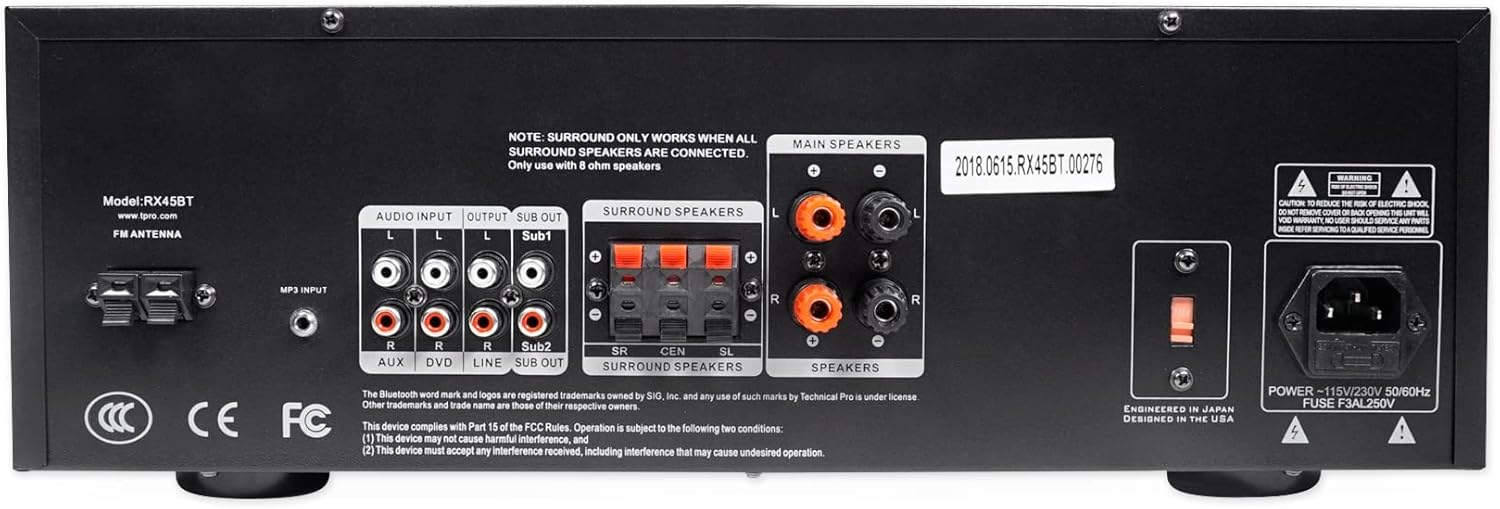
Сүрөт: Арткы view of the Technical Pro RX45BT Home Theater Receiver, showing RCA audio inputs (AUX, DVD), audio outputs (Line Out, Sub Out), speaker terminals (Main, Surround), FM antenna input, and power input with voltage селектор.
- FM АНТЕННА: FM антеннасын туташтыруу.
- АУДО КИРГИЗҮҮ (RCA): Two sets of RCA inputs for audio sources (AUX, DVD).
- OUTPUT (RCA): Line Out and two Mono RCA Subwoofer Outputs (Sub1, Sub2).
- АЙРАН ДИПИКЕРЛЕР: Push-button terminals for surround speakers. Note: Surround sound only works when all surround speakers are connected and only with 8 ohm speakers.
- НЕГИЗГИ СПИКЕРЛЕР: Banana binding post terminals for main speakers.
- КҮЧ КИРГИЗҮҮ: AC power inlet with voltage селектор (110/220V).
Rockville REQ20 Graphic Equalizer Overview
The Rockville REQ20 is a dual 10-band graphic equalizer designed to fine-tune your audio system's frequency response.
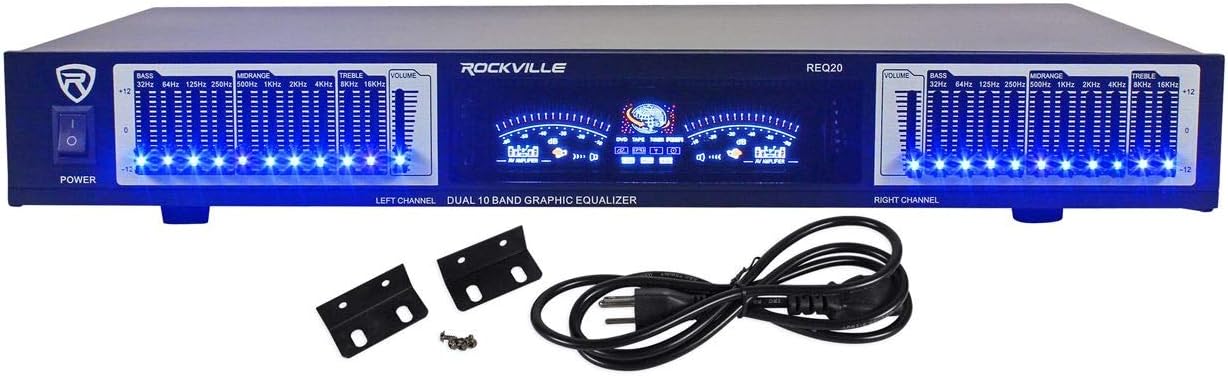
Сүрөт: алдыңкы view of the Rockville REQ20 19" Rack Mount Pro Dual 10 Band Graphic Equalizer, featuring blue LED illuminated slide controls for each frequency band, dual VU meters, and power switch.

Image: The Rockville REQ20 Graphic Equalizer shown with its included rack mount brackets and power cable.
- Кубат которгучу: Агрегатты күйгүзөт же өчүрөт.
- Equalizer Slide Controls: Dual 10-band controls (20 bands total) with blue LEDs for adjusting specific frequency ranges (e.g., 32Hz, 64Hz, 125Hz, 250Hz, 500Hz, 1KHz, 2KHz, 4KHz, 8KHz, 16KHz).
- VU метрлер: Dual meters to monitor left and right channel audio levels.
- Volume Gain Control: Separate left/right channel volume gain controls.
- RCA линиясын киргизүү: Stereo RCA input for connecting audio sources.
- RCA линиясынын чыгышы: Stereo RCA output for connecting to an ampкөтөргүч же кабыл алгыч.
- RCA Line Output for Record: Additional stereo RCA output for recording purposes.
Орнотуу нускамалары
Follow these steps to properly set up your Technical Pro RX45BT Receiver and Rockville REQ20 Equalizer.
1. Жайгаштыруу
- Place the receiver and equalizer on a stable, flat surface with adequate ventilation.
- Ensure there is enough space around the units for proper airflow to prevent overheating.
- The REQ20 is designed for 19" rack mounting. Use the included brackets and screws if rack mounting.
2. Connecting Speakers to RX45BT
Connect your speakers to the appropriate terminals on the rear panel of the RX45BT receiver.
- Негизги баяндамачылар: Use banana plugs or bare wire to connect your main left and right speakers to the "MAIN SPEAKERS" binding posts. Ensure correct polarity (+ to + and - to -).
- Көлөмдүү динамиктер: Connect your surround speakers to the "SURROUND SPEAKERS" push-button terminals. Note that surround sound functionality requires all surround speakers to be connected and they must be 8 ohm speakers.
3. Connecting Audio Sources to RX45BT
Connect your external audio devices to the RCA input jacks on the rear panel.
- Use RCA cables to connect devices like DVD players, CD players, or other audio sources to the "DVD" or "AUX" input jacks.
- For MP3 players or other devices with a 3.5mm output, use an appropriate adapter cable to connect to the "AUX/MP3" input on the front panel.
4. Connecting the Rockville REQ20 Equalizer
To integrate the REQ20 equalizer into your audio system, connect it between your audio source and the RX45BT receiver, or between the receiver's line out and an external amplifier if you are using one.
Typical Connection (Equalizer between source and receiver):
- Connect your audio source (e.g., CD player) to the "RCA Line Input" of the REQ20 using RCA cables.
- Connect the "RCA Line Output" of the REQ20 to one of the "AUDIO INPUT" (e.g., DVD or AUX) jacks on the rear of the RX45BT receiver using RCA cables.
Alternative Connection (Equalizer in a tape loop or processor loop, if available on your receiver):
If your receiver has a dedicated processor loop or tape monitor loop, you can connect the equalizer there. The RX45BT has a "Line Out" which can be used to feed an external amplifier, but not a dedicated processor loop for an equalizer to be inserted directly into the main signal path for all inputs. The recommended method is to place it between a specific source and the receiver.
5. Power Connection
- Ensure both the RX45BT and REQ20 are switched off.
- Connect the power cords of both units to a standard AC power outlet.
- Томду ырастаңызtage selector on the RX45BT rear panel is set correctly for your region (110V or 220V).
Operating Instructions - RX45BT Receiver
1. Негизги операция
- басыңыз Күч button to turn on the receiver.
- Select your desired audio source using the Киргизүү тандагыч buttons on the front panel (Tuner, DVD, AUX/MP3, SD/USB, Bluetooth).
- жардамы менен жалпы үндү тууралаңыз Башкы том баскыч.
- колдонуу Бас, Үч эсе, жана Баланс controls to fine-tune the audio output.
2. Bluetooth Жупташтыруу
- басыңыз Bluetooth input selector button on the front panel. The display will indicate "Bluetooth" or a pairing mode.
- Мобилдик түзмөгүңүздө Bluetooth'ду иштетиңиз (смартфон, планшет ж.б.).
- Издөө available devices and select "RX45BT" from the list.
- Жупташтырылгандан кийин, сиз түзмөгүңүздөн аудиону кабыл алгычка агылта аласыз.
3. USB/SD Card Playback & Recording
The RX45BT supports playback of .mp3, .wav, and .wma files from USB drives and SD cards (up to 32GB).
Ойнотуу:
- Insert a USB flash drive or SD card into the respective slot on the front panel.
- тандаңыз SD / USB input. The unit will automatically begin playing compatible audio files.
- Use the playback controls (Repeat/Random) on the unit or remote.
Жаздыруу:
The unit can record .wav files (128 kbps / 32 KHz sampling rate) onto a USB Flash Drive or SD Card from the Tuner or RCA inputs.
- USB флеш-диск же SD картаны салыңыз.
- Select the desired input source (Tuner or an RCA input like DVD/AUX).
- басыңыз Жаздыруу button (if available on the unit or remote) to start recording. Press again to stop.
4. Микрофонду башкаруу элементтери
Connect up to two microphones to the MIC1 and MIC2 1/4" input jacks on the front panel.
- Микрофондун үнүн төмөнкү аркылуу тууралаңыз Микрофондун үнү баскыч.
- Apply echo effect using the Эхо контролдоо.
- Adjust microphone tone with Микрофон Treble жана Микрофон бас башкаруу элементтери.
5. FM тюнеринин иштеши
Connect the FM antenna to the rear panel for optimal reception.
- тандаңыз тюнер киргизүү.
- Use the manual tuning controls (or remote) to find desired FM radio stations.
6. Алыстан башкаруу
The included remote control provides convenient access to most receiver functions from a distance.
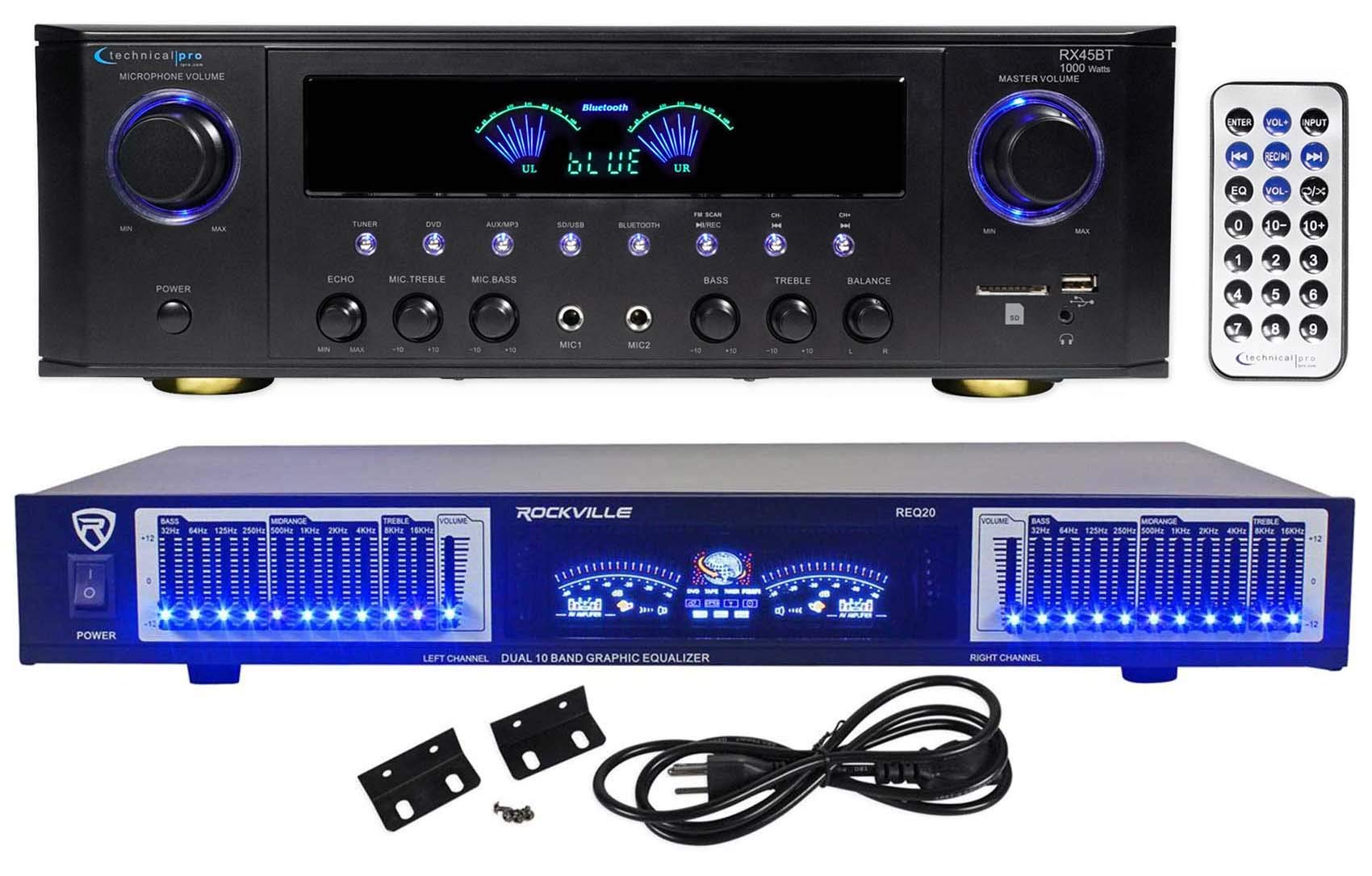
Image: Close-up of the Technical Pro RX45BT remote control, showing buttons for power, input selection, volume, EQ, number pad, and playback controls.
Refer to the button labels on the remote for specific functions such as input selection, volume adjustment, EQ presets, and media playback controls.
Operating Instructions - REQ20 Equalizer
1. Equalizer Controls
The REQ20 features dual 10-band graphic equalization for precise audio shaping.
- Use the individual slide controls for each frequency band (32Hz to 16KHz) to boost or cut specific frequencies.
- Adjust the left and right channels independently for stereo equalization.
- The blue LEDs on each slider indicate the active status.
2. VU Meters
The dual VU meters provide a visual representation of the audio signal level for both the left and right channels.
- Monitor the meters to ensure your audio levels are not clipping (too high) or too low.
- Adjust the separate Left/Right Channel Volume gain controls to optimize signal levels.
Техникалык тейлөө
- Тазалоо: Түзмөктөрдүн сыртын тазалоо үчүн жумшак, кургак чүпүрөктү колдонуңуз. Суюк тазалоочу каражаттарды же аэрозольдорду колдонбоңуз.
- Вентиляция: Желдетүү тешиктери чаңдан жана таштандылардан тазаланганын текшериңиз.
- Сактагыч: If storing the units for an extended period, disconnect them from power and store in a cool, dry place.
Проблемаларды чечүү
| Көйгөй | Мүмкүн себеп | Чечим |
|---|---|---|
| Күч жок | Электр шнуру туташтырылган эмес; Розетка бузулган; Voltage selector incorrect (RX45BT). | Check power cord connection; Try a different outlet; Verify RX45BT voltage селектор орнотуу. |
| Динамиктерден үн жок | Incorrect input selected; Speaker wires loose or incorrectly connected; Volume too low; Mute activated. | Select correct input; Check speaker connections and polarity; Increase Master Volume; Deactivate Mute. |
| Bluetooth жупташкан жок | RX45BT not in Bluetooth mode; Device too far; Device already paired with another unit. | Ensure RX45BT is in Bluetooth mode; Move device closer; Disconnect from other devices and try again. |
| USB/SD карта ойнотулбай жатат | Колдоого алынбайт file format; Card/drive not inserted correctly; Card/drive capacity too large. | камсыз кылуу files are .mp3, .wav, or .wma; Reinsert card/drive; Use card/drive up to 32GB. |
| Equalizer has no effect | REQ20 not powered on; Incorrect connection; EQ sliders at neutral position. | Ensure REQ20 is powered on; Verify RCA connections between source/receiver and REQ20; Adjust EQ sliders. |
Техникалык шарттар
Technical Pro RX45BT Home Theater Receiver
- Чыгуу кубаттуулугу: 150 watts RMS (both channels driven @ 1.0% THD @ 8 ohms), 1000 watts peak power
- Киргизүүлөр: RCA (2 audio sources), USB, SD Card, MP3 (AUX)
- Чыгуулары: Banana binding post (2 speakers), Push Button (surround speakers), RCA (Line Out), 2 Mono RCA (Subwoofer Out)
- USB & SD Card Max Size: 32 ГБ
- Колдоого алынган File Түрлөрү: .mp3, .wav, .wma
- Жаздыруу форматы: .wav (128 kbps / 32 KHz sampлинг чен)
- Жыштык жообу: 20Гц-20КГц
- Башкаруу каражаттары: Bass, Treble, Balance, Dual Mic Inputs with Volume, Echo, Tone
- тюнер: FM manual tuner
- Гарнитуранын чыгышы: 1/8''
- Тtage: 110/220v Switchable
- Өлчөмдөрү (Продукт): 16.9" L x 11.3" W x 5.8" H
- Weight (Unit): 9.26 фунт
Rockville REQ20 Graphic Equalizer
- Түрү: Dual 10 Band Graphic Equalizer (20 Bands Total)
- Жыштык жообу: 20Гц - 20КГц
- Башкаруу каражаттары: Blue LED on each Equalizer Slide Control, Separate Left/Right Channel Volume gain control
- Дисплей: Dual VU Meters Level Monitor, Vacuum Fluorescent Display
- Киргизүүлөр: Stereo RCA Line Input
- Чыгуулары: Stereo RCA Line Output, Stereo RCA Line Output for Record
- Сигнал ызы-чуу катышы: >88дБ
- Киргизүү күчү: AC ~ 110V 60Hz / 220V 50Hz (Switchable)
- Өлчөмдөрү: 19" (rack mountable)
- Болжолдуу салмак: 7.3 фунт
Кепилдик жана колдоо
Кепилдик жөнүндө маалымат жана техникалык колдоо алуу үчүн, өндүрүүчүнүн расмий өкүлүнө кайрылыңыз webсайтка же кардарларды тейлөө бөлүмүнө кайрылыңыз. Сатып алганыңыздын далили катары сатып алуу дүмүрчөгүңүздү сактаңыз.
Өндүрүүчү: Technical Pro
Модель номери: RX45BT+REQ20


