1. Киришүү
This manual provides essential information for the setup, operation, maintenance, and troubleshooting of your HP Elitebook 840 G1 laptop. Please read this manual thoroughly to ensure proper use and longevity of your device.

Image 1.1: HP Elitebook 840 G1 Laptop
The HP Elitebook 840 G1 is a 14-inch high-performance laptop featuring an Intel Core i5-4300U processor, 8GB of memory, and a 1TB HDD, running Windows 10 Professional. It is designed for productivity and includes various connectivity options.
2. Кутуда эмне бар
Upon unpacking your HP Elitebook 840 G1, verify that all the following items are present:
- HP Elitebook 840 G1 Laptop
- AC кубат адаптери
- Battery (may be pre-installed)
- Документтер (бул колдонмо жана башка колдонмолор)

Image 2.1: AC Power Adapter
3. Орнотуу
3.1 Initial Power-on and Charging
- Connect the AC power adapter to the laptop's power port and then to a wall outlet.
- Ноутбукту күйгүзүү үчүн клавиатуранын жогорку оң бурчунда жайгашкан кубат баскычын басыңыз.
- Follow the on-screen instructions to complete the initial Windows 10 Professional setup, including language, region, and user account creation.
3.2 Перифериялык түзүлүштөрдү туташтыруу
The HP Elitebook 840 G1 offers various ports for connecting external devices:
- USB 3.0 Ports (4x): For connecting USB devices such as external hard drives, keyboards, and mice.
- VGA порту (1x): For connecting to older external monitors or projectors.
- DisplayPort (1x): For connecting to modern external monitors or TVs.
- RJ-45 (Ethernet) Port (1x): Зымдуу тармак туташуусу үчүн.
- Headphone-out/Microphone-in Combo Jack (1x): For connecting headphones or an external microphone.
- Multi-Format Digital Media Card Reader: For inserting SD, SDHC, or SDXC memory cards.

Image 3.1: Left Side Ports
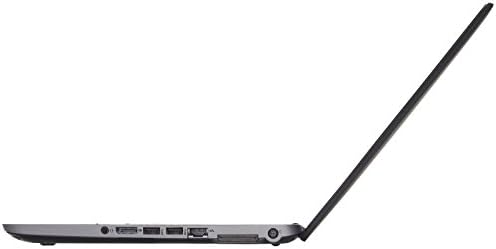
Image 3.2: Right Side Ports
3.3 Тармактык туташуу
- Wi-Fi: Зымсыз тармакка туташуу үчүн, тапшырмалар тилкесиндеги Wi-Fi сөлөкөтүн чыкылдатып, тармакты тандап, керек болсо сырсөздү киргизиңиз.
- Ethernet: Роутериңизден же модемиңизден Ethernet кабелин ноутбуктун RJ-45 портуна туташтырыңыз.
4. Иштөө нускамалары
4.1 Электр энергиясын башкаруу
- Күйгүзүү: Кубат баскычын басыңыз.
- Өчүрүү: Баштоо баскычын чыкылдатып, андан кийин Кубат > Өчүрүү.
- Уйку: "Старт" баскычын, андан кийин "Күчүн" > "Уйку" режимин чыкылдатыңыз же ноутбуктун капкагын жабыңыз.
- Кайра баштоо: Баштоо баскычын чыкылдатып, андан кийин Кубат > Кайра иштетүү.
4.2 Баскычтоп жана сенсордук такта
The laptop features a full-size keyboard and a multi-touch touchpad for navigation.

Image 4.1: Keyboard and Touchpad Layout
- Сенсордук такта жаңсоолору: Ыңгайлаштырылуучу көп тийүү жаңсоолору үчүн Windows жөндөөлөрүн караңыз (мисалы, эки манжа менен жылдыруу, чоңойтуу үчүн чымчып көрүү).
- Функция баскычтары (Fn): Use the 'Fn' key in combination with the F1-F12 keys for special functions like adjusting brightness, volume, or enabling/disabling Wi-Fi.
4.3 Дисплей жана аудио
- Жарыктыкты жөндөө: Use the dedicated function keys (e.g., Fn + F2/F3) or Windows display settings.
- Үндү көзөмөлдөө: Use the dedicated function keys (e.g., Fn + F6/F7/F8) or the volume icon in the Windows taskbar.
- Тышкы дисплей: Connect an external monitor to the VGA or DisplayPort. Press Windows баскычы + P to select display mode (Duplicate, Extend, Second screen only).
5. Техникалык тейлөө
5.1 Ноутбукту тазалоо
- Бир аз жумшак, түксүз кездемени колдонуңуз dampдисплей үчүн суу же экран тазалоочу менен жабылган.
- Баскычтоп жана шасси үчүн жумшак кездеме колдонуңуз. Катуу химиялык заттардан алыс болуңуз.
- Periodically clean the vents to prevent dust buildup, which can affect cooling.
5.2 Батареяга кам көрүү
- Батареяны бат-баттан толук кубаттап калуудан алыс болуңуз.
- Ноутбукту узак убакытка колдонбогондо салкын, кургак жерде сактаңыз.
- If the laptop will not be used for a long time, charge the battery to about 50% before storage.
5.3 Программалык камсыздоо жаңыртуулары
Оптималдуу аткарууну жана коопсуздукту камсыз кылуу үчүн Windows операциялык тутумуңузду жана драйверлерди дайыма жаңыртып туруңуз. Орнотуулар менюсу аркылуу Windows Update'ке кириңиз.
6. Кыйынчылыктарды
This section addresses common issues you might encounter with your HP Elitebook 840 G1.
6.1 Ноутбук күйбөй жатат
- AC адаптери ноутбукка да, иштеген электр розеткасына да бекем туташып турганын текшериңиз.
- Башка аспапка сайып, розетка иштеп жатканын текшериңиз.
- If the battery is removable, try removing it, connecting the AC adapter, and then powering on.
6.2 Wi-Fi байланышы жок
- Check if Wi-Fi is enabled via the function keys or Windows settings.
- Роутериңизди жана модемиңизди өчүрүп күйгүзүңүз.
- Ensure you are selecting the correct Wi-Fi network and entering the correct password.
6.3 Дисплей маселелери
- If the screen is blank, try connecting an external monitor to check if the issue is with the laptop's internal display.
- Функционалдык баскычтарды колдонуп, экрандын жарыктыгын тууралаңыз.
- Update graphics drivers through Windows Update or HP's support webсайт.
6.4 Жай аткаруу
- Фондо иштеп жаткан керексиз тиркемелерди жабыңыз.
- Дискти тазалоону жана дефрагментациялоону иштетиңиз (HDD үчүн).
- Кесепеттүү программаларды же вирустарды текшериңиз.
- Windows жана драйверлер жаңыртылганын текшериңиз.
7. Техникалык шарттар
Key technical specifications for the HP Elitebook 840 G1 laptop:
| Процессор | Intel Core i5-4300U (1.9GHz, up to 2.9GHz Turbo) |
| Эстутум (RAM) | 8 ГБ DDR3 SDRAM |
| Сактагыч | 1TB HDD |
| Дисплей | 14-inch HD (1366 x 768) LED-backlit |
| Графика | Intel HD Graphics 4400 (Интеграцияланган) |
| Операция системасы | Windows 10 Professional (64-бит) |
| Зымсыз байланыш | 802.11ac (1x1) Wi-Fi, Bluetooth |
| Порттар | 4x USB 3.0, 1x VGA, 1x DisplayPort, 1x RJ-45, 1x Headphone/Mic Combo, 1x Media Card Reader |
| Webcam | HP TrueVision HD Webcam |
| Өлчөмдөр (HxWxL) | 0.8" x 13.3" x 9.3" (2.03 см x 33.78 см x 23.62 см) |
| Салмагы | 3.68 фунт (1.67 кг) |
8. Кепилдик жана колдоо
This product is a Certified Refurbished item. It has been tested and certified to function like new. The refurbishing process includes functionality testing, basic cleaning, inspection, and repackaging. The product ships with all relevant accessories and includes a minimum 90-day warranty.
For technical support or warranty claims, please refer to the documentation provided with your purchase or contact the seller directly. Ensure you have your purchase details and product model number available when seeking support.