1. Киришүү
Сатып алганыңыз үчүн рахматasing the CAIWEI A8AB-NEW Video Projector. This manual provides essential information for the safe and efficient operation of your device. Please read it thoroughly before use and retain it for future reference.
2. Коопсуздук нускамалары
- l болгондо проектордун объективине тике карабаamp күйүк.
- Ашыкча ысып кетүүнүн алдын алуу үчүн проектордун айланасында туура желдетүүнү камсыз кылыңыз.
- Проекторду жамгырга же нымдуулукка дуушар кылбаңыз.
- Проектор менен кошо берилген кубат адаптерин гана колдонуңуз.
- Keep the projector away from flammable materials.
- Чагылган бороондордо же көпкө колдонулбаганда проекторду электр розеткасынан ажыратыңыз.
- Проекторду өз алдынча оңдоого аракет кылбаңыз. Бардык тейлөө иштерин квалификациялуу адистерге тапшырыңыз.
3. Пакеттин мазмуну
Таңгактан чыгарганда бардык буюмдардын бар экенин текшериңиз:
- CAIWEI A8AB-NEW Video Projector
- Электр кабели
- Алыстан башкаруу
- HDMI кабели
- VGA кабели
- AV Cable
- User Manual
4. Продукт бүтүп калдыview
Familiarize yourself with the projector's components:
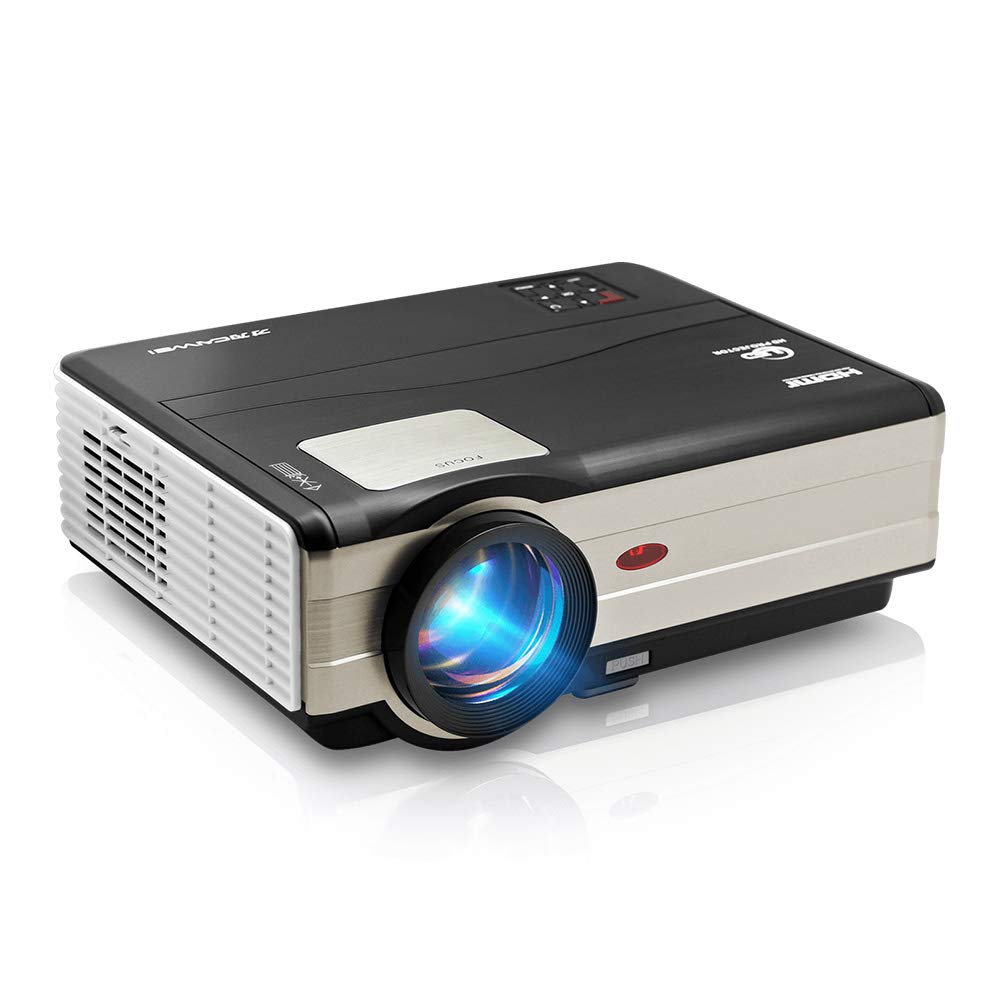
1-сүрөт: Фронт view of the CAIWEI A8AB-NEW Video Projector, showing the lens and ventilation.
Front Panel
- Проекциялык линза: Сүрөттү чыгарат.
- Фокус шакеги: Сүрөттүн тунуктугун тууралайт.
- Негизги ташты оңдоо: Трапеция сымал сүрөттүн бурмаланышын оңдойт.
Арткы панель
- Электр порту: Электр кабелине туташтырылат.
- HDMI порттору (x2): Connects to HDMI-enabled devices (e.g., Blu-ray player, game console).
- USB порттору (x2): Connects to USB storage devices or other USB peripherals.
- VGA порту: Connects to computers or laptops with VGA output.
- AV порт: Connects to older devices using composite video and stereo audio.
- Аудио чыгышы (3.5 мм): Тышкы динамиктерге же кулакчындарга туташат.
5. Орнотуу
5.1 Орнотуу
Place the projector on a stable, flat surface or mount it to a ceiling. Ensure the projector is perpendicular to the projection screen or wall. The optimal projection distance varies, but generally, a larger distance yields a larger image.
5.2 Кубат туташтыруу
- Электр кабелин проектордун электр портуна туташтырыңыз.
- Электр кабелинин экинчи учун розеткага сайыңыз.
- Кубат индикаторунун жарыгы күйөт.
5.3 Киргизүү түзүлүштөрүн туташтыруу
Проектор ар кандай киргизүү булактарын колдойт:
- HDMI: Connect an HDMI cable from your device (e.g., laptop, game console, streaming stick) to one of the projector's HDMI ports.
- USB: Медиа файлдарды ойнотуу үчүн USB флеш-дискти USB портуна салыңыз fileтүздөн-түз с.
- VGA: Компьютериңизден VGA кабелин проектордун VGA портуна туташтырыңыз.
- OF: Use the provided AV cable to connect to devices with composite video output.
- Зымсыз (WiFi): For screen mirroring from smartphones or tablets, navigate to the 'Wireless Display' or 'Screen Mirroring' option in the projector's menu and follow the on-screen instructions. Ensure your device and the projector are on the same Wi-Fi network.
- Bluetooth: To connect external Bluetooth speakers, go to the Bluetooth settings in the projector's menu, enable Bluetooth, and pair with your desired audio device.
5.4 Фокусту жана Keystone жөндөөсүн
- Проекторду күйгүзүңүз жана сүрөттү көрсөтүңүз.
- айлантыңыз Фокус шакеги on the lens until the image appears sharp and clear.
- If the image is trapezoidal (wider at the top or bottom), adjust the Keystone Correction dial or setting until the image is rectangular.
6. Иштөө нускамалары
6.1 Күйгүзүү/өчүрүү
- Күйгүзүү: Проектордун же пульттун кубат баскычын басыңыз.
- Өчүрүү: Кубат баскычын кайра басыңыз. Суралса, өчүрүүнү ырастаңыз.
6.2 Меню Навигациясы
Use the navigation buttons (Up, Down, Left, Right, OK) on the projector or remote control to browse the on-screen menu. The 'Menu' button typically opens the main settings, and 'Exit' or 'Back' closes sub-menus.
6.3 Киргизүү булагын тандоо
Press the 'Source' or 'Input' button on the remote control or projector. A list of available input sources (HDMI1, HDMI2, USB1, USB2, VGA, AV, Wireless Display) will appear. Select the desired source using the navigation buttons and press 'OK'.
6.4 Аудио орнотуулары
Access the audio settings through the main menu to adjust volume, select audio output (internal speaker, external via 3.5mm jack, or Bluetooth), and modify sound modes.
6.5 Wireless/Bluetooth Connection
Refer to section 5.3 for detailed instructions on connecting via Wi-Fi for screen mirroring or Bluetooth for audio output.
7. Техникалык тейлөө
7.1 Линзаны тазалоо
Use a soft, lint-free cloth specifically designed for optical lenses. Gently wipe the lens surface. Avoid using abrasive cleaners or excessive force, which can scratch the lens.
7.2 Cleaning the Air Filter/Vents
Regularly check the air intake and exhaust vents for dust accumulation. Use a soft brush or a can of compressed air to gently clean the vents. This helps maintain proper airflow and prevents overheating.
7.3 Сактоо
When not in use, store the projector in a cool, dry, and dust-free environment. Use the original packaging or a protective case to prevent damage.
8. Кыйынчылыктарды
| Көйгөй | Мүмкүн себеп | Чечим |
|---|---|---|
| Экранда сүрөт жок | Power not connected; Incorrect input source; Device not powered on. | Check power cable; Select correct input source; Ensure connected device is on. |
| Сүрөт бүдөмүк | Фокус туураланган эмес; Проектор өтө алыс/жакын. | Adjust the focus ring; Reposition the projector. |
| Сүрөт трапеция түрүндө | Keystone туураланган эмес. | Негизги таштын оңдоосун тууралаңыз. |
| Үн жок | Volume too low; Muted; Incorrect audio output; Cable issue. | Increase volume; Unmute; Check audio settings; Verify cable connections. |
| Пульт иштебей жатат | Batteries dead; Obstruction; Out of range. | Replace batteries; Remove obstructions; Ensure line of sight to IR receiver. |
| Ашыкча ысып кетүү эскертүүсү | Blocked vents; Poor ventilation. | Clear vents; Ensure adequate space around projector. |
9. Техникалык шарттар
- Модел: A8AB-NEW
- Бренд: CAIWEI
- Дисплейдин чечилиши: 1280 x 800
- Байланыш технологиясы: Bluetooth, HDMI, USB, VGA, Wireless
- Өзгөчөлүктөр: Built-In Wi-Fi, Portable, Wireless
- Сунушталган колдонуулар: Оюн, үй кинотеатры
- Элемент Салмагы: 6.1 фунт
- Продукциянын өлчөмдөрү: 11.2 x 14.7 x 5 дюйм
10. Кепилдик жана колдоо
CAIWEI products are designed for reliability and performance. For specific warranty details, please refer to the warranty card included with your purchase or contact CAIWEI customer support. If you encounter any issues not covered in this manual, please reach out to our support team for assistance.
Кардарларды колдоо: Please visit the official CAIWEI website or contact your retailer for support information.


