1. Киришүү
Thank you for choosing the revolt Digital Plug Thermostat ZX-2630. This device is designed to automatically control heating or cooling appliances by maintaining a desired temperature. Please read this manual carefully before use to ensure proper operation and to maximize the product's lifespan.
2. Коопсуздук маалыматы
- Ensure the thermostat is connected to a properly grounded power outlet.
- Do not exceed the maximum load capacity of 3680 W (16 A).
- Түзмөктү же анын сенсорун сууга же башка суюктуктарга салбаңыз.
- Keep out of reach of children. The child lock function can be activated for added safety.
- Аппаратты ачпаңыз casinг. Оңдоо иштери квалификациялуу кызматкерлер тарабынан гана жүргүзүлүшү керек.
- Avoid placing the sensor in direct sunlight, near heat sources, or in drafts, as this can affect temperature readings.
3. Пакеттин мазмуну
- revolt Digital Plug Thermostat ZX-2630
- Temperature sensor with 3-meter cable
- User Manual

Image: The revolt Digital Plug Thermostat with its temperature sensor, shown coiled.
4. Продукт бүтүп калдыview
The revolt Digital Plug Thermostat ZX-2630 features a large LCD display and intuitive buttons for easy temperature control and programming.

Сүрөт: алдыңкы view of the thermostat, highlighting the display, control buttons, and integrated power socket.
4.1. Компоненттер
- LCD дисплей: Shows current room temperature, set temperature, time, day of the week, and operating modes.
- Кубат баскычы: Аппаратты күйгүзөт/өчүрөт.
- Орнотуу баскычы: Программалоо режимине кирет.
- OK баскычы: Тандоолорду ырастайт.
- Өйдө/ылдый баскычтары: Маанилерди тууралаңыз жана менюларды башкарыңыз.
- Интегралдык кубат розеткасы: For connecting heating or cooling appliances.
- Температура сенсору: External probe with a 3-meter cable for accurate temperature measurement.

Сүрөт: Каптал жана арткы views of the thermostat, showing the plug and ventilation slots.
5. Орнотуу
- Батарея салыңыз: The device has an integrated button cell battery for backup memory. Ensure it is functional.
- Сенсорду туташтыруу: Plug the temperature sensor cable into the designated port on the thermostat.
- Позиция сенсору: Place the temperature sensor in the area where you want to measure the temperature. The 3-meter cable allows for flexible positioning, away from the thermostat itself, for more accurate readings. Avoid direct sunlight, drafts, or proximity to heat sources.
- Plug In Thermostat: Insert the thermostat into a standard 230V wall outlet.
- Түзмөктү туташтыруу: Plug your heating or cooling appliance (e.g., heater, air conditioner) into the power socket on the front of the thermostat.
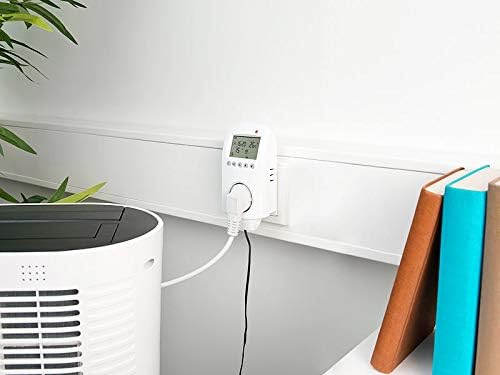
Image: The thermostat plugged into a wall, with its sensor extended and connected to an air conditioning unit.
6. Иштөө режимдери
The thermostat offers both automatic and manual operating modes, along with an anti-frost function.
6.1. Автоматтык режим
In automatic mode, the thermostat follows your programmed weekly schedule to switch the connected appliance on or off, maintaining the desired temperature at specific times.
6.2. Кол режими
Manual mode allows you to set a constant target temperature that the thermostat will maintain until you switch back to automatic mode or change the setting. This is useful for temporary adjustments.
6.3. Үшүккө каршы функция
The anti-frost function is a safety feature. If the ambient temperature measured by the sensor drops below 2 °C, the thermostat will automatically activate the connected heating appliance, regardless of the current operating mode or programmed settings, to prevent freezing.
7. Программалоо
The thermostat allows for individual weekly programming to optimize energy consumption and comfort.
7.1. Убакытты жана күндү орнотуу
- басыңыз коюу button repeatedly until the time or day setting flashes.
- колдонуу Up жана Төмөн маанисин тууралоо үчүн баскычтар.
- Басыңыз OK ырастоо жана кийинки жөндөө үчүн.
7.2. Weekly Program
You can set up to 6 switching times for Monday to Friday and 2 switching times for Saturday and Sunday. Each switching time includes a target temperature.
- басыңыз коюу button until the programming mode for the weekly schedule is displayed.
- колдонуу Up жана Төмөн buttons to select the day group (Mon-Fri or Sat-Sun) and the specific switching period (e.g., P1, P2).
- Басыңыз OK to enter the time setting for that period. Adjust with Өйдө/Төмөн, менен ырастаңыз OK.
- Next, set the target temperature for that period. Adjust with Өйдө/Төмөн, менен ырастаңыз OK.
- Repeat for all desired switching periods.
- баскычын басып программалоо режиминен чыгуу коюу until the normal display appears, or wait for automatic exit.
7.3. Таймер функциясы
The timer function allows for two adjustable times to switch devices on and off, independent of the weekly program.
- Access the timer settings via the коюу баскычы.
- Set the desired ON time and OFF time using the Өйдө/Төмөн жана OK баскычтар.
- Activate the timer function as needed.
8. Өркүндөтүлгөн жөндөөлөр
The thermostat includes advanced settings for fine-tuning its operation, such as hysteresis and temperature calibration.
8.1. Hysteresis (Temperature Difference)
The hysteresis setting (often labeled as A2 in advanced menus) determines the temperature difference around the set point before the appliance switches on or off. For example, if set to 1°C, and the target is 22°C in heating mode, the heater will turn on at 21°C and off at 23°C. The default setting is often 2°C (meaning a 4°C swing), but it can typically be reduced to 1°C (for a 2°C swing) for more precise control.
8.2. Температураны калибрлөө
If you suspect the temperature sensor is inaccurate, you can calibrate it (often labeled as A5). Compare the thermostat's reading with a known accurate thermometer placed next to the sensor. Adjust the calibration value to match the accurate reading. Be cautious when changing this setting, as incorrect calibration will lead to inaccurate temperature control.
8.3. Жылытуу/Муздатуу режимин тандоо
The device can operate in either heating or cooling mode (often labeled as A8). Ensure the correct mode is selected based on whether you are controlling a heater or an air conditioner. In heating mode, the appliance turns on when the temperature drops below the set point. In cooling mode, it turns on when the temperature rises above the set point.
9. Техникалык тейлөө
- Тазалоо: Аппаратты жумшак, кургак чүпүрөк менен сүртүңүз. Абразивдүү тазалагычтарды же эриткичтерди колдонбоңуз.
- Сенсорго кам көрүү: Keep the temperature sensor clean and free from dust or debris to ensure accurate readings.
- Батареяны алмаштыруу: The integrated button cell battery provides backup for settings. If settings are lost during a power outage, батареяны алмаштыруу керек болушу мүмкүн. Батареяны алмаштыруу үчүн квалификациялуу техникке кайрылыңыз.
10. Кыйынчылыктарды
| Көйгөй | Мүмкүн себеп | Чечим |
|---|---|---|
| Түзмөк күйбөй жатат. | No power supply; device is switched off. | Check power outlet; press the Power button. |
| Appliance not switching on/off. | Incorrect mode selected; programming error; appliance fault. | Verify operating mode (Auto/Manual); check programmed times and temperatures; test appliance directly. |
| Температураны туура эмес окуу. | Sensor improperly placed; sensor dirty/damaged; calibration needed. | Relocate sensor away from drafts/heat; clean sensor; perform temperature calibration (refer to Advanced Settings). |
| Жөндөөлөр өчүрүлгөндөн кийин жоголотtage. | Backup battery depleted or faulty. | Replace the internal button cell battery (professional service recommended). |
| Child lock activated unexpectedly. | Accidental activation. | Refer to the manual for specific key combination to deactivate child lock. |
11. Техникалык шарттар
- Модел: ZX-2630
- Кубат булагы: 230V AC, 50/60Hz
- Максималдуу жүк: 3680 Вт / 16 А.
- Температураны коюу диапазону: 1 °C to 70 °C (in 0.5 °C increments)
- Temperature Sensor Cable Length: 3 метр
- Температуранын тактыгы: +/- 1 ° C
- Дисплей: Multi-line XXL LCD (5 cm / 2" diagonal)
- Программалоо: Individually adjustable weekly program (6 periods Mon-Fri, 2 periods Sat-Sun)
- Өзгөчөлүктөр: Automatic programming, Anti-frost function, Child lock, Timer function
- Камдык эстутум: Integrated button cell battery
- Dimensions (without plug): Болжол менен 62 x 135 x 34 мм
- Элемент Салмагы: Болжол менен 265 г
- Материал: Thermostat plug with probe
12. Кепилдик жана колдоо
This revolt product is covered by a standard manufacturer's warranty. For detailed warranty terms, technical support, or service inquiries, please refer to the documentation provided with your purchase or contact your retailer. Keep your proof of purchase for warranty claims.


