Introduction
This manual provides comprehensive instructions for the safe and effective installation, operation, and maintenance of your ONKRON Full Motion TV Wall Mount M7L Black. Please read all instructions carefully before beginning installation and retain this manual for future reference. This mount is designed for 40-75 inch televisions weighing up to 150 lbs, supporting VESA mounting patterns from 100x100mm to 600x400mm.
Маанилүү коопсуздук маалыматы
- Салмак сыйымдуулугу: 150 фунттан (68 кг) ашпаңыз. Бул чектен ашып кетүү олуттуу жаракат алууга же мүлккө зыян келтирүүгө алып келиши мүмкүн.
- TV өлчөмү: Бул орнотуу 40 жана 75 дюймдук телевизорлор үчүн ылайыктуу.
- VESA шайкештиги: Ensure your TV's VESA pattern (mounting holes on the back of the TV) is within the range of 100x100mm to 600x400mm.
- Дубал түрү: This mount is designed for installation on solid concrete, brick walls, or wood wall studs. ЖАЛГЫЗ ГИПСОКОЛЬОНГО ОРНОТПОҢУЗ.
- Кесиптик орнотуу: Эгерде сиз орнотуу процессине же дубалыңыздын ылайыктуулугуна күмөн санасаңыз, квалификациялуу кесипкөй орнотуучуга кайрылыңыз.
- Куралдар: Use appropriate tools for installation. Ensure pilot holes are drilled to the correct size to prevent damage to the wall or hardware.
- Аппараттык камсыздоо: Use only the provided hardware or suitable replacements that meet strength and size requirements. Do not overtighten screws.
- Балдар жана үй жаныбарлары: Keep children and pets away from the installation area. Ensure the TV is securely mounted to prevent accidental falls.
Пакеттин мазмуну
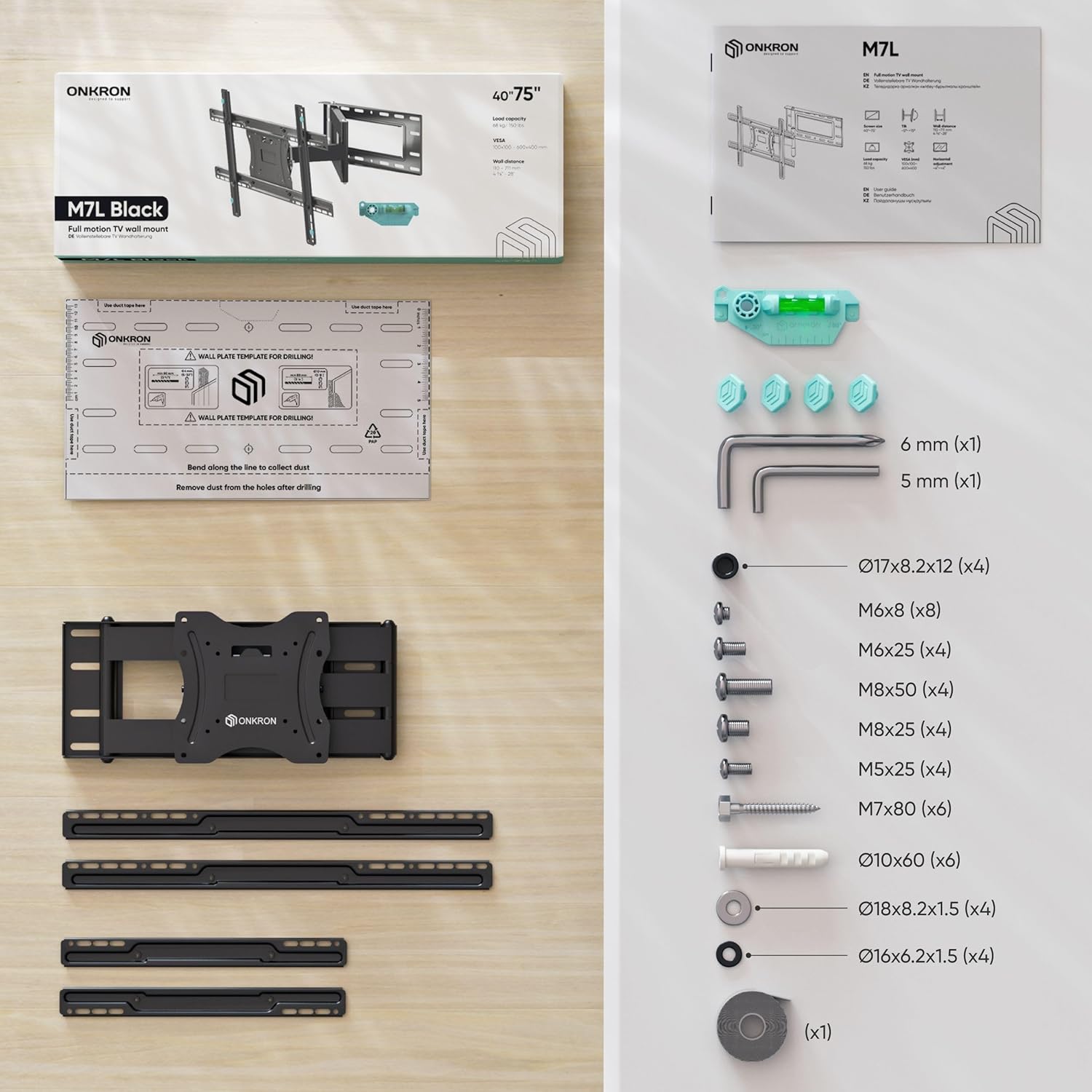
Verify that all components are present and undamaged before beginning installation. If any parts are missing or defective, contact ONKRON customer service.

Сүрөт: A detailed diagram illustrating all parts and hardware included in the ONKRON M7L TV wall mount package, such as the wall plate, TV brackets, various screws, washers, spacers, Allen wrenches, and a spirit level.
Техникалык шарттар
| Өзгөчөлүк | Спецификация |
|---|---|
| Модель номери | M7L |
| Сыналгы экранынын өлчөмүнүн шайкештиги | 40 - 75 дюйм |
| Максималдуу Салмак сыйымдуулугу | 150 фунт (68 кг) |
| VESA орнотуу үлгүлөрү | 100x100ммден 600x400ммге чейин |
| Wall Distance (Extension) | 4.4 дюймдан 28 дюймга чейин |
| Тит бурч | -5°тан +15°ка чейин |
| Swivel Angle | 180° чейин (телевизордун өлчөмүнө жараша) |
| Материал | Эритме болот |
| Продукциянын өлчөмдөрү | 27.99 x 23.62 x 15.75 дюйм |
| Элемент Салмагы | 19.8 фунт |
Орнотуу жана орнотуу
1. Check VESA Compatibility
Before installation, confirm that your television's VESA mounting pattern matches the mount's capabilities. The VESA pattern refers to the four holes on the back of your TV, measured horizontally and vertically in millimeters. This mount supports VESA patterns from 100x100mm to 600x400mm.

Сүрөт: A visual guide demonstrating different VESA mounting configurations (e.g., 100x100, 200x200, 400x400, 600x400) and how the mount's brackets can be adjusted to fit.
2. Determine Wall Type
The stability of your TV mount depends on the wall structure. This mount is suitable for:
- Жыгачтан жасалган дубалдар: Locate the center of the wood studs using a stud finder.
- Катуу бетон дубалдар: Бетондун бекем жана жаракалары жок экенине ынаныңыз.
- Кирпич дубалдар: Ensure the brick is solid and in good condition.
WARNING: Do not install this mount on drywall alone. Drywall cannot support the weight of the mount and television, leading to potential failure and injury.

Сүрөт: An illustration showing the three types of walls suitable for mounting: solid concrete, brick walls, and wood wall studs, with a clear warning against mounting on drywall without studs.
3. Дубал плитасын орнотуу
- Марк учкуч тешиктери: Use the provided mounting template to mark the desired location for the pilot holes on your wall. Ensure the template is level.
- Бургулоочу тешиктер: Drill pilot holes according to the recommended drill bit size for your wall type.
- Дубал плитасын бекитүү: Secure the wall plate to the wall using the appropriate lag bolts and washers. Ensure it is firmly attached and level.

Сүрөт: A visual guide demonstrating the process of marking and drilling pilot holes, then securing the wall plate to the wall using a drill and the provided hardware.
4. Телевизордун кашааларын бекитүү
- Бурамаларды тандаңыз: Choose the correct diameter and length of screws that fit your TV's VESA holes. Use the provided spacers if necessary to ensure proper clearance.
- Кашаларды тиркөө: Secure the vertical TV brackets to the back of your television. Ensure they are centered and tightened securely.
5. Телевизорду илип коюу
- Лифт телевизор: With assistance, carefully lift the television and hook the TV brackets onto the wall plate.
- Коопсуз сыналгы: Engage the safety locking mechanisms on the TV brackets to prevent the TV from accidentally dislodging from the wall plate.
Видео: An official ONKRON promotional video demonstrating the installation process and key features of the M7L TV wall mount, including its extension, swivel, and tilt capabilities. This video provides a visual guide to the setup.
Тоо иштетүү
The ONKRON M7L mount offers full motion capabilities for optimal viewар кандай кызматтардан.
1. Кеңейтүү жана артка тартуу
Gently pull or push the television to extend or retract the mount arm. The arm allows for a distance from the wall ranging from 4.4 inches to 28 inches, providing flexibility for viewing and accessing cables.

Сүрөт: A television mounted on the ONKRON M7L, shown extended from the wall, highlighting the ability to freely position the screen and adjust its distance from the wall.
2. Айлануучуну тууралоо
The mount allows the TV to swivel up to 180 degrees horizontally, depending on the size of your television. This enables you to adjust the viewing angle to suit different seating arrangements or room layouts.

Сүрөт: A television mounted on the ONKRON M7L, swiveled to an angle, illustrating the wide range of horizontal movement for optimal viewing from various points in a room.
Сүрөт: A chart providing specific swivel angles for the M7L mount, indicating how the maximum swivel range decreases with larger TV screen sizes (e.g., up to 90° for <55" TVs, 55° for 75" TVs).
3. жантайып тууралоо
You can tilt your TV from -5 degrees (downward) to +15 degrees (upward) to reduce glare and achieve a comfortable viewing angle. The tilt mechanism can be adjusted without additional tools.

Сүрөт: A person demonstrating the tilt adjustment feature of the ONKRON M7L mount, showing the TV being tilted upwards and downwards within its specified range.
4. Horizontal Alignment
After installation, the TV can be horizontally aligned to ensure it is perfectly level. This feature allows for minor adjustments to correct any slight misalignment during the mounting process.

Сүрөт: An illustration depicting the horizontal adjustment capability of the ONKRON M7L mount, showing how the TV can be shifted left or right on the wall plate for perfect centering.
Техникалык тейлөө
To ensure the longevity and safe operation of your ONKRON TV wall mount, follow these maintenance guidelines:
- Үзгүлтүксүз текшерүү: Periodically check all screws and connections to ensure they remain tight and secure. Over time, vibrations or frequent adjustments may cause fasteners to loosen.
- Тазалоо: Wipe the mount with a soft, dry cloth to remove dust. Avoid using abrasive cleaners or solvents, as these can damage the finish.
- Майлоо: Муунткуч муундар жылмакай кыймыл үчүн иштелип чыккан. Эгерде кыймыл катып калса, электрдик компоненттерге тийүүдөн сактануу үчүн айланма чекиттерге бир аз өлчөмдө силикон негизиндеги майлоочу каражатты колдонсо болот.
- Кабелдик башкаруу: Ensure cables are routed neatly and are not pinched or under tension when adjusting the TV position.
Проблемаларды чечүү
If you encounter issues with your ONKRON M7L TV wall mount, refer to the following common problems and solutions:
- Көйгөй: Телевизор орнотулгандан кийин тегиз эмес.
Чечим: Use the horizontal adjustment feature to fine-tune the TV's position on the wall plate. Ensure the wall plate itself was installed level using a spirit level. - Problem: Difficulty moving the TV (stiff joints).
Чечим: Check for any obstructions or pinched cables. Apply a small amount of silicone-based lubricant to the articulating joints if necessary. Ensure the TV's weight is within the specified limit. - Problem: Screws or lag bolts broke during installation.
Чечим: This often indicates overtightening or incorrect pilot hole size. Always use the recommended drill bit size and avoid excessive force. If a bolt breaks, it may require professional assistance to remove and repair the wall. Ensure you are using the correct screws for your TV's VESA holes and not overtightening them. - Problem: TV feels unstable or wobbly.
Чечим: Immediately remove the TV from the mount. Re-check all wall plate fasteners and TV bracket connections. Ensure the wall type is appropriate and that the mount is securely anchored to studs or solid masonry. Verify that the safety locking mechanisms are fully engaged. - Problem: Cables are too short or get tangled when moving the TV.
Чечим: Ensure you have cables of sufficient length to accommodate the full extension and swivel range of the mount. Use the integrated cable management features (if any) or cable ties to keep cables organized and prevent snagging.
Кепилдик жана Кардарларды колдоо
ONKRON products undergo multi-stage quality control to ensure reliability and durability. Your ONKRON M7L TV wall mount is backed by our commitment to quality.
For any questions, concerns, or assistance with your product, please contact ONKRON customer service. Our experts are available to provide support and answer any inquiries you may have regarding installation, operation, or troubleshooting.
Please refer to the product packaging or the official ONKRON webатайын кепилдик маалымат жана байланыш маалыматы үчүн сайт.


