1. Киришүү
Thank you for choosing the SV3C 1080P WiFi Outdoor Security Camera. This manual provides essential information for the proper installation, configuration, and operation of your camera. Please read this manual thoroughly before use and retain it for future reference.

Figure 1: SV3C 1080P WiFi Outdoor Security Camera
2. Продукт бүтүп калдыview
2.1 Негизги өзгөчөлүктөрү
- 1080P Full HD токтому: Так жана деталдуу видеону тартатtage.
- WiFi байланышы: Supports wireless connection for flexible placement.
- Outdoor & Waterproof (IP66): Designed for reliable performance in various weather conditions.
- Кыймылды аныктоо: Alerts and records upon detecting movement.
- Инфракызыл түнкү көрүнүш: Provides clear black and white video up to 15 meters in low-light conditions.
- SD карта жаздыруу: Supports local storage on a microSD card (up to 64GB).
- Multi-Platform Access: View live feed and recordings via iOS, Android, and Windows devices.
2.2 Камеранын компоненттери

Figure 2: Labeled components of the SV3C camera. Includes WiFi antenna, high-quality plastic casing, IR LED lights, 3.6mm lens, high-performance sensor, aluminum cover, power port, network cable port, and reset button.
2.3 Продукциянын өлчөмдөрү

Figure 3: Detailed dimensions of the SV3C camera, showing measurements in millimeters.
3. Орнотуу
3.1 Initial Connection (Wired LAN)
- Камераны берилген кубат адаптерин колдонуп, кубат булагына туташтырыңыз.
- Ethernet кабели аркылуу камераны роутериңизге туташтырыңыз.
- Download the 'CamHi' app from your device's app store (iOS/Android) or install the client software for Windows.
- Open the app/software and search for devices on the local area network (LAN).
- Once the camera is detected, enter the default password (usually 'admin') to add the device.
3.2 WiFi конфигурациясы
- After successfully connecting via wired LAN, access the camera settings in the CamHi app.
- Navigate to the 'WiFi Setting' option.
- Select your desired WiFi network from the list and enter the password.
- Wait approximately 30 seconds for the camera to connect to the WiFi network. Once connected, you can disconnect the Ethernet cable.

Figure 4: Visual guide for wired LAN connection and subsequent wireless setup via the mobile application.
3.3 MicroSD картасын орнотуу
The camera supports microSD cards up to 64GB for local video storage. Follow these steps carefully:
- Loosen the screws on the top cover and carefully remove the black wind shield.
- Unscrew the lens cover.
- Gently peel off the black protective seal inside the camera (avoid touching the adhesive side).
- Unscrew the four screws holding the main board in place (these are the four screws clamping the U-shaped groove, not the screws on the board itself).
- Carefully pull out the main board to reveal the square microSD card slot.
- microSD картасын уячага салыңыз.
- Reassemble the camera by reversing the steps. Ensure all screws are tightened and seals are properly seated to maintain waterproofing.
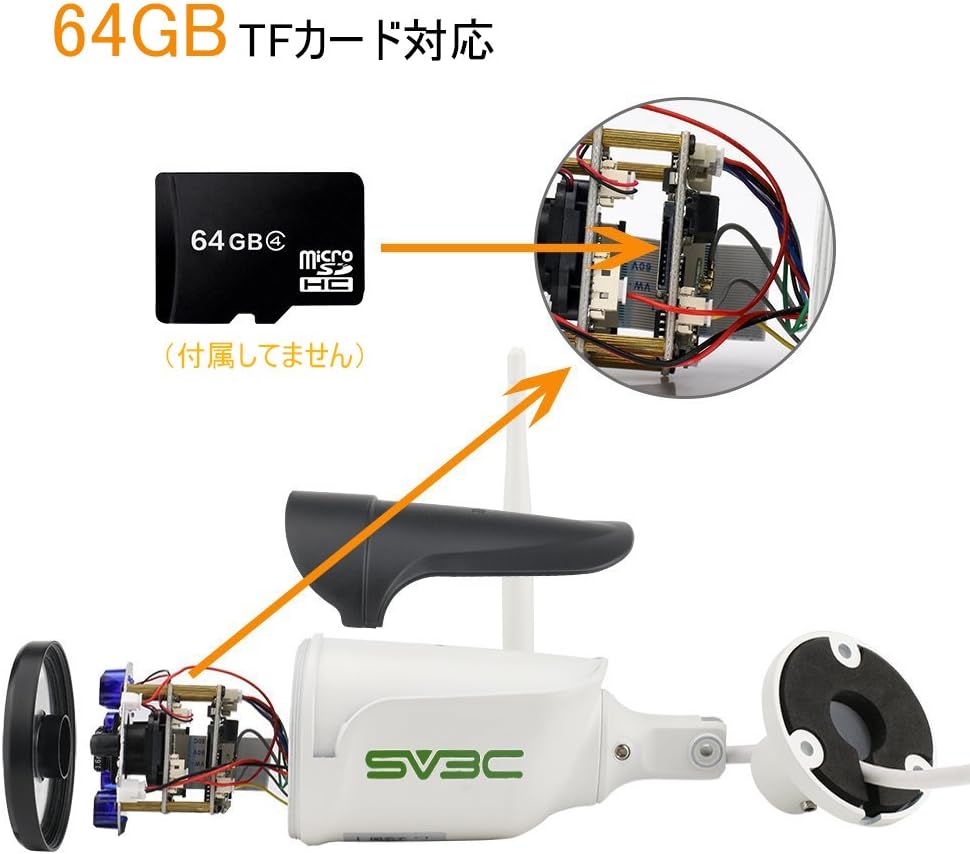
5-сүрөт: Ички view showing the location for microSD card installation.
4. Иштөө нускамалары
4.1 Live View жана Remote Access
Once the camera is set up and connected to your network, you can access the live video feed from anywhere using the CamHi app on your smartphone or tablet, or the client software on your PC.

Figure 6: The camera feed can be viewed on various devices including smartphones, tablets, and desktop computers.
4.2 Кыймылды аныктоо жана эскертүүлөр
The camera features motion detection capabilities. You can configure motion detection sensitivity and specific detection areas within the app. When motion is detected, the camera can trigger recording and send push notifications to your mobile device.
4.3 Recording to SD Card
With a microSD card installed, the camera can record continuously or based on motion detection. Recordings are typically saved in 15-minute segments. When the card is full, older footage will be automatically overwritten.
4.4 Күндүзгү жана түнкү көрүү
The camera automatically switches between day (color) and night (black and white infrared) vision modes based on ambient light conditions. The infrared LEDs provide clear visibility up to 15 meters in complete darkness.

Figure 7: Comparison of video quality during daytime (color) and nighttime (infrared black and white).

Figure 8: Visual representation of key features including 1080P high-quality recording, easy setup, motion detection, IP66 waterproof/dustproof rating, and 20-meter night vision distance.
5. Техникалык тейлөө
- Тазалоо: Сүрөттүн сапатын так сактоо үчүн камеранын линзасын жумшак, кургак чүпүрөк менен үзгүлтүксүз тазалап туруңуз. Күчтүү химиялык заттарды колдонбоңуз.
- Туташуу текшерүү: Periodically check all cable connections (power, Ethernet if used) to ensure they are secure and free from damage.
- SD Card башкаруу: The camera automatically manages SD card storage by overwriting old files. No manual intervention is typically required unless you wish to retrieve specific footage or replace the card.
- Программалык камсыздоонун жаңыртуулары: Өндүрүүчүнү текшериңиз webсайт (www.sv3c.com/cd/) for any available firmware updates to ensure optimal performance and security.
6. Кыйынчылыктарды
- Камера Wi-Fiга туташпай жатат: Ensure the camera is within range of your WiFi router. Verify the WiFi password is correct. Try resetting the camera using the reset button.
- Сүрөт жок/Кара экран: Check the power connection. Ensure the camera is properly connected to your network. Restart the camera and your router.
- SD Card Not Recognized/Recording: Ensure the microSD card is correctly installed and formatted (if necessary) through the app. The camera supports up to 64GB. If issues persist, try a different microSD card.
- Тез-тез өчүрүүлөр: Check your WiFi signal strength. Consider using a WiFi repeater if the camera is far from the router.
- Түнкү көрүү начар: Камера линзасынын таза жана тоскоолдуктардан таза экенин текшериңиз. Камеранын жанында инфракызыл жарыкка тоскоол болушу мүмкүн болгон күчтүү жарык булактарын текшериңиз.
For more detailed troubleshooting guides and support, please visit the official SV3C webсайтка же кардарларды тейлөөгө кайрылыңыз.
7. Техникалык шарттар
| Бренд | SV3C |
| Модел | B01W |
| Видео тартуунун резолюциясы | 1080p |
| Байланыш технологиясы | Wi-Fi |
| Зымсыз байланыш технологиясы | Wi-Fi |
| Ички/тышкы колдонуу | Ички, сырткы |
| Суу өткөрбөйт рейтинги | IP66 |
| Өзгөчө өзгөчөлүк | Infrared, Motion Detection |
| Түнкү көрүү диапазону | 15 метр |
| Power Voltage | 12 вольт |
| Материал | Пластик, металл |
| Форма фактору | Ок |
| Шайкеш түзмөктөр | Desktop (also iOS/Android via app) |
8. Кепилдик жана колдоо
For warranty information, technical support, or any inquiries regarding your SV3C camera, please refer to the official SV3C website or contact their customer service team. Details can typically be found on the product packaging or the official webсайт.
Официалдуу Webсайт: www.sv3c.com/cd/


