1. Киришүү
The Digital Yacht 4G Connect is a high-performance 2G/3G/4G LTE internet access solution designed to provide reliable and fast internet connectivity in challenging environments, such as marine vessels or remote locations. This device acts as a Wi-Fi hotspot and wired router, allowing multiple devices to connect to the internet via a cellular data connection. It is built for durability and ease of use, ensuring seamless communication wherever you are.
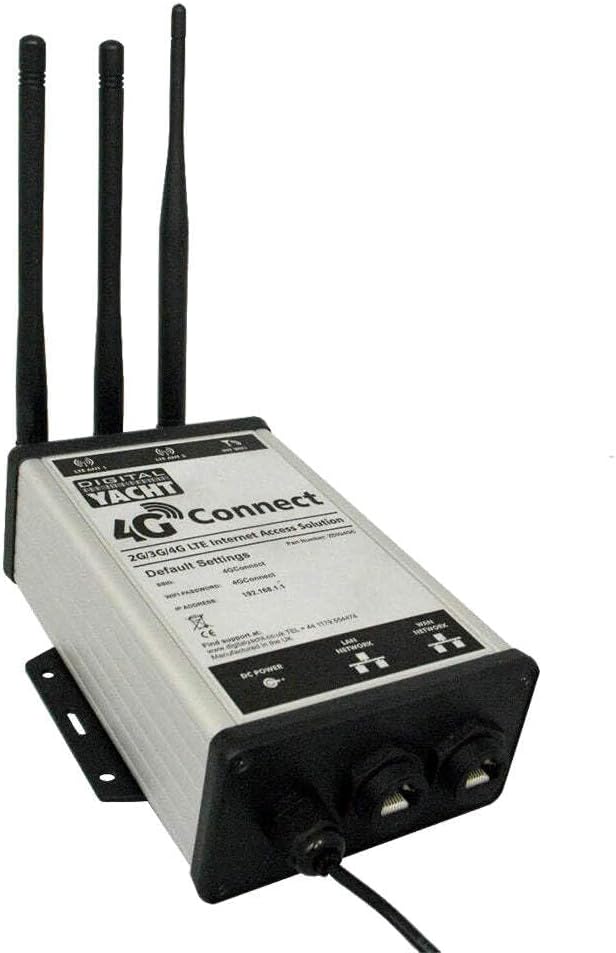
Figure 1: The Digital Yacht 4G Connect unit, showcasing its compact design, three external antennas for enhanced signal reception, and the LAN/WAN network ports at the base. The device label indicates default Wi-Fi settings and IP address.
2. Орнотуу жана орнотуу
2.1 Пакеттин мазмуну
- Digital Yacht 4G Connect Unit
- Үч тышкы антенна
- Электр кабели
- Монтаждоо кронштейндери жана бурамалар
- Ыкчам баштоо колдонмосу (толук маалымат үчүн бул колдонмону караңыз)
2.2 Физикалык орнотуу
- Монтаждоо: Select a suitable location for the 4G Connect unit, ensuring good ventilation and protection from direct elements. Use the provided mounting bracket and screws to securely attach the unit to a flat surface.
- Антенна туташуу: Carefully screw the three external antennas onto the corresponding connectors on the top of the 4G Connect unit. Ensure they are finger-tight.
- SIM картаны салуу: Locate the SIM card slot (usually on the side or bottom, refer to device markings). Insert a standard size (2FF) or micro/nano SIM with an adapter, ensuring it clicks into place. The device supports 2G, 3G, and 4G LTE SIM cards.
2.3 Электр энергиясы жана тармакка туташуу
- DC кубаттуулугу: Connect the supplied DC power cable to the "DC POWER" input port on the unit. Connect the other end to a compatible 12V or 24V DC power source.
- LAN Network: For wired connections, connect an Ethernet cable from your device (e.g., computer, network switch) to the "LAN NETWORK" port on the 4G Connect unit.
- WAN Network (Optional): If you wish to use the 4G Connect as a router for an existing wired internet source (e.g., shore-side Wi-Fi bridge), connect that source to the "WAN NETWORK" port.
2.4 Баштапкы конфигурация
The 4G Connect unit comes with default settings for easy initial access:
- Wi-Fi тармагынын аталышы (SSID): 4GConnect
- Wi-Fi сырсөзү: 4GConnect
- Демейки IP дареги: 192.168.1.1
кирүү үчүн web interface for advanced settings:
- Connect your computer or mobile device to the "4GConnect" Wi-Fi network or via an Ethernet cable to the LAN port.
- ачуу а web браузер жана кирүү
http://192.168.1.1дарек тилкесинде. - Log in using the default username and password (refer to the device label or quick start guide for these credentials, typically "admin" for both).
- It is highly recommended to change the default Wi-Fi password and router login credentials for security purposes.
3. Иштөө нускамалары
3.1 Түзмөктөрдү туташтыруу
- Wi-Fi түзмөктөрү: On your smartphone, tablet, or laptop, search for available Wi-Fi networks and select "4GConnect". Enter the Wi-Fi password (default: 4GConnect) to connect.
- Зымдуу түзмөктөр: Connect any Ethernet-enabled device directly to the "LAN NETWORK" port using an Ethernet cable.
3.2 Статус индикаторлору
The 4G Connect unit features LED indicators to provide status information:
- Power LED: Күйгүзүлгөндө катуу жашыл.
- Сигнал күчү LEDs: Multiple LEDs indicating cellular signal strength (e.g., 1-4 bars). More LEDs lit means stronger signal.
- Маалымат LED: Flashes when data is being transmitted or received.
- Wi-Fi LED: Solid when Wi-Fi is active, flashes when devices are connected and active.
4. Техникалык тейлөө
Regular maintenance ensures optimal performance and longevity of your 4G Connect unit.
- Тазалоо: Periodically wipe the unit with a soft, dry cloth. Do not use liquid cleaners or abrasive materials.
- Программалык камсыздоонун жаңыртуулары: Check the Digital Yacht webсайт (www.digitalyacht.co.uk) for available firmware updates. Keeping the firmware updated can improve performance, add features, and enhance security.
- Туташуу текшерүүлөрү: Ensure all cable connections (power, antennas, Ethernet) are secure and free from corrosion or damage.
5. Кыйынчылыктарды
5.1 Интернет байланышы жок
- Күчтү текшерүү: Ensure the Power LED is solid green.
- SIM картаны текшерүү: Verify the SIM card is correctly inserted and active with a data plan.
- Сигнал күчү: Check the Signal Strength LEDs. If low or no signal, try repositioning the unit or antennas.
- APN Орнотуулары: кирүү web interface (192.168.1.1) and verify that the correct APN (Access Point Name) settings for your mobile network provider are configured.
- Кайра жүктөө: Power cycle the 4G Connect unit by disconnecting and reconnecting the power.
5.2 Slow Speeds or Intermittent Connection
- Сигнал күчү: Weak cellular signal is a common cause. Ensure antennas are optimally positioned.
- Тармактын тыгыны: Cellular network performance can vary based on local congestion.
- Интерференция: Other electronic devices might cause interference. Try to isolate the 4G Connect unit.
- Data Cap: Check if your mobile data plan has reached its data cap, which might result in throttled speeds.
5.3 Кирүү мүмкүн эмес Web Интерфейс
- IP дареги: Ensure you are using the correct IP address:
http://192.168.1.1. - Тармак туташуусу: Verify your device is connected to the 4G Connect's Wi-Fi network or LAN port.
- IP карама-каршылыгы: Компьютериңиздин IP жөндөөлөрү IP дарегин автоматтык түрдө алуу (DHCP) үчүн коюлганын текшериңиз.
- Firewall: Temporarily disable any firewall on your computer to rule it out as a cause.
6. Техникалык шарттар
| Өзгөчөлүк | Description |
|---|---|
| Модель аты | ZDIG4GC-US |
| Бренд | Digital Yacht |
| Байланыш | 2G/3G/4G LTE Cellular, Wi-Fi, Ethernet (LAN/WAN) |
| Өлчөмдөрү (L x W x Y) | 10 x 7 x 4 inches (approximate, based on package dimensions) |
| Элемент Салмагы | 885 грамм (1.95 фунт) |
| Материал | Пластик |
| Power Input | DC Power (12V/24V compatible) |
| Демейки Wi-Fi SSID | 4GConnect |
| Default Wi-Fi Password | 4GConnect |
| Демейки IP дареги | 192.168.1.1 |
| Өзгөчө өзгөчөлүк | WPS (Wi-Fi корголгон орнотуу) |
7. Кепилдик жана колдоо
7.1 Кепилдик маалыматы
The Digital Yacht 4G Connect comes with a manufacturer's warranty. For detailed information regarding warranty terms, conditions, and duration, please refer to the official warranty documentation included with your product or visit the Digital Yacht webсайт.
7.2 Техникалык колдоо
For technical assistance, product inquiries, or support, please contact Digital Yacht directly:
- Webсайт: www.digitalyacht.co.uk
- Электрондук почта: кайрылыңыз webбайланыш формалары же электрондук почта даректери үчүн сайт.
- Телефон: +44 1784 223456 (Улуу Британия)
- Өндүрүүчүнүн жайгашкан жери: Улуу Британияда өндүрүлгөн
When contacting support, please have your product model number (ZDIG4GC-US) and a detailed description of your issue ready.


