Introduction
This manual provides detailed instructions for the installation, operation, and maintenance of your Westek TM1627LP Digital Plug-in Countdown Lighting Timer. Please read this manual thoroughly before using the device to ensure proper function and safety. Keep this manual for future reference.
Коопсуздук маалыматы
- Имараттын ичинде гана колдонуу үчүн. Нымдуулукка же өтө жогорку температурага дуушар кылбаңыз.
- 15 максималдуу электрдик номиналдык күчүнөн ашпаңыз Amps. Overloading the timer can cause damage or fire.
- Ensure the timer is securely plugged into a grounded electrical outlet.
- Таймерди бөлүктөргө бөлбөңүз же оңдоого аракет кылбаңыз. Бардык тейлөө иштерин квалификациялуу адистерге тапшырыңыз.
- Балдар жетпеген жерде сактаңыз.
Продукт бүттүview
The Westek TM1627LP is a versatile digital timer designed to automate the control of your electrical devices. It features three grounded outlets, a clear digital display, and intuitive buttons for programming. Key functions include:
- Programmable up to 20 ON/OFF programs per week.
- Random function for enhanced security.
- Daylight Saving Time (DST) adjustment.
- Dusk-to-Dawn operation.
- Артка саноо таймеринин функциясы.
- Internal battery backup to retain settings during power outages.
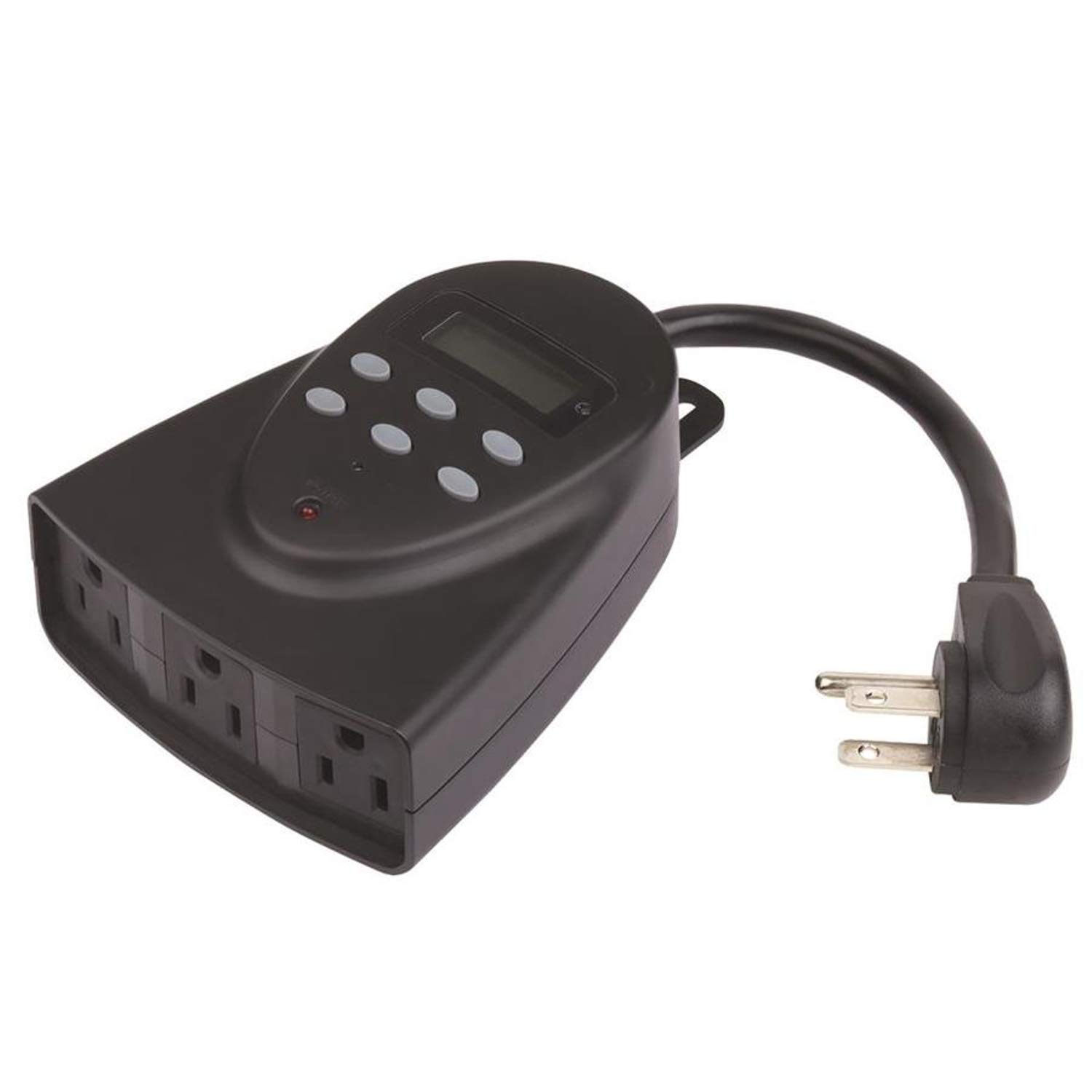
Бул сүрөт алдыңкы жагын көрсөтөт view of the Westek TM1627LP digital timer. It features a large digital display at the top, several control buttons below it, and three grounded electrical outlets on the bottom face. The timer is designed to plug directly into a wall outlet.
Жайгашуу
1. Баштапкы заряддоо
Before first use, plug the timer into a live electrical outlet for at least 30 minutes to charge the internal battery backup. This ensures the display and settings are retained during power outages же таймер суурулганда.
2. Учурдагы убакытты жана күндү коюу
- басыңыз СААТ button. The display will show the current time.
- колдонуу HOUR жана MINUTE убакытты тууралоо үчүн баскычтар.
- басыңыз КҮН button to cycle through the days of the week until the correct day is displayed.
- Басыңыз СААТ сактоо жана чыгуу үчүн кайра.
3. Тиричилик техникаларын туташтыруу
Plug your desired appliances into the three grounded outlets on the front of the timer. Ensure the total load does not exceed 15 Amps.
Иштөө нускамалары
Programming ON/OFF Schedules
- басыңыз ПРОГ баскычын басыңыз. Дисплейде "1 ON" көрсөтүлөт.
- колдонуу HOUR, MINUTE, жана КҮН buttons to set the desired ON time and day(s) for the first program.
- Басыңыз ПРОГ кайрадан. Дисплейде "1 OFF" көрсөтүлөт.
- колдонуу HOUR, MINUTE, жана КҮН buttons to set the desired OFF time and day(s) for the first program.
- 20ге чейин КҮЙГҮЗҮҮ/ӨЧҮРҮҮ программалары үчүн 1-4 кадамдарды кайталаңыз.
- басыңыз СААТ программалоо режиминен чыгуу үчүн баскычты басыңыз.
Countdown Function
- басыңыз АРТТЫРУУ баскычы.
- колдонуу HOUR жана MINUTE каалаган саноонун узактыгын орнотуу үчүн баскычтарды басыңыз.
- Басыңыз АРТТЫРУУ Артка саноону баштоо үчүн кайра басыңыз. Таймер белгиленген убакыттан кийин ӨЧҮП калат.
Random Function
Кокустук функцияны иштетүү үчүн, баскычын басыңыз RANDOM button. The timer will turn connected devices ON and OFF at random intervals around your programmed times, providing a lived-in appearance for security purposes. Press RANDOM кайра өчүрүү.
Жазгы убакыт (DST)
басып, кармап туруңуз DST button for 3 seconds to toggle Daylight Saving Time ON or OFF. The clock will adjust automatically by one hour.
Күүгүмдөн таңга чейин операция
The timer can be set to operate from dusk until dawn. Refer to the programming section for specific instructions on setting this mode, which typically involves selecting a specific program option or a dedicated button if available on your model (check the timer's face for a 'Dusk-to-Dawn' button or setting within the PROG menu).
Кол менен жокко чыгаруу
басыңыз КҮЙГҮЗҮҮ/ӨЧҮРҮҮ button to manually turn the connected devices ON or OFF, overriding any active programs. The timer will resume its programmed schedule at the next scheduled event.
Техникалык тейлөө
The Westek TM1627LP timer requires minimal maintenance. To clean, wipe the exterior with a soft, dry cloth. Do not use abrasive cleaners or immerse the unit in water. There are no user-serviceable parts inside.
Проблемаларды чечүү
- Дисплей бош же жооп бербей жатат: Ensure the timer is plugged into a live outlet. Allow at least 30 minutes for the internal battery to charge. If the issue persists, try pressing the RESET button (usually a small recessed button requiring a paperclip).
- Timer not turning devices ON/OFF:
- Verify that the timer is receiving power from the wall outlet.
- Check that the connected device is properly plugged into the timer and is functional.
- Review your programmed ON/OFF times to ensure they are set correctly.
- Ensure the timer is not in manual override mode.
- Programs not saving: Ensure the internal battery backup is sufficiently charged. If programs are lost after a power outage, the battery may need more charging time.
Техникалык шарттар
- Модел:
- TM1627LP (Manufacturer Model: 864604)
- Электрдик рейтинг:
- 125V AC, 60Hz, 15A Resistive, 1875W
- Туташтыргыч түрү:
- Плагин
- Соода түйүндөрү:
- 3-way Grounded
- Элементтин өлчөмдөрү (L x W x Y):
- 6 x 6 x 2.5 дюйм
- Монтаж түрү:
- Plug In Mount
- Актуатор түрү:
- Push Button
- Элемент Салмагы:
- 0.4 фунт
- UPC:
- 070686507636
Кепилдик жана колдоо
For warranty information or technical support, please contact Westek customer service. Refer to the product packaging or the Westek webучурдагы байланыш маалыматтары үчүн сайт.


