1. Киришүү
The NETGEAR GS116PP Unmanaged Power over Ethernet (PoE) Switch is designed for desktop or rackmount installations. It features 16 Gigabit Ethernet ports, including 16 PoE+ ports with a total power budget of 183 watts. This switch offers simple plug-and-play functionality without requiring software installation or complex configuration, making it suitable for various networking environments.
2. Пакеттин мазмуну
Пакетиңизде төмөнкү заттар бар экенин текшериңиз:
- 16-port Gigabit Ethernet PoE+ Unmanaged Switch (GS116PP)
- Power adapter (External 200W)
- Тез орнотуу боюнча колдонмо
- Стойкага орнотуу комплекти
- Дубалга орнотуу комплекти
3. Физикалык бүтүрүүview
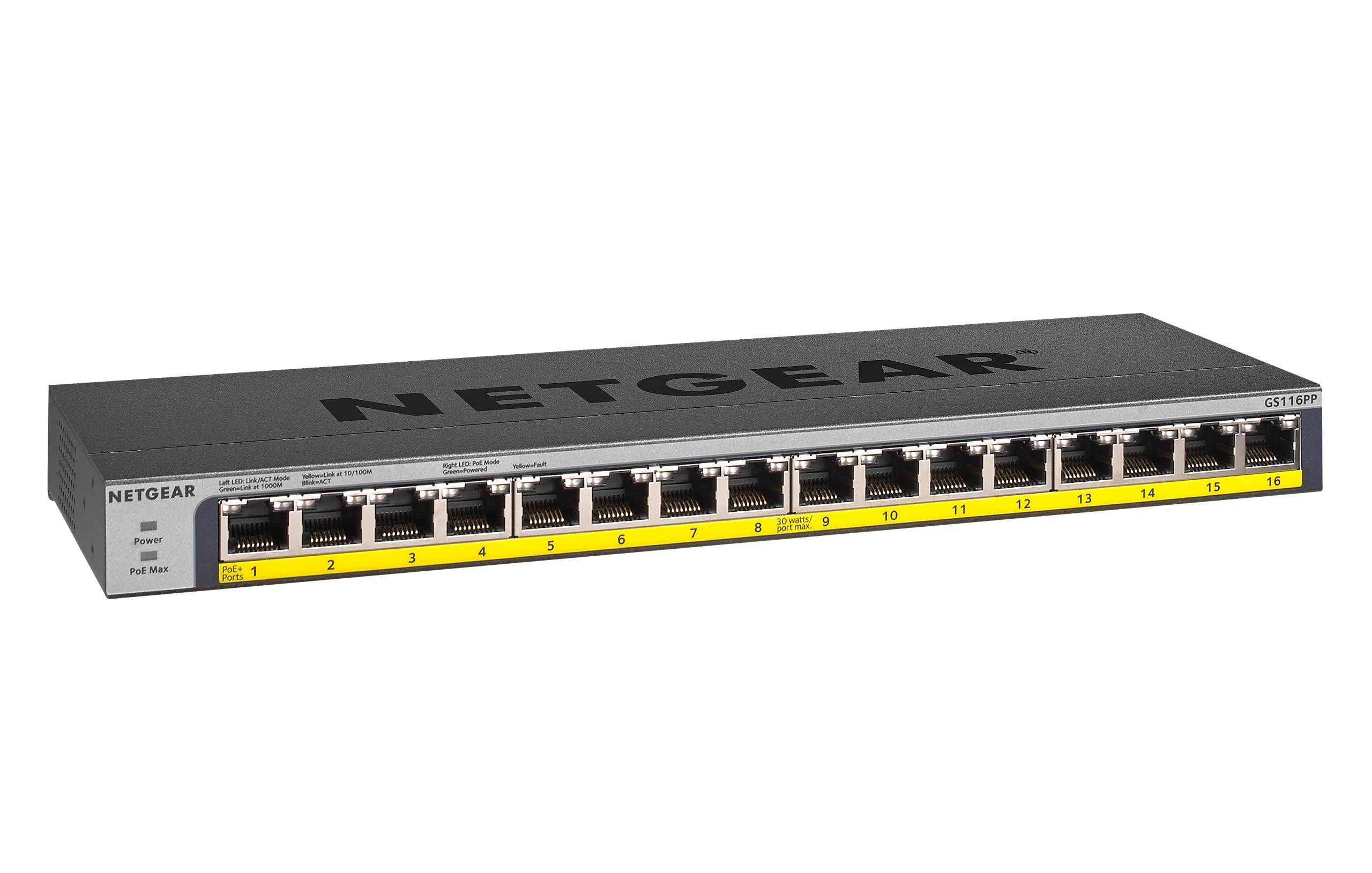
1-сүрөт: Фронт view of the NETGEAR GS116PP Switch.

2-сүрөт: Close-up of the front panel with 16 Gigabit Ethernet PoE+ ports.

3-сүрөт: Арткы view of the NETGEAR GS116PP Switch, showing the power input and ventilation.

4-сүрөт: Dimensions of the NETGEAR GS116PP Switch (11.3"L x 4"W x 1.1"H).
4. Орнотуу
4.1 Пакеттен чыгаруу жана жайгаштыруу
Carefully remove the switch and all accessories from the packaging. The GS116PP supports desktop, wall-mount, or rack-mount placement. Ensure adequate ventilation around the device and avoid placing it near heat sources or in enclosed spaces.
4.2 Кубат туташтыруу
- Connect the provided external 200W power adapter to the power input port on the rear of the switch.
- Plug the power adapter into a standard electrical outlet. The power LED on the front panel will illuminate, indicating the switch is powered on.
4.3 Тармактык туташуу
The GS116PP is an unmanaged switch, offering simple plug-and-play connectivity. No software installation or configuration is required.
- Connect your network router or main network device to any of the 16 Gigabit Ethernet ports on the switch using a standard Ethernet cable.
- Connect your network devices (computers, IP cameras, VoIP phones, wireless access points, etc.) to the remaining ports.
- For PoE-powered devices, simply connect them to any of the 16 PoE+ ports. The switch will automatically detect and provide power to compatible devices.
Видео 1: An overview of Power over Ethernet (PoE) switching concepts and applications.
5. Которгучту иштетүү
5.1 Негизги операция
The NETGEAR GS116PP operates as a standard unmanaged network switch. It automatically detects the speed and duplex mode of connected devices and adjusts accordingly. Data is forwarded efficiently between connected devices at Gigabit speeds.
5.2 Power over Ethernet (PoE+) Functionality
All 16 ports on the GS116PP support PoE+ (802.3at) and standard PoE (802.3af). This allows you to power compatible devices directly through the Ethernet cable, eliminating the need for separate power adapters and simplifying cable management.
- Total Power Budget: The switch provides a total power budget of 183W across all 16 PoE+ ports.
- Per-Port Power: Each PoE+ port can deliver up to 30W of power to a connected device.
- Автоматтык аныктоо: The switch automatically detects if a connected device is PoE-compatible and supplies the necessary power. Non-PoE devices can also be connected safely, as the switch will not supply power to them.
Видео 2: A brief demonstration of the NETGEAR 16-Port Gigabit Ethernet Unmanaged PoE Switch (GS116PP) and its PoE capabilities.
6. Өзгөчөлүктөрү
- 16 гигабит Ethernet порттору: Provides high-speed wired connections for all your network devices.
- 16 PoE+ Ports with 183W Budget: Powers compatible devices like IP cameras, VoIP phones, and wireless access points directly through the Ethernet cable.
- Plug-and-Play Орнотуу: No software to install or configuration needed for immediate use.
- Ийкемдүү орнотуу параметрлери: Supports desktop, wall-mount, or rack-mount placement with included hardware.
- Энергияны үнөмдөөчү дизайн: Compliant with IEEE802.3az for reduced power consumption.
- Тынч операция: Fanless design makes it ideal for noise-sensitive environments.
- Аймактык шайкештик: Made for use in U.S. & CA only.
7. Техникалык шарттар
| Өзгөчөлүк | Спецификация |
|---|---|
| Модель номери | GS116PP-100NAS |
| Порттардын саны | 16 гигабит Ethernet порттору |
| PoE+ порттору | 16 (IEEE 802.3at/af) |
| Жалпы PoE кубаттуулугу бюджети | 183 Вт |
| Маалыматтарды өткөрүү ылдамдыгы | Секундасына 1 Гигабит |
| Продукциянын өлчөмдөрү (LxWxH) | 11.3" x 4" x 1.1" (28.7 см x 10.16 см x 2.79 см) |
| Элемент Салмагы | 1.94 фунт (0.88 кг) |
| Иштин материалы | Металл |
| Тtage | 240 вольт |
| Иштөө температурасы | Up to 130 Degrees Fahrenheit (54.4°C) |
8. Техникалык тейлөө
To ensure optimal performance and longevity of your NETGEAR GS116PP switch, follow these maintenance guidelines:
- Тазалыкты сактоо: Коммутатордун сыртын жумшак, кургак чүпүрөк менен үзгүлтүксүз тазалап туруңуз. Суюк же аэрозоль тазалагычтарды колдонуудан алыс болуңуз.
- Вентиляцияны камсыз кылуу: Do not block the ventilation openings on the switch. Proper airflow prevents overheating.
- Кабелдик башкаруу: Сигналдын начарлашына жол бербөө үчүн тармак кабелдерин иреттүү жана ийилип кетпеген же ашыкча ийилген абалда кармаңыз.
- Power Cycle (if needed): If the switch or connected devices are experiencing issues, a simple power cycle (unplugging and replugging the power adapter) can often resolve minor problems.
9. Кыйынчылыктарды
If you encounter issues with your GS116PP switch, consider the following troubleshooting steps:
- Кубат жок:
- Кубат адаптери өчүргүчкө да, иштеп жаткан электр розеткасына да бекем туташтырылганын текшериңиз.
- Check the power LED on the front panel; it should be illuminated.
- Тармакка туташуу жок:
- Verify that Ethernet cables are securely plugged into both the switch and the connected devices.
- Check the link/activity LEDs on the switch ports; they should be lit or blinking for active connections.
- Ensure your router or upstream network device is functioning correctly.
- PoE түзмөгү күйбөй жатат:
- Confirm that the connected device is PoE-compatible (IEEE 802.3af or 802.3at).
- Check the PoE status LED for the specific port; it should indicate power delivery.
- Ensure the total power consumption of all connected PoE devices does not exceed the 183W budget. If the budget is exceeded, the switch may prioritize power to certain ports or disable power to others.
- Try connecting the PoE device to a different port.
- Жай тармак ылдамдыгы:
- Оптималдуу иштеши үчүн бардык туташкан түзмөктөр жана кабелдер Gigabit Ethernet колдоого алынсын.
- Check for faulty cables by testing with known good cables.
- Avoid network loops by ensuring cables are not connected in a way that creates a circular path.
10. Кепилдик жана колдоо
The NETGEAR GS116PP Switch comes with a Lifetime Limited Hardware Warranty. This includes Next Business Day Replacement for eligible hardware failures.
For technical assistance and support, NETGEAR offers 24/7 chat support with a NETGEAR expert. Please refer to the official NETGEAR website or the quick install guide for detailed support contact information and warranty terms.


