1. Киришүү
This manual provides comprehensive instructions for the installation, setup, operation, and maintenance of your Kwikset Smartcode 912 Z-Wave Plus Keypad Lever Lock. This keyless entry system offers enhanced security and convenience for your home.
The Smartcode 912 integrates Z-Wave technology, allowing for remote access and control when connected to a compatible smart home system. It features a backlit keypad for easy code entry, one-touch locking, and an auto-locking function. The lock also incorporates SmartKey Security for rekeying convenience.
2. Коопсуздук маалыматы
Please read all instructions thoroughly before installation and use. Failure to follow these instructions could result in product damage, property damage, or personal injury.
- Do not use corrosive cleaners or abrasive materials on the lock finish.
- Ensure all components are installed correctly and securely before operation.
- Keep your user codes confidential.
- Always test the lock's functionality after installation and any programming changes.
3. Пакеттин мазмуну
Сиздин пакетте төмөнкү компоненттердин бардыгы камтылганын текшериңиз:
- Сырткы жыйын
- Ички ассамблея
- 2 Ачкычтар
- SmartKey үйрөнүү куралы
- Лач
- Strike Plate
- 2 Levers (Tustin style)
- Орнотуу жабдыктары
- Орнотуу боюнча колдонмо (бул документ)
4. Орнотуу
The Kwikset Smartcode 912 is designed for easy installation with basic tools. A screwdriver is typically the only tool required. This lock fits standard doors between 1-3/8" and 1-3/4" thick.
4.1 Эшикти даярдаңыз
- Ensure your door is properly prepped for a lever lock.
- Check the backset (distance from door edge to center of bore hole) and adjust the latch if necessary.
4.2 Install the Latch and Strike Plate
- Эшиктин четине кулпуну салып, бурама менен бекитиңиз.
- Эшиктин алкагына бекиткич пластинканы орнотуп, аны кулпу менен тегиздеңиз.
4.3 Install the Exterior Assembly
Position the exterior keypad assembly on the outside of the door, ensuring the cable passes through the door bore hole.
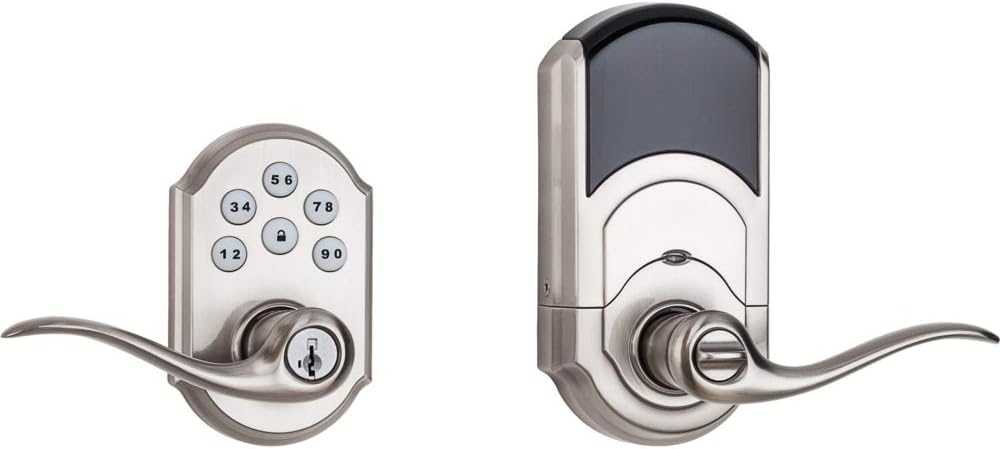
Image: Kwikset Smartcode 912 Z-Wave Plus Keypad Lever Lock, showing both the exterior keypad assembly and the interior battery housing and lever.
4.4 Install the Interior Assembly
Connect the cable from the exterior assembly to the interior assembly. Secure the interior assembly to the door using the provided screws. Ensure the levers are correctly oriented.

Сүрөт: Интерьер view of the Kwikset Smartcode 912 Z-Wave Plus Keypad Lever Lock, showing the battery cover and the thumb turn for manual locking.
4.5 Батареяны орнотуңуз
Install 4 AA batteries into the interior assembly. The lock will perform a self-calibration process. Ensure the battery pack is securely seated.
5. Орнотуу жана программалоо
5.1 Master Code Creation
The first step is to create a Master Code. This code is used to add or delete user codes and to configure lock settings. It does not unlock the door.
- Ички блоктогу батареянын капкагын ачыңыз.
- Press the "Program" button once.
- Жаңы 4-8 орундуу Негизги кодду киргизиңиз.
- "Кулпулоо" баскычын басыңыз.
- Re-enter the Master Code.
- Press the "Lock" button again.
A successful programming will be indicated by a green flash and a single beep. A red flash and three beeps indicate an error.

Image: Close-up of the Kwikset Smartcode 912 keypad, showing the numbered buttons and the lock button.
5.2 Adding User Codes
You can program up to 30 unique user codes for keyless entry.
- Батареянын капкагын ачыңыз.
- Press the "Program" button once.
- Негизги кодуңузду киргизиңиз.
- "Кулпулоо" баскычын басыңыз.
- Жаңы 4-8 орундуу колдонуучу кодун киргизиңиз.
- "Кулпулоо" баскычын басыңыз.
5.3 Колдонуучу коддорун жок кылуу
To delete a specific user code:
- Батареянын капкагын ачыңыз.
- Press the "Program" button once.
- Негизги кодуңузду киргизиңиз.
- "Кулпулоо" баскычын басыңыз.
- Жок кылгыңыз келген Колдонуучу кодун киргизиңиз.
- "Кулпулоо" баскычын басыңыз.
5.4 Z-Wave Pairing
To integrate your lock with a Z-Wave smart home system (hub required):
- Initiate the inclusion (pairing) process on your Z-Wave controller. Refer to your controller's instructions.
- On the lock, open the battery cover and press the "A" button (located on the interior assembly) once.
- The lock will attempt to pair. A successful pairing will be indicated by a green flash and a single beep.
Once paired, you can control the lock remotely and receive notifications via your Z-Wave smart home system.
6. Иштөө нускамалары
6.1 Unlocking the Door from Outside
- Enter a valid User Code on the keypad.
- The lock will unlock. Turn the lever to open the door.
6.2 Locking the Door from Outside
- Press the "Lock" button once. The lock will engage.
- Alternatively, if the auto-lock feature is enabled, the lock will automatically engage after a set time.
6.3 Locking/Unlocking from Inside
Use the thumb turn on the interior assembly to manually lock or unlock the door.
7. SmartKey Security
Your Kwikset Smartcode 912 features SmartKey Security, allowing you to rekey your lock to work with an existing Kwikset key. This is useful if you want all your Kwikset locks to operate with a single key.

Image: Diagram showing the SmartKey rekeying tool and the rekeying slot on the lock cylinder. This feature allows users to rekey their lock to an existing Kwikset key in seconds.
7.1 Rekeying Instructions
- Insert your functioning key into the cylinder and turn it 90 degrees clockwise.
- Insert the SmartKey Learn Tool fully into the SmartKey hole. Apply firm pressure and remove the tool.
- Иштеп жаткан ачкычыңызды алып салыңыз.
- Жаңы ачкычыңызды цилиндрге толугу менен салып, саат жебесине каршы 90 градуска буруңуз.
- Remove the new key. The lock is now rekeyed.
Always test the new key multiple times to ensure successful rekeying.
8. Техникалык тейлөө
8.1 Батареяны алмаштыруу
The lock will provide a low battery warning (e.g., flashing red light, audible beeps) when the batteries are running low. Replace all four AA batteries promptly.
- Ички монтаждан батареянын капкагын алып салыңыз.
- Эски батарейкаларды алып салыңыз.
- Төрт жаңы AA щелочтуу батарейкасын туура уюлдуулукту камсыз кылуу менен кыстарыңыз.
- Батареянын капкагын алмаштырыңыз.
8.2 Тазалоо
Кулпуну жумшак, d менен тазалаңызamp cloth. Do not use abrasive cleaners or solvents, as these can damage the finish and electronic components.
9. Кыйынчылыктарды
| Көйгөй | Мүмкүн себеп | Чечим |
|---|---|---|
| Кулпу баскычтоп жазуусуна жооп бербейт. | Батареялар аз же түгөндү. Туура эмес код киргизилди. | Replace batteries. Verify correct user code. |
| Кулпу жылмакай туташпайт/ажыратпайт. | Misalignment of lock components. Door frame obstruction. | Check installation for proper alignment. Ensure door frame is clear. |
| Z-Wave pairing fails. | Controller not in inclusion mode. Lock too far from controller. | Ensure Z-Wave controller is in inclusion mode. Move controller closer or use a Z-Wave repeater. |
| Автоматтык бөгөттөө функциясы иштебейт. | Feature not enabled or incorrectly configured. | Refer to programming instructions to enable and configure auto-lock. |
10. Техникалык шарттар
- Модель номери: 99120-037
- Материал: Металл
- Бүтүрүү: Satin Nickel (Brushed)
- Эшик калыңдыгы: 1-3/8" to 1-3/4"
- Кубат булагы: 4 АА батарейкалар (киргизилген эмес)
- Байланыш: Z Wave Plus
- Колдонуучу коддору: 30гө чейин программалануучу коддор
- Өзгөчөлүктөр: Keypad Entry, One-Touch Locking, Auto-Lock, SmartKey Security
- Продукциянын өлчөмдөрү: 5.34 x 4.89 x 9.74 дюйм
- Элемент Салмагы: 4.09 фунт
- UPC: 883351628600
11. Сапатты камсыздоо
Kwikset is committed to providing high-quality security products. The manufacturing process involves rigorous testing and adherence to strict standards to ensure reliability and durability.
Video: "Kwikset Means Quality" - This video highlights Kwikset's manufacturing processes and commitment to product quality and durability, showcasinар кандай stages of lock production and testing.
12. Кепилдик жана колдоо
Kwikset provides a comprehensive warranty for its products:
- Механикалык жана бүтүрүү кепилдик: Өмүр бою
- Электрондук кепилдик: 1 жыл
For full warranty details, product support, or technical assistance, please visit the official Kwikset website or contact Kwikset customer service. Contact information can typically be found on the Kwikset webсайт же продукт таңгак.
Сиз да зыярат кылсаңыз болот Amazon'догу Kwikset дүкөнү кошумча продукт маалымат жана колдоо ресурстар үчүн.


