1. Киришүү
Thank you for choosing the Facmogu S800 Mini Stereo Ampкөтөргүч. Бул түзмөк жогорку сапаттагы аудиону камсыз кылуу үчүн иштелип чыккан amplification for both home and car audio systems, featuring Bluetooth connectivity, AUX input, and USB sound card functionality. This manual provides detailed instructions for the proper setup, operation, and maintenance of your ampоптималдуу аткарууну жана узак өмүрдү камсыз кылуу үчүн lifier.
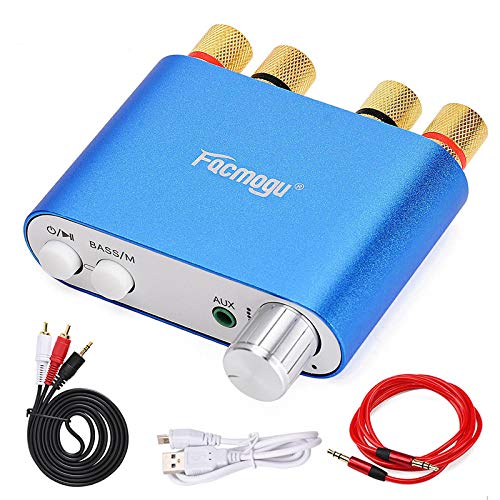
Figure 1: Facmogu S800 Mini Stereo Ampөмүрлүү
2. Продукт бүтүп калдыview
2.1 Негизги өзгөчөлүктөрү
- Кош каналдуу чыгаруу: Provides 50W x 2 stereo ampжашоо.
- Бир нече аудио киргизүүлөр: Supports Bluetooth 4.0 + EDR, 3.5mm AUX, and USB sound card input.
- Enhanced Bass Function: Adjustable bass settings available in Bluetooth mode.
- EMI Troubleshooting Design: Built-in design to reduce interference from other electronic devices.
- Компакт жана көчмө: Mini size (80 × 53 × 22mm) and lightweight (105g) for versatile use.
- Режимдерди оңой которуу: Dedicated 'M' button to switch between Bluetooth and AUX functions.
2.2 Пакеттин мазмуну
Сураныч, пакетте төмөнкү нерселерди текшериңиз:
- 1 × Facmogu S800 Bluetooth Ampөмүрлүү
- 1 × Audio Signal Cable (1.2m length)
- 1 × AV Audio Signal Cable (1.5m length)
- 1 × USB Cable

2-сүрөт: Пакеттин мазмуну
3. Орнотуу
3.1 Динамиктерди бириктирүү
- Identify the left (L) and right (R) channel speaker terminals on the rear of the ampөмүрлүү.
- Connect your passive speakers to the corresponding terminals. Ensure correct polarity (positive to positive, negative to negative) for optimal sound quality.
3.2 Кубат туташтыруу
- Locate the DC9V-24V IN power input port on the rear of the ampөмүрлүү.
- Connect a compatible DC power adapter (not included in all packages, ensure it meets 9-24V, minimum 3A, and at least 50W output) to this port.
- Кубат адаптерин розеткага сайыңыз.
3.3 Аудио киргизүү параметрлери
S800 amplifier supports three audio input methods:
- Bluetooth: For wireless connection from your smartphone, tablet, or other Bluetooth-enabled devices.
- AUX (3.5 мм): For wired connection from devices with a 3.5mm audio output.
- USB үн картасы: Connect to a computer via the USB port for high-fidelity audio playback without drivers.

Figure 3: Rear Panel Connections (Power Input, USB Sound, Right/Left Channels)
4. Иштөө нускамалары

Figure 4: Front Panel Controls (Power, Mode, AUX, Volume)
4.1 Күйгүзүү/өчүрүү
- Күйгүзүү үчүн ampкөтөргүч, узак басуу the power button (O/II) for 2 seconds. The working indicator will illuminate.
- Өчүрүү үчүн, узак басуу кубат баскычын кайра 2 секундага басыңыз.
4.2 Ойноону башкаруу
- While playing audio, кыска басуу the power button (O/II) to pause playback.
- Кыска басуу it again to resume playback.
4.3 Режимди алмаштыруу
- The 'M' button (BASS/M) is used to switch between Bluetooth mode and AUX audio input mode.
- Press the 'M' button to cycle through available input modes.
4.4 Үндү тууралоо
- Rotate the volume knob clockwise to increase volume.
- Rotate the volume knob counter-clockwise to decrease volume.
4.5 Bass Function
- The bass function is only active in Bluetooth mode.
- To adjust bass sound effects, узак басуу the 'M' button (BASS/M) for 2 seconds, then узак басуу it again for 2 seconds to cycle through different sound effects.
- Эскертүү: The sound effect setting will not be saved after the device is powered off and will need to be reset upon next use.
4.6 Bluetooth жупташтыруу
- камсыз кылуу amplifier is powered on and in Bluetooth mode (indicated by the working indicator).
- Түзмөгүңүздө (смартфон, планшет) Bluetooth иштетип, жеткиликтүү түзмөктөрдү издеңиз.
- Select "S800" from the list of devices to pair.
- Once paired, audio will be streamed wirelessly to the ampөмүрлүү.
5. Техникалык тейлөө
- сактаңыз amplifier clean by wiping it with a soft, dry cloth. Avoid using liquid cleaners or solvents.
- Ашыкча ысып кетүүнүн алдын алуу үчүн аппараттын айланасында туура желдетүүнү камсыз кылыңыз. Эч кандай желдетүүчү тешиктерди жаап албаңыз.
- сактаңыз amplifier in a cool, dry place away from direct sunlight, extreme temperatures, and humidity when not in use for extended periods.
- Аппаратты жерге түшүрүүдөн же катуу таасирлерден сактаныңыз.
6. Кыйынчылыктарды
- Кубат жок: Кубат адаптери туура туташтырылганын жана көрсөтүлгөн көлөмдү камсыз кылганын текшериңизtage (DC 9-24V) and sufficient current (minimum 3A). Check the power outlet.
- Power Cuts Off During Use: This indicates the power supply is insufficient. Replace with a power supply of higher wattage (e.g., 12V 5A for 60W) or reduce the volume to decrease power consumption.
- Үн чыгышы жок:
- Динамиктердин туташууларынын туура полярдуулугун жана бекем орнотулгандыгын текшериңиз.
- Verify the correct input mode (Bluetooth, AUX, USB) is selected using the 'M' button.
- Ensure the volume is turned up on both the ampкөтөргүч жана баштапкы түзүлүш.
- Башка аудио булагы же кабель менен сынап көрүңүз.
- Bluetooth туташуу маселелери:
- камсыз кылуу ampкөтөргүч Bluetooth режиминде.
- Make sure the source device is within the 30-foot wireless range.
- Түзмөгүңүздөгү Bluetooth'ду өчүрүп, күйгүзүп, кайра жупташтырып көрүңүз.
- Clear previous Bluetooth pairings on your source device if necessary.
- Interference/Whining Noise: The amplifier may be susceptible to electromagnetic interference from other electronics (e.g., alternators in vehicles, cellular amplifiers). Try relocating the amplifier or the interfering device, or ensure proper grounding.
7. Техникалык шарттар
| Өзгөчөлүк | Спецификация |
|---|---|
| Модел | S800 (A18042) |
| Bluetooth стандарты | Bluetooth 4.0 + EDR |
| Bluetooth диапазону | Up to 10 meters (30 feet) in open space |
| Каналдар | 2 (Стерео) |
| Чыгуу номиналдык кубаттуулугу | 50Вт × 2 |
| киргизүү Interface | Bluetooth, USB Sound Card, AUX (3.5mm) |
| Иштөө режими | Control Button |
| Киргизүү көлөмүtage | DC 9V-24V |
| Киргизүү агымы | 3A (minimum) |
| Өлчөмдөрү (W×D×H) | 80 × 53 × 22 мм (3.15 × 2.09 × 0.87 дюйм) |
| Салмагы | 105 грамм (0.231 фунт) |
| Шайкештик | FCC, RoHS |
8. Кепилдик жана колдоо
Facmogu products are designed for reliability and performance. For specific warranty information, please refer to the warranty card included with your purchase or contact your retailer. If you encounter any issues or have questions not covered in this manual, please contact the seller or manufacturer's customer support for assistance.


