Introduction
Thank you for choosing the ELECDER i37 Kids Headphones. These headphones are designed to provide a comfortable and enjoyable audio experience for children, teens, and even adults. Featuring a foldable design, adjustable headband, and a durable tangle-free cord, the i37 headphones are ideal for various uses, including school, travel, and everyday listening. This manual provides essential information on setup, operation, maintenance, and troubleshooting to ensure optimal performance and longevity of your headphones.
Кутуда эмне бар
Пакетти ачканда, төмөнкү нерселердин бардыгы бар экенин текшериңиз:
- ELECDER i37 Kids Headphone
- Колдонуучунун Колдонмосу (бул документ)

Figure 1: Packaging of the ELECDER i37 Kids Headphones, showing the headphones and the box.
Продукт бүттүview
The ELECDER i37 headphones are designed for comfort and durability. Key features include:
- Мыкты үн: Stereo bass headphone with clear audio output.
- Durable and Tangle-Free Cord: The 4.9 ft (1.5m) cord is made of high-quality cloth to prevent tangling and ensure longevity.
- Жөнгө салынуучу баш боосу: The headband can be adjusted to fit various head sizes, suitable for children, teens, and many adults.
- Бүктөлүүчү Дизайн: The headphones can be folded for convenient storage and portability.
- Жумшак кулак жаздыкчалары: Узакка колдонуу учурунда ыңгайлуулук үчүн иштелип чыккан.

Сүрөт 2: Алдыңкы view of the ELECDER i37 Kids Headphones, showcasing the black and blue design.

Figure 3: A child wearing the ELECDER i37 headphones, demonstrating their comfortable fit during use with a laptop.

Figure 4: The headphones in their folded configuration, highlighting the compact design for easy storage and portability.
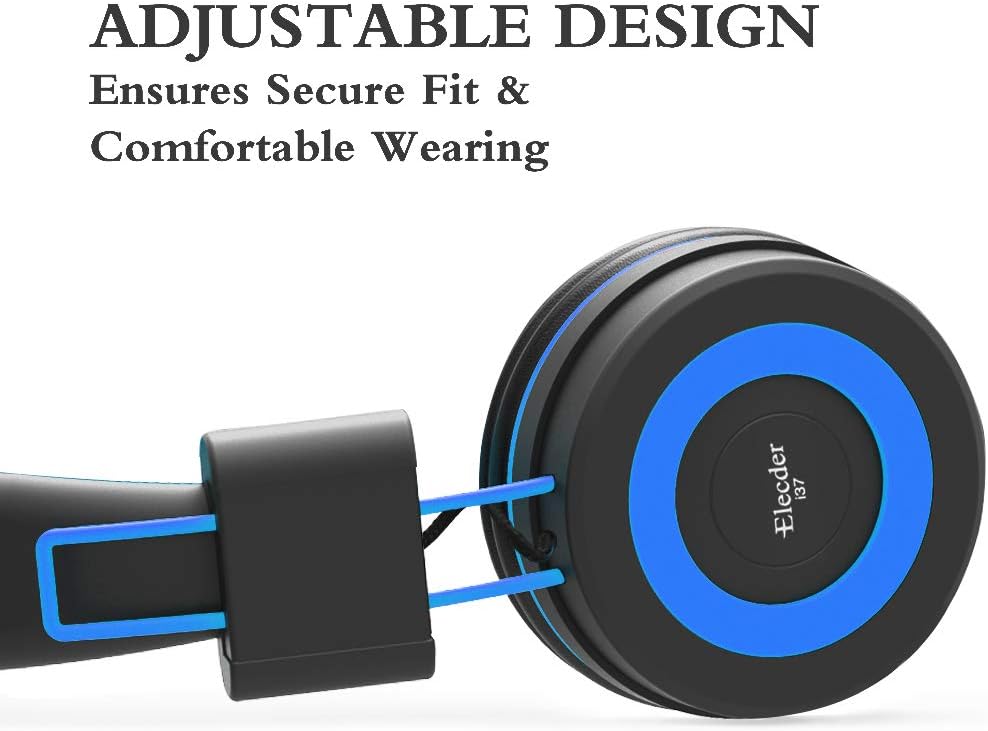
Figure 5: Detail of the adjustable slider on the headband, which allows for a secure and comfortable fit for various head sizes.

6-сүрөт: А view of the soft, noise-isolating ear pads, designed to provide comfort and reduce external distractions.
Орнотуу нускамалары
- Кулакчындарды таңгактан чыгарыңыз: Carefully remove the headphones and any included accessories from the packaging.
- Түзмөккө туташуу: Insert the 3.5mm audio jack firmly into the headphone port of your audio device (e.g., smartphone, tablet, computer, MP3/4 player, Kindle).
Note: For devices like iPhone 7 and newer, or iPad Pro 11 and above, a lightning to 3.5mm jack adapter (not included) is required.
- Баш боосун тууралаңыз: Gently slide the earcups up or down along the headband to achieve a comfortable and secure fit on the user's head. Ensure both earcups sit comfortably over the ears.
Иштөө нускамалары
The ELECDER i37 headphones are designed for simple plug-and-play operation.
- Аудио ойнотуу: Once connected to your device, audio will be routed through the headphones. Control playback (play, pause, skip) and volume directly from your connected device.
- Үндү көзөмөлдөө: Please note that these headphones do жок feature an inline microphone, remote, or volume control. All volume adjustments must be made on the connected audio source.
Кароо жана тейлөө
- Тазалоо: Use a soft, dry cloth to wipe the exterior surfaces of the headphones. Do not use liquid cleaners or abrasive materials.
- Сактагыч: When not in use, fold the headphones to their compact size and store them in a clean, dry place away from direct sunlight and extreme temperatures. This helps protect the headphones and prevents the cord from tangling.
- Шнур кам көрүү: Avoid sharply bending or pulling the audio cable to prevent internal damage. The cloth-braided cord is designed to be durable and tangle-resistant, but proper handling will extend its lifespan.
Проблемаларды чечүү
| Көйгөй | Мүмкүн себеп | Чечим |
|---|---|---|
| Үн жок же үнү төмөн |
|
|
| Үндүн бурмаланышы же сапаты начар |
|
|
| Кулакчындар ыңгайлуу батып кетпейт |
|
|
Техникалык шарттар
| Өзгөчөлүк | Деталь |
|---|---|
| Модель аты | i37 |
| Бренд | ЭЛЕКДЕР |
| Байланыш технологиясы | Зымдуу |
| Наушник уясы | 3.5 мм Джек |
| Кабель өзгөчөлүгү | Retractable (Durable, Tangle-Free Cloth) |
| Наушник формасы | On Ear |
| Материал | Плюс |
| Элемент Салмагы | 5.6 унция (болжол менен 158.76 грамм) |
| Продукциянын өлчөмдөрү | 8.9 x 2.8 x 6.1 дюйм |
| Жыштык диапазону | 20 Гц - 20 000 Гц |
| Башкаруу түрү | Volume Control (via connected device) |
| Noise Control | Үн изоляциясы |
| Шайкеш түзмөктөр | Smartphone, computer, laptops, PCs, Kindle, MP3/4, tablets, etc. (Adapter needed for iPhone 7/iPad Pro 11 and above) |
Кепилдик жана колдоо
Кепилдик маалымат
The ELECDER i37 Kids Headphones come with a 1 Year Hassle-Free-Protection warranty. This warranty covers manufacturing defects and ensures your satisfaction with the product. Please retain your proof of purchase for warranty claims.
Кардарларды колдоо
For any questions, concerns, or assistance with your ELECDER i37 headphones, please do not hesitate to contact our customer service team.
- Amazon аркылуу: You can contact us at any time via Amazon email through your order details.
- Refer to Instructions: Additional contact information may be available on the physical instructions included with your product.

