Introduction
The DIGOO DG-TH8380 is a multifunctional wireless weather station designed to monitor indoor and outdoor temperature and humidity. It features a large LCD touchscreen display with a soft eye-care white backlight, a weather forecast function, and supports up to three outdoor sensors. This manual provides detailed instructions for setup, operation, maintenance, and troubleshooting.

Image: The DIGOO DG-TH8380 main display unit and its accompanying wireless outdoor sensor. The main unit shows time, indoor temperature and humidity, outdoor temperature and humidity, and a weather forecast icon. The outdoor sensor displays its current temperature and channel.
Пакеттин мазмуну
Төмөндө тизмеленген нерселердин баары пакетиңизге камтылганын текшериңиз:
- 1 x DIGOO DG-TH8380 Wireless Touch Screen Weather Station Clock (Main Unit)
- 1 x DIGOO DG-TH8380 Wireless Outdoor Sensor
- 1 x DIGOO DG-TH8380 Full English User Manual
- 1 x USB Power Cable (Note: Charger and batteries are not included)
Техникалык шарттар
| Өзгөчөлүк | Description |
|---|---|
| Негизги бирдиктин өлчөмдөрү | 14.1см x 9.4см x 2.2см (5.6" x 3.7" x 0.9") |
| Дисплей | LCD Touch Screen with Soft Eye-Care White Backlight |
| Жабык температура диапазону | 0°C ~ 50°C (32°F ~ 122°F) |
| Тышкы температура диапазону | -40°C ~ +60°C (-40°F ~ 140°F) |
| Humidity Range (Indoor & Outdoor) | 20% RH ~ 90% RH |
| Wireless КПП Расстояние | Up to 100 meters (328 feet) in open area |
| Кубат булагы (Негизги блок) | 3 x AAA batteries or USB cable (batteries not included) |
| Кубат булагы (Алыскы сенсор) | 2 x AAA batteries (batteries not included) |
| Монтаждоо параметрлери | Desktop stand or Wall-mount |
| Өзгөчөлүктөр | Touchscreen, Weather Forecast, 12/24 Hour Time, Calendar, Max/Min Temperature/Humidity Record, Low Battery Indicator, Supports up to 3 outdoor sensors |

Сүрөт: An overview showing the dimensions of the main unit (141mm x 95mm x 24mm) and various features including wall-mount capability, a table stand, battery power option, and the remote sensor.
Жайгашуу
1. Негизги блокту кубаттоо
- Open the battery compartment on the back of the main unit.
- Туура полярдуулукту (+/-) камсыз кылып, 3 AAA батарейкасын салыңыз.
- Alternatively, connect the provided USB cable to the main unit and a USB power adapter (not included) for continuous power. Note: When powered by USB, the backlight will remain on. When battery-powered, the backlight activates for 20 seconds by pressing the top button.
- Батарея отсегин жабыңыз.
2. Powering the Outdoor Sensor
- Сырткы сенсордун арткы жагындагы батарея бөлүмүн ачыңыз.
- Туура полярдуулукту (+/-) камсыз кылып, 2 AAA батарейкасын салыңыз.
- Батарея отсегин жабыңыз.
3. Pairing the Sensor(s)
The main unit will automatically search for the outdoor sensor upon initial power-up. Ensure the sensor is within range. If pairing does not occur automatically or if adding additional sensors:
- Place the outdoor sensor near the main unit during the pairing process.
- On the outdoor sensor, select a channel (1, 2, or 3) using the channel switch inside the battery compartment.
- On the main unit, press the "CH" touch button to cycle through channels until the desired sensor channel is displayed. The main unit supports up to 3 outdoor sensors.
- Allow a few minutes for the sensor to transmit data to the main unit.
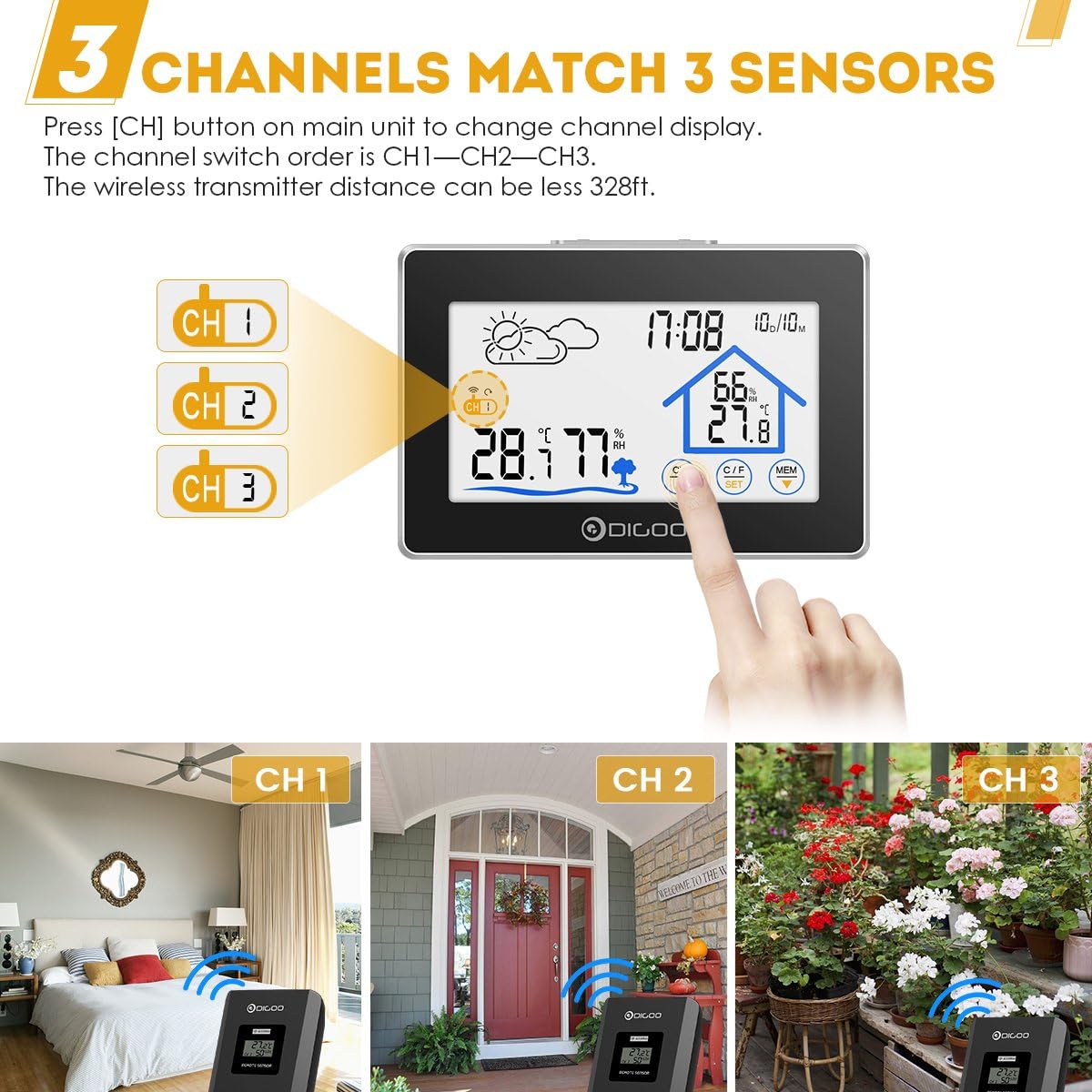
Image: The main unit display showing three channel indicators (CH 1, CH 2, CH 3) and a finger pressing the "CH" button to switch between them. This illustrates the multi-sensor capability.
4. Жайгаштыруу
- Негизги блок: Place the main unit on a flat surface using its integrated stand or mount it on a wall using the hanging hole on the back. Choose a location away from direct sunlight or heat sources for accurate indoor readings.
- Тышкы сенсор: Place the outdoor sensor in a shaded, dry location, protected from direct rain and sunlight, to ensure accurate outdoor temperature and humidity readings. Ensure it is within the 100-meter wireless transmission range of the main unit.
Иштөө нускамалары
Дисплейview

Сүрөт: деталдуу view of the main unit's LCD screen with labels pointing to key display elements: Weather Icon, Channel Display, Outdoor Temperature & Humidity, Backlight Button, Time & Date, Indoor Temperature & Humidity, and Touch Switch Buttons.
- Weather Icon: Displays current weather forecast (Sunny, Partly Cloudy, Cloudy, Rainy).
- Убактысы жана датасы: Shows current time (12/24 hour format) and calendar.
- Имараттын температурасы жана нымдуулугу: Displays readings from the main unit's internal sensor.
- Сырттагы температура жана нымдуулук: Displays readings from the currently selected outdoor sensor.
- Канал дисплейи: Indicates which outdoor sensor channel (CH1, CH2, or CH3) is currently being displayed.
Touch Button Функциялары
The DIGOO DG-TH8380 features sensitive touch buttons for easy operation:
- CH (Channel) Button: Touch to switch between outdoor sensor channels (CH1, CH2, CH3).
- °C/°F (Unit) Button: Touch to toggle temperature display between Celsius (°C) and Fahrenheit (°F).
- MEM (Memory) Button: Touch to display the maximum and minimum temperature and humidity records for both indoor and outdoor readings. Press again to cycle through current, maximum, and minimum values.
- SET баскычы: Used for setting time and date. Press and hold to enter setting mode. Use UP/DOWN buttons to adjust values.
- ЖОГОРУ/ТӨМӨН баскычтары: Used to adjust values during setting mode.
- LIGHT Button (Top of Unit): Press to activate the backlight for 20 seconds (when battery-powered). When powered by USB, the backlight remains continuously on.
Убакыт жана дата орнотуу
- басып, кармап туруңуз SET touch button until the time display starts flashing.
- колдонуу UP жана ылдый touch buttons to adjust the hour.
- Басыңыз SET again to confirm the hour and move to the minute setting.
- Процессти мүнөт, жыл, ай жана күн үчүн кайталаңыз.
- Басыңыз SET орнотуу режиминен чыгуу үчүн акыркы жолу.

Image: The DIGOO DG-TH8380 main unit displaying its soft white backlight in a dimly lit room, illustrating its visibility at night.
Техникалык тейлөө
- Тазалоо: Негизги блокту жана сенсорду жумшак, кургак чүпүрөк менен сүртүңүз. Абразивдүү тазалоочу каражаттарды же эриткичтерди колдонбоңуз.
- Батареяны алмаштыруу: Replace batteries in both the main unit and outdoor sensor when the low battery indicator appears on the display. Ensure correct polarity.
- Сактагыч: Аппаратты узак убакытка сактасаңыз, агып кетпеш үчүн бардык батарейкаларды алып салыңыз.
- Курчап турган чөйрөнү коргоо: Do not expose the outdoor sensor to direct water immersion or extreme weather conditions beyond its specified operating range.
Проблемаларды чечүү
| Көйгөй | Мүмкүн себеп | Чечим |
|---|---|---|
| Негизги блокто дисплей жок. | Batteries are dead or incorrectly inserted; USB cable not connected or faulty. | Check battery polarity and replace if necessary. Ensure USB cable is securely connected to a working power source. |
| Сырткы температура/нымдуулук көрсөтүлгөн эмес же так эмес. | Sensor out of range; sensor batteries dead; incorrect channel selected; interference. | Move sensor closer to the main unit. Replace sensor batteries. Press "CH" button to select the correct channel. Avoid placing near large metal objects or strong electromagnetic sources. |
| Backlight not staying on (when battery powered). | Normal operation for battery mode. | The backlight is designed to turn off after 20 seconds to conserve battery. For continuous backlight, use USB power. |
| Аба ырайынын божомолу так эмес. | Weather forecast is based on internal barometric pressure changes, not external data. | The weather station predicts weather for the next 12-24 hours based on atmospheric pressure trends. It may not always match local weather reports. Allow time for the unit to calibrate. |
Кепилдик жана колдоо
DIGOO products are designed for reliability and performance. For any issues encountered during use, please refer to the troubleshooting section first.
If further assistance is required, please contact the seller or manufacturer's customer service. Information regarding warranty coverage and support channels is typically provided at the point of purchase or on the official DIGOO webсайт.
Note: The product description mentions "Wolifui US Based Customer Service, 5 Days a Week (Business Days)" for warranty/refund inquiries. Please refer to your purchase documentation for specific contact details.


