1. Киришүү
This manual provides detailed instructions for the setup, operation, and maintenance of your CAME TOP432EV remote control. The CAME TOP432EV is designed for controlling compatible gate openers, garage door systems, and other access control devices. It features a durable design and a reliable operating range.
Included with your remote control are the necessary batteries, ensuring it is ready for initial setup upon arrival.

Сүрөт 1.1: Бурчтуу view of the CAME TOP432EV remote control, showcasing its two primary buttons and the CAME logo at the bottom.
2. Орнотуу жана программалоо
2.1 Батареяны орнотуу
The CAME TOP432EV remote control comes with a pre-installed battery. If replacement is needed, follow these steps:
- Пульттун артындагы батарея бөлүкчөсүнүн капкагын табыңыз.
- Using a small screwdriver or coin, carefully pry open the cover.
- Remove the old battery and insert a new CR2032 type battery, ensuring the positive (+) side faces upwards.
- Батарея уясынын капкагын ордуна коюңуз, анын ордуна бекем чыкылдатыңыз.
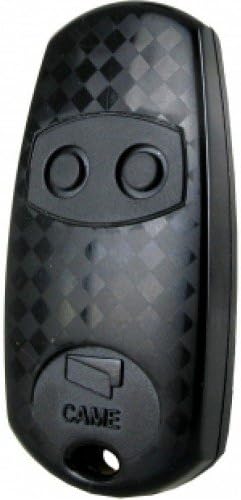
2.1-сүрөт: Түз фронт view of the CAME TOP432EV remote control, highlighting the two circular buttons and the CAME branding.
2.2 Алыстан башкарууну программалоо
Programming the CAME TOP432EV typically involves cloning from an existing remote or programming directly to the receiver unit. Consult your receiver's manual for specific programming modes. A common cloning procedure is as follows:
- Бар болгон коддорду тазалаңыз (зарыл болсо): On the new remote, press and hold both buttons simultaneously until the LED flashes rapidly, then release. This clears any pre-existing codes.
- Окуу режимине кириңиз: Press and hold the button on the new remote that you wish to program. The LED will light up steadily.
- Баштапкы пульттан клондоо: While still holding the button on the new remote, bring the original, working remote close to it (typically back-to-back or side-by-side). Press and hold the corresponding button on the original remote.
- Ырастоо: The LED on the new remote should flash rapidly, then turn solid, indicating successful code transfer. Release both buttons.
- Сыноо: Test the newly programmed button with your device. If it does not work, repeat the steps or refer to your receiver's specific programming instructions.
For direct programming to a receiver, activate the receiver's learning mode (often by pressing a button on the receiver itself), then press the desired button on the CAME TOP432EV remote. The receiver will typically provide visual or audible confirmation.

Сүрөт 2.2: Жакын план view of the CAME TOP432EV remote control's buttons, illustrating their placement for programming and operation.
3. Иштөө нускамалары
Once programmed, operating your CAME TOP432EV remote control is straightforward:
- Жандандыруу: Press the programmed button corresponding to the desired function (e.g., open gate, close garage door).
- Диапазон: The remote control has an operational range of up to 150 meters under optimal conditions. Ensure there are no significant obstructions between the remote and the receiver for best performance.
- Индикатор жарыгы: The LED on the remote will illuminate when a button is pressed, indicating that a signal is being transmitted.
4. Техникалык тейлөө
4.1 Батареяны алмаштыруу
If the remote's operational range decreases significantly or the LED indicator light becomes dim or fails to illuminate, it is likely time to replace the battery. Refer to Section 2.1 for battery installation instructions.
4.2 Тазалоо
To clean the remote control, use a soft, dry cloth. Avoid using abrasive cleaners, solvents, or excessive moisture, as these can damage the device's electronics and casing.
4.3 Сактоо
Store the remote control in a dry place, away from extreme temperatures and direct sunlight. Avoid placing heavy objects on the remote to prevent damage to the buttons or internal components.
5. Кыйынчылыктарды
Жалпы көйгөйлөр жана аларды чечүү жолдору үчүн төмөнкү таблицаны караңыз:
| Көйгөй | Мүмкүн себеп | Чечим |
|---|---|---|
| Remote not working / No response | Өлгөн же аз батарея Туура эмес программалоо Алыскы аралыктан | Replace battery (CR2032) Reprogram the remote (Section 2.2) Алуучуга жакыныраак жылыңыз |
| Short operational range | Батарея начар Obstructions between remote and receiver Интерференция | Replace battery (CR2032) Көздүн так сызыгын камсыз кылыңыз Check for other radio frequency devices |
| LED индикатору күйбөйт | Өлгөн батарея Ички күнөө | Replace battery (CR2032) Көйгөй чечилбесе, кардарларды колдоо кызматына кайрылыңыз |
6. Техникалык шарттар
- Бренд: КЕЛДИ
- Модел: TOP432EV
- Түсү: Кара
- Өзгөчө өзгөчөлүгү: Эргономикалык дизайн
- Колдоого алынган түзмөктөрдүн максималдуу саны: 1 (per button, typically two buttons available)
- Шайкеш түзмөктөр: Gate openers, garage door systems, and other CAME-compatible access control systems. (Note: While product data may list 'Television', this model is primarily designed for gate/garage systems.)
- Иштөө диапазону: Up to 150 meters (under optimal conditions)
- Батарея түрү: CR2032 (камтылган)
7. Кепилдик жана колдоо
Your CAME TOP432EV remote control is covered by a standard manufacturer's warranty against defects in materials and workmanship. Please retain your proof of purchase for warranty claims.
For technical assistance, troubleshooting beyond this manual, or warranty inquiries, please contact the retailer or authorized CAME service center where the product was purchased. Provide your model number (TOP432EV) and a detailed description of the issue to facilitate support.


