Introduction
This manual provides essential instructions for the setup, operation, and maintenance of your LG 43UK6500MLA.AEE 43-inch 4K UHD LED TV. Please read this manual thoroughly before operating your television to ensure safe and correct use. Keep this manual for future reference.
The LG 43UK6500MLA.AEE features a 43-inch 4K Ultra HD LED display, Active HDR for enhanced picture quality, and the intuitive WebOS 4.0 smart TV platform. It includes a QuadCore Processor, TruMotion 100Hz, Wide Color Gamut, and Bluetooth connectivity.
Кутуда эмне бар
Carefully unpack the box and ensure all items are present. If any items are missing or damaged, contact your dealer.
- LG 43UK6500MLA.AEE 43-inch 4K UHD LED TV
- Алыстан башкаруу (Батареялар кошулган эмес)
- Электр кабели
- Стенд компоненттери (эгер бар болсо)
- Документация (Колдонуучунун колдонмосу, Кепилдик картасы)
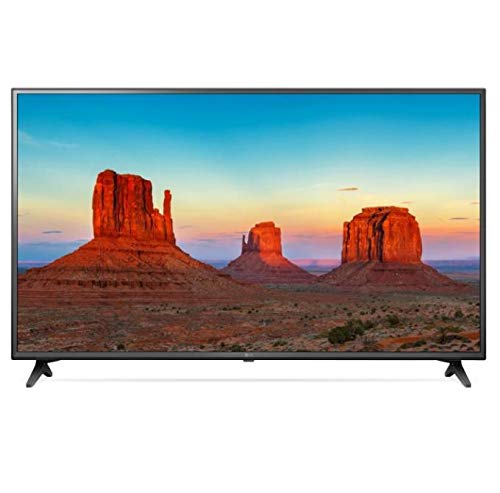
Image: LG 43UK6500MLA.AEE 43-inch 4K UHD LED TV. This image shows the television unit, typically including the screen, bezel, and a stand. A remote control may also be depicted alongside the TV.
Жайгашуу
1. таңгактан чыгаруу
Remove the TV and all accessories from the packaging. It is recommended to keep the packaging materials for future transport of the TV.
2. Stand Assembly (Table-top Mounting)
If you are placing the TV on a table, you will need to attach the stand. Follow these steps:
- Сыналгы экранын сызып кетпеши үчүн жумшак, тегиз бетке ылдый каратып кой.
- Стенд негизин телевизордун астындагы монтаждоо тешиктери менен тууралаңыз.
- Берилген бурамалар менен стендди бекитиңиз. Бардык бурамалар бекем бекемделгенин текшериңиз.
Note: The TV supports table mounting. For wall mounting, a separate VESA-compatible wall mount kit (not included) is required. Refer to the wall mount kit's instructions for installation.
3. Перифериялык түзүлүштөрдү туташтыруу
- Күч: Кубат кабелин телевизордун кубат киресине, андан кийин розеткага туташтырыңыз.
- HDMI түзмөктөрү: Connect external devices like Blu-ray players, game consoles, or set-top boxes to the HDMI ports on the back of the TV using HDMI cables.
- Антенна/кабель: Connect an antenna or cable TV feed to the ANTENNA/CABLE input.
- Тармак: Интернетке кирүү үчүн, баштапкы орнотуу учурунда LAN портуна Ethernet кабелин туташтырыңыз же Wi-Fi аркылуу зымсыз туташыңыз.
- USB түзмөктөрү: Connect USB storage devices to the USB port for media playback.
4. Баштапкы орнотуу устасы
After connecting the power and turning on the TV for the first time, an on-screen setup wizard will guide you through essential settings:
- Тил тандоо: Өзүңүзгө жаккан тилди тандаңыз.
- Өлкө тандоо: Select your country for correct channel tuning.
- Тармак туташуусу: Configure your Wi-Fi connection or confirm the wired connection.
- Каналды жөндөө: Жеткиликтүү берүү каналдарын издөө.
- Убакыт жана дата: Туура убакытты жана күндү коюңуз.
- Шарттар жана жоболор: Review and accept the user agreements.
Иштөө нускамалары
1. Remote Control Overview
The remote control allows you to access all functions of your TV. Insert two AAA batteries (not included) into the remote control, ensuring correct polarity.
- Кубат баскычы: Телевизорду күйгүзөт же өчүрөт.
- Сан баскычтары: Каналдарды түз тандаңыз.
- Үнүн жогорулатуу/төмөндөтүү: Үн деңгээлин тууралаңыз.
- Канал өйдө/төмөн: Каналдарды ырааттуу өзгөртүү.
- Үй баскычы: кирүү WebOS Smart TV launcher.
- Киргизүү баскычы: Киргизүү булактарын тандаңыз (HDMI, USB, TV).
- Чабыттоо баскычтары (өйдө/төмөн/сол/оң) жана OK: Менюларды чабыттап, тандоолорду ырастаңыз.
- Артка баскычы: Мурунку экранга кайтуу.
- Орнотуулар баскычы: Access picture, sound, and general settings.
2. WebOS 4.0 Smart TV Navigation
басыңыз Үй button on your remote to open the WebOS launcher bar at the bottom of the screen. Use the navigation buttons to scroll through apps, input sources, and other features. Select an item by pressing OK.
3. Сүрөт жана үн орнотуулары
To adjust picture or sound settings:
- басыңыз Орнотуулар алыстан башкаруудагы баскыч.
- багыттоо Сүрөт or Үн.
- Select desired options such as Picture Mode (Vivid, Standard, Cinema), Brightness, Contrast, or Sound Mode (Standard, Cinema, Music).
4. Bluetooth байланышы
Your TV supports Bluetooth for connecting compatible audio devices like headphones or soundbars.
- барыңыз Орнотуулар > Үн > Sound Out.
- Тандоо LG Sound Sync (Зымсыз) or Bluetooth.
- Bluetooth түзмөгүңүздү жупташтыруу режимине коюңуз.
- Select your device from the list on the TV screen to connect.
Техникалык тейлөө
1. Телевизорду тазалоо
- Тазалоодон мурун дайыма сыналгыдан ажыратыңыз.
- Экранды жана шкафты сүртүү үчүн жумшак, кургак чүпүрөктү колдонуңуз.
- өжөр белгилери үчүн, жеңил гampкездемени суу же жумшак, абразивдүү эмес экран тазалагыч менен сүртүңүз. Тазалоочу каражатты эч качан түз экранга чачпаңыз.
- Спирт, бензол, эритүүчү же башка учуучу заттарды колдонуудан алыс болуңуз, анткени алар сыналгыга зыян келтириши мүмкүн.
2. Программалык камсыздоону жаңыртуу
To ensure optimal performance and access to the latest features, regularly check for software updates:
- Сыналгыңыз интернетке туташып турганын текшериңиз.
- барыңыз Орнотуулар > Генерал > Бул ТВ жөнүндө > Жаңыртууларды текшериңиз.
- Бардык жеткиликтүү жаңыртууларды жүктөп алуу жана орнотуу үчүн экрандагы көрсөтмөлөрдү аткарыңыз.
Проблемаларды чечүү
Кызматка кайрылуудан мурун, жалпы көйгөйлөр үчүн төмөнкү чечимдерди колдонуп көрүңүз:
| Көйгөй | Мүмкүн болгон себеп / Чечим |
|---|---|
| Электр кубаты жок / телевизор күйбөйт. |
|
| No picture or sound from an external device. |
|
| No channels found during tuning. |
|
| Пульт иштебей жатат. |
|
| Wi-Fi туташуу маселелери. |
|
Техникалык шарттар
| Өзгөчөлүк | Деталь |
|---|---|
| Бренд | LG Electronics |
| Модель номери | 43UK6500MLA.AEE |
| Модель аты | 43UK6500MLA |
| Модель жылы | 2018 |
| Дисплей технологиясы | LED |
| Screen Size | 43 дюйм (109 см) |
| Резолюция | 4K UHD (3840 x 2160) |
| Аспект катышы | 16:9 |
| Жаңыртуу ылдамдыгы | TruMotion 100Hz |
| Процессор | QuadCore Processor |
| HDR колдоо | Активдүү HDR |
| Түс гаммасы | Wide Color Gamut |
| Операция системасы | WebOS 4.0 |
| Байланыш | Wi-Fi, Bluetooth |
| Аппараттык интерфейс | Bluetooth |
| USB порттору | 1 |
| Аудио чыгаруу режими | Стерео |
| Динамик конфигурациясы | 2-канал |
| Өзгөчөлүктөр | Электрондук программалык колдонмо (EPG) |
| Монтаж түрү | Стол орнотуу |
| Продукт өлчөмдөрү (WxHxD) | 105.2 x 66 x 15.2 см (стенд менен) |
| Салмагы | 10.92 кг |
Кепилдик жана колдоо
Кепилдик маалыматы үчүн продуктуңузга кошулган кепилдик картасын караңыз же расмий LG компаниясына баш багыңыз webсайт. Техникалык колдоо, продуктуну каттоо же тейлөө боюнча суроолор боюнча, LG Кардарларды тейлөө кызматына алардын расмий каналдары аркылуу кайрылыңыз.
You can typically find contact information and support resources on the LG official webсайт: www.lg.com/support