1. Бүттүview
The Yahboom Micro:bit Robot Car Kit is an educational STEM toy designed to introduce users to programming and robotics. This kit combines the BBC Micro:bit board (not included) with various learning components and expansion boards, allowing for a hands-on experience in building and programming a functional robot car. The vehicle features a compact design and is assembled using screws and anti-reverse sockets for simple and safe construction.
Key functionalities include tracking, ultrasonic obstacle avoidance, following, light discoloration, singing, and music playback. It supports JavaScript graphical programming, Python, and other Micro:bit programming methods, with over 30 experimental courses available.

Image: The Yahboom Micro:bit Robot Car Kit, showcasing the assembled robot with the Micro:bit board, highlighting its integration with learning and development tutorials.
2. Пакеттин мазмуну
Please verify all components are present upon opening the package. The kit includes the following items:
- Expansion Board (1)
- Vertical Ultrasonic Module (1) + 4-pin Cable (1)
- Aluminum Alloy Bracket (1)
- Motors (2) + Motor Brackets (2)
- Ultrasonic Acrylic Board (1)
- Шиналар (2)
- Micro USB Data Cable (1)
- Infrared Remote Control (1)
- Бурағыш (1)
- Track Map (1)
- M3*40 Copper Pillars (4)
- Universal Wheel Bracket (1)
- Universal Wheel (1)
- Литий Батарея (1)
- Battery Velcro (2)
- Колдонмо (1)
- Screw Nut Package (1)
- Advanced Packing Box (1)
Note: The BBC Micro:bit board (v1 or v2) is NOT included and must be prepared separately for the robot to function correctly.

Сүрөт: деталдуу view of all components included in the Yahboom Micro:bit Robot Car Kit, neatly arranged for easy identification.
Video: An initial tutorial video demonstrating the unboxing and basic assembly steps of the Micro:bit Robot Car Kit, including how to load programs for IR and Bluetooth control.
3. Орнотуу жана чогултуу
Follow the step-by-step instructions provided in the included manual to assemble the robot car. Most parts connect with screws, and some feature anti-reverse sockets for ease of installation. No soldering is required.
Маанилүү эскертүүлөр:
- Children without programming experience may require parental support during assembly and programming.
- Ensure you have a BBC Micro:bit board (v1 or v2) as it is essential for the robot's operation and is not included in this kit.
- The robot kit is not pre-assembled; self-installation is required.
Сүрөт: жарылган view diagram illustrating the assembly of the Yahboom Micro:bit Robot Car Kit, showing the placement of the Micro:bit board, ultrasonic sensor, wheels, and motors.

Image: The assembled Yahboom Micro:bit Robot Car Kit, emphasizing the requirement for a separate Micro:bit board to ensure proper functionality.
4. Программалоо
The Yahboom Micro:bit Robot Car Kit supports multiple programming environments, making it accessible for various skill levels:
- JavaScript Graphical Programming: Ideal for beginners, offering a block-based visual interface.
- Python программалоо: Suitable for users with some coding experience, providing a text-based programming environment.
More than 30 experimental courses are provided to guide users through different programming concepts and robot functionalities. For detailed tutorials and resources, please visit the official Yahboom website or refer to the links provided in the manual.

Image: A child engaging with Makecode graphical programming on a laptop, demonstrating the visual and intuitive way to program the Micro:bit robot.

Image: A person typing code on a laptop, illustrating the use of Python programming for advanced control of the Micro:bit robot.
Video: A short tutorial demonstrating the programming process for the Yahboom Micro:bit Robot Car, highlighting how to upload code to enable various functionalities.
5. Иштөө нускамалары
The robot car offers multiple control methods and functionalities:
- IR алыстан башкаруу: Use the included infrared remote to control the robot's movement and other features. Ensure the remote's transmitting tube is aimed at the receiving head on the expansion board.
- APP алыстан башкаруу: Download the dedicated app (search "Mbit" or "Yahboom" in your device's app store) for Android and iOS devices. Connect via Bluetooth to control the robot.
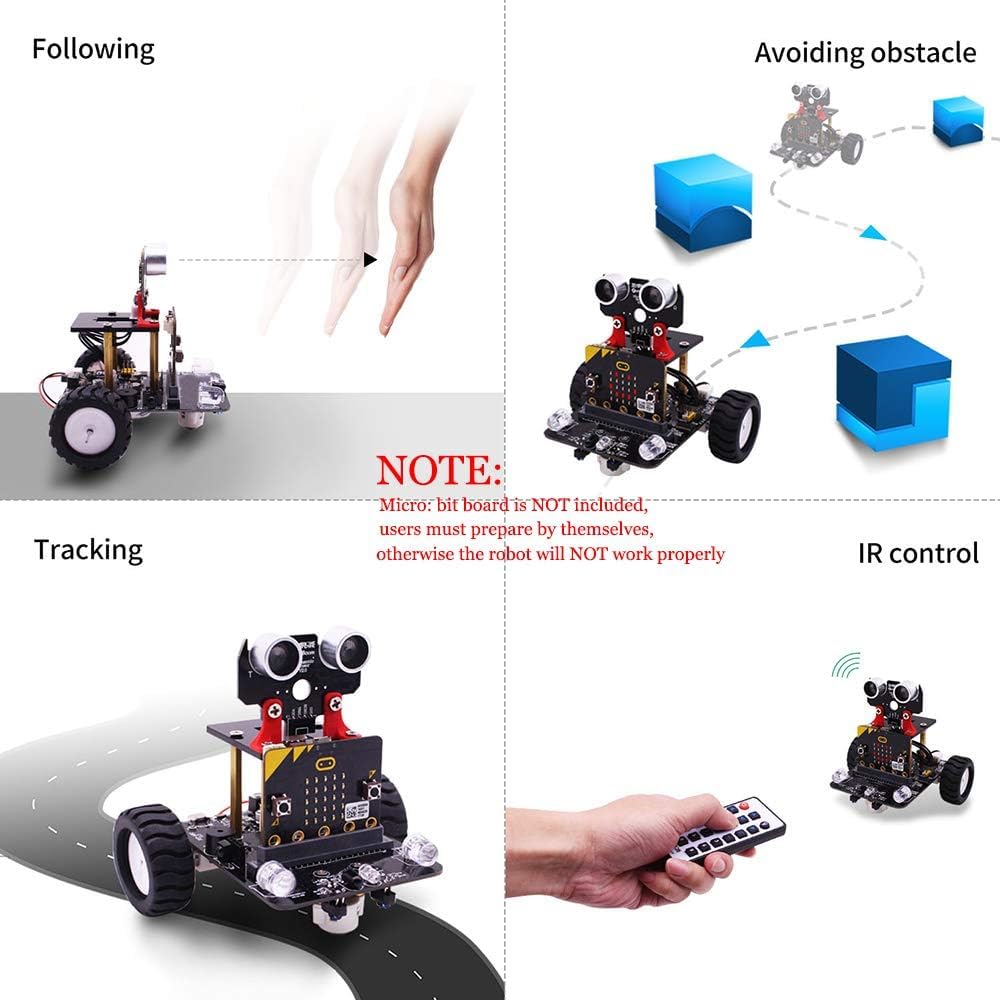
- Функциялары: The robot supports advanced functions such as line tracking, ultrasonic obstacle avoidance, following, light discoloration, and playing music.

Image: Visual representation of the robot's core functions including following, obstacle avoidance, line tracking, and control via IR remote.

Image: A collage showing the robot performing various actions such as turning, drawing, interacting with objects, and being controlled by a smartphone app and IR remote, demonstrating its versatile operating modes.
Video: A demonstration of the robot car's flexible and intelligent movements, showcasing its ability to navigate and interact with its environment.
6. Техникалык тейлөө
To ensure the longevity and optimal performance of your Yahboom Micro:bit Robot Car Kit, follow these maintenance guidelines:
- Тазалоо: Keep the robot free from dust and debris. Use a soft, dry cloth to wipe surfaces. Avoid using liquids or harsh chemicals.
- Батареяга кам көрүү: Charge the lithium battery using the provided USB cable. Do not overcharge or completely drain the battery. Store the robot with a partially charged battery if not in use for extended periods.
- Байланыштары: Periodically check all screw connections and cable plugs to ensure they are secure. Loose connections can affect performance.
- Сактагыч: Роботту күн нурунан жана экстремалдык температурадан алыс салкын, кургак жерде сактаңыз.
7. Кыйынчылыктарды
If you encounter issues with your robot car, consider the following troubleshooting steps:
- Робот күйбөйт: Ensure the lithium battery is fully charged and correctly connected. Check the power switch on the expansion board.
- Робот жооп бербей жатат: Verify that the Micro:bit board is securely inserted into the expansion board. If using IR control, ensure the remote's plastic gasket is removed and it is aimed correctly. For APP control, confirm Bluetooth is enabled on your device and the app has necessary permissions.
- Кыймыл маселелери: Check motor connections and ensure wheels are properly attached. If a wheel is not moving, inspect its wiring.
- Программалоо каталары: Double-check your code for any syntax errors or logical flaws. Refer to the online tutorials for guidance. Re-downloading the program to the Micro:bit can resolve many issues.
- Micro:bit Display Issues: If the Micro:bit's LED matrix is not displaying correctly, ensure the board is properly seated and the program is loaded.
8. Техникалык шарттар
| Өзгөчөлүк | Деталь |
|---|---|
| Controller | Микро: бит тактасы |
| Программалоо программасы | JavaScript editor / Python editor / Mobile phone programming |
| Киргизүү | Infrared obstacle avoidance sensor / Ultrasonic module / Infrared tracking sensor / Infrared receiving probe |
| Чыгуу | Motor / Buzzer / LED Light / Servo / Colorful Searchlight / Colorful Programming Light |
| Электр камсыздоо | 3.7V литий батарейка |
| Жумуш убактысы | Болжол менен 30 мүнөт |
| Дистанцияны өлчөө | Vertical ultrasonic module |
| Мотор | 1:10 DC geared motor |
| Алыстан башкаруу ыкмасы | Bluetooth remote control / Infrared remote control |
| Чогултуу ыкмасы | Welding-free installation |
| After Assembly Size | 96*120*110мм |
| After Assembly Weight | 157г |
9. Кепилдик жана колдоо
For any questions, concerns, or technical assistance regarding your Yahboom Micro:bit Robot Car Kit, please contact Yahboom customer support. We are committed to resolving any product-related inquiries you may have.
- Онлайн окуу куралдары: Access detailed experiment courses and programming guides on the official Yahboom webсайт.
- Кардарларды тейлөө: Contact Yahboom directly for support. Refer to the contact information provided in your product's physical instruction manual for the most up-to-date details.