Introduction
Сатып алганыңыз үчүн рахматasing the iTOMA White Noise Machine and Alarm Clock Model 301. This device combines a sound machine with 20 soothing sounds and a digital alarm clock with vibration and buzzer options, designed to enhance your sleep and waking experience. Please read this manual thoroughly before use to ensure proper operation and to maximize the product's features.

1-сүрөт: iTOMA White Noise Machine and Alarm Clock Model 301. This image shows the front view of the device with its digital display showing "12:38" and control buttons on top.
Пакеттин мазмуну
Пакетте бардык буюмдар бар экенин текшериңиз:
- 1 x iTOMA White Noise Machine and Alarm Clock
- 1 x User Manual
- 1 x Type-C заряддоо кабели
- 1 x USB - USB C адаптер

2-сүрөт: Package Contents. This image displays the white noise machine, user manual, Type-C charging cable, and a USB to USB-C adapter, laid out on a surface.
Жайгашуу
Аппаратты кубаттандыруу
The iTOMA White Noise Machine and Alarm Clock is powered via a USB Type-C connection. An AC adapter is not included, but you can use any standard USB power adapter (e.g., from a smartphone) or a USB port on a computer or power bank.
- Connect the provided Type-C charging cable to the Type-C port on the back of the device.
- Кабелдин экинчи учун USB кубат булагына туташтырыңыз (мисалы, дубал адаптери, компьютердин USB порту).
- The device will power on, and the display will illuminate.
Battery Installation (for backup)
The device requires 1 CR2032 battery (not included) for time and alarm settings backup during power outages. This battery does not power the main functions of the device.
- Аппараттын түбүндөгү батарея отсегин табыңыз.
- Бөлүмдүн капкагын ачыңыз.
- Туура полярдуулукту (+/-) текшерип, бир CR2032 батарейкасын салыңыз.
- Батарея уясынын капкагын бекем жабыңыз.
Иштөө нускамалары
Убакытты коюу
- басып, кармап туруңуз УБАКЫТТЫ ОРНОТУУ button located on the top of the device. The hour display will begin to flash.
- колдонуу UP (▲) же ылдый (▼) buttons to adjust the hour.
- басыңыз УБАКЫТТЫ ОРНОТУУ button again. The minute display will flash.
- колдонуу UP (▲) же ылдый (▼) buttons to adjust the minutes.
- Басыңыз УБАКЫТТЫ ОРНОТУУ once more to confirm and exit time setting mode.
Sound Machine Operation
The device offers 20 natural soothing sounds to aid relaxation and sleep.

3-сүрөт: Soothing Sounds Selection. This image highlights the "WHITE NOISE", "FANS SOUNDS", and "NATURE SOUNDS" buttons on the device, indicating the variety of available sounds.
- White Noise Sounds (5 types): басыңыз АК ШУУЛДОО button to cycle through 5 different white noise options.
- Fan Sounds (5 types): басыңыз FANS SOUNDS button to cycle through 5 different fan sound options.
- Nature Sounds (10 types): басыңыз ЖАРАТЫЛЫШТЫН ТУУСУ button to cycle through 10 different nature sounds (e.g., bird, clock, forest, ocean, rain, thunder).
- Үндү көзөмөлдөө: колдонуу UP (▲) же ылдый (▼) buttons to adjust the sound volume (16 levels).
- Sound Timer: басыңыз ТАЙМЕР button to set an automatic shut-off timer for the sounds. Options include 30, 60, 90, or 120 minutes, or continuous play. The device will remember your last sound and volume settings.

4-сүрөт: Timer Options. This image illustrates the available timer settings: Continuous, 30 minutes, 60 minutes, 90 minutes, and 120 minutes, shown above the device on a bedside table.
Ойготкуч саат функциясы
The device features a digital alarm clock with multiple wake-up options.

5-сүрөт: Digital Alarm Clock Features. This image highlights the wake-up options (buzzer or vibration), 16-level volume control, and snooze function, with the device shown on a wooden surface.
- Ойготкучту орнотуу:
- басып, кармап туруңуз Сигналды орнотуу button. The alarm hour will flash.
- колдонуу UP (▲) же ылдый (▼) buttons to set the desired alarm hour.
- Басыңыз Сигналды орнотуу again. The alarm minute will flash.
- колдонуу UP (▲) же ылдый (▼) buttons to set the desired alarm minutes.
- Басыңыз Сигналды орнотуу a third time to select the alarm mode:
- Күнүмдүк: Күн сайын ойготкуч ызы-чуу болуп турат.
- Иш күндөрү: Alarm sounds Monday to Friday.
- Дем алыш күндөрү: Alarm sounds Saturday and Sunday.
- Басыңыз Сигналды орнотуу a fourth time to select the wake-up method:
- Коңгуроо: Стандарттык үн сигнализациясы.
- Дирилдөө: Silent vibration alarm (requires device to be placed on a surface where vibration can be felt, e.g., under a pillow).
- Басыңыз Сигналды орнотуу one last time to confirm and exit alarm setting mode.
- Ойготкучту иштетүү/өчүрүү: баскычын кыскача басыңыз Сигналды орнотуу ойготкучту күйгүзүү же өчүрүү үчүн баскыч. Иштеп турганда дисплейде сигналдын сөлөкөтү пайда болот.
- Чырым Function: Ойготкуч басылганда, басыңыз SNOOZE / DIMMER button to activate snooze. The alarm will pause for 9 minutes and then sound again. This can be repeated up to 6 times.
- Ойготкучту токтотуу: To stop the alarm completely, press any button other than SNOOZE / DIMMER. The alarm will reset for the next scheduled time.
Dimmer Control режимин көрсөтүү
The display brightness can be adjusted to suit your preference, especially for nighttime use.
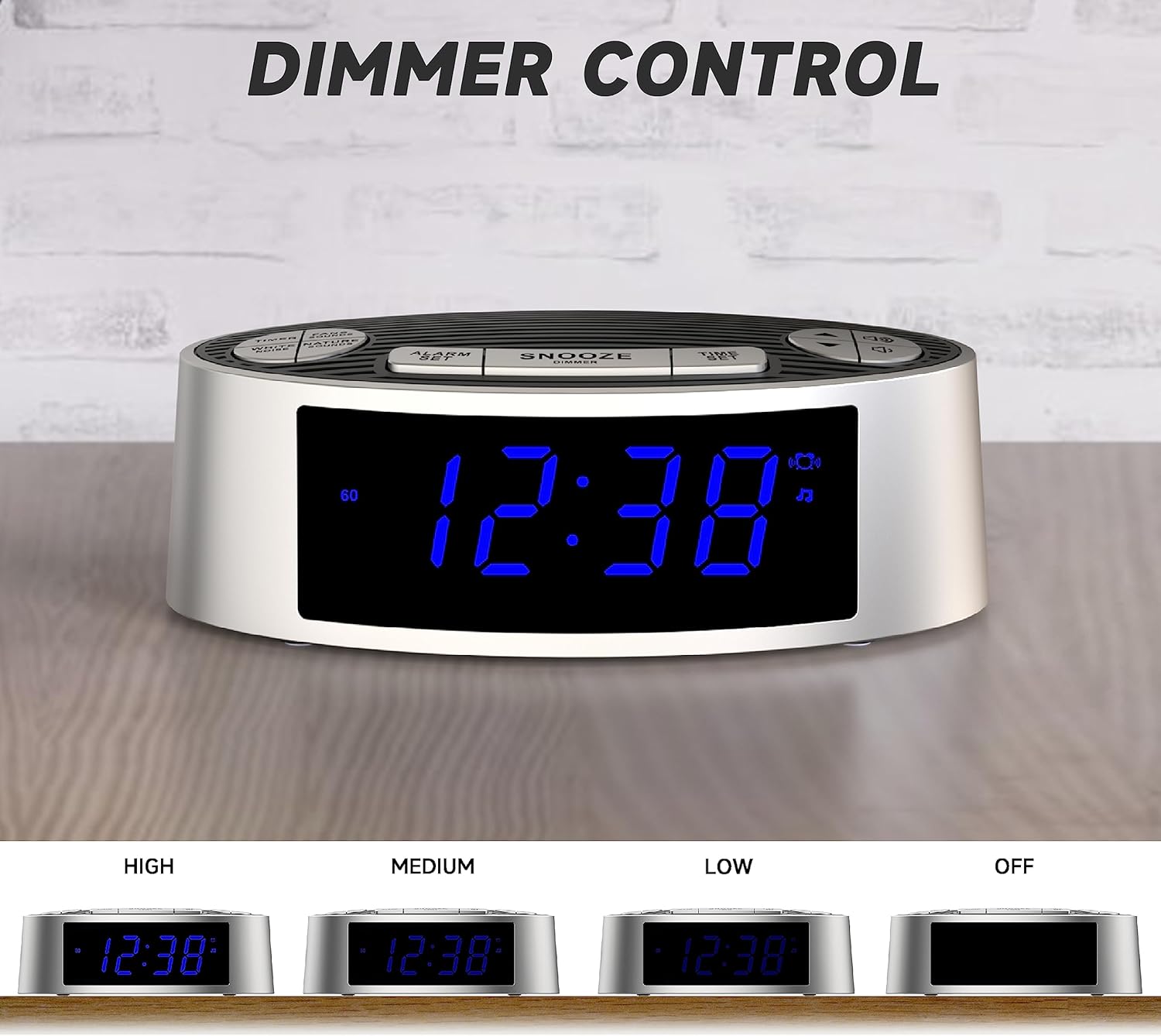
6-сүрөт: Dimmer Control. This image shows the device's display at four different brightness levels: High, Medium, Low, and Off, demonstrating the adjustable dimmer function.
- баскычын кыскача басыңыз SNOOZE / DIMMER button (when the alarm is not sounding) to cycle through the 4 brightness levels: High, Medium, Low, and Off.
Техникалык тейлөө
Тазалоо
- Тазалоодон мурун аппаратты кубат булагынан сууруп алыңыз.
- Аппараттын сыртын сүртүү үчүн жумшак, кургак чүпүрөктү колдонуңуз.
- Do not use liquid cleaners, abrasive cleaners, or sprays, as these may damage the finish or internal components.
Батареяны алмаштыруу
If the time and alarm settings are lost after a power outage, the CR2032 backup battery may need to be replaced. Follow the battery installation steps in the "Setup" section.
Проблемаларды чечүү
| Көйгөй | Мүмкүн себеп | Чечим |
|---|---|---|
| Түзмөк күйбөйт. | Электр энергиясына туташуу жок же кабель/адаптер бузук. | Ensure the USB-C cable is securely connected to both the device and a working USB power source. Try a different USB cable or power adapter. |
| Сигнализация үн чыгарбайт/дирилдебейт. | Alarm not activated, incorrect time, or volume too low. | Verify the alarm is set and activated (alarm icon visible). Check alarm time. Increase alarm volume. Ensure vibration mode is selected if desired. |
| Кубат өчкөндөн кийин убакыт/жөндөөлөр баштапкы абалга келтирилет. | CR2032 backup battery is dead or missing. | CR2032 камдык батареясын алмаштырыңыз. |
| Дисплей өтө жарык/күңүрт. | Диммерди жөндөө тууралоону талап кылат. | басыңыз SNOOZE / DIMMER жарыктык деңгээлдерин өзгөртүү үчүн баскычты басыңыз. |
Техникалык шарттар
| Өзгөчөлүк | Деталь |
|---|---|
| Модель номери | 301 (CKS703) |
| Бренд | iTOMA |
| Өлчөмдөрү (L x W x Y) | 15 x 9 x 5.2 см (5.9 x 3.5 x 2.0 дюйм) |
| Салмагы | 240 грамм (0.53 фунт) |
| Power Source | USB Type-C (AC adapter not included) |
| Камдык батарея | 1 x CR2032 (кошулбайт) |
| Sound Types | 20 (5 ак ызы-чуу, 5 желдеткич, 10 жаратылыш) |
| Үн деңгээли | 16 |
| Sound Timers | Continuous, 30, 60, 90, 120 minutes |
| Alarm Wake-up Options | Buzzer, Vibration |
| Тындыруунун узактыгы | 9 minutes (up to 6 times) |
| Диммерди көрсөтүү | 4 levels (High, Medium, Low, Off) |
| Материал | Акрилонитрил бутадиен стирол (ABS) |
Кепилдик жана колдоо
For warranty information or technical support, please refer to the contact details provided on the product packaging or the official iTOMA webсайт. Сатып алганыңыздын далили катары сатып алуу дүмүрчөгүңүздү сактаңыз.
For further assistance, you may visit: www.itoma.com


