1. Киришүү
This manual provides comprehensive instructions for the installation, operation, and maintenance of the DIGI WR11-M400-DE1-XB Cellular Router. This device is designed to provide reliable 4G LTE cellular connectivity and Ethernet networking for various applications. Please read this manual thoroughly before using the product to ensure proper setup and functionality.
2. Коопсуздук маалыматы
Түзмөктүн бузулушун же персоналдын жаракат алышын алдын алуу үчүн төмөнкү коопсуздук чараларын сактаңыз:
- электр менен жабдууну камсыз кылуу voltage түзмөктүн талаптарына жооп берет.
- Аппаратты сууга же ашыкча нымдуулукка дуушар кылбаңыз.
- Аппаратты жылуулук булактарынын жанына же тике күн нуруна коюудан алыс болуңуз.
- Аппаратты ачпаңыз casing; бардык тейлөөлөрдү квалификациялуу кызматкерлерге тапшырыңыз.
- Use only approved accessories and antennas with the router.
3. Пакеттин мазмуну
Пакетте бардык буюмдар бар экенин текшериңиз:
- DIGI WR11-M400-DE1-XB Cellular Router
- Кубат адаптери (аймакка жараша өзгөрүшү мүмкүн)
- Quick Start Guide
- Орнотуу жабдуулары (эгер бар болсо)
Note: Antennas are not included with this model and must be purchased separately.
4. Продукт бүтүп калдыview
The DIGI WR11-M400-DE1-XB is a compact and robust cellular router designed for reliable connectivity. Below is an image of the device with key features highlighted.
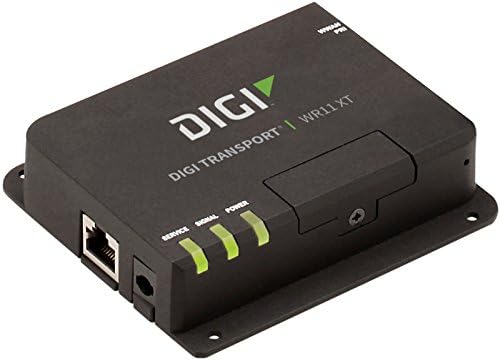
Сүрөт: алдыңкы view of the DIGI WR11-M400-DE1-XB Cellular Router, showing the Ethernet port, power input, and three LED indicators for Service, Signal, and Power. The device is black with the "DIGI TRANSPORT WR11 XT" logo.
Алдыңкы панелдин көрсөткүчтөрү
- Кызмат LED: Indicates cellular service status. (e.g., Solid Green: Connected, Blinking: Attempting connection, Off: No service)
- Сигнал LED: Indicates cellular signal strength. (e.g., Green: Strong, Amber: Medium, Red: Weak)
- Power LED: Indicates power status. (e.g., Solid Green: Power on, Off: Power off)
Порттор жана туташтыргычтар
- Ethernet порту (LAN): One RJ45 port for wired network connection.
- Кубат киргизүү: Connector for the DC power adapter.
- Антенна туташтыргычтары: (Not visible in image, but typically present on cellular routers for external antennas, though this model states "NO Antenna" in description, implying internal or separate purchase). Note: This model does not include antennas. External antennas must be connected to the appropriate ports (if available) for cellular connectivity.
5. Орнотуу
Баштапкы орнотуу
- Позициялоо: Place the router in a central location, away from obstructions and other electronic devices that may cause interference. Ensure good cellular signal reception.
- SIM картаны орнотуу: If applicable, insert your activated 4G LTE SIM card into the designated SIM card slot. Ensure it is inserted correctly according to the diagram on the device or in the Quick Start Guide.
- Антенна туташуу: If using external antennas (recommended for optimal performance, and necessary for this model as it ships without antennas), connect them securely to the antenna ports.
- Кубат туташуу: Connect the power adapter to the router's power input port, then plug the adapter into a power outlet. The Power LED should illuminate.
Network Connection
- Зымдуу туташуу: Connect an Ethernet cable from the router's LAN port to your computer or network switch.
- Байланыштуулугун текшерүү: Once powered on, the router will attempt to establish a cellular connection. Monitor the Service and Signal LEDs. The Service LED should turn solid green, and the Signal LED should indicate good signal strength.
6. Иштөө нускамалары
Негизги операция
Once the router is powered on and has established a cellular connection (indicated by the Service and Signal LEDs), devices connected to its Ethernet port will be able to access the internet via the 4G LTE network.
кирүү Web Интерфейс
For advanced configuration and monitoring, you can access the router's web- негизделген башкаруу интерфейси:
- Ensure your computer is connected to the router via Ethernet.
- ачуу а web браузер (мисалы, Chrome, Firefox, Edge).
- Дарек тилкесине роутердин демейки IP дарегин териңиз (адатта
192.168.1.1or192.168.0.1, refer to the Quick Start Guide or device label for the exact address) and press Enter. - Enter the default username and password when prompted (typically
adminfor both, or as specified in the Quick Start Guide). - You can now configure network settings, security, and monitor device status.
7. Техникалык тейлөө
Үзгүлтүксүз техникалык тейлөө роутериңиздин узак мөөнөттүү иштешин жана оптималдуу иштешин камсыз кылууга жардам берет:
- Тазалоо: Маршрутизатордун сыртын тазалоо үчүн жумшак, кургак чүпүрөктү колдонуңуз. Суюк тазалагычтарды же аэрозолдорду колдонбоңуз.
- Программалык камсыздоонун жаңыртуулары: Мезгил-мезгили менен өндүрүүчүнүн текшерүү webмикропрограммаларды жаңыртуу үчүн сайт. Микропрограмманы жаңыртып туруу иштин майнаптуулугун жогорулатып, функцияларды кошуп, коопсуздукту жакшыртат.
- Вентиляция: Ensure the router is placed in a well-ventilated area to prevent overheating. Do not block ventilation openings.
- Power Cycle: If the router experiences issues, try power cycling it by disconnecting the power adapter for 10 seconds and then reconnecting it.
8. Кыйынчылыктарды
This section addresses common issues you might encounter with the DIGI WR11-M400-DE1-XB Cellular Router.
| Көйгөй | Мүмкүн себеп | Чечим |
|---|---|---|
| Кубат жок (Күч LED өчүк) | Кубат адаптери туташкан эмес же туура эмес розетка. | Check power connections. Try a different power outlet. Ensure the power adapter is functioning. |
| No Cellular Service (Service LED Off/Blinking) | No SIM card, inactive SIM, poor signal, or network issue. | Ensure SIM card is correctly inserted and activated. Relocate the router for better signal. Contact your cellular provider. |
| Poor Signal Strength (Signal LED Red/Amber) | Router location, external interference, or antenna issue. | Move the router to an area with better cellular reception. Ensure external antennas (if used) are properly connected and positioned. |
| No Internet Access via Ethernet | No cellular connection, incorrect network settings, or faulty Ethernet cable. | Verify cellular connection status (Service LED). Check Ethernet cable connection. Access web interface to verify network settings. |
| Кирүү мүмкүн эмес Web Интерфейс | Incorrect IP address, network configuration issue, or router not responding. | Verify the router's IP address. Ensure your computer is set to obtain an IP address automatically (DHCP). Try power cycling the router. |
9. Техникалык шарттар
Key technical specifications for the DIGI WR11-M400-DE1-XB Cellular Router:
| Өзгөчөлүк | Деталь |
|---|---|
| Модел | WR11-M400-DE1-XB |
| Бренд | Санарип |
| Байланыш технологиясы | Cellular (4G LTE Sprint), Ethernet |
| Порттардын саны | 1 (Ethernet) |
| Шайкеш түзмөктөр | Персоналдык компьютер |
| Башкаруу ыкмасы | Алыстан |
| Controller Type | Которуу |
| Өзгөчө өзгөчөлүк | WPS |
| UPC | 665752885062 |
| Биринчи жеткиликтүү күн | 23-июль, 2018-жыл |
10. Кепилдик жана колдоо
For information regarding product warranty, technical support, or service, please refer to the warranty card included with your product or visit the official Digi International website. Support resources, including FAQs, documentation, and contact information, are typically available online.
Кепилдик дооматтары үчүн сатып алганыңыздын далилин сактап коюңуз.


