1. Киришүү
This manual provides comprehensive instructions for the setup, operation, maintenance, and troubleshooting of your Xiaomi AI Translator. Please read this manual carefully before using the device to ensure optimal performance and longevity.

1-сүрөт: Xiaomi AI Translator device. This image shows the front of the translator, highlighting its minimalist design, central control buttons, and speaker grille at the bottom.
2. Продукциянын өзгөчөлүктөрү
- Көп тилдүү колдоо: Translates between 14 languages, covering over 170 countries and districts. Supported languages include Chinese, English, Japanese, Korean, French, German, Spanish, Russian, Portuguese, Italian, Dutch, Danish, Finnish, and Swedish.
- Өркүндөтүлгөн AI технологиясы: Utilizes Microsoft voice technology for natural language understanding and accurate mechanical translation, with self-correction capabilities.
- Versatile Assistant Functions: Beyond translation, it acts as a personal assistant for tasks such as music playback, weather updates, time checks, news broadcasts, calculator functions, voice reading, item explanations, story telling, exchange rate conversions, encryption, and relative salutations.
- Ызы-чууну азайтуу: Equipped with technology for clearer audio reception and more precise voice recognition in various environments.
- Портативдик дизайн: Features a pocket-sized, lightweight (approximately 63g), and durable aluminum alloy body with a curved design.

2-сүрөт: Language coverage map. This image illustrates the global reach of the 14 supported languages, indicating the extensive usability of the translator across various regions.

3-сүрөт: AI Translator technology. This image highlights the core technologies, including Microsoft voice and translation services, that power the device's accurate translation capabilities.

4-сүрөт: Assistant functions. This image displays a range of additional features, demonstrating the device's utility beyond simple translation, acting as a comprehensive personal assistant.
3. Бөлүктөр жана башкаруу элементтери
Familiarize yourself with the various parts and controls of your Xiaomi AI Translator:
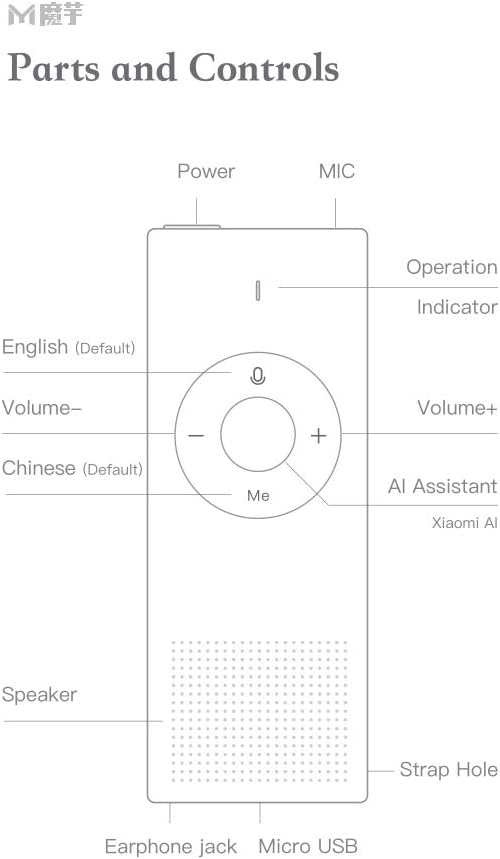
5-сүрөт: Parts and Controls. This diagram labels all external components and buttons of the Xiaomi AI Translator, essential for understanding its operation.
- Кубат баскычы: Located at the top, used to turn the device on/off and for screen wake/sleep.
- MIC (Microphone): Located at the top, for voice input.
- Иштөө көрсөткүчү: Light indicator for device status.
- English (Default) Button: Press and hold to speak in English (or the currently selected left-side language).
- Үндүн көлөмү - баскычы: Үнүн азайтат.
- Chinese (Default) Button: Press and hold to speak in Chinese (or the currently selected right-side language).
- Көлөм + баскычы: Үнүн көбөйтөт.
- AI Assistant (Xiaomi AI) Button: Activates the AI assistant for various functions.
- Баяндамачы: Located at the bottom, for audio output.
- Боо тешиги: For attaching a wrist strap or lanyard.
- Наушник джек: Наушниктерди туташтыруу үчүн.
- Микро USB порту: Аппаратты заряддоо үчүн.
4. Орнотуу
4.1 Алгачкы заряддоо
Before first use, fully charge the Xiaomi AI Translator. Connect the device to a power source using the provided Micro USB cable. The operation indicator will show charging status.
4.2 Күйгүзүү/өчүрүү
- Күйгүзүү үчүн: Түзмөк күйгөнгө чейин Кубат баскычын басып, кармап туруңуз.
- Өчүрүү үчүн: Press and hold the Power button until a power-off prompt appears, then confirm.
- Экранды ойготуу/уйку режими: Briefly press the Power button to wake or put the screen to sleep.
4.3 Language Selection and Network Connection
Upon first power-on, you may be prompted to select your preferred interface language and connect to a Wi-Fi network. A stable internet connection is required for translation functions.
- Түзмөктүн иштөө тилин тандоо үчүн экрандагы көрсөтмөлөрдү аткарыңыз.
- Navigate to the Wi-Fi settings and connect to an available network.
- Ensure the device's firmware is up to date for optimal performance. Check for updates in the settings menu.
5. Иштөө нускамалары
5.1 Basic Translation
The Xiaomi AI Translator supports two-way translation between selected languages.
- Тилдерди тандаңыз: On the device screen, select the two languages you wish to translate between. For example, set the left-side language to English and the right-side language to Chinese.
- Speak in Left-Side Language: басып, кармап туруңуз Англисче (Демейки) button (left button on the control panel) and speak clearly into the MIC. Release the button when you finish speaking. The device will translate and speak the text in the right-side language.
- Speak in Right-Side Language: басып, кармап туруңуз Chinese (Default) button (right button on the control panel) and speak clearly into the MIC. Release the button when you finish speaking. The device will translate and speak the text in the left-side language.
5.2 Using the AI Assistant
басыңыз AI Assistant (Xiaomi AI) button (central button labeled "Me") to activate the AI assistant. You can then ask questions or issue commands for various functions:
- "Play music."
- "Бүгүн аба ырайы кандай?"
- "Tell me the time."
- "Read the news."
- "Open calculator."
- "Explain [item name]."
- "Tell me a story."
- "What's the exchange rate for USD to EUR?"
5.3 Үндү тууралоо
колдонуу Көлөм + жана Көлөмү - buttons on the control panel to adjust the playback volume.
5.4 Колдонуу сценарийлери
The Xiaomi AI Translator is designed for various situations:

6-сүрөт: Multiple usage purposes. This image illustrates diverse applications of the translator, from travel and business to academic use and daily interactions like ordering food or checking into a hotel.
6. Техникалык тейлөө
- Тазалоо: Аппаратты жумшак, кургак чүпүрөк менен сүртүңүз. Суюк тазалагычтарды же абразивдүү материалдарды колдонбоңуз.
- Сактагыч: Store the translator in a cool, dry place away from direct sunlight and extreme temperatures.
- Батареяга кам көрүү: Батареянын иштөө мөөнөтүн узартуу үчүн, аппаратты бат-баттан толук кубаттап турбаңыз. Узак мөөнөткө колдонулбаса да, аны үзгүлтүксүз заряддаңыз.
- Программалык камсыздоо жаңыртуулары: Periodically check for and install software updates to ensure optimal performance, new features, and security enhancements.
7. Кыйынчылыктарды
| Көйгөй | Мүмкүн себеп | Чечим |
|---|---|---|
| Түзмөк күйбөйт. | Батареянын кубаты аз же түзмөктүн иштебей калышы. | Charge the device for at least 30 minutes. If it still doesn't power on, contact customer support. |
| Котормо туура эмес же жай. | Poor internet connection, unclear speech, or outdated software. | Wi-Fi байланышынын туруктуулугун камсыз кылыңыз. Так жана орточо темпте сүйлөңүз. Программалык камсыздоонун жаңыртууларын текшерип, орнотуңуз. |
| Динамиктен үн жок. | Volume too low or speaker malfunction. | Increase the volume using the Volume + button. Ensure no headphones are connected if you expect sound from the speaker. |
| Түзмөк катып калат же жооп бербей калат. | Программалык камсыздоо катасы. | Түзмөк кайра жүктөлүп бүткөнгө чейин Кубат баскычын болжол менен 10-15 секунд басып туруу менен мажбурлап өчүрүп-күйгүзүүнү аткарыңыз. |
8. Техникалык шарттар
| Бренд | XIAOMI |
| Модел | AI Translator |
| Бөлүмдүн номери | ART4847267255513BP |
| Продукт түрү | Электроника |
| Колдоого алынган тилдер | 14 (Chinese, English, Japanese, Korean, French, German, Spanish, Russian, Portuguese, Italian, Dutch, Danish, Finnish, Swedish) |
| Салмагы | Болжол менен 63 г (2.22 унция) |
| Өлчөмдөрү (L x W x Y) | Approximately 150 mm x 40 mm x 10 mm (5.91 in x 1.57 in x 0.39 in) |
| Байланыш | Wi-Fi (for translation), Micro USB (for charging) |
| Материал | Aluminum Alloy Cover |

7-сүрөт: Portable design and dimensions. This image demonstrates the compact size of the translator, fitting easily into a pocket, and provides key physical specifications.
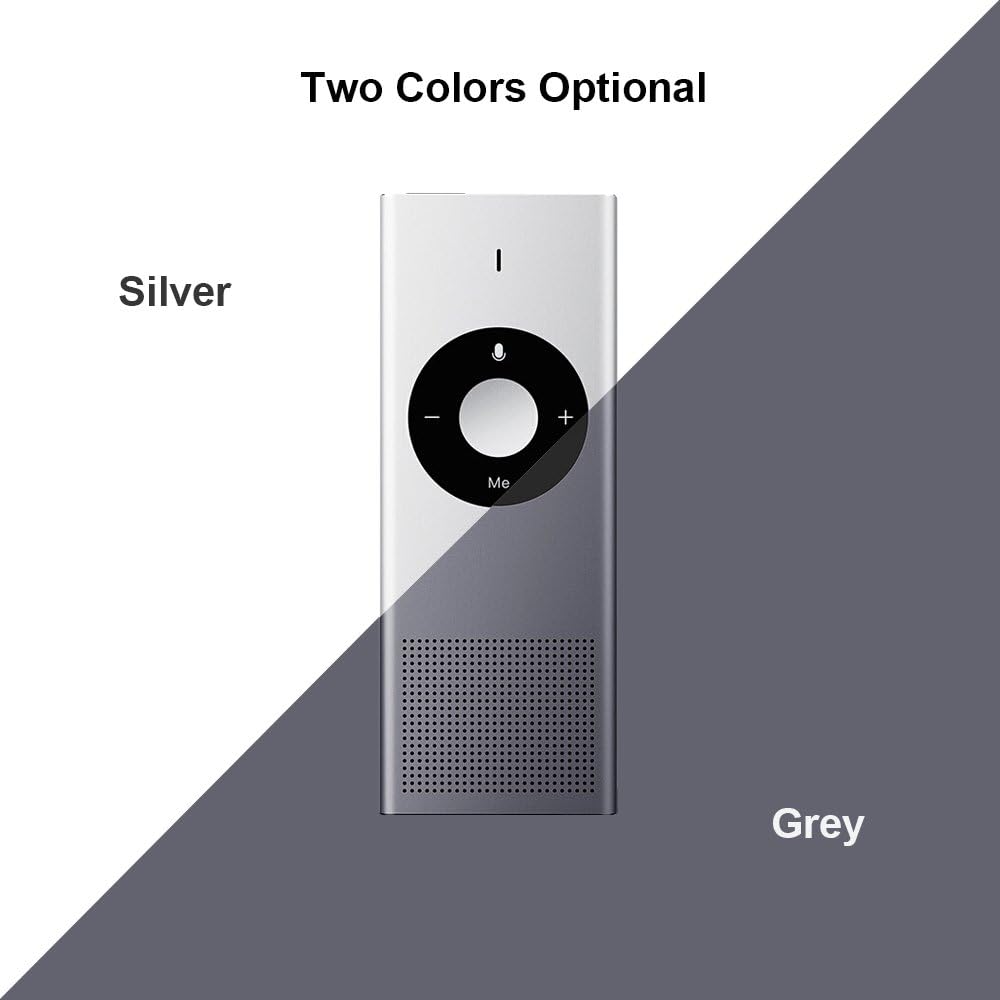
8-сүрөт: Available colors. This image displays the two color options for the Xiaomi AI Translator: Silver and Grey.
9. Кепилдик жана колдоо
Кепилдик маалыматы, техникалык колдоо же тейлөө боюнча суроо үчүн расмий Xiaomi'ге кайрылыңыз webсайтка же жергиликтүү ыйгарым укуктуу дилериңизге кайрылыңыз. Сатып алуу квитанциясын кепилдик дооматтары үчүн сатып алуунун далили катары сактаңыз.
Өндүрүүчү: Xiaomi
ASIN: B07FX88LFZ
Сатып алууга болот, анткени: 20-август, 2018-жыл


