1. Киришүү
The Azpen Dockall D101 is a versatile device combining a Qi wireless charging dock station, a Bluetooth speaker, and a phone stand. It is designed to enhance your audio experience while conveniently charging your compatible smartphones and tablets.
2. Кутуда эмне бар
- 1 x DockAll Slim D101
- 1 x DC кубат адаптери
- 1 x User Manual

Image: Box contents including the DockAll D101 unit, DC power adapter, and user manual.
3. Продукт бүтүп калдыview
The Dockall D101 features an innovative design that integrates multiple functionalities into one device for home and office use. Key components include:
- Qi зымсыз кубаттоочу аянтча: For compatible devices.
- Bluetooth динамиги: For audio streaming.
- Adjustable Phone Stand: Provides an upright viewбурч.
- Башкаруу баскычтары: For power, volume, and playback.
- MicroSD слоту: Supports cards up to 64 GB.

Сүрөт: алдыңкы view of the Azpen Dockall D101 with a smartphone placed on the charging pad, illustrating wireless charging capability.
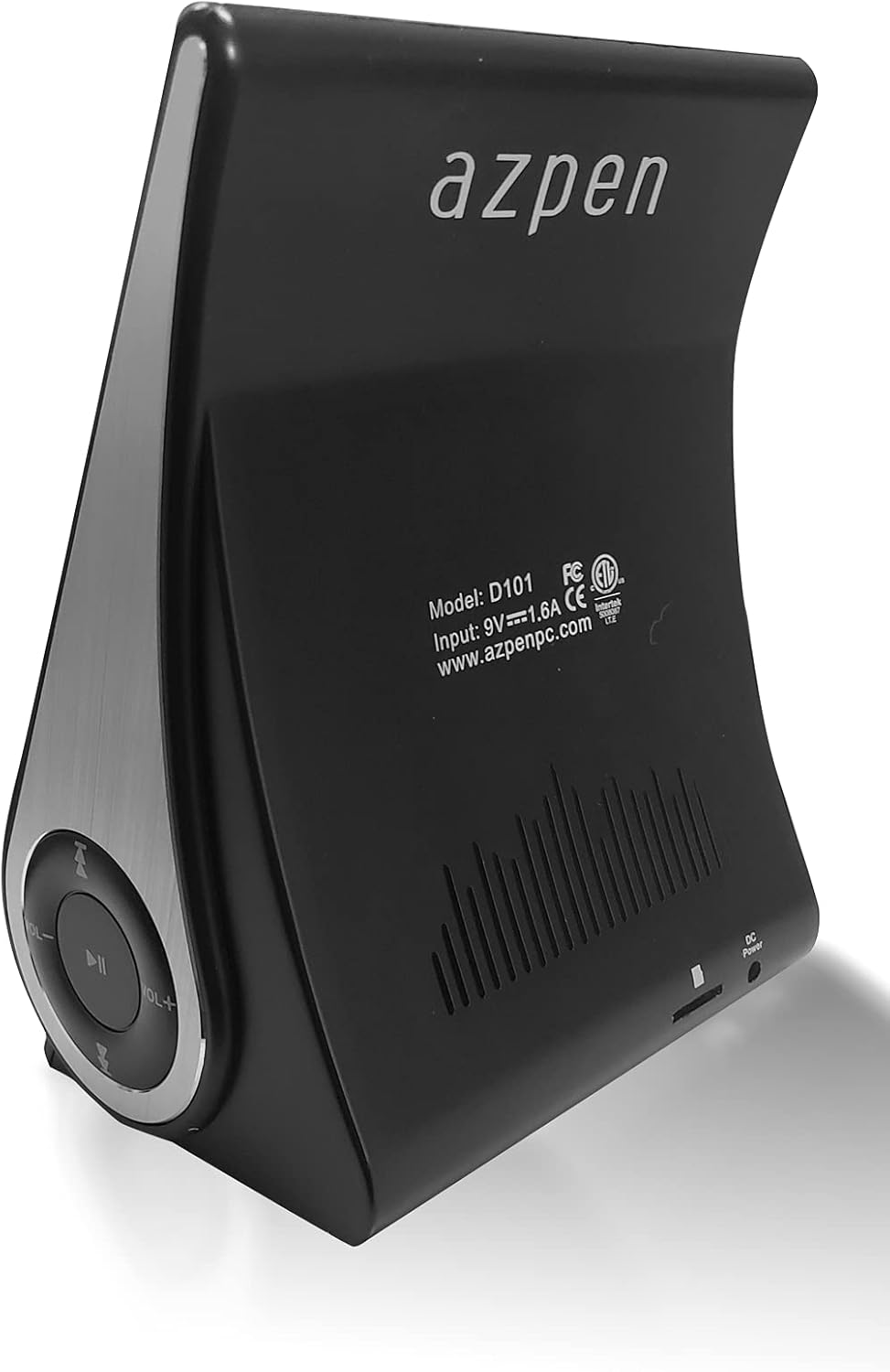
Сүрөт: Арткы view of the Azpen Dockall D101, displaying the model number (D101), input specifications, and regulatory certifications.

Сүрөт: Side profile of the Azpen Dockall D101, highlighting the circular control panel with volume, playback, and phone call buttons.
4. Орнотуу
- Кубат туташуу: Connect the provided DC Power Adapter to the "DC Power" port on the back of the Dockall D101. Plug the adapter into a standard wall outlet.
- Позициялоо: Place the Dockall D101 on a stable, flat surface.
- Adjust Phone Stand: Gently pull up the phone stand to your desired viewing angle. Ensure the stand is securely locked in place.
5. Иштөө нускамалары
5.1 Күйгүзүү/өчүрүү
- To power on, press and hold the Power button (usually indicated by a circle with a vertical line) on the control panel until the device activates.
- To power off, press and hold the Power button again until the device shuts down.
5.2 Qi зымсыз кубаттоо
- Ensure the Dockall D101 is powered on.
- Place your Qi-compatible smartphone or tablet onto the charging pad on the adjustable stand.
- Adjust the position of your device until the solid blue light appears, indicating that wireless charging has begun.
- The Dockall D101 supports fast Qi wireless charging (10W).
- Note: Charging may not work through metal cases or excessively thick phone cases (e.g., OtterBox Defender).
5.3 Bluetooth спикеринин иштеши
- Жупташтыруу:
- Power on the Dockall D101.
- Смартфонуңузда же аудио түзмөгүңүздө Bluetooth'ду жандырыңыз.
- Издөө "Dockall D101" (or similar name) in your device's Bluetooth settings and select it to pair.
- Ырастоо үнү ийгиликтүү жупташтырууну көрсөтөт.
- Аудио ойнотуу:
- Use the control buttons on the Dockall D101 to play/pause, skip tracks (forward/backward), and adjust volume.
- You can also control playback directly from your paired device.
- Hands Free Чалуу:
- When a call comes in, press the Phone button (usually indicated by a phone icon) to answer.
- Speak into the built-in microphone on the Dockall D101.
- Press the Phone button again to end the call.

Image: A smartphone positioned on the Dockall D101 stand, displaying a music player interface, highlighting the device's audio capabilities.
Видео: Бүттүview of the Azpen DockAll Mini, demonstrating its features and functionality. While the video showcases a "Mini" model, the core operations for charging and Bluetooth are similar to the D101.
6. Техникалык тейлөө
- Тазалоо: Use a soft, dry cloth to clean the surface of the Dockall D101. Do not use liquid cleaners or aerosols.
- Сактагыч: Узак мөөнөткө колдонулбаганда, аспапты күн тийбеген, салкын, кургак жерде сактаңыз.
- Колдонуу: Түзмөктү түшүрүп албоо же аны өтө жогорку температурага же нымдуулукка дуушар кылбоо керек.
7. Кыйынчылыктарды
| Көйгөй | Мүмкүн чечим |
|---|---|
| Түзмөк күйбөй жатат. | Ensure the DC Power Adapter is securely connected to both the device and a working power outlet. |
| Зымсыз кубаттоо иштебейт. |
|
| Bluetooth туташпай жатат. |
|
| Үн сапаты начар. |
|
8. Техникалык шарттар
- Модель аты: D101
- Динамик түрү: Bluetooth Speaker
- Өзгөчөлүктөр: Wireless Charger, Upright View Angle, Bluetooth Speaker, 3-in-1 Hub
- Сунушталган колдонуулар: Смартфондор же планшеттер үчүн
- Шайкеш түзмөктөр: For iPhone 15/14/13/12/11, for Samsung Galaxy S24/S23/S22/S21/S20/S10
- Түсү: Кара
- Элемент Салмагы: 11.2 унция
- Суу өткөрбөйт: ЖАЛГАН
- Кепилдик түрү: Чектелген
- Элементтердин саны: 1
- Башкаруу ыкмасы: тийүү
- Зымсыз байланыш технологиясы: Bluetooth
- Динамик өлчөмү: 5 сантиметр
- Кубат булагы: Батарея менен иштейт
- Аудио драйвер түрү: Динамикалык драйвер
- UPC: 859592006828
- Өндүрүүчү: Azpen
- Продукциянын өлчөмдөрү: 5.9 x 4.3 x 3.75 дюйм
- Динамиктин максималдуу чыгаруу күчү: 5 Ватт
- Байланыш технологиясы: Bluetooth
- Аудио чыгаруу режими: Моно
- Монтаж түрү: Док

Image: Diagram showing the dimensions of the Azpen Dockall D101, with measurements in centimeters.
9. Кепилдик жана колдоо
The Azpen Dockall D101 comes with a Limited Warranty. For specific details regarding warranty coverage and to access customer support, please refer to the warranty information provided in the original packaging or visit the official Azpen webсайт.
For further assistance, you may also contact Azpen customer service directly.


