1. Продукт бүтүп калдыview
The AOFAR GX-2S is a high-precision hunting rangefinder designed for various outdoor activities, including hunting and archery. It offers accurate distance measurements up to 1100 yards, incorporating advanced AI technology for fast and clear readings. Key features include angle and horizontal distance measurement, speed mode, and continuous scan mode. Its compact, durable, and waterproof design ensures reliable performance in diverse conditions.

Figure 1: AOFAR GX-2S Hunting Rangefinder. This image displays the overall design of the rangefinder, highlighting its compact and ergonomic form factor.
2. Орнотуу жана алгачкы колдонуу
2.1 Кутудан чыгаруу жана компоненттер
Пакетти ачкандан кийин, бардык компоненттер бар экенин текшериңиз:
- AOFAR GX-2S Rangefinder
- Ташуу баштыгы
- Батарея CR2
- High-Grade Portable Rope
- Карабин
- Тазалоочу кездеме
- User Manual

Figure 2: Contents of the AOFAR GX-2S package. This image shows all accessories included with the rangefinder, such as the carrying pouch, battery, and cleaning cloth.
2.2 Батареяны орнотуу
The AOFAR GX-2S uses a CR2 battery. To install:
- Аппараттагы батарея бөлүкчөсүн табыңыз.
- Бөлүмдүн капкагын ачыңыз.
- CR2 батареясын туура полярдуулукту (+/-) камсыз кылып, салыңыз.
- Батарея уясынын капкагын бекем жабыңыз.
2.3 Power On/Off and Focus Adjustment
To power on the device, press the power button (usually marked with a power symbol). To achieve a clear view through the eyepiece, rotate the diopter adjustment ring (gear focusing) until the display and target appear sharp.
3. Иштөө нускамалары
3.1 Өлчөө бирдиктерин которуу (ярд/метр)
To switch between yards ("Y") and meters ("M"), press and hold the "MODE" button for 3 seconds. The unit displayed on the screen will change accordingly.
3.2 Range Mode (Standard Measurement)
This mode is used for general distance measurement. Single-press the power button to activate the range mode. Aim the crosshairs at your target and press the power button again to get the distance. The device will display the straight-line distance, angle, and horizontal distance.
3.3 Скандоо режими
Scan mode is useful for measuring distances to multiple targets or when testing distances to objects like bunkers or trees. To use:
- Activate Scan Mode by single-pressing the "MODE" button until "SCAN" appears (or similar indicator).
- Press and hold the power button while sweeping the rangefinder across the desired area.
- The display will continuously update with distances to various objects in your field of view.
3.4 Flag-Lock Mode with Vibration
This mode is designed to accurately measure the distance to a flagstick, especially when there are background objects. It provides a vibration alert when the flag is successfully locked. This mode is particularly effective for flags over 150 yards.
- Ensure the device is in Flag-Lock mode (often integrated with Range or Scan mode, or a separate mode).
- Aim the rangefinder at a large object behind the flagstick.
- Кубат баскычын басып, кармап туруңуз.
- Slowly move the target marker towards the flag.
- Once the flag is detected and locked, the device will vibrate, and the flag's distance will be displayed.

Figure 3: Flag locking feature with vibration feedback. The image shows the view through the rangefinder, indicating a locked flagstick and the measured distance.
3.5 Жантайыңкы компенсациянын өзгөчөлүгү
The GX-2S can measure both straight-line distance and slope-compensated distance, which adjusts for elevation changes. The slope compensation feature can be toggled on or off.
- To turn OFF slope display: Hold the "MODE" button down for approximately 10 seconds. An "OFF" signal will appear on the top of the LCD, indicating that only straight-line distance will be displayed.
- To turn ON slope display: Hold the "MODE" button down again until the "OFF" signal disappears.

Figure 4: Illustration of slope compensation. This image shows how the rangefinder calculates both straight-line and slope-compensated distances, along with a user demonstrating its use.
3.6 Official Product Video: AOFAR GX-2S Operation
Video 1: AOFAR GX-2S Golf Rangefinder Flag-Lock with Vibration. This video demonstrates the key operational features of the AOFAR GX-2S rangefinder, including flag-lock, distance measurement, and unit switching.
4. Кароо жана тейлөө
- Тазалоо: Use the provided cleaning cloth to gently wipe the lenses and exterior of the rangefinder. Avoid using abrasive materials or harsh chemicals.
- Суу каршылык: The device is waterproof and dust resistant (IPX4 rating). While it can withstand splashes and light rain, avoid submerging it in water.
- Сактагыч: When not in use, store the rangefinder in its carrying pouch in a cool, dry place to protect it from dust, moisture, and physical damage.
- Батарея: Эгерде түзмөк көпкө чейин колдонулбаса, агып кетүүнүн алдын алуу үчүн батарейканы алып салыңыз.
5. Кыйынчылыктарды
| Көйгөй | Мүмкүн болгон себеп / Чечим |
|---|---|
| Туура эмес же дал келбеген окуулар |
|
| Flag-Lock feature not working |
|
| Slow reading acquisition |
|
| Түзмөк күйбөйт |
|
6. Продукттун спецификациялары
| Өзгөчөлүк | Деталь |
|---|---|
| Бренд | АОФАР |
| Модель номери | GX-2S |
| Өлчөө диапазону | 5-1100 ярд |
| Тактык | +/- 1 ярд |
| Чоңойтуу | 6X |
| Сууга туруктуулук деңгээли | Суу өткөрбөйт (IPX4) |
| Батарея түрү | CR2 (Литий) |
| Элемент Салмагы | 160г |
| Өлчөмдөр | 95*75*40мм |
| Материал | Каучук |
| Оптика | 95%+ transmission from glass |

Figure 5: High precision measurement capabilities of the AOFAR GX-2S. This image highlights the maximum range and accuracy of the device.
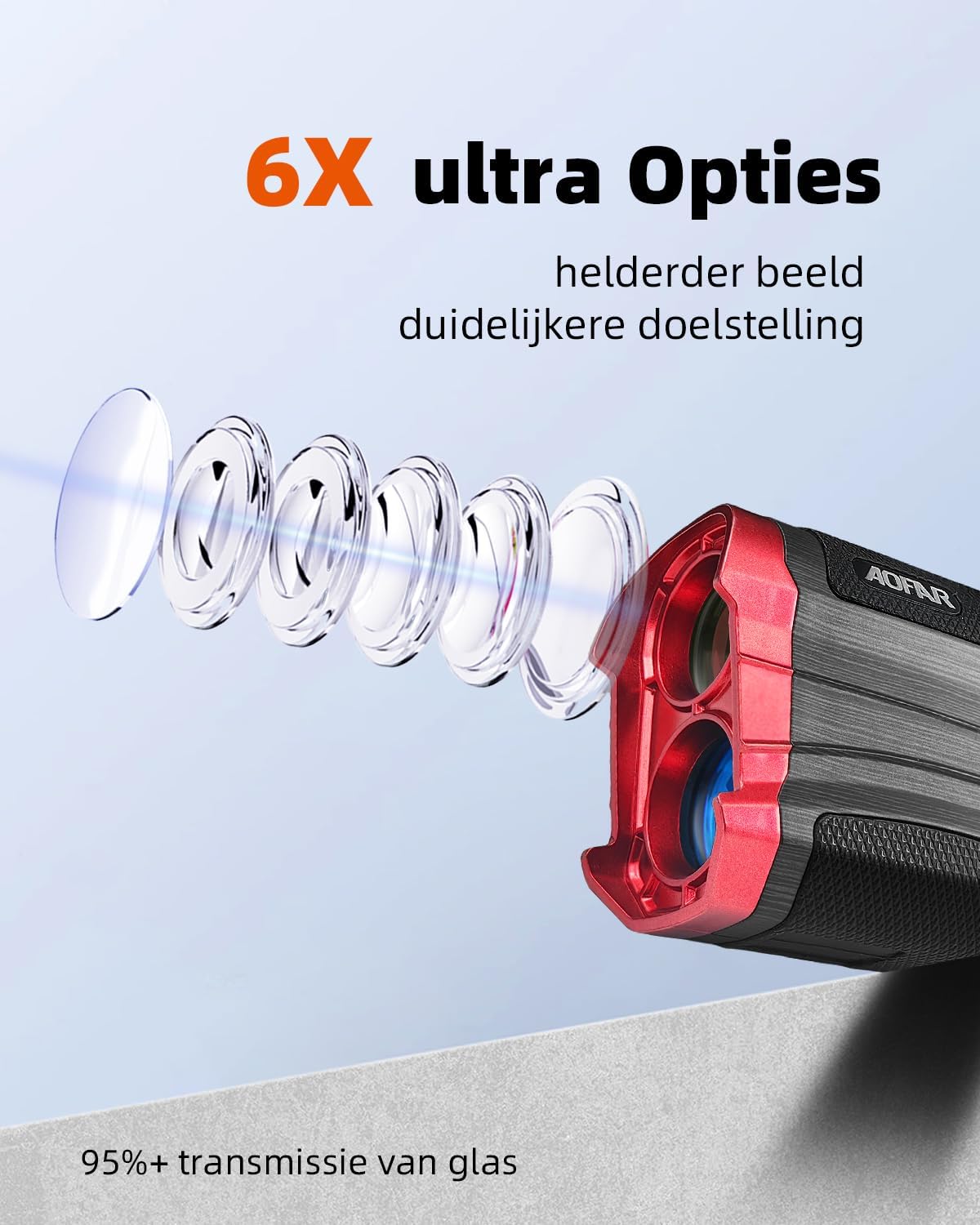
Figure 6: Illustration of the 6X ultra optics for clearer imaging. This image details the optical components that contribute to a brighter and clearer view.
7. Кепилдик жана Кардарларды колдоо
AOFAR provides a two-year VIP warranty and lifetime customer support for the GX-2S rangefinder. If you encounter any questions or issues with your device, please contact AOFAR customer support for assistance.
For support, please refer to the contact information provided in your product packaging or visit the official AOFAR webсайт.


