Introduction
Сатып алганыңыз үчүн рахматasing the Altec Lansing LifeJacket H2O 4 Waterproof Bluetooth Speaker. This manual provides essential information for setting up, operating, maintaining, and troubleshooting your speaker to ensure optimal performance and longevity.

Image: The Altec Lansing LifeJacket H2O 4 speaker, black in color, surrounded by water splashes, highlighting its waterproof capabilities.
Кутуда эмне бар
- Altec Lansing LifeJacket H2O 4 Portable Bluetooth Speaker
- USB заряддоо кабели
- Quick Start Guide
Негизги өзгөчөлүктөрү
- Баарынын далили: Certified IP67 rating ensures the speaker is waterproof, shockproof, snowproof, and dustproof.
- Узартылган батареянын иштөө мөөнөтү: Бир кубаттоо менен 10 саатка чейин үзгүлтүксүз музыка ойнотуңуз.
- Impressive Bluetooth Range: Connect and play music from up to 100 feet away with Bluetooth 4.2 technology.
- Үн жардамчысы интеграциясы: Seamlessly use Siri or Google Assistant through the speakerphone.
- Туруктуу дизайн: Rugged construction built to withstand various outdoor and indoor environments.
- Аудиону тазалоо: Delivers breathtaking stereo sound with deep bass and exceptional clarity.
Жайгашуу
1. Динамикти кубаттоо
Before first use, fully charge your LifeJacket H2O 4 speaker.
- Динамиктеги заряддоо портун табыңыз, адатта резина капкак менен корголгон.
- Open the rubber flap and insert the small end of the provided USB charging cable into the speaker's charging port.
- USB кабелинин чоңураак учун USB кубат адаптерине (кошулмада жок) же компьютердин USB портуна туташтырыңыз.
- The charging indicator light will illuminate. Once fully charged, the light will change or turn off (refer to specific light behavior in the Quick Start Guide).
2. Күйгүзүү / Өчүрүү
- To power on, press and hold the Power button until you hear an audible prompt and the indicator light turns on.
- To power off, press and hold the Power button again until you hear an audible prompt and the indicator light turns off.
Спикерди иштетүү
1. Bluetooth Жупташтыруу
Pair your speaker with a Bluetooth-enabled device (smartphone, tablet, laptop) to stream audio wirelessly.
- Ensure the speaker is powered on and within 100 feet of your device.
- The speaker will automatically enter pairing mode when powered on for the first time, or if no device is connected. The Bluetooth indicator light will flash.
- Түзмөгүңүздө Bluetooth жөндөөлөрүнө өтүп, жеткиликтүү түзмөктөрдү издеңиз.
- Select "LifeJacket H2O 4" from the list.
- Жупташтырылгандан кийин динамиктеги Bluetooth индикатор жарыгы катуу болуп, сиз ырастоо үнүн угасыз.
- Эгер сырсөз суралса, "0000" киргизиңиз.

Image: The Altec Lansing LifeJacket H2O 4 speaker resting on a wooden bench, demonstrating its portability and suitability for outdoor use.
2. Үндү башкаруу
- басыңыз + үнүн жогорулатуу үчүн баскыч.
- басыңыз - үнүн азайтуу үчүн баскыч.
3. Ойноону башкаруу
- Press the Play/Pause button to play or pause audio.
- Кийинки трекке өтүү үчүн Ойнотуу/Тынытуу баскычын эки жолу басыңыз.
- Triple-press the Play/Pause button to go to the previous track.
4. Үн жардамчысы
Activate your device's voice assistant (Siri or Google Assistant) through the speaker.
- Press the Voice Assistant button (often indicated by a microphone icon) to activate Siri or Google Assistant on your paired device.
- Буйрукту сүйлөөчүнүн микрофонуна так айтыңыз.
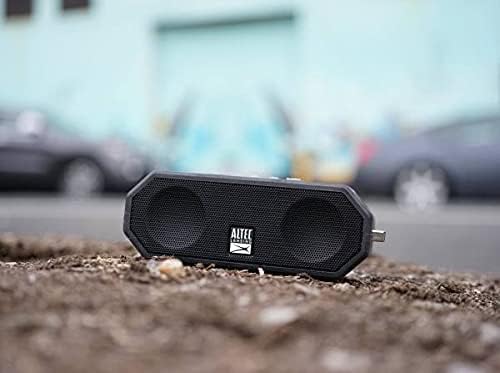
Image: The Altec Lansing LifeJacket H2O 4 speaker placed on rough ground, showcasing its durable and rugged design suitable for various environments.
Техникалык тейлөө
- Тазалоо: жумшак колдонуу, damp cloth to clean the speaker. Avoid harsh chemicals or abrasive cleaners.
- Суу таасири: While waterproof, ensure the charging port cover is securely closed before exposing the speaker to water. After water exposure, dry the speaker thoroughly, especially the charging port, before charging.
- Сактагыч: Колдонулбаган учурда динамикти салкын, кургак жерде сактаңыз. Ашыкча температурадан алыс болуңуз.
- Батареяга кам көрүү: Батареянын иштөө мөөнөтүн узартуу үчүн, бат-баттан батарейканы толук зарядсыздандырбаңыз. Үзгүлтүксүз колдонууда болбосо да, динамикти дайыма заряддаңыз.
Проблемаларды чечүү
| Көйгөй | Чечим |
|---|---|
| Динамик күйбөйт. | Батареянын заряддалганын текшериңиз. Динамикти USB кабели аркылуу кубат булагына туташтырыңыз. |
| Bluetooth түзмөгү менен жупташтыруу мүмкүн эмес. |
|
| Үн жок же үнү төмөн. |
|
| Audio cutting out or distorted. |
|
Техникалык шарттар
| Өзгөчөлүк | Деталь |
|---|---|
| Модель аты | Jacket H2O 4 Rugged Floating Ultra Portable Bluetooth |
| Модель номери | IMW449-BLKC |
| Динамик түрү | Ачык асман алдындагы, көчмө |
| Байланыш | Bluetooth 4.2 |
| Bluetooth диапазону | 100 фут (30 метр) чейин |
| Суу каршылык | IP67 (Суу өткөрбөйт, соккуга чыдамдуу, кар өткөрбөйт, чаң өткөрбөйт) |
| Батареянын иштөө мөөнөтү | 10 саатка чейин |
| Power Output | 10 Ватт |
| Өлчөмдөрү (L x W x Y) | 7.1" x 2.9" x 4.2" (18.03 см x 7.37 см x 10.67 см) |
| Салмагы | 1.3 фунт (0.59 кг) |
| Шайкеш үн жардамчылары | Siri, Google Жардамчысы |

Image: The Altec Lansing LifeJacket H2O 4 speaker shown with its approximate dimensions: 7.1 inches in length, 2.9 inches in width, and 4.2 inches in height.
Кепилдик жана колдоо
Your Altec Lansing LifeJacket H2O 4 speaker comes with a limited warranty. For detailed warranty information, product registration, and technical support, please visit the official Altec Lansing webсайтка же кардарларды тейлөөгө кайрылыңыз.
Официалдуу Webсайт: www.alteclansing.com


