1. Продукт бүтүп калдыview
The DJI Mavic 2 Zoom is a high-performance drone quadcopter equipped with an optical zoom camera, a 3-axis gimbal for stable footage, and advanced flight features. Designed for dynamic perspectives, it offers exceptional image and video quality.

Figure 1: DJI Mavic 2 Zoom Drone (unfolded, front view). This image displays the drone in its ready-to-fly configuration, highlighting the camera and propeller arms.
Негизги өзгөчөлүктөрү:
- Optical Zoom Camera: Features a 1/2.3-inch 12MP sensor with up to 4x zoom, including a 2x optical zoom (24–48 mm).
- 3-Axis Gimbal: Ensures steady and smooth shots during flight.
- 4K Video: Records high-resolution video at 3840×2160 24/25/30p.
- Flight Performance: Up to 31 minutes flight time and 44 mph max speed.
- Advanced Sensing: Omnidirectional Obstacle Sensing for enhanced flight safety.
- Акылдуу учуу режимдери: Includes ActiveTrack 2.0, Hyperlapse, and Dolly Zoom.
2. Орнотуу жана даярдоо
2.1 Учактын ачылышы
To prepare the Mavic 2 Zoom for flight, carefully unfold the propeller arms. The front arms unfold first, followed by the rear arms. Ensure all arms are securely locked into position.
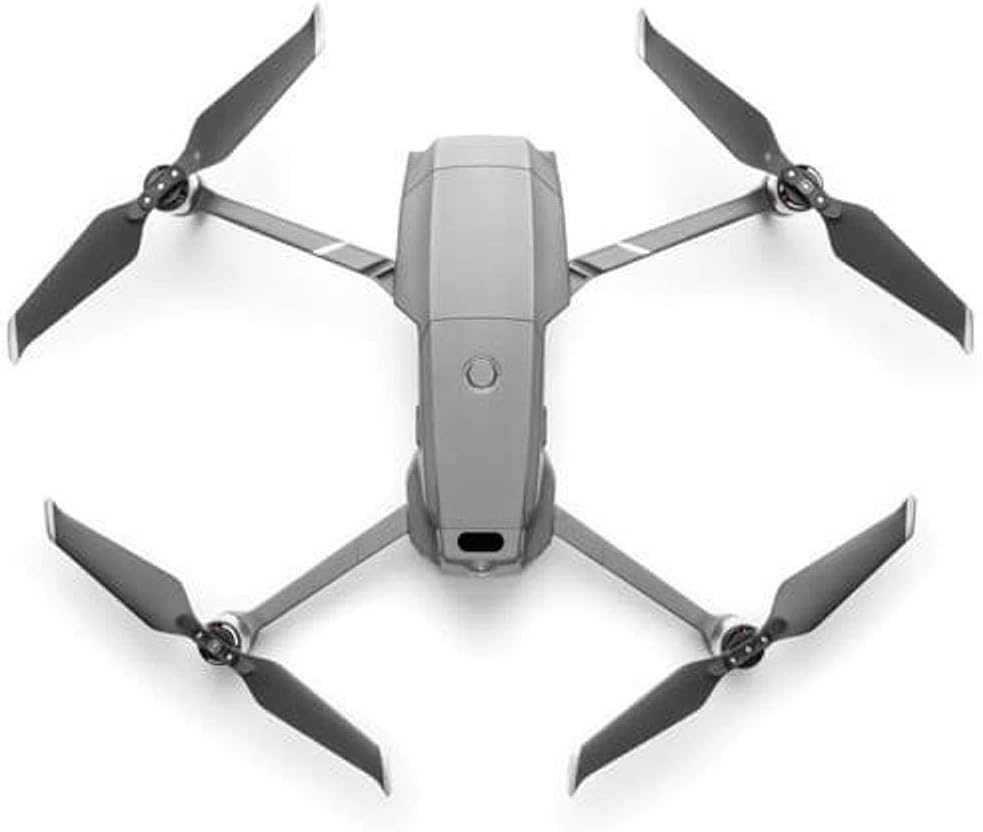
Figure 2: DJI Mavic 2 Zoom Drone (unfolded, top view). Бул view shows the drone fully unfolded and ready for propeller attachment or flight.
2.2 Батареяны орнотуу жана заряддоо
The Intelligent Flight Battery slides into the top compartment of the drone. Ensure it clicks securely into place. To charge, use the provided battery charger and power cable. The standard remote controller also has a built-in battery that offers up to 135 minutes of battery life on a full charge.
2.3 Алыстан башкаруучуну орнотуу
The standard remote controller connects to your smartphone via an RC cable (Lightning, Micro USB, or USB Type-C, all included). Download and install the DJI GO 4 App on your smartphone (requires iOS 10.0.2, Android 5.0 or above). Some versions of the Mavic 2 Zoom may come with a Smart Controller, which features an integrated screen, eliminating the need for a separate smartphone.
Video 1: DJI Mavic 2 Overview. Бул видео жалпы маалымат беретview of the Mavic 2 drone, showcasing its design and some operational aspects.
3. Дронду башкаруу
3.1 Учууну башкаруунун негизги каражаттары
Once the drone is unfolded, batteries are charged, and the controller is connected to the DJI GO 4 App, you are ready for flight. The app provides a live feed from the drone's camera and displays important flight information. Take-off and landing can be initiated via the app or specific controller commands.
3.2 Учуу режимдери
- Кадимки режим: Standard flight mode with all safety features and obstacle sensing active.
- Спорт режими: Disables some obstacle sensing for increased speed and agility. Use with caution.
- Tripod режими: Limits flight speed and control sensitivity for precise movements and stable shots.
3.3 Камеранын иштеши
The Mavic 2 Zoom's camera features a 2x optical zoom (24-48mm equivalent) and can capture 12MP photos and 4K video. The 3-axis gimbal ensures stable footage. Zoom and gimbal tilt can be controlled via dedicated wheels/buttons on the remote controller.
3.4 Intelligent Flight Features
- ActiveTrack 2.0: Advanced subject tracking that can predict subject movement.
- Гиперлапс: Creates stunning time-lapse videos with various sub-modes (Free, Circle, Course Lock, Waypoint).
- Dolly Zoom: A cinematic effect where the camera zooms in while the drone flies backward, creating a disorienting visual.
- Ар тараптуу тоскоолдуктарды аныктоо: Detects obstacles in all directions (forward, backward, downward, upward, and sideways) to enhance flight safety. Side sensing is available in ActiveTrack and Tripod modes.
4. Техникалык тейлөө
Regular maintenance ensures the longevity and optimal performance of your DJI Mavic 2 Zoom.
- Пропеллер: Inspect propellers before each flight for any cracks, bends, or damage. Replace damaged propellers immediately using the spare propellers provided.
- Батареяга кам көрүү: Store batteries in a cool, dry place. Do not overcharge or fully discharge batteries. Follow charging guidelines in the DJI GO 4 App.
- Gimbal жана камера: Keep the gimbal and camera lens clean and free from dust or debris. Use a soft, dry cloth for cleaning.
- Программалык камсыздоонун жаңыртуулары: Regularly check for and install firmware updates via the DJI GO 4 App to ensure optimal performance and access to new features.
5. Кыйынчылыктарды
- Сигналдын жоголушу: If the drone loses connection with the remote controller, it will automatically initiate Return to Home (RTH) and fly back to its recorded home point.
- Obstacle Detection Issues: Obstacle sensing may be affected when flying low over water due to reflections. Exercise caution in such environments.
- Батареянын аздыгы жөнүндө эскертүү: The remote controller will provide audible and visual warnings when the drone's battery is low, prompting an automatic RTH if not manually overridden.
6. Техникалык шарттар
| Өзгөчөлүк | Спецификация |
|---|---|
| Бренд | DJI |
| Модель аты | DJI Mavic 2 Zoom |
| Оптикалык масштаб | 2x (24-48 мм эквиваленттүү) |
| Сенсор | 1/2.3-inch 12MP CMOS |
| Видео тартуунун резолюциясы | 4K: 3840×2160 24/25/30p; 2.7K: 2688x1512 24/25/30/48/50/60p; FHD: 1920×1080 24/25/30/48/50/60/120p |
| Максималдуу учуу убактысы | 31 мүнөткө чейин |
| Максималдуу ылдамдык | 44 mph (72 kph in Sport Mode) |
| Obstacle Sensing | Көп багыттуу |
| Алыстан башкаруу технологиясы | OcuSync 2.0 |
| Макс диапазон | 5 миль (8 км) |
| Элемент Салмагы | 905 грамм (2 фунт) |
| Продукциянын өлчөмдөрү | 8.43"L x 3.58"W x 1.3"H |
| Камтылган компоненттер | Mavic 2 Zoom, Intelligent Flight Battery, Gimbal Protector, Remote Controller, 3x Propellers (Pair), Battery Charger, Power Cable, Communication Cable (USB3.0 Type-C), USB Adapter, Spare Control Sticks (Pair), RC Cable (Lightning Connector), RC Cable (Standard Micro USB Connector), RC Cable (USB Type-C Connector). |
7. Кепилдик жана колдоо
Кепилдик жана техникалык колдоо боюнча толук маалымат алуу үчүн, расмий DJI компаниясына кайрылыңыз webсайтына кириңиз же DJI кардарларды тейлөө кызматына кайрылыңыз. Кепилдик талаптары үчүн сатып алганыңызды тастыктаган документти сактап коюңуз.


