Introduction
Сатып алганыңыз үчүн рахматasing the VTech VT1091 Cordless Phone. This manual provides essential information for setting up, operating, and maintaining your new phone. Please read these instructions carefully to ensure proper use and to fully benefit from its features.
Пакеттин мазмуну
Баштоодон мурун, пакетиңизде бардык элементтер бар экенин текшериңиз:
- Зымсыз телефон
- Негизги бирдиги
- Негизги блок үчүн кубат адаптери
- Телефон линиясы
- Кайра заряддалуучу батареялар (алдын ала орнотулган же өзүнчө)
- Колдонуучунун Колдонмосу (бул документ)
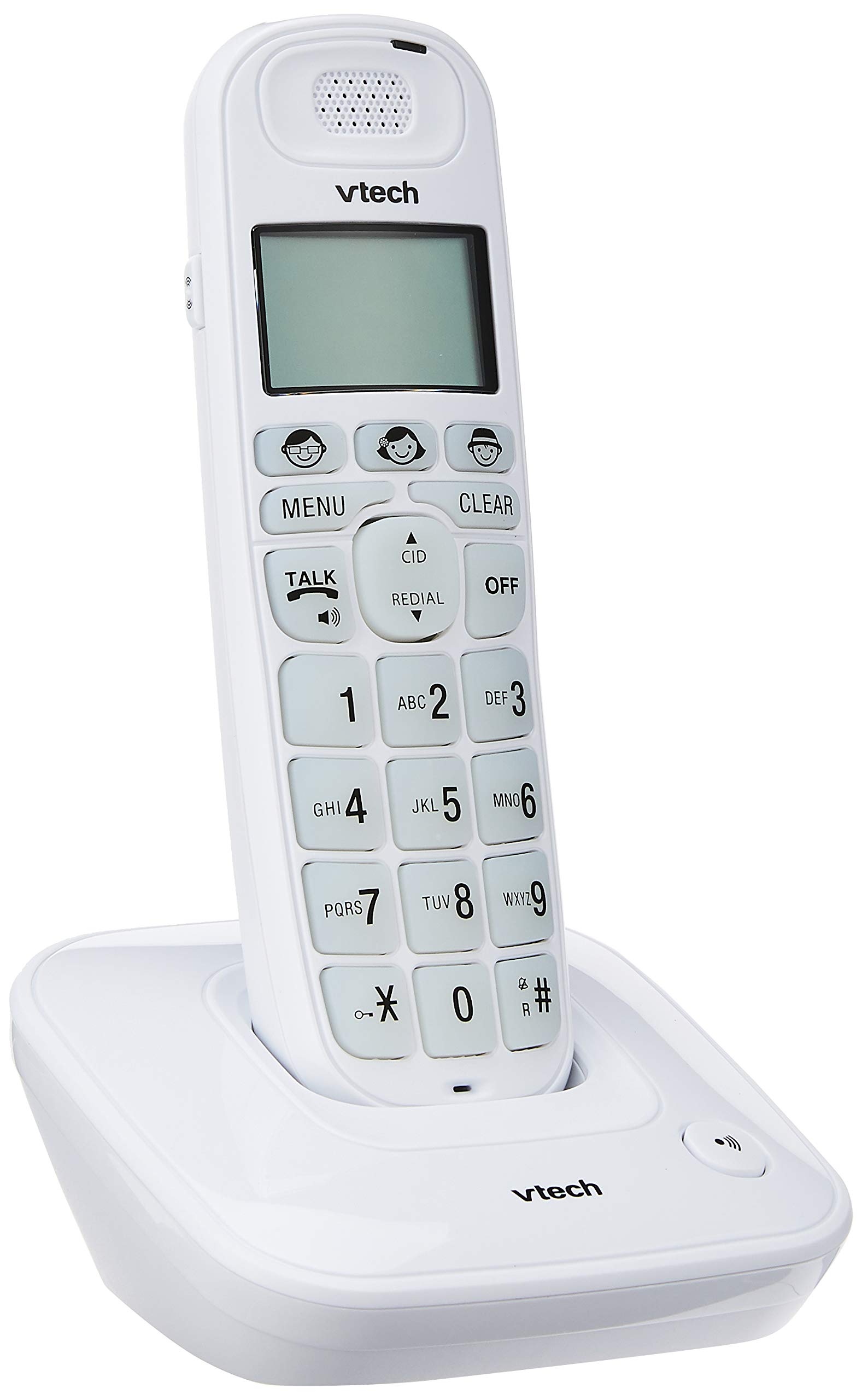
Image: The VTech VT1091 cordless phone handset resting in its base unit, showing the front view of the keypad and screen.
Жайгашуу
1. Батареяны орнотуу
- Телефондун артындагы батарея бөлүкчөсүнүн капкагын табыңыз.
- Капкакты ачуу үчүн ылдый жылдырыңыз.
- Берилген кайра заряддоого болгон батарейкаларды туура полярдуулукка (+ жана -) сактоо менен салыңыз.
- Батарея бөлүгүнүн капкагын ордуна коюңуз.
2. Негизги блокту туташтыруу
- Телефон линиясынын шнурунун бир учун негизги блоктун арткы жагындагы TEL LINE уячасына туташтырыңыз.
- Телефон линиясынын экинчи учуна телефонуңуздун уячасына туташтырыңыз.
- Connect the small end of the power adapter to the DC IN jack on the back of the base unit.
- Кубат адаптеринин чоң учун стандарттуу электр розеткасына сайыңыз.

Сүрөт: Арткы view of the VTech VT1091 base unit, showing the ports for the telephone line cord and the power adapter.
3. Телефонду заряддоо
Place the handset on the base unit with the display facing forward. The handset will begin charging. For optimal battery performance, allow the handset to charge for at least 16 hours before initial use.

Сүрөт: каптал view of the VTech VT1091 cordless phone handset securely placed in its charging base.
Негизги өзгөчөлүктөрү
- Ampжашоо: Amplification of incoming sounds by up to 30 decibels.
- Ultra-low Radiation Mode: Operates with reduced radiation levels.
- BOOSTER Button: One-touch button for easy sound ampжашоо.
- Чоң баскычтоп: Big buttons with backlit keypad for improved visibility.
- Жарыктандырылган LCD дисплейи: Large display with orange backlight.
- Спикер телефон: Handsfree байланыш үчүн.
- Барактын/Телефондун жайгашкан жерин аныктоочу: Helps locate a misplaced handset.
- Auto Answer/Keypad Lock: Convenient call handling and security features.
- Alarm/Secrecy: Includes alarm function and call secrecy feature.
- GAP Compliant: Compatible with other GAP-enabled DECT devices.
- Телефон китепчесинин каталогу: 20 name and number entries.
- Чалуучунун ID: Displays the last 10 caller numbers.
- Кайра терүү: Stores the last 5 numbers dialed.
- Ringer Melodies: 10 selectable ringer melodies (5 polyphonic and 5 standard).
- Батареянын иштөө мөөнөтү: Approximately 10 hours talk time / 100 hours standby time.
- Эстутум баскычтары: 3 one-touch memory buttons.
- Тез терүү: 8 number (2-9) speed dial memories.
- Угуу аппараты шайкеш келет: Designed for use with hearing aids.
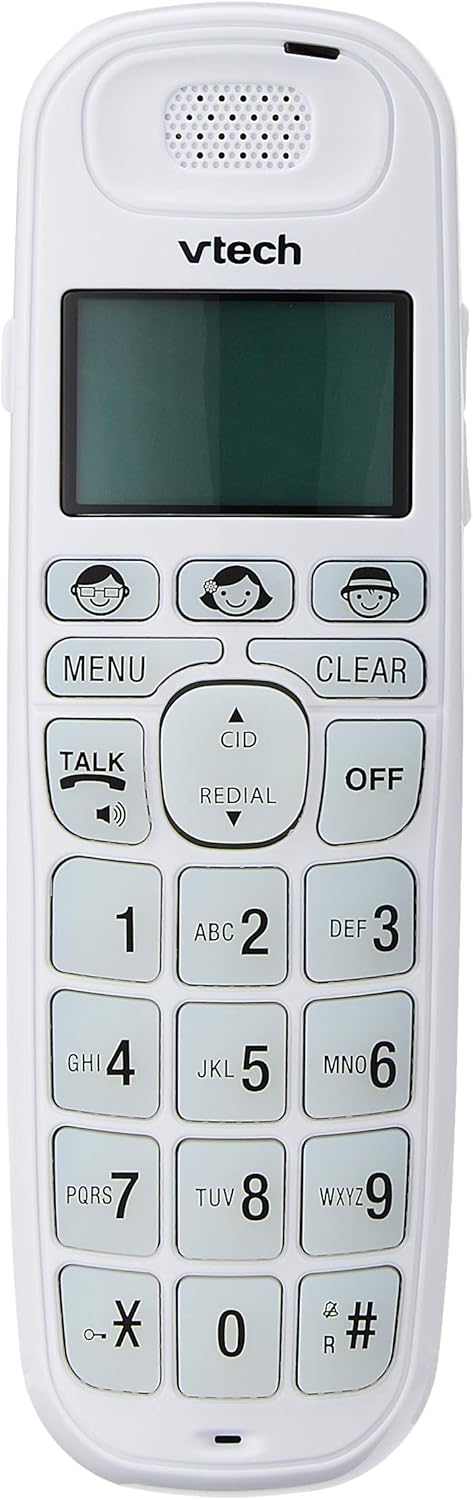
Image: Close-up of the VTech VT1091 handset, highlighting the large backlit keypad, LCD display, and dedicated function buttons.
Иштөө нускамалары
Чакыруу
- басыңыз СҮЙЛӨШҮҮ терүү сигналын алуу үчүн баскычты басыңыз.
- Каалаган телефон номерин териңиз.
- Чакырууну аяктоо үчүн басыңыз ӨЧҮРҮҮ баскычын басыңыз же телефонду кайра базалык блокко коюңуз.
Чалууга жооп берүү
Телефон шыңгыраганда, басыңыз СҮЙЛӨШҮҮ чалууга жооп берүү үчүн баскыч.
Динамикти колдонуу
Чалуу учурунда, басыңыз СҮЙЛӨШҮҮ button again (with the speaker icon) to activate the speakerphone function. Press it again to switch back to the earpiece.
Үндү тууралоо
Чалуу учурунда колдонуңуз UP жана ылдый arrow buttons on the side of the handset to adjust the earpiece or speakerphone volume.
Телефон китепчесинин каталогу
- басыңыз МЕНЮ баскычы.
- Navigate to "Phonebook" using the arrow buttons and press МЕНЮ тандоо үчүн.
- Жазууларды кошуу, түзөтүү же жок кылуу үчүн экрандагы көрсөтмөлөрдү аткарыңыз.
Кайра терүү функциясы
басыңыз РЕДИАЛ баскычына view a list of the last 5 dialed numbers. Use the arrow buttons to select a number and press СҮЙЛӨШҮҮ терүү.
Чалуучунун ID
When the phone rings, the caller's number (if available) will be displayed on the screen. Press the CID кайра баскычынview the caller ID list. Use the arrow buttons to scroll through entries.
BOOSTER Function
Чалуу учурунда атайын баскычты басыңыз BOOSTER button (if available, often integrated with volume or a specific key) to instantly amplify the incoming audio by up to 30 decibels. Press again to deactivate.
Телефон локатору
To locate a misplaced handset, press the БЕТ негизги блоктогу баскычты басыңыз. Трубка шыңгырайт.
Техникалык тейлөө
Тазалоо
Уюлдук аппаратты жана негизги блокту жумшак менен сүртүңүз, damp cloth. Do not use cleaning sprays or abrasive cleaners, as these can damage the finish or electrical components.
Батареяга кам көрүү
- Only use the supplied rechargeable batteries.
- Эгер телефон узак убакыт бою колдонулбаса, агып кетпеш үчүн батарейкаларды алып салыңыз.
- Батареяларды отко таштабаңыз.
Проблемаларды чечүү
| Көйгөй | Чечим |
|---|---|
| Терүү үнү жок |
|
| Телефон заряддалбайт |
|
| Үн сапаты начар |
|
| Чалуучунун ID көрсөтүлбөйт |
|
Техникалык шарттар
| Бренд | VTech |
| Модел | VT1091 |
| Телефон түрү | Зымсыз |
| Түс | Ак |
| Материал | Пластик |
| Power Source | Зымдуу электр (негизги блок үчүн) |
| Терүүчү түрү | Жалгыз баскычтоп |
| Жооп берүү системасынын түрү | Digital (Note: This model's primary features do not highlight an integrated answering machine, but refers to general digital phone capabilities.) |
| Көп линия операциясы | Бойдок |
| Телефон менен сүйлөшүү убактысы | 10 саат |
| Телефон күтүү убактысы | 100 саат |
| Чалуучунун ID | Ооба |
| UPC | 735078026569 |

Image: The VTech VT1091 cordless phone in its base, with a measurement overlay indicating a height of 8.3 inches (21 cm).
Кепилдик жана колдоо
This VTech VT1091 Cordless Phone comes with a 2 жылдык жергиликтүү (Сингапур) Өндүрүүчүнүн Кепилдиги. For warranty claims or technical support, please refer to the contact information provided with your purchase documentation or visit the official VTech Singapore webсайт.
For further assistance, please contact VTech customer service.