1. Продукт бүтүп калдыview
The HMC9000S diesel engine controller is a sophisticated unit that integrates digitization, intelligentization, and network technology. It is designed for genset automation and monitoring control systems, enabling automatic start/stop, data measurement, alarm protection, and 'three remote' functions (remote control, remote measuring, and remote communication).
Equipped with a 4.3-inch TFT-LCD display, the controller offers an intuitive interface with optional Chinese/English language support. Its robust 32-bit ARM processor ensures precise parameter measurement, fixed value adjustment, time setting, and value adjustment. Most parameters can be configured directly from the front panel or via a PC communication interface.
Due to its compact design, straightforward connections, and high reliability, the HMC9000S is widely used in various diesel engine automation systems, including marine emergency units, main propulsion units, main generator units, and pumping units.
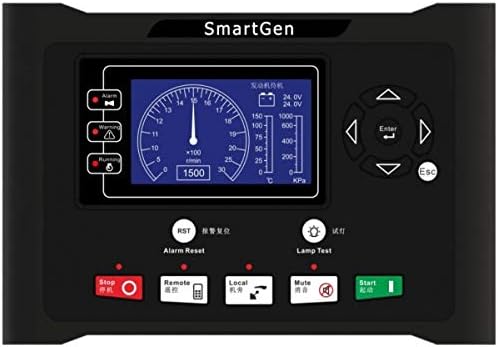
Figure 1: Front panel of the HMC9000S Marine Engine Controller. The display shows engine parameters, and the panel includes various control buttons for operation and testing.
2. Негизги өзгөчөлүктөрү
- Өркүндөтүлгөн процессор: Features a powerful 32-bit ARM micro-processor for high performance.
- Колдонуучу интерфейси: Equipped with a 4.3-inch LCD display with backlight and optional Chinese/English interface for easy operation via push-buttons.
- ECU Engine Communication: Ability to control and communicate with various ECU engines via the SAE J1939 interface.
- Module Expansion: The J1939 interface supports connection to digital input modules, digital output modules, LED lamp indicator modules, and security modules, allowing for system expansion.
- Параметр мониторинги: Transmits and displays multiple engine parameters such as speed, water temperature, oil temperature, and oil pressure directly on the LCD, reducing the need for additional sensors and complex wiring.
- Алыстан башкаруу мүмкүнчүлүгү: Can be connected to a remote control module to perform remote start, stop, and other functions.
- Комплекстүү коргоо: Integrates alarm protection for enhanced system safety.
3. Орнотуу жана орнотуу
The HMC9000S is designed for simple installation due to its compact structure and high reliability. Proper installation is crucial for optimal performance.
3.1 Зымдарды туташтыруу
- Электр камсыздоо: Connect the controller to a stable DC power source as per the specifications.
- Engine Connections: Connect the necessary engine sensors (e.g., speed, oil pressure, water temperature) to the designated inputs.
- J1939 Interface: For ECU engines, connect the J1939 communication lines to the engine's ECU. This interface simplifies wiring by transmitting multiple parameters digitally.
- Чыгуу туташуулары: Connect the control outputs (e.g., start, stop, alarm) to the corresponding engine actuators or relays.
- Remote Module: If using a remote control module, connect it to the dedicated remote communication port.
Ensure all connections are secure and properly insulated to prevent short circuits or interference. Refer to the detailed wiring diagrams provided in the full product manual for specific terminal assignments.
4. Operating the HMC9000S
The HMC9000S controller provides intuitive operation through its front panel buttons and LCD display.
4.1 Негизги операция
- Баштоо/Токтоо: Use the dedicated 'Start' and 'Stop' buttons on the front panel to manually control the engine. The controller also supports automatic start/stop sequences based on configured parameters.
- Мониторинг: The 4.3-inch LCD displays real-time engine parameters such as RPM, oil pressure, water temperature, and battery voltage. Use the navigation buttons (Up, Down, Left, Right) and 'Enter' to browse through different display screens.
- Ойготкучту баштапкы абалга келтирүү: In case of an alarm, the 'Alarm' indicator will illuminate. Press the 'Alarm Reset' button (RST) to clear the alarm after addressing the issue.
- Lamp Сыноо: 'L' баскычын басыңызamp Test' button to verify that all indicator lights on the panel are functioning correctly.
- Режим тандоо: The 'Remote' and 'Local' buttons allow switching between remote control mode (via a connected remote module or communication interface) and local manual control.
- Үнсүз: The 'Mute' button silences audible alarms.
4.2 Параметр конфигурациясы
Most operational parameters can be configured directly from the controller's front panel menu. For advanced settings and comprehensive configuration, connect the controller to a PC via its communication interface and use the SmartGen configuration software.
5. Техникалык тейлөө боюнча көрсөтмөлөр
To ensure the longevity and reliable operation of your HMC9000S Marine Engine Controller, follow these maintenance guidelines:
- үзгүлтүксүз тазалоо: Keep the controller's display and buttons clean using a soft, dry cloth. Avoid abrasive cleaners or solvents.
- Байланыш текшерүү: Periodically check all wiring connections for tightness and signs of corrosion. Loose connections can lead to intermittent operation or system failures.
- Экологиялык шарттар: Ensure the operating environment remains within the specified temperature and humidity ranges. Protect the unit from excessive moisture, dust, and direct sunlight.
- Программалык камсыздоо жаңыртуулары: Check the SmartGen official webсайттын иштешин жакшыртуучу же жаңы функцияларды кошуучу ар кандай микропрограммалык камсыздоо жаңыртуулары үчүн мезгил-мезгили менен текшерип туруңуз.
- Вентиляция: Ensure adequate ventilation around the unit to prevent overheating, especially if installed in an enclosed space.
6. Кыйынчылыктарды
This section provides basic troubleshooting steps for common issues. For more complex problems, refer to the detailed troubleshooting guide in the full product manual or contact technical support.
| Көйгөй | Мүмкүн себеп | Чечим |
|---|---|---|
| Контроллер күйбөй жатат | No power supply; Loose power connection; Blown fuse. | Check power source; Verify power cable connections; Inspect and replace fuse if necessary. |
| Мотор иштебейт | Incorrect operating mode (e.g., in Remote mode); Engine fault; Wiring issue. | Ensure controller is in 'Local' mode or remote start signal is active; Check engine status and clear any engine faults; Verify start circuit wiring. |
| Ойготкуч индикатор күйүп турат | Engine fault detected (e.g., low oil pressure, high temperature); Sensor malfunction. | Check the LCD for specific alarm codes; Address the underlying engine issue; Verify sensor connections and functionality; Press 'Alarm Reset' after resolving. |
| Дисплей бош же бүлбүлдөп турат | Power supply issue; Loose display cable; Extreme temperature. | Электр менен камсыздоону текшерүү томtage; Ensure display cable is securely connected; Operate within specified temperature range. |
7. Техникалык шарттар
| Спецификация | Деталь |
|---|---|
| Өндүрүүчү | АКЫЛДУУ ЖАНА |
| Бөлүмдүн номери | HMC9000S |
| Элемент моделинин номери | HMC9000S |
| Продукциянын өлчөмдөрү | 10.47 x 7.17 x 1.77 дюйм (26.59 x 18.21 x 4.5 см) |
| Элемент Салмагы | 1.98 фунт (0.9 килограмм) |
| Дисплей түрү | 4.3 inches TFT-LCD |
| Процессор | 32-bit ARM micro-processor |
| Байланыш интерфейси | SAE J1939, RS485 |
| Биринчи жеткиликтүү күн | 13-декабрь, 2018-жыл |
8. Кепилдик жана колдоо
8.1 Кайтаруу саясаты
This product is eligible for a return within 30 days of receipt for a refund or replacement, subject to the seller's return policy. Please ensure the product is returned in its original condition and packaging.
8.2 Коргоо пландары
Extended protection plans are available for this product to provide additional coverage beyond the standard return period. Options may include:
- 3 жылдык коргоо планы
- 4 жылдык коргоо планы
- Complete Protect (жарактуу өткөн жана келечектеги сатып алууларды камтыган айлык план)
For details on coverage, terms, and pricing, please refer to the specific protection plan documentation.
8.3 Техникалык колдоо
For technical assistance, troubleshooting beyond this manual, or warranty claims, please contact SmartGen-America, the authorized seller. Ensure you have your product model number (HMC9000S) and purchase details ready when contacting support.


