1. Киришүү
Бул колдонмо Supermicro MBD-X11SCA-FO энелик платасын орнотуу, конфигурациялоо жана иштетүү боюнча кеңири нускамаларды берет. Сервер жана жумуш станцияларынын тиркемелери үчүн иштелип чыккан бул энелик плата Intel 8/9-муундагы Core i9/i7/i5/i3/Pentium/Celeron жана Intel Xeon E процессорлорун колдойт, бул бекем иштөөнү жана ишенимдүүлүктү камсыз кылат. Орнотууну улантуудан мурун бул колдонмону кылдат окуп чыгыңыз.
2. Өзгөчөлүктөрү
- Процессорду колдоо: Intel 8/9-муундагы Core i9/i7/i5/i3/Pentium/Celeron жана Intel Xeon E процессорлору (Coffee Lake-S) үчүн бир розеткалуу H4 (LGA 1151), 95 Вт чейин CPU TDP колдоосу менен.
- Чипсет: Intel C246.
- Эстутум: DDR4 ECC/ECC эмес UDIMM, 4 DIMM уячасында 64 ГБ чейин.
- Сактагыч: Intel C246 контроллери аркылуу 8x SATA3 (6Gbps) порттору, RAID 0, 1, 5, 10 колдойт.
- Кеңейтүү уячалары: Ар кандай кеңейтүү карталары үчүн бир нече PCI-Express 3.0 слоттору.
- Интегралдык графика: VGA чыгышы бар борттогу графика.
- Networking: Эки гигабиттик Ethernet LAN порттору.
- Башкаруу: Алыстан башкаруу үчүн интеграцияланган платформаны башкаруу интерфейси (IPMI).
- Форма фактору: ATX.
3. Пакеттин мазмуну
Бардык буюмдардын бар экенин жана жакшы абалда экенин текшериңиз. Эгерде кандайдыр бир буюмдар бузулган же жок болсо, сатуучуга кайрылыңыз.
- Supermicro MBD-X11SCA-FO энелик платасы
- I / O Shield
- SATA кабелдери
- Ыкчам маалымдама колдонмосу
- Драйвер CD/DVD
4. Орнотуу
4.1. Компонентти орнотуу
Кандайдыр бир компоненттерди орнотуудан мурун, энелик плата ток өткөрбөгөн бетке коюлганын жана электростатикалык разряддын (ЭСР) алдын алуу үчүн жерге туташтырылганын текшериңиз.
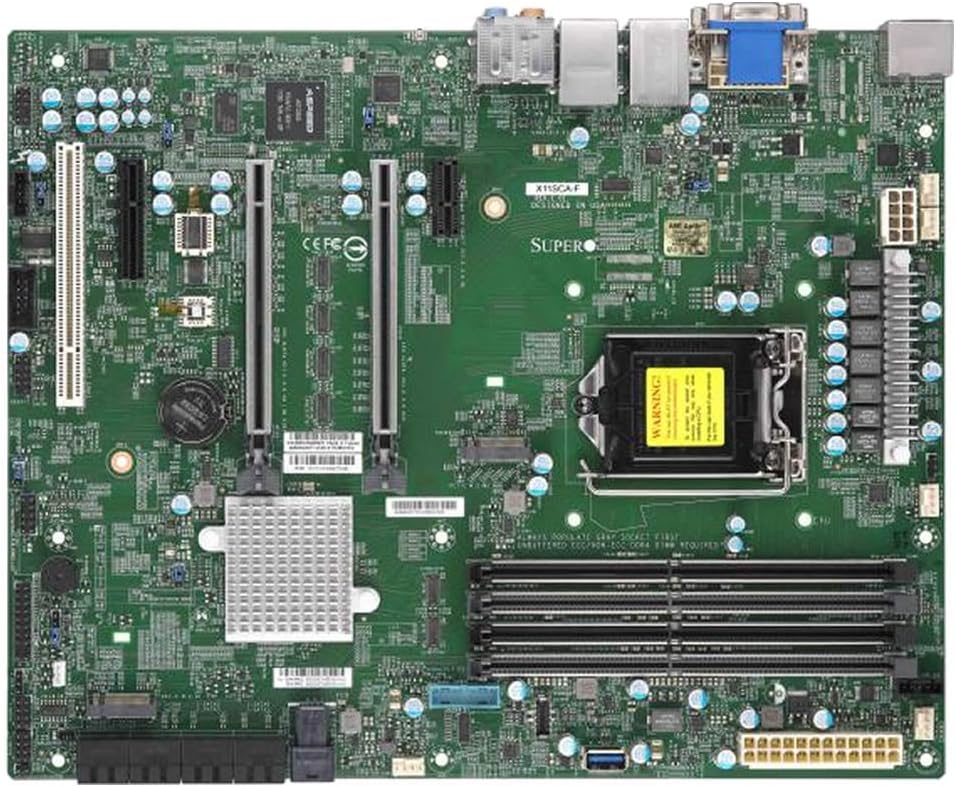
Үстүбүздөгү чыгым view Supermicro MBD-X11SCA-FO энелик платасынын, көрсөтүүasinанын ар кандай компоненттерин, анын ичинде CPU розеткасын, RAM уячаларын, PCIe уячаларын, SATA портторун жана киргизүү/чыгаруу панелин камтыйт.
4.1.1. CPU орнотуу
- CPU розеткасынын рычагын ачып, жүктөө пластинасын көтөрүңүз.
- CPUдагы алтын үч бурчтук розеткадагы үч бурчтукка дал келишин камсыз кылып, CPU менен розеткага кылдат тууралаңыз. Процессорду розеткага күчтөп салбаңыз.
- Жүктөө пластинасын түшүрүп, аны рычаг менен бекитиңиз.
- Процессорго термикалык пастаны сүйкөңүз жана CPU муздаткычын өндүрүүчүнүн көрсөтмөлөрүнө ылайык орнотуңуз.
4.1.2. Эстутум (RAM) орнотуу
- DIMM уячасынын эки учундагы клиптерди ачыңыз.
- DDR4 эстутум модулундагы оюкту DIMM уячасындагы ачкыч менен тууралаңыз.
- Модулду клипстер ордуна орнотулганга чейин бекем салыңыз. Оптималдуу иштеши үчүн, кош каналдуу иштөө үчүн эстутумду дал келген жуптарга орнотуңуз.
4.1.3. Сактагыч түзмөктү орнотуу
- Сактагыч дисктериңизден (HDD/SSD) SATA маалымат кабелдерин энелик платадагы SATA портторуна туташтырыңыз.
- Кубат кабелдери сактагыч түзмөктөрүңүзгө кубат булагынан туташтырылганын текшериңиз.
4.1.4. Кеңейтүү картасын орнотуу
- Бош PCI-Express уячасын табыңыз.
- Шассиңизден тиешелүү кеңейтүү уячасынын капкагын алып салыңыз.
- Кеңейтүү картасын туура орнотулганга чейин уячага бекем салыңыз.
- Картаны бурамалар же бекитүүчү клип менен бекитиңиз.
4.2. Электр байланыштары
- Кубат булагыңыздан келген 24-пиндүү ATX негизги кубат туташтыргычын энелик платадагы тиешелүү коллекторго туташтырыңыз.
- 8-пиндүү EPS/CPU кубат туташтыргычын CPU кубат булагына туташтырыңыз.
4.3. Front Panel Connections
Шассиңиздин алдыңкы панелиндеги кабелдерди (кубат баскычы, баштапкы абалга келтирүү баскычы, катуу дисктин индикатору, кубат индикатору, USB порттору, аудио порттору) энелик платадагы тиешелүү колонкаларга туташтырыңыз. Туура пиндерди дайындоо үчүн энелик платанын жибек экран этикеткаларын караңыз.
5. Иштөө
5.1. Баштапкы жүктөө жана BIOS/UEFI орнотуу
- Системаны чогулткандан кийин, мониторду, клавиатураны жана чычканды туташтырыңыз.
- Системаны күйгүзүңүз. POST (Күйгүзүлгөндө өзүн-өзү текшерүү) учурунда, BIOS/UEFI орнотуу утилитасын ачуу үчүн белгиленген баскычты (адатта DEL же F2) басыңыз.
- Жүктөө тартибин, датасын/убакытын жана башка система жөндөөлөрүн зарылчылыкка жараша конфигурациялаңыз. Өзгөртүүлөрдү сактап, чыгыңыз.
5.2. Операциялық системаны орнотуу
Операциялык системаңызды орнотуучу медианы (USB диск же DVD) салып, экрандагы көрсөтмөлөрдү аткарып, операциялык системаны орнотуңуз. Орноткондон кийин, берилген драйвер CDсинен же Supermicro компаниясынын расмий файлынан бардык керектүү драйверлерди орнотуңуз. webсайт.
5.3. IPMI алыстан башкаруу
MBD-X11SCA-FO интеграцияланган платформаны башкаруу интерфейсине (IPMI) ээ, ал операциялык система иштебей турган учурда да системаны алыстан көзөмөлдөөгө жана башкарууга мүмкүндүк берет. IPMI портуна атайын LAN кабелин туташтырып, тармак жөндөөлөрүн BIOS/UEFI же IPMI аркылуу конфигурациялаңыз. web интерфейс.
6. Техникалык тейлөө
- Чаңды тазалоо: Аба агымынын туура болушун камсыз кылуу жана ысып кетүүнүн алдын алуу үчүн энелик платадан жана анын компоненттеринен чаңды үзгүлтүксүз кысылган аба менен тазалап туруңуз.
- BIOS жаңыртуулары: Мезгил-мезгили менен Supermicro текшерип туруңуз webBIOS/UEFI жаңыртуулары үчүн сайт. Жаңыртуулар туруктуулукту жакшыртып, жаңы жабдыктарды колдоону кошуп же каталарды оңдой алат. BIOS жаңыртуусун жүргүзүүдө, көбүнчө USB дискти колдонуу менен, берилген көрсөтмөлөрдү кылдаттык менен аткарыңыз.
- Туташуу текшерүүлөрү: Бардык кабелдердин (электр, маалымат, кеңейтүү карталары) бекем туташтырылганын мезгил-мезгили менен текшерип туруңуз.
7. Кыйынчылыктарды
7.1. Электр жок / ПОСТ жок
- Кубат булагы энелик платага туура туташтырылганын текшериңиз (24-пиндүү ATX жана 8-пиндүү EPS).
- Электр булагы күйгүзүлгөнүн жана иштеп жатканын текшериңиз.
- CPU туура орнотулганын жана CPU муздаткычы туура орнотулганын текшериңиз.
- RAM модулдарын кайра орнотуңуз. Бир гана RAM модулу орнотулган абалда жүктөөгө аракет кылып көрүңүз.
- Көйгөйдү чечүү үчүн бардык зарыл эмес перифериялык түзүлүштөрдү жана кеңейтүү карталарын ажыратыңыз.
7.2. Операциялык система жүктөлбөй жатат
- Туура диск тандалганын текшерүү үчүн BIOS/UEFI жөндөөлөрүнөн жүктөө тартибин текшериңиз.
- Операциялык системаны камтыган сактагыч диск туура туташтырылганын жана BIOS/UEFI тарабынан аныкталганын текшериңиз.
- Эгер жакында эле орнотулган болсо, бардык керектүү драйверлер жүктөлүп алынганын текшериңиз.
7.3. Компонент аныкталган жок
- RAM үчүн, модулдар өз уячаларына толугу менен орнотулганын текшериңиз.
- Кеңейтүү карталары үчүн, алардын PCIe уячасына туура салынып, бекитилгенин текшериңиз.
- SATA түзмөктөрү үчүн, маалымат жана кубат кабелдеринин туташууларын текшериңиз.
- Белгилүү бир мүчүлүштүктөрдү оңдоо кадамдары же бип коддору үчүн энелик платанын толук колдонмосун караңыз.
8. Техникалык шарттар
| Өзгөчөлүк | Спецификация |
|---|---|
| Бренд | Supermicro |
| Модель аты | MBD-X11SCA-FO |
| CPU розетка | LGA 1151 |
| Шайкеш процессорлор | Intel 8/9-муундагы Core i9/i7/i5/i3/Pentium/Celeron, Intel Xeon E процессорлору |
| Чипсет | Intel C246 |
| RAM эс технологиясы | DDR4 (ECC/ECC эмес UDIMM) |
| Максималдуу RAM сыйымдуулугу | 64 ГБ чейин |
| SATA порттору | RAID 0, 1, 5, 10 колдоосу менен 8x SATA3 (6Gbps) |
| USB 2.0 порттору | 2 (кошумча USB 3.x порттору бар) |
| Интегралдык графика | Ооба (VGA чыгаруу) |
| Форма фактору | ATX |
| Элемент Салмагы | 2.61 фунт |
| Продукциянын өлчөмдөрү | 14 x 13 x 3 дюйм (упаковка) |
9. Кепилдик жана колдоо
Supermicro өнүмдөрү өндүрүүчүнүн кепилдиги менен камтылган. Кепилдиктин конкреттүү шарттары жана эрежелери үчүн, өнүмүңүзгө тиркелген кепилдик маалыматын караңыз же расмий Supermicro веб-сайтына кириңиз. webсайт. Техникалык колдоо, драйверлерди жүктөп алуу жана кошумча документтер үчүн Supermicro колдоо порталына кириңиз.
Супермикро колдоо: https://www.supermicro.com/support


